HCIE LAB(有价值的项目)
- X园区:传统网改造及升级
- Y园区:iMaster NCE-Campus SD-WAN 部署
- Z园区:广域网承载及设计
- Python网络自动化
- 网络八股文
X园区:传统网改造及升级
环境信息
- 账号密码
# 通用的密码
admin/Admin@123
# 防火墙 X_T1_FW1
admin/Huawei@123- IP规划
## 公网 网段:10.255.X.0/24 8根线, x取值1-8, 本段.1, 对端的地址都是.254
# X_Export1 X_Export2   Y_Export    Store_Export
10.255.1.1  10.255.3.1  10.255.5.1  10.255.7.1
10.255.2.1  10.255.4.1  10.255.6.1  10.255.8.1

## X园区内部 网段:10.1.X.X/X
# loopback接口  10.1.0.X/32
# X_Export1 X_Export2   X_Core{P,E,G}   X_T1_AGG1   X_T1_AGG2   X_FW{E,G}       X_AC
10.1.0.1    10.1.0.2    10.1.0.{3,4,5}  10.1.0.6    10.1.0.7    10.1.0.{8.9}    10.1.0.11

# 设备互联地址  10.1.200.X/30 从上到下 从左到右 网段0,4,8,12,16,20,24,28,32
# E1_C=1_2  E2_C=5_6    C_AC=9_10   C_FW={13_14,17_18,21_22,25_26}  C_T1AGG1=29_30      C_T2AGG1=33_34
# vlan201   vlan202     vlan203     vlan{204,205,206,207}           vlan208             vlan209
服务器 10.1.60.0/24   vlan60
1. 设置密码和初始化
# X_T1_AC
system-view
user-interface console 0
  idle-time 0 0
  authentication-mode password
  set authentication password cipher
  Enter New Password...
  return
  quit
# X_T2_ACC1 / X_T2_ACC2 / X_T2_AGG1
system-view
user-interface console 0
  idle-time 0 0
  authentication-mode password
  set authentication password cipher Huawei@123
  return
  quit
# Other
system-view
user-interface console 0
  idle-time 0 0
  quit
lldp enable
undo info enable
2.1 配置Eth-Trunk / Trunk / Hybrid / Access / Loopback接口
2.2 绑定vpn-instance / 配置接口IP地址 / 开启DHCP
- X_T_Export
# X_T_Export2
dis lldp nei brief
interface LoopBack 0
  ip add 10.1.0.2 32
interface GigabitEthernet 0/0/1
  ip add 10.1.200.5 30
interface GigabitEthernet 0/0/0
  ip add 10.255.3.1 24
interface GigabitEthernet 0/0/2
  ip add 10.255.4.1 24
dis ip int brief- X_T_CROE
dhcp enable
vlan batch 51 to 55 60 100 to 105 201 to 209
dis port vlan
interface GigabitEthernet 0/0/2
  port link-type access
  port default vlan 202
interface GigabitEthernet 0/0/3
  port trunk allow-pass vlan 51 to 55 101 to 105
interface GigabitEthernet 0/0/4
  port link-type trunk
  port trunk allow-pass vlan 204 205
  undo port trunk allow-pass vlan 1
interface GigabitEthernet 0/0/5
  port link-type trunk
  port trunk allow-pass vlan 206 207
  undo port trunk allow-pass vlan 1
interface GigabitEthernet 0/0/6
  port link-type access
  port default vlan 60
interface Eth-Trunk 2
  mode lacp-static
  port link-type trunk
  port trunk allow-pass vlan 100 209
  dis lldp nei brief
  trunkport GigabitEthernet 0/0/9 to 0/0/10
#
ip vpn-instance Employee
  route-distinguisher 65001:1
    quit
  quit
ip vpn-instance Guest
  route-distinguisher 65001:2
    quit
  quit
#
display current-configuration configuration ip-pool
...
ip pool wired_finance1
  vpn-instance Employee
  ...
#
interface lo1
  ip binding vpn-instance Employee
  ip add 10.1.0.4 32
interface lo2
  ip binding vpn-instance Guest
  ip add 10.1.0.5 32
interface vlanif 202
  ip add 10.1.200.6 30
interface vlanif 204
  ip add 10.1.200.13 30
interface vlanif 205
  ip add 10.1.200.17 30
interface vlanif 206
  ip binding vpn-instance Employee
  ip add 10.1.200.21 30
interface vlanif 207
  ip binding vpn-instance Guest
  ip add 10.1.200.25 30
interface vlanif 208
  ip binding vpn-instance Employee
  ip add 10.1.200.29 30
  dhcp select global
interface vlanif 209
  ip binding vpn-instance Employee
  ip add 10.1.200.33 30
  dhcp select global
#
interface vlanif 51
  ip binding vpn-instance Employee
  ip add 10.1.51.254 24
  dhcp select global
interface vlanif 52
  ip binding vpn-instance Employee
  ip add 10.1.52.254 24
  dhcp select global
interface vlanif 53
  ip binding vpn-instance Employee
  ip add 10.1.53.254 24
  dhcp select global
interface vlanif 54
  ip binding vpn-instance Employee
  ip add 10.1.54.254 24
  dhcp select global
interface vlanif 55
  ip binding vpn-instance Employee
  ip add 10.1.55.254 24
  dhcp select global
#
interface vlanif 60
  ip binding vpn-instance Employee
  ip add 10.1.60.254 24
#
interface vlanif 101
  ip binding vpn-instance Guest
  ip add 10.1.101.254 24
  dhcp select global
interface vlanif 102
  ip binding vpn-instance Guest
  ip add 10.1.102.254 24
  dhcp select global
interface vlanif 103
  ip binding vpn-instance Guest
  ip add 10.1.103.254 24
  dhcp select global
interface vlanif 104
  ip binding vpn-instance Guest
  ip add 10.1.104.254 24
  dhcp select global
interface vlanif 105
  ip binding vpn-instance Guest
  ip add 10.1.105.254 24
dhcp select global- X_T1
# X_T1_AGG1
dhcp enable
vlan batch 11 to 15 21 to 25
dis port vlan
interface Eth-trunk 2
  port hybrid tagged vlan 11 to 15 21 to 25 100
interface Eth-trunk 3
  port hybrid tagged vlan 11 to 15 21 to 25 100
#
dis ip int brief
interface vlanif 11
  ip add 10.1.11.254 24
  dhcp select relay
  dhcp relay server-ip 10.1.200.29
interface vlanif 12
  ip add 10.1.12.254 24
  dhcp select relay
  dhcp relay server-ip 10.1.200.29
interface vlanif 13
  ip add 10.1.13.254 24
  dhcp select relay
  dhcp relay server-ip 10.1.200.29
interface vlanif 14
  ip add 10.1.14.254 24
  dhcp select relay
  dhcp relay server-ip 10.1.200.29
interface vlanif 15
  ip add 10.1.15.254 24
  dhcp select relay
  dhcp relay server-ip 10.1.200.29
interface vlanif 21
  ip add 10.1.21.254 24
  dhcp select relay
  dhcp relay server-ip 10.1.200.29
interface vlanif 22
  ip add 10.1.22.254 24
  dhcp select relay
  dhcp relay server-ip 10.1.200.29
interface vlanif 23
  ip add 10.1.23.254 24
  dhcp select relay
  dhcp relay server-ip 10.1.200.29
interface vlanif 24
  ip add 10.1.24.254 24
  dhcp select relay
  dhcp relay server-ip 10.1.200.29
interface vlanif 25
  ip add 10.1.25.254 24
  dhcp select relay
  dhcp relay server-ip 10.1.200.29
dis ip int  brief
# X_T1_ACC1
vlan batch 11 to 15 21 to 25 100
interface Eth-trunk 1
  port trunk allow-pass vlan 11 to 15 21 to 25 100
dis port vlan
# X_T1_ACC2
vlan batch 11 to 15 21 to 25 100
interface Eth-trunk 1
  port trunk allow-pass vlan 11 to 15 21 to 25 100
interface GigabitEthernet 0/0/1
 port hybrid pvid vlan 24
 port hybrid untagged vlan 24
dis port vlan- X_T2
# X_T2_AGG1
dhcp enable
vlan batch 31 to 35 41 to 45 100 209
interface Eth-Trunk 1
  mode lacp-static
  port link-type trunk
  port trunk allow-pass vlan 100 209
  dis lldp nei brief
  trunkport GigabitEthernet 0/0/5 to 0/0/6
interface Eth-Trunk 2
  mode lacp-static
  port hybrid tagged vlan 31 to 35 41 to 45 100
  trunkport GigabitEthernet 0/0/1 to 0/0/2
interface Eth_Trunk 3
  mode lacp-static
  port hybrid tagged vlan 31 to 35 41 to 45 100
  trunkport GigabitEthernet 0/0/3 to 0/0/4
dis port vlan
#
dis ip int brier
interface vlanif 209
  ip add 10.1.200.34 30
interface vlanif 31
  ip add 10.1.31.254 24
  dhcp select realy
  dhcp realy server-ip 10.1.200.33
interface vlanif 32
  ip add 10.1.32.254 24
  dhcp select realy
  dhcp realy server-ip 10.1.200.33
interface vlanif 33
  ip add 10.1.33.254 24
  dhcp select realy
  dhcp realy server-ip 10.1.200.33
interface vlanif 34
  ip add 10.1.34.254 24
  dhcp select realy
  dhcp realy server-ip 10.1.200.33
interface vlanif 35
  ip add 10.1.35.254 24
  dhcp select realy
  dhcp realy server-ip 10.1.200.33
interface vlanif 41
  ip add 10.1.41.254 24
  dhcp select realy
  dhcp realy server-ip 10.1.200.33
interface vlanif 42
  ip add 10.1.42.254 24
  dhcp select realy
  dhcp realy server-ip 10.1.200.33
interface vlanif 43
  ip add 10.1.43.254 24
  dhcp select realy
  dhcp realy server-ip 10.1.200.33
interface vlanif 44
  ip add 10.1.44.254 24
  dhcp select realy
  dhcp realy server-ip 10.1.200.33
interface vlanif 45
  ip add 10.1.45.254 24
  dhcp select realy
  dhcp realy server-ip 10.1.200.33
# X_T2_ACC1
vlan batch 31 to 35 41 to 45 100
interface Eth-Trunk 1
  mode lacp-static
  port link-type trunk
  port trunk allow-pass vlan 31 to 35 41 to 45 100
  dis lldp nei brief
  trunkport GigabitEthernet 0/0/23 to 0/0/24
interface GigabitEthernet 0/0/1
 port hybrid pvid vlan 33
 port hybrid untagged vlan 33
# X_T2_ACC2
vlan batch 31 to 35 41 to 45 100
interface Eth-Trunk 1
  mode lacp-static
  port link-type trunk
  port trunk allow-pass vlan 31 to 35 41 to 45 100
  dis lldp nei brief
  trunkport GigabitEthernet 0/0/23 to 0/0/24
interface GigabitEthernet 0/0/22
  port link-type access
port default vlan 100- X_T1_FW
# X_T1_FW
vlan batch 204 to 207
interface GigabitEthernet 1/0/1
  portswitch
  port link-type trunk
  port trunk allow-pass vlan 204 205
  undo port trunk allow-pass vlan 1
interface GigabitEthernet 1/0/2
  portswitch
  port link-type trunk
  port trunk allow-pass vlan 206 207
  undo port trunk allow-pass valn 1
interface lo1
interface lo2
vsys enable
vsys name Employee
  assign vlan 204
  assign vlan 206
  assign interface LoopBack 1
vsys name Guest
  assign vlan 205
  assign vlan 207
  assingn interface LoopBack 2
interface lo1
  ip add 10.1.0.8 32
interface lo2
  ip add 10.1.0.9 32
interface vlanif 204
  ip add 10.1.200.14 30
interface vlanif 205
  ip add 10.1.200.18 30
interface vlanif 206
  ip add 10.1.200.22 30
interface vlanif 207
  ip add 10.1.200.26 30
interface Virtual-if 1
  ip add 10.1.200.254 32
interface Virtual-if 2
  ip add 10.1.200.253 32
switch vsys Guest
  sys
    firewall zone trust
      add interface vlanif 207
    firewall zone untrust
      add interface vlanif 205
      add interface virtual-if 2
    security-policy
      rule name ospf
        source-zone trust
        source-zone untrust
        source-zone local
        destination-zone local
        destination-zone untrust
        destination-zone trust
        service ospf
        action permit
switch vsys Employee
  sys
    firewall zone trust
      add interface vlanif 206
    firewall zone untrust
      add interface vlanif 204
      add interface virtual-if 1
    security-policy
      rule name ospf
        source-zone trust
        source-zone untrust
        source-zone local
        destination-zone local
        destination-zone untrust
        destination-zone trust
        service ospf
        action permit
3.1 配置 静态路由 / ip-prefix / vpn-instance / vsys
3.2 配置 OSPF
- X_T_Export
<
>
HCIE Lab
置顶 网络
发布时间 : 2024-05-06 19:42
字数:34.7k 阅读 :398
HCIE LAB(有价值的项目)
X园区:传统网改造及升级
Y园区:iMaster NCE-Campus SD-WAN 部署
Z园区:广域网承载及设计
Python网络自动化
网络八股文
X园区:传统网改造及升级
环境信息
账号密码
# 通用的密码
admin/Huawei@123
# 防火墙 X_T1_FW1
admin/Admin@123
IP规划
## 公网 网段:10.255.X.0/24 8根线, x取值1-8, 本段.1, 对端的地址都是.254
# X_Export1 X_Export2 Y_Export Store_Export
10.255.1.1 10.255.3.1 10.255.5.1 10.255.7.1
10.255.2.1 10.255.4.1 10.255.6.1 10.255.8.1
## X园区内部 网段:10.1.X.X/X
# loopback接口 10.1.0.X/32
# X_Export1 X_Export2 X_Core{P,E,G} X_T1_AGG1 X_T1_AGG2 X_FW{E,G} X_AC
10.1.0.1 10.1.0.2 10.1.0.{3,4,5} 10.1.0.6 10.1.0.7 10.1.0.{8.9} 10.1.0.11
# 设备互联地址 10.1.200.X/30 从上到下 从左到右 网段0,4,8,12,16,20,24,28,32
# E1_C=1_2 E2_C=5_6 C_AC=9_10 C_FW={13_14,17_18,21_22,25_26} C_T1AGG1=29_30 C_T2AGG1=33_34
# vlan201 vlan202 vlan203 vlan{204,205,206,207} vlan208 vlan209
服务器 10.1.60.0/24 vlan60
1. 设置密码和初始化
# X_T1_AC
system-view
user-interface console 0
idle-time 0 0
authentication-mode password
set authentication password cipher
Enter New Password...
return
quit
# X_T2_ACC1 / X_T2_ACC2 / X_T2_AGG1
system-view
user-interface console 0
idle-time 0 0
authentication-mode password
set authentication password cipher Huawei@123
return
quit
# Other
system-view
user-interface console 0
idle-time 0 0
quit
lldp enable
undo info enable
2.1 配置Eth-Trunk / Trunk / Hybrid / Access / Loopback接口
2.2 绑定vpn-instance / 配置接口IP地址 / 开启DHCP
X_T_Export
# X_T_Export2
dis lldp nei brief
interface LoopBack 0
ip add 10.1.0.2 32
interface GigabitEthernet 0/0/1
ip add 10.1.200.5 30
interface GigabitEthernet 0/0/0
ip add 10.255.3.1 24
interface GigabitEthernet 0/0/2
ip add 10.255.4.1 24
dis ip int brief
X_T_CROE
dhcp enable
vlan batch 51 to 55 60 100 to 105 201 to 209
dis port vlan
interface GigabitEthernet 0/0/2
port link-type access
port default vlan 202
interface GigabitEthernet 0/0/3
port trunk allow-pass vlan 51 to 55 101 to 105
interface GigabitEthernet 0/0/4
port link-type trunk
port trunk allow-pass vlan 204 205
undo port trunk allow-pass vlan 1
interface GigabitEthernet 0/0/5
port link-type trunk
port trunk allow-pass vlan 206 207
undo port trunk allow-pass vlan 1
interface GigabitEthernet 0/0/6
port link-type access
port default vlan 60
interface Eth-Trunk 2
mode lacp-static
port link-type trunk
port trunk allow-pass vlan 100 209
dis lldp nei brief
trunkport GigabitEthernet 0/0/9 to 0/0/10
#
ip vpn-instance Employee
route-distinguisher 65001:1
quit
quit
ip vpn-instance Guest
route-distinguisher 65001:2
quit
quit
#
display current-configuration configuration ip-pool
...
ip pool wired_finance1
vpn-instance Employee
...
#
interface lo1
ip binding vpn-instance Employee
ip add 10.1.0.4 32
interface lo2
ip binding vpn-instance Guest
ip add 10.1.0.5 32
interface vlanif 202
ip add 10.1.200.6 30
interface vlanif 204
ip add 10.1.200.13 30
interface vlanif 205
ip add 10.1.200.17 30
interface vlanif 206
ip binding vpn-instance Employee
ip add 10.1.200.21 30
interface vlanif 207
ip binding vpn-instance Guest
ip add 10.1.200.25 30
interface vlanif 208
ip binding vpn-instance Employee
ip add 10.1.200.29 30
dhcp select global
interface vlanif 209
ip binding vpn-instance Employee
ip add 10.1.200.33 30
dhcp select global
#
interface vlanif 51
ip binding vpn-instance Employee
ip add 10.1.51.254 24
dhcp select global
interface vlanif 52
ip binding vpn-instance Employee
ip add 10.1.52.254 24
dhcp select global
interface vlanif 53
ip binding vpn-instance Employee
ip add 10.1.53.254 24
dhcp select global
interface vlanif 54
ip binding vpn-instance Employee
ip add 10.1.54.254 24
dhcp select global
interface vlanif 55
ip binding vpn-instance Employee
ip add 10.1.55.254 24
dhcp select global
#
interface vlanif 60
ip binding vpn-instance Employee
ip add 10.1.60.254 24
#
interface vlanif 101
ip binding vpn-instance Guest
ip add 10.1.101.254 24
dhcp select global
interface vlanif 102
ip binding vpn-instance Guest
ip add 10.1.102.254 24
dhcp select global
interface vlanif 103
ip binding vpn-instance Guest
ip add 10.1.103.254 24
dhcp select global
interface vlanif 104
ip binding vpn-instance Guest
ip add 10.1.104.254 24
dhcp select global
interface vlanif 105
ip binding vpn-instance Guest
ip add 10.1.105.254 24
dhcp select global
X_T1
# X_T1_AGG1
dhcp enable
vlan batch 11 to 15 21 to 25
dis port vlan
interface Eth-trunk 2
port hybrid tagged vlan 11 to 15 21 to 25 100
interface Eth-trunk 3
port hybrid tagged vlan 11 to 15 21 to 25 100
#
dis ip int brief
interface lo0
ip add 10.1.0.6 32
interface vlanif 11
ip add 10.1.11.254 24
dhcp select relay
dhcp relay server-ip 10.1.200.29
interface vlanif 12
ip add 10.1.12.254 24
dhcp select relay
dhcp relay server-ip 10.1.200.29
interface vlanif 13
ip add 10.1.13.254 24
dhcp select relay
dhcp relay server-ip 10.1.200.29
interface vlanif 14
ip add 10.1.14.254 24
dhcp select relay
dhcp relay server-ip 10.1.200.29
interface vlanif 15
ip add 10.1.15.254 24
dhcp select relay
dhcp relay server-ip 10.1.200.29
interface vlanif 21
ip add 10.1.21.254 24
dhcp select relay
dhcp relay server-ip 10.1.200.29
interface vlanif 22
ip add 10.1.22.254 24
dhcp select relay
dhcp relay server-ip 10.1.200.29
interface vlanif 23
ip add 10.1.23.254 24
dhcp select relay
dhcp relay server-ip 10.1.200.29
interface vlanif 24
ip add 10.1.24.254 24
dhcp select relay
dhcp relay server-ip 10.1.200.29
interface vlanif 25
ip add 10.1.25.254 24
dhcp select relay
dhcp relay server-ip 10.1.200.29
dis ip int brief
# X_T1_ACC1
vlan batch 11 to 15 21 to 25 100
interface Eth-trunk 1
port trunk allow-pass vlan 11 to 15 21 to 25 100
dis port vlan
# X_T1_ACC2
vlan batch 11 to 15 21 to 25 100
interface Eth-trunk 1
port trunk allow-pass vlan 11 to 15 21 to 25 100
interface GigabitEthernet 0/0/1
port hybrid pvid vlan 24
port hybrid untagged vlan 24
dis port vlan
X_T2
# X_T2_AGG1
dhcp enable
vlan batch 31 to 35 41 to 45 100 209
interface Eth-Trunk 1
mode lacp-static
port link-type trunk
port trunk allow-pass vlan 100 209
dis lldp nei brief
trunkport GigabitEthernet 0/0/5 to 0/0/6
interface Eth-Trunk 2
mode lacp-static
port hybrid tagged vlan 31 to 35 41 to 45 100
trunkport GigabitEthernet 0/0/1 to 0/0/2
interface Eth_Trunk 3
mode lacp-static
port hybrid tagged vlan 31 to 35 41 to 45 100
trunkport GigabitEthernet 0/0/3 to 0/0/4
dis port vlan
#
dis ip int brier
interface vlanif 209
ip add 10.1.200.34 30
interface vlanif 31
ip add 10.1.31.254 24
dhcp select realy
dhcp realy server-ip 10.1.200.33
interface vlanif 32
ip add 10.1.32.254 24
dhcp select realy
dhcp realy server-ip 10.1.200.33
interface vlanif 33
ip add 10.1.33.254 24
dhcp select realy
dhcp realy server-ip 10.1.200.33
interface vlanif 34
ip add 10.1.34.254 24
dhcp select realy
dhcp realy server-ip 10.1.200.33
interface vlanif 35
ip add 10.1.35.254 24
dhcp select realy
dhcp realy server-ip 10.1.200.33
interface vlanif 41
ip add 10.1.41.254 24
dhcp select realy
dhcp realy server-ip 10.1.200.33
interface vlanif 42
ip add 10.1.42.254 24
dhcp select realy
dhcp realy server-ip 10.1.200.33
interface vlanif 43
ip add 10.1.43.254 24
dhcp select realy
dhcp realy server-ip 10.1.200.33
interface vlanif 44
ip add 10.1.44.254 24
dhcp select realy
dhcp realy server-ip 10.1.200.33
interface vlanif 45
ip add 10.1.45.254 24
dhcp select realy
dhcp realy server-ip 10.1.200.33
# X_T2_ACC1
vlan batch 31 to 35 41 to 45 100
interface Eth-Trunk 1
mode lacp-static
port link-type trunk
port trunk allow-pass vlan 31 to 35 41 to 45 100
dis lldp nei brief
trunkport GigabitEthernet 0/0/23 to 0/0/24
interface GigabitEthernet 0/0/1
port hybrid pvid vlan 33
port hybrid untagged vlan 33
# X_T2_ACC2
vlan batch 31 to 35 41 to 45 100
interface Eth-Trunk 1
mode lacp-static
port link-type trunk
port trunk allow-pass vlan 31 to 35 41 to 45 100
dis lldp nei brief
trunkport GigabitEthernet 0/0/23 to 0/0/24
interface GigabitEthernet 0/0/22
port link-type access
port default vlan 100
X_T1_FW
# X_T1_FW
vlan batch 204 to 207
interface GigabitEthernet 1/0/1
portswitch
port link-type trunk
port trunk allow-pass vlan 204 205
undo port trunk allow-pass vlan 1
interface GigabitEthernet 1/0/2
portswitch
port link-type trunk
port trunk allow-pass vlan 206 207
undo port trunk allow-pass valn 1
interface lo1
interface lo2
vsys enable
vsys name Employee
assign vlan 204
assign vlan 206
assign interface LoopBack 1
vsys name Guest
assign vlan 205
assign vlan 207
assingn interface LoopBack 2
interface lo1
ip add 10.1.0.8 32
interface lo2
ip add 10.1.0.9 32
interface vlanif 204
ip add 10.1.200.14 30
interface vlanif 205
ip add 10.1.200.18 30
interface vlanif 206
ip add 10.1.200.22 30
interface vlanif 207
ip add 10.1.200.26 30
interface Virtual-if 1
ip add 10.1.200.254 32
interface Virtual-if 2
ip add 10.1.200.253 32
switch vsys Guest
sys
firewall zone trust
add interface vlanif 207
firewall zone untrust
add interface vlanif 205
add interface virtual-if 2
security-policy
rule name ospf
source-zone trust
source-zone untrust
source-zone local
destination-zone local
destination-zone untrust
destination-zone trust
service ospf
action permit
switch vsys Employee
sys
firewall zone trust
add interface vlanif 206
firewall zone untrust
add interface vlanif 204
add interface virtual-if 1
security-policy
rule name ospf
source-zone trust
source-zone untrust
source-zone local
destination-zone local
destination-zone untrust
destination-zone trust
service ospf
action permit
3.1 配置 静态路由 / ip-prefix / vpn-instance / vsys
3.2 配置 OSPF
X_T_Export
# X_T_Export1
ip route-static 0.0.0.0 0 GigabitEthernet 0/0/0 10.255.1.254
ip route-static 0.0.0.0 0 GigabitEthernet 0/0/2 10.255.2.254
ospf 1 router-id 10.1.0.1
default-route-advertise
area 0
network 10.1.0.1 0.0.0.0
network 10.1.200.1 0.0.0.0
# X_T_Export2
ip route-static 0.0.0.0 0 GigabitEthernet 0/0/0 10.255.3.254
ip route-static 0.0.0.0 0 GigabitEthernet 0/0/2 10.255.4.254
ospf 1 router-id 10.1.0.2
default-route-advertise
area 0
network 10.1.0.2 0.0.0.0
network 10.1.200.5 0.0.0.0
# X_T1_AC
ospf 1 router-id 10.1.0.11
area 0
network 10.1.0.11 0.0.0.0
network 10.1.100.254 0.0.0.0
network 10.1.200.10 0.0.0.0
# X_T1_CORE
ip ip-prefix Guest deny 10.1.101.0 24
ip ip-prefix Guest deny 10.1.102.0 24
ip ip-prefix Guest deny 10.1.103.0 24
ip ip-prefix Guest deny 10.1.104.0 24
ip ip-prefix Guest deny 10.1.105.0 24
ip ip-prefix Guest permit 0.0.0.0 0 less-equal 32
ip ip-prefix Employee deny 10.1.11.0 24
ip ip-prefix Employee deny 10.1.12.0 24
ip ip-prefix Employee deny 10.1.13.0 24
ip ip-prefix Employee deny 10.1.14.0 24
ip ip-prefix Employee deny 10.1.15.0 24
ip ip-prefix Employee deny 10.1.21.0 24
ip ip-prefix Employee deny 10.1.22.0 24
ip ip-prefix Employee deny 10.1.23.0 24
ip ip-prefix Employee deny 10.1.24.0 24
ip ip-prefix Employee deny 10.1.25.0 24
ip ip-prefix Employee deny 10.1.31.0 24
ip ip-prefix Employee deny 10.1.32.0 24
ip ip-prefix Employee deny 10.1.33.0 24
ip ip-prefix Employee deny 10.1.34.0 24
ip ip-prefix Employee deny 10.1.35.0 24
ip ip-prefix Employee deny 10.1.41.0 24
ip ip-prefix Employee deny 10.1.42.0 24
ip ip-prefix Employee deny 10.1.43.0 24
ip ip-prefix Employee deny 10.1.44.0 24
ip ip-prefix Employee deny 10.1.45.0 24
ip ip-prefix Employee deny 10.1.51.0 24
ip ip-prefix Employee deny 10.1.52.0 24
ip ip-prefix Employee deny 10.1.53.0 24
ip ip-prefix Employee deny 10.1.54.0 24
ip ip-prefix Employee deny 10.1.55.0 24
ip ip-prefix Employee deny 10.1.60.0 24
ip ip-prefix Employee permit 0.0.0.0 0 less-equal 32
dis ip int brief
ospf 1 router-id 10.1.0.3
area 0
network 10.1.0.3 0.0.0.0
network 10.1.200.2 0.0.0.0
network 10.1.200.6 0.0.0.0
network 10.1.200.9 0.0.0.0
area 1
network 10.1.200.13 0.0.0.0
filter ip-prefix Guest import
area 2
stub
network 10.1.200.17 0.0.0.0
filter ip-prefix Employee import
ospf 65001 vpn-instance Employee router-id 10.1.0.4
vpn-instance-capability simple
area 1
network 10.1.0.0 0.0.255.255
silent-interface vlanif 51
silent-interface vlanif 52
silent-interface vlanif 53
silent-interface vlanif 54
silent-interface vlanif 55
silent-interface vlanif 60
ospf 65002 vpn-instance Guest router-id 10.1.0.5
vpn-instance-capability simple
area 2
stub
network 10.1.0.0 0.0.255.255
silent-interface vlanif 101
silent-interface vlanif 102
silent-interface vlanif 103
silent-interface vlanif 104
silent-interface vlanif 105
# X_T1_AGG1
ospf 1 router-id 10.1.0.6
silent-interface all
udno silent-interface vlanif 208
area 1
network 10.1.0.0 0.0.255.255
# X_T2_AGG1
ospf 1 router-id 10.1.0.7
silent-interface all
udno silent-interface vlanif 209
area 1
network 10.1.0.0 0.0.255.255
# X_T1_FW
ospf 65001 vpn-instance Employee router-id 10.1.0.8
vpn-instance-capability simple
area 1
network 10.1.0.8 0.0.0.0
network 10.1.200.14 0.0.0.0
network 10.1.200.22 0.0.0.0
ospf 65002 vpn-instance Guest router-id 10.1.0.9
vpn-instance-capability simple
area 2
stub
network 10.1.0.9 0.0.0.0
network 10.1.200.18 0.0.0.0
network 10.1.200.26 0.0.0.0
4.1 配置 无线 / 802.1X 认证 / AP 强制不认证
4.2 配置 802.1X / MAC 接入模版,并绑定到身份认证模版中
4.3 在汇聚设备的相应端口上开启认证模版
# X_T1_AC
vlan 51 to 55 101 to 105
int g 0/0/1
port trunk allow-pass vlan 51 to 55 101 to 105
quit
vlan pool wireless_Employee
vlan 51 to 55
assignment hash
vlan pool wireless_Guest
vlan 101 to 105
assignment hash
wlan
ssid-profile name Guest
ssid X_Guest010
y
ssid-profile name Employee
ssid X_Employee010
y
vap-profile name Employee
service-vlan vlan-pool wireless_Employee
y
vap-profile name Guest
service-vlan vlan-pool wireless_Guest
y
ap-id 1 ap-mac 00e0-fca9-6ac0
ap-name X_T2_AP
ap-group X
y
# X_T_ACC1/ACC2
l2protocol-tunnel user-defined-protocol 802.1X protocol-mac 0180-c200-0003 group-mac 0100-0000-0002
port-group group-number GigabitEthernet 0/0/1 to GigabitEthernet 0/0/22
l2protocol-tunnel user-defined-protocol 802.1X enable
interface Eth-trunk 1
l2protocol-tunnel user-defined-protocol 802.1X enable
# X_T_AGG1
radius-server template Employee
radius-server authentication 10.1.60.2 1812
radius-server accounting 10.1.60.2 1813
radius-server shared-key cipher Huawei@123
radius authorization 10.1.60.2 shared-key cipher Huawei@123
aaa
authentication-scheme Employee
authentication-mode radius
authentication-scheme ap_noauthen
authentication-mode none
accounting-scheme Employee
accounting-mode radius
domain Employee
authentication-scheme Employee
accounting-scheme Employee
radius-server Employee
domain ap_noauthen
authenticaton-scheme ap_noauthen
domain Employee
# X_T1_AGG1
# 模拟器不用敲
domain ap_noauthen mac-authentication force mac-address 00e0-fcb7-2890 mask ffff-ffff-ffff
# X_T2_AGG1
domain ap_noauthen mac-authentication force mac-address 00e0-fca9-6ac0 mask ffff-ffff-ffff
# X_T1/2_AGG1
dot1x-access-profile name Employee
mac-access-profile name Employee
authentication-profile name Employee
dot1x-access-profile Employee
mac-access-profile Employee
interface Eth-trunk 2
authentication-profile Employee
interface Eth-trunk 3
authentication-profile Employee
# X_T1_AGG1
vlan pool market
vlan 11 to 15
vlan pool procure
vlan 21 to 25
# X_T2_AGG1
vlan pool finance
vlan 31 to 35
vlan pool hr
vlan 41 to 45
5. 配置 FW 策略
# X_T1_FW
ip route-static vpn-instance Guest 10.1.60.99 32 vpn-instance Employee
switch vsys Guest
sys
ip service-set Guest_Service type object
service protocol tcp source-port 0 to 65535 destination-port 3389
security-policy
rule name Guest_Service //外部无线用户访问HTTP 服务3389
source-zone trust
destination-zone untrust
source-address range 10.1.101.0 10.1.105.255
destination-address 10.1.60.99 mask 255.255.255.255
service Guest_Service
action permit
rule name Deny_other_Servcie
source-zone trust
destination-zone untrust
source-address range 10.1.101.0 10.1.105.255
destination-address 10.1.60.0 mask 255.255.255.0
action deny
rule name Guest_to_Internet //访问Internet 的策略最后配置
source-zone trust
destination-zone untrust
source-address range 10.1.101.0 10.1.105.255
destination-address any
action permit
switch vsys Employee
sys
ip service-set Guest_Service type object
service protocol tcp source-port 0 to 65535 destination-port 3389
ip address-set X type object
add range 10.1.11.0 10.1.15.255
add range 10.1.21.0 10.1.25.255
add range 10.1.31.0 10.1.35.255
add range 10.1.41.0 10.1.45.255
add range 10.1.51.0 10.1.55.255
ip address-set Y type object
add range 10.2.31.0 10.2.35.255
add range 10.2.41.0 10.2.45.255
add range 10.2.51.0 10.2.55.255
ip address-set Z&Store type object
add range 10.2.101.0 10.3.101.255
add range 10.100.2.0 10.100.2.255
quit
security-policy
rule name Wireless_to_Service //内部无线访问服务器
source-zone trust
destination-zone trust
source-address range 10.1.51.0 10.1.55.255
destination-address 10.1.60.100 0.0.0.0
action permit
rule name Deny_other_Service
source-zone trust
destination-zone trust
source-address range 10.1.51.0 10.1.55.255
destination-address 10.1.60.0 0.0.0.255
action deny
rule name Guest_Service //放行Guest 到服务器区域的流量
source-zone untrust
destination-zone trust
source-address range 10.1.101.0 10.1.105.255
destination-address 10.1.60.99 0.0.0.0
service Guest_Service
action permit
rule name Service_http_10.1.60.101 //放行NAT_Service 流量
source-zone untrust
destination-zone trust
source-address any
destination-address 10.1.60.101 0.0.0.0
service http
action permit
rule name X_to_Y&Z&Store
source-zone trust
destination-zone untrust
source-address address-set X
destination-address address-set Y
destination-address address-set Z&Store
action permit
rule name Y&Z&Store_to_X
source-zone untrust
destination-zone trust
source-address address-set Y
source-address address-set Z&Store
destination-address address-set X
action permit
rule name Employee_to_Internet //访问Internet 的策略最后配置
source-zone trust
destination-zone untrust
source-address range 10.1.11.0 10.1.15.255
source-address range 10.1.21.0 10.1.25.255
source-address range 10.1.51.0 10.1.55.255
action permit
6. ACL / NAT / Traffic
## X_T1_CORE
# 模拟器不用敲
acl 3000
rule permit ip source 10.1.51.0 0.0.0.255 destination 10.1.60.0 0.0.0.255
rule permit ip source 10.1.52.0 0.0.0.255 destination 10.1.60.0 0.0.0.255
rule permit ip source 10.1.53.0 0.0.0.255 destination 10.1.60.0 0.0.0.255
rule permit ip source 10.1.54.0 0.0.0.255 destination 10.1.60.0 0.0.0.255
rule permit ip source 10.1.55.0 0.0.0.255 destination 10.1.60.0 0.0.0.255
# 连接AC 的物理口,记住即可,无法配置 拟器不用敲。将Employee无线访问服务器60的流量下一跳直接扔给vlan 206
interface g0/0/3
traffic-redirect inbound acl 3000 vpn-instance Employee ip-nexthop 10.1.200.22
# 将源10.1.60.101的tcp 80 流量,直接扔给10.1.200.5
acl number 3001
rule permit tcp source 10.1.60.101 0.0.0.0 source-port eq 80 destination any
interface vlan 204
traffic-redirect inbound acl 3001 ip-nexthop 10.1.200.5
## X_T_Export1
acl 2000
udno rule 5
rule permit source 10.1.11.0 0.0.0.255
rule permit source 10.1.12.0 0.0.0.255
rule permit source 10.1.13.0 0.0.0.255
rule permit source 10.1.14.0 0.0.0.255
rule permit source 10.1.15.0 0.0.0.255
rule permit source 10.1.21.0 0.0.0.255
rule permit source 10.1.22.0 0.0.0.255
rule permit source 10.1.23.0 0.0.0.255
rule permit source 10.1.24.0 0.0.0.255
rule permit source 10.1.25.0 0.0.0.255
rule permit source 10.1.51.0 0.0.0.255
rule permit source 10.1.52.0 0.0.0.255
rule permit source 10.1.53.0 0.0.0.255
rule permit source 10.1.54.0 0.0.0.255
rule permit source 10.1.55.0 0.0.0.255
rule permit source 10.1.101.0 0.0.0.255
rule permit source 10.1.102.0 0.0.0.255
rule permit source 10.1.103.0 0.0.0.255
rule permit source 10.1.104.0 0.0.0.255
rule permit source 10.1.105.0 0.0.0.255
## X_T_Export2
acl 2000
rule permit source 10.1.11.0 0.0.0.255
rule permit source 10.1.12.0 0.0.0.255
rule permit source 10.1.13.0 0.0.0.255
rule permit source 10.1.14.0 0.0.0.255
rule permit source 10.1.15.0 0.0.0.255
rule permit source 10.1.21.0 0.0.0.255
rule permit source 10.1.22.0 0.0.0.255
rule permit source 10.1.23.0 0.0.0.255
rule permit source 10.1.24.0 0.0.0.255
rule permit source 10.1.25.0 0.0.0.255
rule permit source 10.1.51.0 0.0.0.255
rule permit source 10.1.52.0 0.0.0.255
rule permit source 10.1.53.0 0.0.0.255
rule permit source 10.1.54.0 0.0.0.255
rule permit source 10.1.55.0 0.0.0.255
rule permit source 10.1.101.0 0.0.0.255
rule permit source 10.1.102.0 0.0.0.255
rule permit source 10.1.103.0 0.0.0.255
rule permit source 10.1.104.0 0.0.0.255
rule permit source 10.1.105.0 0.0.0.255
nat address-group 1 10.255.4.2 10.255.4.100
interface GigabitEthernet 0/0/0
nat outbound 2000
interface GigabitEthernet 0/0/2
nat outbound 2000 address-group 1
nat server protocol tcp global current-interface 8081 inside 10.1.60.101 wwww
acl number 3001
rule permit tcp source 10.1.60.101 0.0.0.0 source-port eq 80 destination any
traffic classifier web
if-match acl 3001
traffic behavior web
redirect ip-nexthop 10.255.4.254
traffic policy web
classifier web behavior web
interface GigabitEthernet 0/0/1
traffic-policy web inbound
7. 测试
# X_T1_ACC2
interface GigabitEthernet 0/0/1
port hybrid untagged vlan 24
port hybrid pvid vlan 24
# X_T2_ACC1
interface GigabitEthernet 0/0/1
port hybrid untagged vlan 33
port hybrid pvid vlan 33
# 使用 STA 设备连接到T1 X_Guest010 WIFI
ping 10.255.1.254
ping 10.1.60.99 [不通]
# 使用 STA 设备连接到T2 X_Employee010 WIFI
ping 10.255.1.254
ping 10.1.60.100
# Terminal01测试
ping 10.255.1.254
ping 10.1.60.100
ping 10.1.60.99
# Terminal02测试
ping 10.1.60.100
ping 10.255.1.254 [不通]
# X_T1_AC
interface GigabitEthernet 0/0/2
port hybrid untagged vlan 103
port hybrid pvid vlan 103
# 60.99 模拟终端
sys
telnet server enable
telnet server port 3389
# 模拟Guest
telnet 10.1.60.99 3389
Y园区:iMaster NCE-Campus SD-WAN 部署
概述
OSPF / BGP 65003 / VXLAN
NCE 纳管设备
0 - 环境信息
# 考试环境
NCE-Web地址: 172.22.8.71/171
NCE-南向地址: 172.22.8.72/172
# FZ-Rack
NCE-Web地址: 172.22.8.71
NCE-南向地址: 172.22.8.72
快照地址(FC界面): 192.168.10.110
# NJ-Rack
NCE-Web地址: 172.22.8.70
NCE-南向地址: 172.22.8.71
快照地址(FC界面): 10.1.10.21
# FZMN-Rack
NCE-Web地址: 172.22.8.172
# NJMN-Rack
NCE-Web地址: 172.22.8.81
NCE-南向地址: 172.22.8.82
快照地址(FC界面): 192.168.130.22
user001/Huawei@123
admin/Huawei@123
# 设备清空
# 路由器设备清空> reset saved-configuration
# 路由器设备清空> reboot fast
# 交换机设备清空# reset netconf db-configureation
纳管路由器
# 清除残留netconf
> factory-configuration reset
# Ping通南向地址
ping 172.22.8.72
# Y_Export1
int G0/0/8
undo portswitch
ip address 10.255.5.1 24
#
int g0/0/9
undo portswitch
ip address 10.255.6.1 24
#
ip route-static 0.0.0.0 0 10.255.5.254
ip route-static 0.0.0.0 0 10.255.6.254
# Store_Export1
int G0/0/8
undo portswitch
ip address 10.255.7.1 24
#
int g0/0/9
undo portswitch
ip address 10.255.8.1 24
#
ip route-static 0.0.0.0 0 10.255.7.254
ip route-static 0.0.0.0 0 10.255.8.254
# Y_Export1/Store1_Export1 设备设置控制器地址(预配没有)
agile controller host 172.22.8.72 port 10020
# esn
dis esn
# 查看注册设备的上线上线
dis agile-controller status
纳管交换机
# reset netconf db-configuration
1 - 切换 EVPN 网络隧道模式
设计 / 基础网络设计 / 网络设置 / 隧道模式 / EVPN
切换EVPN
切换EVPN
2 - 关闭 物理网络 开局邮件加密
多分支互联 / 全局配置 / 物理网络 / 设备激活安全配置 / 加密使能
多分支互联
多分支互联
关闭加密使能
关闭加密使能
3 - 确定 BGP AS 65003 & IP地址池 10.99.0.0/16
多分支互联 / 全局配置 / 虚拟网络 / 路由 & IP地址池
4 - 创建 Site_Y & Site_Store1
多分支互联 / 站点设置 / 创建 / Site_Y 和 Store 站点
Site_Y/Site_Store1: 勾选 AR / LSW / WAC
参数说明: WAC – 随绑/带AC的交换机; AP – 云AP
5 - 添加设备
多分支互联 / 设备管理 / 添加设备 / 批量导入 / 选择对应的设备exce模版 / 开始导入 / 确定
6 - 创建 WAN链路模版
多分支互联 / WAN链路模版
7 - 零配置开局 路由器托管配置(手动配置和自动配置)
多分支互联 / 零配置开局 / 点击开局 / 站点 / DHCP Option / 模版导入 / 配置地址 / 接口编号 IP GW Mb/s
多分支互联 / WAN Underlay / WALN路由(静态路由)
配置静态路由和NAT
8 - 站点间组网 RR反射器
9 - 交换机托管配置 并部署 Management VN
91’ Y_Core -> web -> 配置 -> 无线业务管理 -> vlan 3996 -> 应用
10 - 纳管检查
Fabric(池)资源网络
1 - Fabric网络规划
配置IGP 协议的地址和VLAN 创建Radius服务 Rrotal认证服务器 802.1X认证模版
3 - 创建Fabric网络
4 - 配置网络中的设备角色(边缘节点和边界网关节点)
5 - 添加DHCP服务器
6 - 创建 OA/R&D 业务网络的L3独占外部接口
7 - 创建 Guest 业务三层出口
8 - 配置Y_AGG和Y_ACC的接入认证
9 - 执行点配置
10 - 创建LAN侧VN(地址池)
11 - 创建OA虚拟网络,分配地址和网关,添加有线认证部分
12 - 创建RD虚拟网络,分配网段11-15和21-25
13 - 创建Guest虚拟网络
14 - 部署VN之间的互通
15 - 部署无线用户认证(组/用户)及授权(密码)
16 - 创建优秀用户认证(组/用户)及授权(密码)
17 - 创建安全组,资源组(IP/掩码)
18 - 根据要求部署策略矩阵
19 - 部署准入认证
20 - 配置授权结果
21 - 绑定站点
22 - 创建有线用户的授权规则
23 - 创建无线用户的授权规则
24 - 部署无线网络
25 - 创建无线认证模版
26 - 交换机的WEB界面中国呢,新建两个SSID模版
27 - 创建 Guest/Employee VAP模版,并调用SSID模版,选择安全模版
28 - 配置AP组,添加VAP模版
1、规划资源池
2、配置VXLAN组网方式
3、配置DHCP服
4、配置外部网络接口
5、配置外部网络接口
6、配置VN部署
7、配置VN之间互通
8、配置认证策略
9、配置授权规则/授权结果
10、配置无线
SD-WAN
1、创建WAN侧VN(Y_OA_TO_Sites / Guest_To_Internet / OA HUB-Spoke组网)
2、LAN/WAN融合
3、WAN组网
4、Internet访问
5、监控
6、订单业务流量做低延迟处理
7、优化路由
Z园区:广域网承载及设计
0、概述
# FC00: 环回口地址
# FC01: 链路互联地址
# FC02: 标签地址
1、全局ISIS配置(IGB打通)
# X/Y/Z_PE1/2
# network-entity 49.0001.00X0.0000.000X.00
bfd
quit
isis 1
is-level level-2
cost-style wide
bfd all-interfaces enable
bfd all-interfaces min-tx-interval 500 min-rx-interval 500
network-entity 49.0001.0010.0000.0001.00
domain-authentication-mode md5 plain Huawei@123
frr
loop-free-alternate level-2 # 循环-免费-备用
quit
quit
int lo0
isis enable 1
interface GigabitEthernet0/0/0
isis enable 1
isis circuit-type p2p # 线路类型
isis ppp-negotiation 2-way # ppp 协商
isis authentication-mode md5 plain Huawei@123
interface GigabitEthernet0/0/1
isis enable 1
isis circuit-type p2p
isis ppp-negotiation 2-way
isis authentication-mode md5 plain Huawei@123
interface GigabitEthernet0/0/2
isis enable 1
isis cost 4
isis circuit-type p2p
isis ppp-negotiation 2-way
isis authentication-mode md5 plain Huawei@123
quit
# X_PEX 多开窗口
dis isis peer # 3个
dis isis bfd session all # 3个
# X_PE1
dis ip routing-table 5.0.0.5 verbose
int GigabitEthernet 0/0/1
shutdown
tracert -a 1.0.0.1 5.0.0.5
undo shutdown
quit
2、 全局MPLS配置
# X/Y/Z_PE1/2
# mpls lsr-id X.0.0.X
bfd
mpls-passive
quit
mpls lsr-id 1.0.0.1
mpls
mpls bfd enable
mpls bfd-trigger host
mpls bfd min-tx-interval 500 min-rx-interval 500
quit
mpls ldp
quit
interface GigabitEthernet0/0/0
mpls
mpls ldp
mpls mtu 1382
isis ldp-sync
interface GigabitEthernet0/0/1
mpls
mpls ldp
mpls mtu 1382
isis ldp-sync
interface GigabitEthernet0/0/2
mpls
mpls ldp
mpls mtu 1382
isis ldp-sync
quit
# 检查
dis mpls ldp peer # 3个
dis mpls bfd session # 7个
display bfd session all # 17个
dis isis ldp-sync interface # 3个
3、 BGP 65000 / group IBGP / vpnv4配置
# X_PE1/2
# router-id 2.0.0.2
# peer 2.0.0.2 as-number 65000
# peer 2.0.0.2 group IBGP
# peer 2.0.0.2 enable
bgp 65000
router-id 1.0.0.1
undo default ipv4-unicast # 配置BGP对等体默认不在任何地址族下使能
group IBGP internal # 创建IBGP对等体组
peer IBGP connect-interface Loopback 0 # 使用loopback0接口建立BGP邻居关系
peer IBGP bfd min-rx-interval 500 min-tx-interval 500
peer IBGP bfd enable
peer IBGP password cipher Huawei@123
peer 2.0.0.2 as-number 65000
peer 2.0.0.2 group IBGP
peer 3.0.0.3 as-number 65000
peer 3.0.0.3 group IBGP
peer 4.0.0.4 as-number 65000
peer 4.0.0.4 group IBGP
peer 4.0.0.4 as-number 65000
peer 5.0.0.5 group IBGP
peer 5.0.0.5 as-number 65000
peer 6.0.0.6 group IBGP
ipv4-family vpnv4
undo policy vpn-target # (RR)用来取消对接收的VPN路由或者标签块进行VPN-Target过滤的,保证所有的VPN路由或者标签块都能被接收和处理。
reflector cluster-id 65000 # 配置反射器集群ID,所有RR配置相同,建议使用AS号作为集群ID
peer 2.0.0.2 enable
peer 3.0.0.3 enable
peer 3.0.0.3 reflect-client # 本机作为路由反射器,并将指定的对等体(组)作为路由反射器的客户。
peer 4.0.0.4 enable
peer 4.0.0.4 reflect-client
peer 5.0.0.5 enable
peer 5.0.0.5 reflect-client
peer 6.0.0.6 enable
peer 6.0.0.6 reflect-client
quit
quit
# Y/Z_PE1/2
# router-id X.0.0.X # 3,4,5,6
bgp 65000
router-id 3.0.0.3
undo default ipv4-unicast
peer 1.0.0.1 as-number 65000
peer 1.0.0.1 connect-interface LoopBack0
peer 1.0.0.1 bfd enable
peer 1.0.0.1 bfd min-tx-interval 500 min-rx-interval 500
peer 1.0.0.1 password cipher Huawei@123
peer 2.0.0.2 as-number 65000
peer 2.0.0.2 connect-interface LoopBack0
peer 2.0.0.2 bfd enable
peer 2.0.0.2 bfd min-tx-interval 500 min-rx-interval 500
peer 2.0.0.2 password cipher Huawei@123
#
ipv4-family vpnv4
peer 1.0.0.1 enable
peer 2.0.0.2 enable
quit
# 检查
dis bgp vpnv4 all peer # X5个 Y2个 Z2个
dis bgp bfd session all # X5个
4、 [65000, 65001] VPN-Instance / IP / route-policy / BGP
## X_PE1/2
# vpn-instance
# route-distinguisher 65001:2
ip vpn-instance OA
ipv4-family
route-distinguisher 65001:1 # 配置VPN实例IPv4地址族的RD
vpn-target 1:1 export-extcommunity # 必须将对方的export-extcommunity的VPN Target值配置为自己的import-extcommunity的VPN Target值
vpn-target 2:2 import-extcommunity
quit
quit
# ip binding vpn-instance
# ip address 10.20.1.10 30
dis ip int brief
interface GigabitEthernet2/0/0
ip binding vpn-instance OA
ip address 10.20.1.2 30
quit
# X_PE1 oa主路径
# apply cost 12
route-policy oa_med permit node 10
apply cost-type internal # 继承
quit
# BGP绑定VPN-instance
# peer 10.20.1.9 as-number 65001
# peer 10.20.1.9 route-policy oa_med export
bgp 65000
ipv4-family vpn-instance OA
peer 10.20.1.1 as-number 65001
peer 10.20.1.1 route-policy oa_med export
quit
quit
## X_T1_Export1
# ip
# ip address 10.20.1.9 30
# ip address 10.20.1.6 30
interface GigabitEthernet2/0/0
ip address 10.20.1.1 30
interface GigabitEthernet2/0/1
ip address 10.20.1.5 30
quit
# X双点双路路由重发布
acl 2001
rule permit source 10.1.11.0 0.0.0.255
rule permit source 10.1.12.0 0.0.0.255
rule permit source 10.1.13.0 0.0.0.255
rule permit source 10.1.14.0 0.0.0.255
rule permit source 10.1.15.0 0.0.0.255
rule permit source 10.1.21.0 0.0.0.255
rule permit source 10.1.22.0 0.0.0.255
rule permit source 10.1.23.0 0.0.0.255
rule permit source 10.1.24.0 0.0.0.255
rule permit source 10.1.25.0 0.0.0.255
rule permit source 10.1.31.0 0.0.0.255
rule permit source 10.1.32.0 0.0.0.255
rule permit source 10.1.33.0 0.0.0.255
rule permit source 10.1.34.0 0.0.0.255
rule permit source 10.1.35.0 0.0.0.255
rule permit source 10.1.41.0 0.0.0.255
rule permit source 10.1.42.0 0.0.0.255
rule permit source 10.1.43.0 0.0.0.255
rule permit source 10.1.44.0 0.0.0.255
rule permit source 10.1.45.0 0.0.0.255
rule permit source 10.1.51.0 0.0.0.255
rule permit source 10.1.52.0 0.0.0.255
rule permit source 10.1.53.0 0.0.0.255
rule permit source 10.1.54.0 0.0.0.255
rule permit source 10.1.55.0 0.0.0.255
rule permit source 10.20.1.4 0
quit
route-policy b2o permit node 10
apply tag 10
quit
route-policy o2b deny node 10
if-match tag 20
quit
route-policy o2b permit node 20
if-match acl 2001
quit
dis cur config route-policy
# OSPF
ospf 1
import-route bgp route-policy b2o
default cost inherit-metric
quit
#
# BGP
# router-id 10.1.0.2
# peer 10.20.1.10 as-number 65000
bgp 65001
router-id 10.1.0.1
dis ip int brief
peer 10.20.1.2 as-number 65000
network 10.20.1.4 30
preference 120 255 255
import-route ospf 1 route-policy o2b
quit
# 检查
dis ip routing-table 10.2.31.0
dis ip routing-table 10.2.51.0
dis ip routing-table protocol ospf # 70 49 21
## X_PE1
dis ip routing-table vpn-instance OA # 51
dis bgp vpnv4 vpn-instance OA routing-table # 120
## X_PE1
dis bgp vpnv4 vpn-instance OA routing-table # 112
## X_T1_CORE
dis ip routing-table protocol ospf # 67
## Y_PE1
dis ip routing-table vpn-instance OA 10.3.101.0 verbose
5、 [65000, 65003] VPN-Instance / IP / route-policy / BGP
## Y_PE1/2
# VPN-Instance
# route-distinguisher 65003:2
# route-distinguisher 65003:4
ip vpn-instance OA
ipv4-family
route-distinguisher 65003:1
vpn-target 1:1 export-extcommunity
vpn-target 2:2 import-extcommunity
quit
quit
ip vpn-instance R&D
ipv4-family
route-distinguisher 65003:3
vpn-target 3:3 export-extcommunity
vpn-target 4:4 import-extcommunity
quit
quit
# IP binding vpn-instance
# ip address 10.20.2.10 30
# ip address 10.20.2.14 30
interface GigabitEthernet2/0/0.10
dot1q termination vid 10 # 开启识别802.1Q数据帧,同时将子接口划分给相应的vlan
ip binding vpn-instance OA
ip address 10.20.2.2 30
arp broadcast enable
interface GigabitEthernet2/0/0.20
dot1q termination vid 20
ip binding vpn-instance R&D
ip address 10.20.2.6 30
arp broadcast enable
quit
## Y_PE1 oa主路径,rd备路径
# apply cost 12
# apply cost-type internal
route-policy oa_med permit node 10
apply cost-type internal
quit
route-policy rd_med permit node 10
apply cost 12
quit
# BGP绑定VPN-instance
# peer 10.20.2.9 as-number 65003
# peer 10.20.2.9 route-policy oa_med export
# peer 10.20.2.13 as-number 65003
# peer 10.20.2.13 route-policy rd_med export
bgp 65000
ipv4-family vpn-instance OA
peer 10.20.2.1 as-number 65003
peer 10.20.2.1 route-policy oa_med export
ipv4-family vpn-instance R&D
peer 10.20.2.5 as-number 65003
peer 10.20.2.5 route-policy rd_med export
quit
quit
## Y_Export1
interface GigabitEthernet0/0/7
undo portswitch
interface GigabitEthernet0/0/6
undo portswitch
# ip binding vpn-instance
# interface GigabitEthernet2/0/1.10
# ip address 10.20.2.9 30
# interface GigabitEthernet2/0/1.20
# ip address 10.20.2.13 30
interface GigabitEthernet2/0/0.10
dot1q termination vid 10
ip binding vpn-instance vpn2
ip address 10.20.2.1 30
arp broadcast enable
interface GigabitEthernet2/0/0.20
dot1q termination vid 20
ip binding vpn-instance vpn3
ip address 10.20.2.5 30
arp broadcast enable
quit
# Y过滤路由
ip ip-prefix deny_Default deny 0.0.0.0 0
ip ip-prefix deny_Default permit 0.0.0.0 0 less-equal 32
ip ip-prefix OA permit 10.2.0.0 16 greater-equal 24 less-equal 24
ip ip-prefix OA permit 10.100.2.0 24
ip ip-prefix R&D permit 10.2.0.0 16 greater-equal 24 less-equal 24
ip ip-prefix R&D permit 10.100.3.0 24
# BGP绑定VPN-instance
bgp 65003
ipv4-family vpn-instance vpn2
peer 10.20.2.2 as-number 65000
peer 10.20.2.2 ip-prefix deny_default export
peer 10.20.2.2 ip-prefix OA export
peer 10.20.2.10 as-number 65000
peer 10.20.2.10 ip-prefix deny_default export
peer 10.20.2.10 ip-prefix OA export
ipv4-family vpn-instance vpn3
peer 10.20.2.6 as-number 65000
peer 10.20.2.6 ip-prefix R&D export
peer 10.20.2.14 as-number 65000
peer 10.20.2.14 ip-prefix R&D export
quit
quit
# 配置RD业务QOS
acl number 3001
rule permit ip source 10.2.11.0 0.0.0.255
rule permit ip source 10.2.12.0 0.0.0.255
rule permit ip source 10.2.13.0 0.0.0.255
rule permit ip source 10.2.14.0 0.0.0.255
rule permit ip source 10.2.15.0 0.0.0.255
description rd
acl number 3002
rule permit ip source 10.2.21.0 0.0.0.255
rule permit ip source 10.2.22.0 0.0.0.255
rule permit ip source 10.2.23.0 0.0.0.255
rule permit ip source 10.2.24.0 0.0.0.255
rule permit ip source 10.2.25.0 0.0.0.255
description product
traffic classifier rd
if-match acl 3001
traffic classifier pro
if-match acl 3002
traffic behavior pro
remark dscp ef
queue llq bandwidth 100000
traffic behavior rd
remark dscp af41
queue af bandwidth 300000
traffic policy RD
classifier rd behavior rd
classifier pro behavior pro
interface GigabitEthernet0/0/6.20
traffic-policy RD outbound
interface GigabitEthernet0/0/7.20
traffic-policy RD outbound
6、 [65000, 65004] VPN-Instance/IP/BGP
## Z_PE1/2
# vpn-instance
# route-distinguisher 65004:3
# route-distinguisher 65004:4
# route-distinguisher 65004:6
ip vpn-instance OA_In
ipv4-family
route-distinguisher 65004:1
vpn-target 1:1 import-extcommunity
ip vpn-instance OA_Out
ipv4-family
route-distinguisher 65004:2
vpn-target 2:2 export-extcommunity
ip vpn-instance R&D
ipv4-family
route-distinguisher 65004:5
vpn-target 3:3 import-extcommunity
vpn-target 4:4 export-extcommunity
quit
quit
#
dis bgp vpnv4 all peer # Y=4
# ip binding vpn-instance
# ip add 10.20.3.14 30
# ip add 10.20.3.18 30
# ip add 10.20.3.22 30
int g 2/0/0.10
dot1q termination vid 10
ip binding vpn-instance OA_In
ip add 10.20.3.2 30
arp broadcast enable
int g 2/0/0.11
dot1q termination vid 11
ip binding vpn-instance OA_Out
ip add 10.20.3.6 30
arp broadcast enable
int g 2/0/0.20
dot1q termination vid 20
ip binding vpn-instance R&D
ip add 10.20.3.10 30
arp broadcast enable
quit
## Z_PE1 oa主路径,rd备路径
# apply cost 12
# apply cost-type internal
route-policy oa_med permit node 10
apply cost-type internal
quit
route-policy rd_med permit node 10
apply cost 12
quit
# BGP绑定VPN-instance
# peer 10.20.3.13 as-number 65004
# peer 10.20.3.13 route-policy oa_med export
# peer 10.20.3.17 as-number 65004
# peer 10.20.3.21 as-number 65004
# peer 10.20.3.21 route-policy rd_med export
bgp 65000
ipv4-family vpn-instance OA_In
peer 10.20.3.1 as-number 65004
peer 10.20.3.1 route-policy oa_med export
ipv4-family vpn-instance OA_Out
peer 10.20.3.5 as-number 65004
peer 10.20.3.5 allow-as-loop
ipv4-family vpn-instance R&D
peer 10.20.3.9 as-number 65004
peer 10.20.3.9 route-policy rd_med export
quit
quit
## Z_Export1
# vpn-instance
ip vpn-instance OA
route-distinguisher 65004:10
quit
ip vpn-instance R&D
route-distinguisher 65004:20
quit
#
int lo0
ip binding vpn-instance OA
ip add 10.3.101.254 24
int lo1
ip binding vpn-instance R&D
ip add 10.3.99.254 24
int lo2
ip binding vpn-instance R&D
ip add 10.3.100.254 24
quit
# ip binding vpn-instance
# int g 0/0/1.10
# ip add 10.20.3.13 30
# int g 0/0/1.11
# ip add 10.20.3.17 30
# int g 0/0/1.20
# ip add 10.20.3.21 30
int g 0/0/0.10
dot1q termination vid 10
ip binding vpn-instance OA
ip add 10.20.3.1 30
arp broadcast enable
int g 0/0/0.11
dot1q termination vid 11
ip binding vpn-instance OA
ip add 10.20.3.5 30
arp broadcast enable
int g 0/0/0.20
dot1q termination vid 20
ip binding vpn-instance R&D
ip add 10.20.3.9 30
arp broadcast enable
quit
dis ip int brief
# BGP绑定VPN-Instance
bgp 65004
router-id 10.3.99.254
undo default ipv4-unicast
ipv4-family vpn-instance OA
network 10.3.101.0 24
peer 10.20.3.2 as-number 65000
peer 10.20.3.6 as-number 65000
peer 10.20.3.14 as-number 65000
peer 10.20.3.18 as-number 65000
ipv4-family vpn-instance R&D
network 10.3.99.0 24
network 10.3.100.0 24
peer 10.20.3.10 as-number 65000
peer 10.20.3.22 as-number 65000
quit
quit
# 检查
## Z_Export1
dis bgp vpnv4 all peer # 6
## X_T_Export1/2
dis bgp routing-table # 21
## Y_Export1
dis ip routing-table vpn-instance vpn2 # 64 63
dis bgp vpnv4 vpn-instance vpn2 routing-table # 42
dis bgp vpnv4 vpn-instance vpn3 routing-table # 30 -------to do
## Z_Export1
dis bgp vpnv4 vpn-instance OA routing-table # 41
dis bgp vpnv4 vpn-instance R&D routing-table # 28
## Z_PE1
dis bgp vpnv4 vpn-instance OA_In routing-table # 41 --- to do 21
dis bgp vpnv4 vpn-instance OA_Out routing-table # 21
7、VPN FRR / QOS / 防止OA路由倒灌
## VPN FRR
# X/Y_PE1
route-policy vpnfrr permit node 10
apply backup-interface g 0/0/2
apply backup-nexthop 6.0.0.6
quit
ip vpn-instance OA
vpn frr route-policy vpnfrr
quit
# X_PE1
dis ip routing-table vpn-instance OA 10.2.31.0 verbose
# Y_PE1
dis ip routing-table vpn-instance OA 10.3.101.0 verbose
## QOS
## X/Y/Z_PE1/2
drop-profile rd
wred dscp
dscp af41 low-limit 50 high-limit 90 discard-percentage 50
traffic classifier rd
if-match dscp af41
traffic classifier product
if-match dscp ef
traffic behavior rd
queue af bandwidth 300000
drop-profile discover
traffic behavior product
queue llq bandwidth 100000
traffic policy R&D
classifier discover behavior rd
classifier product behavior product
int g 0/0/0
traffic-policy R&D outbound
int g 0/0/1
traffic-policy R&D outbound
int g 0/0/2
traffic-policy R&D outbound
## Z_PE1/2
int g 2/0/0.20
traffic-policy R&D outbound
quit
## X_T_Export1
tracert -a 10.20.1.5 10.100.2.1
## Y_Export1
ping -vpn-instance vpn3 -a 10.100.3.1 10.3.99.254
##
## 防止OA路由倒灌
# X_PE1/PE2
ip ip-prefix YZ index 10 deny 10.1.0.0 16 greater-equal 16 less-equal 32
ip ip-prefix YZ index 20 deny 10.20.1.4 30
ip ip-prefix YZ index 30 permit 0.0.0.0 0 less-equal 32
route-policy YZ permit node 10
if-match ip-prefix YZ
ip vpn-instance OA
import route-policy YZ
# Y_PE1/PE2
ip ip-prefix XZ index 10 deny 10.2.0.0 16 greater-equal 16 less-equal 32
ip ip-prefix XZ index 20 deny 10.100.2.0 24
ip ip-prefix XZ index 30 permit 0.0.0.0 0 less-equal 32
route-policy XZ permit node 10
if-match ip-prefix XZ
ip vpn-instance OA
import route-policy XZ
Z园区: SRv6
1、全局ISIS IPv6配置(IBG打通)
## PEX
bfd
#
isis 1
is-level level-2
cost-style wide
network-entity 49.0001.00X0.0000.000X.00
ipv6 enable topology ipv6
ipv6 bfd all-interfaces enable
ipv6 bfd all-interfaces min-tx-interval 15 min-rx-interval 15 //模拟器 300
domain-authentication-mode md5 plain Huawei@123
#
interface loopback0
isis ipv6 enable 1
#
interface G0/2/28
isis ipv6 enable 1
isis circuit-type p2p
isis authentication-mode md5 cipher Huawei@123
isis ppp-negotiation 2-way
#
interface G0/2/29
isis ipv6 enable 1
isis circuit-type p2p
isis authentication-mode md5 cipher Huawei@123
isis ppp-negotiation 2-way
#
interface G0/2/30
isis ipv6 enable 1
isis circuit-type p2p
isis authentication-mode md5 cipher Huawei@123
isis ppp-negotiation 2-way
isis ipv6 cost 4
## 检查
dis ipv6 routing-table fc00::5:5 verbose # X_PE1
dis isis route ipv6 # X_PE1
2、部署SRv6 Locator 和 Opcode静态
## PEX
## 部署 SRv6 Locator
segment-routing ipv6
sr-te frr enable
encapsulation source-address FC00::X:X //Loopback0 ipv6 地址
locator HCIE ipv6-prefix FC02:X:: 96 static 16 //注意考场有没要求特点前缀
#
isis 1
segment-routing ipv6 locator HCIE
avoid-microloop frr-protected
ipv6 avoid-microloop segment-routing
ipv6 frr
loop-free-alternate level-2
## Opcode静态部署
# X_PE1
segment-routing ipv6
locator HCIE
opcode ::1 end psp
opcode ::10 end-x interface G0/2/30 nexthop FC01:10::A psp
opcode ::20 end-x interface G0/2/28 nexthop FC01:10::2 psp
opcode ::30 end-x interface G0/2/29 nexthop FC01:10::6 psp
opcode ::100 end-op
# X_PE2
segment-routing ipv6
locator HCIE
opcode ::1 end psp
opcode ::10 end-x interface G0/2/30 nexthop FC01:10::9 psp
opcode ::20 end-x interface G0/2/28 nexthop FC01:10::E psp
opcode ::30 end-x interface G0/2/29 nexthop FC01:10::12 psp
# Y_PE1
segment-routing ipv6
locator HCIE
opcode ::1 end psp
opcode ::10 end-x interface G0/2/30 nexthop FC01:10::1A psp
opcode ::20 end-x interface G0/2/28 nexthop FC01:10::1 psp
opcode ::30 end-x interface G0/2/29 nexthop FC01:10::16 psp
opcode ::100 end-op
# Y_PE2
segment-routing ipv6
locator HCIE
opcode ::1 end psp
opcode ::10 end-x interface G0/2/30 nexthop FC01:10::19 psp
opcode ::20 end-x interface G0/2/28 nexthop FC01:10::D psp
opcode ::30 end-x interface G0/2/29 nexthop FC01:10::1E psp
opcode ::100 end-op
# Z_PE1
segment-routing ipv6
locator HCIE
opcode ::1 end psp
opcode ::10 end-x interface G0/2/30 nexthop FC01:10::22 psp
opcode ::20 end-x interface G0/2/28 nexthop FC01:10::5 psp
opcode ::30 end-x interface G0/2/29 nexthop FC01:10::15 psp
opcode ::100 end-op
# Z_PE2
segment-routing ipv6
locator HCIE
opcode ::1 end psp
opcode ::10 end-x interface G0/2/30 nexthop FC01:10::21 psp
opcode ::20 end-x interface G0/2/28 nexthop FC01:10::11 psp
opcode ::30 end-x interface G0/2/29 nexthop FC01:10::1D psp
opcode ::100 end-op
## 检查
ping ipv6-sid segment-by-segment fc02:2::10 # X_PE1
ping ipv6-sid segment-by-segment fc02:2::20 # X_PE1
ping ipv6-sid segment-by-segment fc02:2::30 # X_PE1
ping ipv6-sid segment-by-segment fc02:3::10 # X_PE1
ping ipv6-sid segment-by-segment fc02:3::20 # X_PE1
ping ipv6-sid segment-by-segment fc02:3::30 # X_PE1
ping ipv6-sid segment-by-segment fc02:4::10 # X_PE1
ping ipv6-sid segment-by-segment fc02:4::20 # X_PE1
ping ipv6-sid segment-by-segment fc02:4::30 # X_PE1
ping ipv6-sid segment-by-segment fc02:5::10 # X_PE1
ping ipv6-sid segment-by-segment fc02:5::20 # X_PE1
ping ipv6-sid segment-by-segment fc02:5::30 # X_PE1
ping ipv6-sid segment-by-segment fc02:6::10 # X_PE1
ping ipv6-sid segment-by-segment fc02:6::20 # X_PE1
ping ipv6-sid segment-by-segment fc02:6::30 # X_PE1
ping ipv6-sid segment-by-segment fc02:1::10 # X_PE2
ping ipv6-sid segment-by-segment fc02:1::20 # X_PE2
ping ipv6-sid segment-by-segment fc02:1::30 # X_PE2
dis segment-routing ipv6 local-sid locator HCIE forwarding
3、BGP 65000 / EVPN 配置
## Z_PE1/2
bgp 65000
router-id X.0.0.X //手动配置 RID
peer FC00::1 as-number 65000
peer FC00::1 connect-interface loopback 0
peer FC00::1 password simple Huawei@123
peer FC00::2 as-number 65000
peer FC00::2 connect-interface loopback 0
peer FC00::2 password simple Huawei@123
peer FC00::3 as-number 65000
peer FC00::3 connect-interface loopback 0
peer FC00::3 password simple Huawei@123
peer FC00::4 as-number 65000
peer FC00::4 connect-interface loopback 0
peer FC00::4 password simple Huawei@123 (考场看需求配置)
l2vpn-family evpn
policy vpn-target
peer FC00::1 enable
y
peer FC00::1 advertise encap-type srv6
peer FC00::2 enable
y
peer FC00::2 advertise encap-type srv6
peer FC00::3 enable
y
peer FC00::3 advertise encap-type srv6
peer FC00::4 enable
y
peer FC00::4 advertise encap-type srv6
quit
quit
## X/Y_PE1/2
bgp 65000
router-id X.0.0.X 手动配置 RID
peer FC00::5 as-number 65000
peer FC00::5 connect-interface loopback 0
peer FC00::5 password simple Huawei@123
peer FC00::6 as-number 65000
peer FC00::6 connect-interface loopback 0
peer FC00::6 password simple Huawei@123
l2vpn-family evpn
policy vpn-target
peer FC00::5 enable
y
peer FC00::5 advertise encap-type srv6
peer FC00::6 enable
y
peer FC00::6 advertise encap-type srv6
quit
quit
## 检查
dis bgp evpn peer
4、[65000, 65001] vpn-instance / IP / BGP EVPN / 双点双站路由重分布
## X_PE1
ip vpn-instance OA
route-distinguisher 65001:1
vpn-target 1:4 export-extcommunity evpn
vpn-target 4:1 import-extcommunity evpn
#
interface G0/2/31
ip binding vpn-instance OA
ip address 10.20.1.2 30
#
bgp 65000
ipv4-family vpn-instance OA
advertise l2vpn evpn
segment-routing ipv6 traffic-engineer best-effort evpn
segment-routing ipv6 locator HCIE evpn
peer 10.20.1.1 as-number 65001
quit
quit
# SRv6 Policy部署
segment-routing ipv6
srv6-te-policy locator HCIE
segment-list x1-z1-zhu
index 10 sid ipv6 FC02:1::30
segment-list x1-z1-bei
index 10 sid ipv6 FC02:1::10
index 20 sid ipv6 FC02:2::30
index 30 sid ipv6 FC02:6::10
srv6-te policy x1-z1 endpoint FC00::5 Color 101
candidate-path preference 200
segment-list x1-z1-zhu
candidate-path preference 100
segment-list x1-z1-bei
#
route-policy fz1 permit node 10
apply extcommunity color 0:101
#
route-policy fz2 permit node 10
apply cost 10
#
bgp 65000
l2vpn-family evpn
peer FC00::5 route-policy fz1 import
peer FC00::6 route-policy fz2 import
#
tunnel-policy x1-z1
tunnel select-seq ipv6 srv6-te-policy load-balance-number 1
#
ip vpn-instance OA
ipv4-family
tnl-policy x1-z1 evpn
# SRv6 SBFD部署
te ipv6-router-id FC00::X
bfd
sbfd
reflector discriminator X.0.0.X 对应自己的 Router-ID
destination ipv6 FC00::5 remote-discriminator 5.0.0.5
te ipv6-router-id FC00::X
segment-routing ipv6
srv6-te-policy backup hot-standby enable
srv6-te-policy bfd seamless enable
srv6-te-policy bfd no-bypass
srv6-te-policy bfd min-tx-interval 50
#考场配置如下:
srv6-te-policy seamless-bfd enable
srv6-te-policy seamless-bfd min-tx-interval 50
# 检查
dis bfd session all
dis srv6-te policy
# 路径规划实现, OA主路径
route-policy MED_OA permit node 10
apply cost 10
#
bgp 65000
ipv4-family vpn-instance OA
peer 10.20.1.1 route-policy MED_OA export
## X_PE2
ip vpn-instance OA
route-distinguisher 65001:2
vpn-target 1:4 export-extcommunity evpn
vpn-target 4:1 import-extcommunity evpn
#
interface G0/2/31
ip binding vpn-instance OA
ip address 10.20.1.10 30
#
bgp 65000
ipv4-family vpn-instance OA
advertise l2vpn evpn
segment-routing ipv6 traffic-engineer best-effort evpn
segment-routing ipv6 locator HCIE evpn
peer 10.20.1.9 as-number 65001
# SRv6 Policy部署
segment-routing ipv6
srv6-te-policy locator HCIE
segment-list x2-z2-zhu
index 10 sid ipv6 FC02:2::30
segment-list x2-z2-bei
index 10 sid ipv6 FC02:2::10
index 20 sid ipv6 FC02:1::30
index 30 sid ipv6 FC02:5::10
srv6-te policy x2-z2 endpoint FC00::6 Color 102
candidate-path preference 200
segment-list x2-z2-zhu
candidate-path preference 100
segment-list x2-z2-bei
#
route-policy fz1 permit node 10
apply cost 10
#
route-policy fz2 permit node 10
apply extcommunity color 0:102
#
bgp 65000
l2vpn-family evpn
peer FC00::5 route-policy fz1 import
peer FC00::6 route-policy fz2 import
#
tunnel-policy x2-z2
tunnel select-seq ipv6 srv6-te-policy load-balance-number 1
#
ip vpn-instance OA
ipv4-family
tnl-policy x2-z2 evpn
# SRv6 SBFD部署
te ipv6-router-id FC00::X
bfd
sbfd
reflector discriminator X.0.0.X 对应自己的 Router-ID
destination ipv6 FC00::6 remote-discriminator 6.0.0.6
segment-routing ipv6
srv6-te-policy backup hot-standby enable
srv6-te-policy bfd seamless enable
srv6-te-policy bfd no-bypass
srv6-te-policy bfd min-tx-interval 50
# 考场配置如下:
srv6-te-policy seamless-bfd enable
srv6-te-policy seamless-bfd min-tx-interval 50
# 检查
dis bfd session all
dis srv6-te policy
# 路径规划实现, OA主路径
route-policy MED_OA permit node 10
apply cost 12
bgp 65000
ipv4-family vpn-instance OA
peer 10.20.1.9 route-policy MED_OA export
## X_Export1
inter G0/0/7
undo portswitch
ip add 10.20.1.1 30
inter G0/0/8
ip add 10.20.1.5 30
quit
acl 2001
rule permit source 10.1.11.0 0.0.0.255
rule permit source 10.1.12.0 0.0.0.255
rule permit source 10.1.13.0 0.0.0.255
rule permit source 10.1.14.0 0.0.0.255
rule permit source 10.1.15.0 0.0.0.255
rule permit source 10.1.21.0 0.0.0.255
rule permit source 10.1.22.0 0.0.0.255
rule permit source 10.1.23.0 0.0.0.255
rule permit source 10.1.24.0 0.0.0.255
rule permit source 10.1.25.0 0.0.0.255
rule permit source 10.1.31.0 0.0.0.255
rule permit source 10.1.32.0 0.0.0.255
rule permit source 10.1.33.0 0.0.0.255
rule permit source 10.1.34.0 0.0.0.255
rule permit source 10.1.35.0 0.0.0.255
rule permit source 10.1.41.0 0.0.0.255
rule permit source 10.1.42.0 0.0.0.255
rule permit source 10.1.43.0 0.0.0.255
rule permit source 10.1.44.0 0.0.0.255
rule permit source 10.1.45.0 0.0.0.255
rule permit source 10.1.51.0 0.0.0.255
rule permit source 10.1.52.0 0.0.0.255
rule permit source 10.1.53.0 0.0.0.255
rule permit source 10.1.54.0 0.0.0.255
rule permit source 10.1.55.0 0.0.0.255
quit
route-policy b2o permit node 10
apply tag 10
route-policy o2b deny node 10
if-match tag 20
route-policy o2b permit node 20
if-match acl 2001
quit
bgp 65001
router-id 10.1.0.1
peer 10.20.1.2 as 65000
preference 120 255 255
import ospf 1 route-policy o2b
quit
ospf 1
import bgp route-policy b2o
default cost inherit-metric
area 0
network 10.20.1.5 0.0.0.0
quit
quit
## X_Export2
inter G0/0/7
undo portswitch
ip add 10.20.1.9 30
inter G0/0/8
ip add 10.20.1.6 30
quit
acl 2001
rule permit source 10.1.11.0 0.0.0.255
rule permit source 10.1.12.0 0.0.0.255
rule permit source 10.1.13.0 0.0.0.255
rule permit source 10.1.14.0 0.0.0.255
rule permit source 10.1.15.0 0.0.0.255
rule permit source 10.1.21.0 0.0.0.255
rule permit source 10.1.22.0 0.0.0.255
rule permit source 10.1.23.0 0.0.0.255
rule permit source 10.1.24.0 0.0.0.255
rule permit source 10.1.25.0 0.0.0.255
rule permit source 10.1.31.0 0.0.0.255
rule permit source 10.1.32.0 0.0.0.255
rule permit source 10.1.33.0 0.0.0.255
rule permit source 10.1.34.0 0.0.0.255
rule permit source 10.1.35.0 0.0.0.255
rule permit source 10.1.41.0 0.0.0.255
rule permit source 10.1.42.0 0.0.0.255
rule permit source 10.1.43.0 0.0.0.255
rule permit source 10.1.44.0 0.0.0.255
rule permit source 10.1.45.0 0.0.0.255
rule permit source 10.1.51.0 0.0.0.255
rule permit source 10.1.52.0 0.0.0.255
rule permit source 10.1.53.0 0.0.0.255
rule permit source 10.1.54.0 0.0.0.255
rule permit source 10.1.55.0 0.0.0.255
quit
route-policy b2o permit node 10
apply tag 20
route-policy o2b deny node 10
if-match tag 10
route-policy o2b permit node 20
if-match acl 2001
quit
bgp 65001
router-id 10.1.0.2
peer 10.20.1.10 as 65000
preference 120 255 255
import ospf 1 route-policy o2b
quit
ospf 1
import bgp route-policy b2o
default cost inherit-metric
area 0
network 10.20.1.6 0.0.0.0
quit
quit
5、[65000, 65003] vpn-instance / IP / BGP EVPN
## Y_PE1
ip vpn-instance OA
route-distinguisher 65003:1
vpn-target 3:4 export-extcommunity evpn
vpn-target 4:3 import-extcommunity evpn
#
ip vpn-instance R&D
route-distinguisher 65003:3
vpn-target 33:44 export-extcommunity evpn
vpn-target 44:33 import-extcommunity evpn
#
interface G0/2/31.10
vlan-type dot1q 10
ip binding vpn-instance OA
ip address 10.20.2.2 30
#
interface G0/2/31.20
vlan-type dot1q 20
ip binding vpn-instance R&D
ip address 10.20.2.6 30
#
bgp 65000
ipv4-family vpn-instance OA
advertise l2vpn evpn
segment-routing ipv6 traffic-engineer best-effort evpn
segment-routing ipv6 locator HCIE evpn
peer 10.20.2.1 as-number 65003
ipv4-family vpn-instance R&D
advertise l2vpn evpn
segment-routing ipv6 traffic-engineer best-effort evpn
segment-routing ipv6 locator HCIE evpn
peer 10.20.2.5 as-number 65003
# SRv6 Policy部署
segment-routing ipv6
srv6-te-policy locator HCIE
segment-list y1-z1-zhu
index 10 sid ipv6 FC02:3::30
segment-list y1-z1-bei
index 10 sid ipv6 FC02:3::10
index 20 sid ipv6 FC02:4::30
index 30 sid ipv6 FC02:6::10
srv6-te policy y1-z1 endpoint FC00::5 Color 103
candidate-path preference 200
segment-list y1-z1-zhu
candidate-path preference 100
segment-list y1-z1-bei
#
route-policy fz1 permit node 10
apply extcommunity color 0:103
#
route-policy fz2 permit node 10
apply cost 10
#
bgp 65000
l2vpn-family evpn
peer FC00::5 route-policy fz1 import
peer FC00::6 route-policy fz2 import
#
tunnel-policy y1-z1
tunnel select-seq ipv6 srv6-te-policy load-balance-number 1
#
ip vpn-instance OA
ipv4-family
tnl-policy y1-z1 evpn
#
ip vpn-instance R&D
ipv4-family
tnl-policy y1-z1 evpn
# SRv6 SBFD部署
te ipv6-router-id FC00::X
bfd
sbfd
reflector discriminator X.0.0.X 对应自己的 Router-ID
destination ipv6 FC00::5 remote-discriminator 5.0.0.5
te ipv6-router-id FC00::X
segment-routing ipv6
srv6-te-policy backup hot-standby enable
srv6-te-policy bfd seamless enable
srv6-te-policy bfd no-bypass
srv6-te-policy bfd min-tx-interval 50
考场配置如下:
srv6-te-policy seamless-bfd enable
srv6-te-policy seamless-bfd min-tx-interval 50
# 检查
dis bfd session all
dis srv6-te policy
# 路径规划实现, OA主路径,RD备路径
route-policy MED_OA permit node 10
apply cost 10
route-policy MED_RD permit node 10
apply cost 12
bgp 65000
ipv4-family vpn-instance OA
peer 10.20.2.1 route-policy MED_OA export
ipv4-family vpn-instance R&D
peer 10.20.2.5 route-policy MED_RD export
## Y_PE2
ip vpn-instance OA
route-distinguisher 65003:2
vpn-target 3:4 export-extcommunity evpn
vpn-target 4:3 import-extcommunity evpn
#
ip vpn-instance R&D
route-distinguisher 65003:4
vpn-target 33:44 export-extcommunity evpn
vpn-target 44:33 import-extcommunity evpn
#
interface G0/2/31.10
vlan-type dot1q 10
ip binding vpn-instance OA
ip address 10.20.2.10 30
#
interface G0/2/31.20
vlan-type dot1q 20
ip binding vpn-instance R&D
ip address 10.20.2.14 30
#
bgp 65000
ipv4-family vpn-instance OA
advertise l2vpn evpn
segment-routing ipv6 traffic-engineer best-effort evpn
segment-routing ipv6 locator HCIE evpn
peer 10.20.2.9 as-number 65003
ipv4-family vpn-instance R&D
advertise l2vpn evpn
segment-routing ipv6 traffic-engineer best-effort evpn
segment-routing ipv6 locator HCIE evpn
peer 10.20.2.13 as-number 65003
# SRv6 Policy部署
segment-routing ipv6
srv6-te-policy locator HCIE
segment-list y2-z2-zhu
index 10 sid ipv6 FC02:4::30
segment-list y2-z2-bei
index 10 sid ipv6 FC02:4::10
index 20 sid ipv6 FC02:3::30
index 30 sid ipv6 FC02:5::10
srv6-te policy y2-z2 endpoint FC00::6 Color 104
candidate-path preference 200
segment-list y2-z2-zhu
candidate-path preference 100
segment-list y2-z2-bei
#
route-policy fz2 permit node 10
apply extcommunity color 0:104
#
route-policy fz1 permit node 10
apply cost 10
#
bgp 65000
l2vpn-family evpn
peer FC00::5 route-policy fz1 import
peer FC00::6 route-policy fz2 import
#
tunnel-policy y2-z2
tunnel select-seq ipv6 srv6-te-policy load-balance-number 1
#
ip vpn-instance OA
ipv4-family
tnl-policy y2-z2 evpn
#
ip vpn-instance R&D
ipv4-family
tnl-policy y2-z2 evpn
# SRv6 SBFD部署
te ipv6-router-id FC00::X
bfd
sbfd
reflector discriminator X.0.0.X 对应自己的 Router-ID
destination ipv6 FC00::6 remote-discriminator 6.0.0.6
segment-routing ipv6
srv6-te-policy backup hot-standby enable
srv6-te-policy bfd seamless enable
srv6-te-policy bfd no-bypass
srv6-te-policy bfd min-tx-interval 50
# 考场配置如下:
srv6-te-policy seamless-bfd enable
srv6-te-policy seamless-bfd min-tx-interval 50
## 检查
dis bfd session all
dis srv6-te policy
# 路径规划实现, OA备路径,RD主路径
route-policy MED_OA permit node 10
apply cost 12
route-policy MED_RD permit node 10
apply cost 10
bgp 65000
ipv4-family vpn-instance OA
peer 10.20.2.9 route-policy MED_OA export
ipv4-family vpn-instance R&D
peer 10.20.2.13 route-policy MED_RD export
## Y_Export
ip ip-prefix OA index 10 permit 10.2.0.0 16 greater-equal 24 less-equal 24
ip ip-prefix OA index 20 permit 10.100.2.0 24
#
ip ip-prefix RD index 10 permit 10.2.0.0 16 greater-equal 24 less-equal 24
ip ip-prefix RD index 20 permit 10.100.3.0 24
#
interface G0/0/7
undo portswitch
interface G0/0/6
undo portswitch
interface G0/0/7.10
dot1q termination vid 10
ip binding vpn-instance vpn2
ip address 10.20.2.1 255.255.255.252
interface G0/0/7.20
dot1q termination vid 20
ip binding vpn-instance vpn3
ip address 10.20.2.5 255.255.255.252
interface G0/0/6.10
dot1q termination vid 10
ip binding vpn-instance vpn2
ip address 10.20.2.9 255.255.255.252
interface G0/0/6.20
dot1q termination vid 20
ip binding vpn-instance vpn3
ip address 10.20.2.13 255.255.255.252
#
bgp 65003
ipv4-family vpn-instance vpn2
peer 10.20.2.2 as-number 65000
peer 10.20.2.2 ip-prefix OA export
peer 10.20.2.10 as-number 65000
peer 10.20.2.10 ip-prefix OA export
ipv4-family vpn-instance vpn3
peer 10.20.2.6 as-number 65000
peer 10.20.2.6 ip-prefix RD export
peer 10.20.2.14 as-number 65000
peer 10.20.2.14 ip-prefix RD export
6、[65000, 65004] vpn-instance / IP / BGP EVPN
## Z_PE1
ip vpn-instance OA
route-distinguisher 65004:1
vpn-target 1:4 import-extcommunity evpn
vpn-target 3:4 import-extcommunity evpn
vpn-target 4:1 export-extcommunity evpn
vpn-target 4:3 export-extcommunity evpn
ip vpn-instance R&D
route-distinguisher 65004:3
vpn-target 44:33 export-extcommunity evpn
vpn-target 33:44 import-extcommunity evpn
#
interface G0/2/31.10
vlan-type dot1q 10
ip binding vpn-instance OA
ip address 10.20.3.2 30
interface G0/2/31.20
vlan-type dot1q 20
ip binding vpn-instance R&D
ip address 10.20.3.6 30
#
bgp 65000
ipv4-family vpn-instance OA
advertise l2vpn evpn
segment-routing ipv6 traffic-engineer best-effort evpn
segment-routing ipv6 locator HCIE evpn
peer 10.20.3.1 as-number 65004
ipv4-family vpn-instance R&D
advertise l2vpn evpn
segment-routing ipv6 traffic-engineer best-effort evpn
segment-routing ipv6 locator HCIE evpn
peer 10.20.3.5 as-number 65004
# SRv6 Policy部署
segment-routing ipv6
srv6-te-policy locator HCIE
segment-list z1-x1-zhu
index 10 sid ipv6 FC02:5::20
segment-list z1-x1-bei
index 10 sid ipv6 FC02:5::10
index 20 sid ipv6 FC02:6::20
index 30 sid ipv6 FC02:2::10
srv6-te policy z1-x1 endpoint FC00::1 Color 101
candidate-path preference 200
segment-list z1-x1-zhu
candidate-path preference 100
segment-list z1-x1-bei
quit
quit
segment-list z1-y1-zhu
index 10 sid ipv6 FC02:5::30
segment-list z1-y1-bei
index 10 sid ipv6 FC02:5::10
index 20 sid ipv6 FC02:6::30
index 30 sid ipv6 FC02:4::10
srv6-te policy z1-y1 endpoint FC00::3 Color 103
candidate-path preference 200
segment-list z1-y1-zhu
candidate-path preference 100
segment-list z1-y1-bei
#
route-policy fx1 permit node 10
apply extcommunity color 0:101
#
route-policy fx2 permit node 10
apply cost 10
#
route-policy fy1 permit node 10
apply extcommunity color 0:103
#
route-policy fy2 permit node 10
apply cost 10
#
bgp 65000
l2vpn-family evpn
peer FC00::1 route-policy fx1 import
peer FC00::2 route-policy fx2 import
peer FC00::3 route-policy fy1 import
peer FC00::4 route-policy fy2 import
#
tunnel-policy z1-xy1
tunnel select-seq ipv6 srv6-te-policy load-balance-number 1
#
ip vpn-instance OA
ipv4-family
tnl-policy z1-xy1 evpn
#
ip vpn-instance R&D
ipv4-family
tnl-policy z1-xy1 evpn
# SRv6 SBFD部署
te ipv6-router-id FC00::5
bfd
sbfd
reflector discriminator 5.0.0.5 对应自己的 Router-ID
destination ipv6 FC00::1 remote-discriminator 1.0.0.1
destination ipv6 FC00::3 remote-discriminator 3.0.0.3
segment-routing ipv6
srv6-te-policy backup hot-standby enable
srv6-te-policy bfd seamless enable
srv6-te-policy bfd no-bypass
srv6-te-policy bfd min-tx-interval 50
#考场配置如下:
srv6-te-policy seamless-bfd enable
srv6-te-policy seamless-bfd min-tx-interval 50
# 检查
dis bfd session all
dis srv6-te policy
## 路径规划实现, OA主路径,RD备路径
route-policy MED_OA permit node 10
apply cost 10
route-policy MED_RD permit node 10
apply cost 12
bgp 65000
ipv4-family vpn-instance OA
peer 10.20.3.1 route-policy MED_OA export
ipv4-family vpn-instance R&D
peer 10.20.3.5 route-policy MED_RD export
## Z_PE2
ip vpn-instance OA
route-distinguisher 65004:2
vpn-target 1:4 import-extcommunity evpn
vpn-target 3:4 import-extcommunity evpn
vpn-target 4:1 export-extcommunity evpn
vpn-target 4:3 export-extcommunity evpn
#
ip vpn-instance R&D
route-distinguisher 65004:4
vpn-target 44:33 export-extcommunity evpn
vpn-target 33:44 import-extcommunity evpn
#
interface G0/2/31.10
vlan-type dot1q 10
ip binding vpn-instance OA
ip address 10.20.3.10 30
#
interface G0/2/31.20
vlan-type dot1q 20
ip binding vpn-instance R&D
ip address 10.20.3.14 30
#
bgp 65000
ipv4-family vpn-instance OA
advertise l2vpn evpn
segment-routing ipv6 traffic-engineer best-effort evpn
segment-routing ipv6 locator HCIE evpn
peer 10.20.3.9 as-number 65004
ipv4-family vpn-instance R&D
advertise l2vpn evpn
segment-routing ipv6 traffic-engineer best-effort evpn
segment-routing ipv6 locator HCIE evpn
peer 10.20.3.13 as-number 65004
# SRv6 Policy部署
segment-routing ipv6
srv6-te-policy locator HCIE
segment-list z2-x2-zhu
index 10 sid ipv6 FC02:6::20
segment-list z2-x2-bei
index 10 sid ipv6 FC02:6::10
index 20 sid ipv6 FC02:5::20
index 30 sid ipv6 FC02:1::10
srv6-te policy z2-x2 endpoint FC00::2 Color 102
candidate-path preference 200
segment-list z2-x2-zhu
candidate-path preference 100
segment-list z2-x2-bei
quit
quit
segment-list z2-y2-zhu
index 10 sid ipv6 FC02:6::30
segment-list z2-y2-bei
index 10 sid ipv6 FC02:6::10
index 20 sid ipv6 FC02:5::30
index 30 sid ipv6 FC02:3::10
srv6-te policy z2-y2 endpoint FC00::4 Color 104
candidate-path preference 200
segment-list z2-y2-zhu
candidate-path preference 100
segment-list z2-y2-bei
#
route-policy fx1 permit node 10
apply cost 10
#
route-policy fx2 permit node 10
apply extcommunity color 0:102
#
route-policy fy1 permit node 10
apply cost 10
#
route-policy fy2 permit node 10
apply extcommunity color 0:104
#
bgp 65000
l2vpn-family evpn
peer FC00::1 route-policy fx1 import
peer FC00::2 route-policy fx2 import
peer FC00::3 route-policy fy1 import
peer FC00::4 route-policy fy2 import
#
tunnel-policy z2-xy2
tunnel select-seq ipv6 srv6-te-policy load-balance-number 1
#
ip vpn-instance OA
ipv4-family
tnl-policy z2-xy2 evpn
#
ip vpn-instance R&D
ipv4-family
tnl-policy z2-xy2 evpn
# SRv6 SBFD部署
te ipv6-router-id FC00::6
bfd
sbfd
reflector discriminator 6.0.0.6 对应自己的 Router-ID
destination ipv6 FC00::2 remote-discriminator 2.0.0.2
destination ipv6 FC00::4 remote-discriminator 4.0.0.4
segment-routing ipv6
srv6-te-policy backup hot-standby enable
srv6-te-policy bfd seamless enable
srv6-te-policy bfd no-bypass
srv6-te-policy bfd min-tx-interval 50
#考场配置如下:
srv6-te-policy seamless-bfd enable
srv6-te-policy seamless-bfd min-tx-interval 50
# 检查
dis bfd session all
dis srv6-te policy
## 路径规划实现, OA备路径,RD主路径
route-policy MED_OA permit node 10
apply cost 12
route-policy MED_RD permit node 10
apply cost 10
bgp 65000
ipv4-family vpn-instance OA
peer 10.20.3.9 route-policy MED_OA export
ipv4-family vpn-instance R&D
peer 10.20.2.13 route-policy MED_RD export
## Z_Export1
sysname Z_Export1
#
ip vpn-instance OA
route-distinguisher 65004:10
ip vpn-instance RD
route-distinguisher 65004:20
quit
int lo0
ip binding vpn-instance OA
ip add 10.3.101.254 24
int lo1
ip binding vpn-instance R&D
ip add 10.3.99.254 24
int lo2
ip binding vpn-instance R&D
ip add 10.3.100.254 24
quit
int E 0/0/7
undo portswitch
int E 0/0/6
undo portswitch
int E 0/0/7.10
dot1q termination vid 10
ip binding vpn-instance OA
ip add 10.20.3.1 30
arp broadcast enable
int E 0/0/7.20
dot1q termination vid 20
ip binding vpn-instance R&D
ip add 10.20.3.5 30
arp broadcast enable
int E 0/0/6.10
dot1q termination vid 10
ip binding vpn-instance OA
ip add 10.20.3.9 30
arp broadcast enable
int E 0/0/6.20
dot1q termination vid 20
ip binding vpn-instance R&D
ip add 10.20.3.13 30
arp broadcast enable
bgp 65004
router-id 10.3.99.254
ipv4-family vpn-instance OA
network 10.3.101.0 24
peer 10.20.3.2 as-number 65000
peer 10.20.3.10 as-number 65000
ipv4-family vpn-instance R&D
network 10.3.99.0 24
network 10.3.100.0 24
peer 10.20.3.6 as-number 65000
peer 10.20.3.14 as-number 65000
quit
quit
# 检查
dis bgp peer
dis bgp vpnv4 all peer
dis vpnv4 vpn-instance OA routing-table
dis vpnv4 vpn-instance R&D routing-table
7、VPN FRR部署 / 部署 QOS
## VPN FRR部署
# X/Y_PE1
bgp 65000
ipv4-family vpn-instance OA
auto-frr \\使能 VPN FRR
## 部署QOS
acl number 3001
rule permit ip source 10.2.11.0 0.0.0.255
rule permit ip source 10.2.12.0 0.0.0.255
rule permit ip source 10.2.13.0 0.0.0.255
rule permit ip source 10.2.14.0 0.0.0.255
rule permit ip source 10.2.15.0 0.0.0.255
description rd
acl number 3002
rule permit ip source 10.2.21.0 0.0.0.255
rule permit ip source 10.2.22.0 0.0.0.255
rule permit ip source 10.2.23.0 0.0.0.255
rule permit ip source 10.2.24.0 0.0.0.255
rule permit ip source 10.2.25.0 0.0.0.255
description product
traffic classifier rd
if-match acl 3001
traffic classifier pro
if-match acl 3002
traffic behavior pro
remark dscp ef
queue llq bandwidth 100000
traffic behavior rd
remark dscp af41
queue af bandwidth 300000
traffic policy RD
classifier rd behavior rd
classifier pro behavior pro
interface GigabitEthernet0/0/6.20
traffic-policy RD outbound
interface GigabitEthernet0/0/7.20
traffic-policy RD outbound
## Y_PE1/2
interface G0/2/31.20
trust upstream default # 信任 QOS 映射
## ALL PE
flow-wred drop
color green low-limit 70 high-limit 90 discard-percentage 50
color yellow low-limit 60 high-limit 90 discard-percentage 50
color red low-limit 50 high-limit 90 discard-percentage 100
flow-queue QOS
queue af4 wfq weight 10 flow-wred drop
queue ef pq flow-wred drop
qos-profile QOS
user-queue cir 1000000 pir 1000000 flow-queue QOS
interface G0/2/28
qos-profile QOS outbound
interface G0/2/29
qos-profile QOS outbound
interface G0/2/30
qos-profile QOS outbound
# Z_PE1/2
int G0/2/31.20
qos-profile QOS outbound
SRv6配置整理
1、ISIS/SR/BGP EVPN
## network-entity 49.0001.00X0.0000.000X.00
isis 1
is-level level-2
cost-style wide
network-entity 49.0001.0010.0000.0001.00
domain-authentication-mode md5 cipher Huawei@123
ipv6 enable topology ipv6
ipv6 bfd all-interfaces enable
ipv6 bfd all-interfaces min-tx-interval 15 min-rx-interval 15
#SR
segment-routing ipv6 locator HCIE
avoid-microloop frr-protected
ipv6 avoid-microloop segment-routing
ipv6 frr
loop-free-alternate level-2
interface LoopBack0
isis ipv6 enable 1
interface GigabitEthernet0/2/28
isis ipv6 enable 1
isis circuit-type p2p
isis authentication-mode md5 cipher Huawei@123
isis ppp-negotiation 2-way
interface GigabitEthernet0/2/29
isis ipv6 enable 1
isis circuit-type p2p
isis authentication-mode md5 cipher Huawei@123
isis ppp-negotiation 2-way
interface GigabitEthernet0/2/28
isis ipv6 enable 1
isis circuit-type p2p
isis authentication-mode md5 cipher Huawei@123
isis ppp-negotiation 2-way
interface GigabitEthernet0/2/30
isis ipv6 enable 1
isis ipv6 cost 4
isis circuit-type p2p
isis authentication-mode md5 cipher Huawei@123
isis ppp-negotiation 2-way
## SR
# encapsulation source-address FC00::X
# locator HCIE ipv6-prefix FC02:X:: 96 static 16
segment-routing ipv6
sr-te frr enable
encapsulation source-address FC00::1
locator HCIE ipv6-prefix FC02:1:: 96 static 16
# Opcode静态部署,考场不用加PSP
opcode ::1 end psp
opcode ::10 end-x interface GigabitEthernet0/2/30 nexthop FC01:10::A psp
opcode ::20 end-x interface GigabitEthernet0/2/28 nexthop FC01:10::2 psp
opcode ::30 end-x interface GigabitEthernet0/2/29 nexthop FC01:10::6 psp
opcode ::100 end-op
## BGP EVPN邻居部署
# Z_PE1/2
bgp 65000
router-id 5.0.0.5
peer FC00::1 as-number 65000
peer FC00::1 connect-interface LoopBack0
peer FC00::1 password cipher Huawei@123
peer FC00::2 as-number 65000
peer FC00::2 connect-interface LoopBack0
peer FC00::2 password cipher Huawei@123
peer FC00::3 as-number 65000
peer FC00::3 connect-interface LoopBack0
peer FC00::3 password cipher Huawei@123
peer FC00::4 as-number 65000
peer FC00::4 connect-interface LoopBack0
peer FC00::4 password cipher Huawei@123
l2vpn-family evpn
policy vpn-target
peer FC00::1 enable
peer FC00::1 advertise encap-type srv6
peer FC00::2 enable
peer FC00::2 advertise encap-type srv6
peer FC00::3 enable
peer FC00::3 advertise encap-type srv6
peer FC00::4 enable
peer FC00::4 advertise encap-type srv6
# X/Y_PE1/2
bgp 65000
router-id 1.0.0.1
peer FC00::5 as-number 65000
peer FC00::5 connect-interface LoopBack0
peer FC00::5 password cipher Huawei@123
peer FC00::6 as-number 65000
peer FC00::6 connect-interface LoopBack0
peer FC00::6 password cipher Huawei@123
l2vpn-family evpn
policy vpn-target
peer FC00::5 enable
peer FC00::5 advertise encap-type srv6
peer FC00::6 enable
peer FC00::6 advertise encap-type srv6
2、65001 vpn-instance / ip / bgp
# X_PE1/2
# peer 10.20.1.9 as-number 65001
# ip address 10.20.1.10 30
ip vpn-instance OA
route-distinguisher 65001:1
vpn-target 1:4 export-extcommunity evpn
vpn-target 4:1 import-extcommunity evpn
#
interface G0/2/31
ip binding vpn-instance OA
ip address 10.20.1.2 30
#
bgp 65000
ipv4-family vpn-instance OA
advertise l2vpn evpn
segment-routing ipv6 traffic-engineer best-effort evpn
segment-routing ipv6 locator HCIE evpn
peer 10.20.1.1 as-number 65001
# X_Export1/2
# ip add 10.20.1.9 30
# ip add 10.20.1.6 30
# router-id 10.1.0.2
# peer 10.20.1.10 as 65000
inter E0/0/7
ip add 10.20.1.1 30
#
inter E0/0/6
ip add 10.20.1.5 30
#
acl 2001
rule permit source 10.1.11.0 0.0.0.255
rule permit source 10.1.12.0 0.0.0.255
rule permit source 10.1.13.0 0.0.0.255
rule permit source 10.1.14.0 0.0.0.255
rule permit source 10.1.15.0 0.0.0.255
rule permit source 10.1.21.0 0.0.0.255
rule permit source 10.1.22.0 0.0.0.255
rule permit source 10.1.23.0 0.0.0.255
rule permit source 10.1.24.0 0.0.0.255
rule permit source 10.1.25.0 0.0.0.255
rule permit source 10.1.31.0 0.0.0.255
rule permit source 10.1.32.0 0.0.0.255
rule permit source 10.1.33.0 0.0.0.255
rule permit source 10.1.34.0 0.0.0.255
rule permit source 10.1.35.0 0.0.0.255
rule permit source 10.1.41.0 0.0.0.255
rule permit source 10.1.42.0 0.0.0.255
rule permit source 10.1.43.0 0.0.0.255
rule permit source 10.1.44.0 0.0.0.255
rule permit source 10.1.45.0 0.0.0.255
rule permit source 10.1.51.0 0.0.0.255
rule permit source 10.1.52.0 0.0.0.255
rule permit source 10.1.53.0 0.0.0.255
rule permit source 10.1.54.0 0.0.0.255
rule permit source 10.1.55.0 0.0.0.255
quit
route-policy b2o permit node 10
apply tag 10
route-policy o2b deny node 10
if-match tag 20
route-policy o2b permit node 20
if-match acl 2001
bgp 65001
router-id 10.1.0.1
peer 10.20.1.2 as 65000
preference 120 255 255
import ospf 1 route-policy o2b
ospf 1
import bgp route-policy b2o
default cost inherit-metric
area 0
network 10.20.1.5 0.0.0.0
# X_T1_FW1
switch vsys Employee
sys
security-policy
rule name x-z
source-zone trust
source-zone untrust
destination-zone untrust
destination-zone trust
source-address rang 10.1.11.0 10.1.15.255
source-address rang 10.1.21.0 10.1.25.255
source-address rang 10.1.31.0 10.1.35.255
source-address rang 10.1.41.0 10.1.45.255
source-address rang 10.1.51.0 10.1.55.255
destination-address 10.3.101.0 24
action permit
rule move Employee_to_internet bottom
3、65003 vpn-instance / ip / bgp
# Y_PE1
ip vpn-instance OA
route-distinguisher 65003:1
vpn-target 3:4 export-extcommunity evpn
vpn-target 4:3 import-extcommunity evpn
#
ip vpn-instance R&D
route-distinguisher 65003:3
vpn-target 33:44 export-extcommunity evpn
vpn-target 44:33 import-extcommunity evpn
#
bgp 65000
ipv4-family vpn-instance OA
advertise l2vpn evpn
segment-routing ipv6 traffic-engineer best-effort evpn
segment-routing ipv6 locator HCIE evpn
peer 10.20.2.1 as-number 65003
ipv4-family vpn-instance R&D
advertise l2vpn evpn
segment-routing ipv6 traffic-engineer best-effort evpn
segment-routing ipv6 locator HCIE evpn
peer 10.20.2.5 as-number 65003
#
interface G0/2/31.10
vlan-type dot1q 10
ip binding vpn-instance OA
ip address 10.20.2.2 30
interface G0/2/31.20
vlan-type dot1q 20
ip binding vpn-instance R&D
ip address 10.20.2.6 30
# Y_Export
interface G0/0/7
undo portswitch
interface G0/0/6
undo portswitch
interface G0/0/7.10
dot1q termination vid 10
ip binding vpn-instance vpn2
ip address 10.20.2.1 255.255.255.252
interface G0/0/7.20
dot1q termination vid 20
ip binding vpn-instance vpn3
ip address 10.20.2.5 255.255.255.252
interface G0/0/6.10
dot1q termination vid 10
ip binding vpn-instance vpn2
ip address 10.20.2.9 255.255.255.252
interface G0/0/6.20
dot1q termination vid 20
ip binding vpn-instance vpn3
ip address 10.20.2.13 255.255.255.252
#
ip ip-prefix OA index 10 permit 10.2.0.0 16 greater-equal 24 less-equal 24
ip ip-prefix OA index 20 permit 10.100.2.0 24
ip ip-prefix RD index 10 permit 10.2.0.0 16 greater-equal 24 less-equal 24
ip ip-prefix RD index 20 permit 10.100.3.0 24
bgp 65003
ipv4-family vpn-instance vpn2
peer 10.20.2.2 as-number 65000
peer 10.20.2.2 ip-prefix OA export
peer 10.20.2.10 as-number 65000
peer 10.20.2.10 ip-prefix OA export
ipv4-family vpn-instance vpn3
peer 10.20.2.6 as-number 65000
peer 10.20.2.6 ip-prefix RD export
peer 10.20.2.14 as-number 65000
peer 10.20.2.14 ip-prefix RD export
4、65004 vpn-instance / ip / bgp
# Z_PE1/2
ip vpn-instance OA
route-distinguisher 65004:1
vpn-target 1:4 import-extcommunity evpn
vpn-target 3:4 import-extcommunity evpn
vpn-target 4:1 export-extcommunity evpn
vpn-target 4:3 export-extcommunity evpn
ip vpn-instance R&D
route-distinguisher 65004:3
vpn-target 44:33 export-extcommunity evpn
vpn-target 33:44 import-extcommunity evpn
#
interface G0/2/31.10
vlan-type dot1q 10
ip binding vpn-instance OA
ip address 10.20.3.2 30
interface G0/2/31.20
vlan-type dot1q 20
ip binding vpn-instance R&D
ip address 10.20.3.6 30
#
bgp 65000
ipv4-family vpn-instance OA
advertise l2vpn evpn
segment-routing ipv6 traffic-engineer best-effort evpn
segment-routing ipv6 locator HCIE evpn
peer 10.20.3.1 as-number 65004
ipv4-family vpn-instance R&D
advertise l2vpn evpn
segment-routing ipv6 traffic-engineer best-effort evpn
segment-routing ipv6 locator HCIE evpn
peer 10.20.3.5 as-number 65004
# Z_Export1
ip vpn-instance OA
route-distinguisher 65004:1
ip vpn-instance R&D
route-distinguisher 65004:2
int E0/0/7
undo portswitch
int E0/0/6
undo portswitch
int loopback0
ip binding vpn-instance OA
ip address 10.3.101.254 24
int loopback1
ip binding vpn-instance R&D
ip address 10.3.99.254 24
int loopback2
ip binding vpn-instance R&D
ip address 10.3.100.254 24
int E0/0/7.10
dot1q termination vid 10
ip binding vpn-instance OA
ip address 10.20.3.1 30
arp broadcast enable
int E0/0/7.20
dot1q termination vid 20
ip binding vpn-instance R&D
ip address 10.20.3.5 30
arp broadcast enable
int E0/0/6.10
dot1q termination vid 10
ip binding vpn-instance OA
ip address 10.20.3.9 30
arp broadcast enable
int E0/0/6.20
dot1q termination vid 20
ip binding vpn-instance R&D
ip address 10.20.3.13 30
arp broadcast enable
#
bgp 65004
router-id 10.3.99.1
ipv4-family vpn-instance OA
network 10.3.101.0 24
peer 10.20.3.2 as-number 65000
peer 10.20.3.10 as-number 65000
ipv4-family vpn-instance R&D
network 10.3.99.0 24
network 10.3.100.0 24
peer 10.20.3.6 as-number 65000
peer 10.20.3.14 as-number 65000
5、SRv6 Policy部署
# X_PE1
segment-routing ipv6
srv6-te-policy locator HCIE
segment-list x1-z1-zhu
index 10 sid ipv6 FC02:1::30
segment-list x1-z1-bei
index 10 sid ipv6 FC02:1::10
index 20 sid ipv6 FC02:2::30
index 30 sid ipv6 FC02:6::10
srv6-te policy x1-z1 endpoint FC00::5 color 101
candidate-path preference 200
segment-list x1-z1-zhu
candidate-path preference 100
segment-list x1-z1-bei
#
route-policy fz1 permit node 10
apply extcommunity color 0:101
route-policy fz2 permit node 10
apply cost 10
#
bgp 65000
l2vpn-family evpn
peer FC00::5 route-policy fz1 import
peer FC00::6 route-policy fz2 import
#
tunnel-policy x1-z1
tunnel select-seq ipv6 srv6-te-policy load-balance-number 1
#
ip vpn-instance OA
ipv4-family
tnl-policy x1-z1 evpn
# X_PE2
segment-routing ipv6
srv6-te-policy locator HCIE
segment-list x2-z2-zhu
index 10 sid ipv6 FC02:2::30
segment-list x2-z2-bei
index 10 sid ipv6 FC02:2::10
index 20 sid ipv6 FC02:1::30
index 30 sid ipv6 FC02:5::10
srv6-te policy x2-z2 endpoint FC00::6 Color 102
candidate-path preference 200
segment-list x2-z2-zhu
candidate-path preference 100
segment-list x2-z2-bei
#
route-policy fz1 permit node 10
apply cost 10
route-policy fz2 permit node 10
apply extcommunity color 0:102
#
bgp 65000
l2vpn-family evpn
peer FC00::5 route-policy fz1 import
peer FC00::6 route-policy fz2 import
#
tunnel-policy x2-z2
tunnel select-seq ipv6 srv6-te-policy load-balance-number 1
#
ip vpn-instance OA
ipv4-family
tnl-policy x2-z2 evpn
# Y_PE1
segment-routing ipv6
srv6-te-policy locator HCIE
segment-list y1-z1-zhu
index 10 sid ipv6 FC02:3::30
segment-list y1-z1-bei
index 10 sid ipv6 FC02:3::10
index 20 sid ipv6 FC02:4::30
index 30 sid ipv6 FC02:6::10
srv6-te policy y1-z1 endpoint FC00::5 Color 103
candidate-path preference 200
segment-list y1-z1-zhu
candidate-path preference 100
segment-list y1-z1-bei
#
route-policy fz1 permit node 10
apply extcommunity color 0:103
route-policy fz2 permit node 10
apply cost 10
#
bgp 65000
l2vpn-family evpn
peer FC00::5 route-policy fz1 import
peer FC00::6 route-policy fz2 import
#
tunnel-policy y1-z1
tunnel select-seq ipv6 srv6-te-policy load-balance-number 1
#
ip vpn-instance OA
ipv4-family
tnl-policy y1-z1 evpn
ip vpn-instance R&D
ipv4-family
tnl-policy y1-z1 evpn
# Y_PE2
segment-routing ipv6
srv6-te-policy locator HCIE
segment-list y2-z2-zhu
index 10 sid ipv6 FC02:4::30
segment-list y2-z2-bei
index 10 sid ipv6 FC02:4::10
index 20 sid ipv6 FC02:3::30
index 30 sid ipv6 FC02:5::10
srv6-te policy y2-z2 endpoint FC00::6 Color 104
candidate-path preference 200
segment-list y2-z2-zhu
candidate-path preference 100
segment-list y2-z2-bei
#
route-policy fz2 permit node 10
apply extcommunity color 0:104
route-policy fz1 permit node 10
apply cost 10
#
bgp 65000
l2vpn-family evpn
peer FC00::5 route-policy fz1 import
peer FC00::6 route-policy fz2 import
#
tunnel-policy y2-z2
tunnel select-seq ipv6 srv6-te-policy load-balance-number 1
#
ip vpn-instance OA
ipv4-family
tnl-policy y2-z2 evpn
ip vpn-instance R&D
ipv4-family
tnl-policy y2-z2 evpn
# Z_PE1
segment-routing ipv6
srv6-te-policy locator HCIE
segment-list z1-x1-zhu
index 10 sid ipv6 FC02:5::20
segment-list z1-x1-bei
index 10 sid ipv6 FC02:5::10
index 20 sid ipv6 FC02:6::20
index 30 sid ipv6 FC02:2::10
srv6-te policy z1-x1 endpoint FC00::1 Color 101
candidate-path preference 200
segment-list z1-x1-zhu
candidate-path preference 100
segment-list z1-x1-bei
#
segment-list z1-y1-zhu
index 10 sid ipv6 FC02:5::30
segment-list z1-y1-bei
index 10 sid ipv6 FC02:5::10
index 20 sid ipv6 FC02:6::30
index 30 sid ipv6 FC02:4::10
srv6-te policy z1-y1 endpoint FC00::3 Color 103
candidate-path preference 200
segment-list z1-y1-zhu
candidate-path preference 100
segment-list z1-y1-bei
quit
quit
#
route-policy fx1 permit node 10
apply extcommunity color 0:101
route-policy fx2 permit node 10
apply cost 10
route-policy fy1 permit node 10
apply extcommunity color 0:103
route-policy fy2 permit node 10
apply cost 10
#
bgp 65000
l2vpn-family evpn
peer FC00::1 route-policy fx1 import
peer FC00::2 route-policy fx2 import
peer FC00::3 route-policy fy1 import
peer FC00::4 route-policy fy2 import
#
tunnel-policy z1-xy1
tunnel select-seq ipv6 srv6-te-policy load-balance-number 1
#
ip vpn-instance OA
ipv4-family
tnl-policy z1-xy1 evpn
ip vpn-instance R&D
ipv4-family
tnl-policy z1-xy1 evpn
# Z_PE2
segment-routing ipv6
srv6-te-policy locator HCIE
segment-list z2-x2-zhu
index 10 sid ipv6 FC02:6::20
segment-list z2-x2-bei
index 10 sid ipv6 FC02:6::10
index 20 sid ipv6 FC02:5::20
index 30 sid ipv6 FC02:1::10
srv6-te policy z2-x2 endpoint FC00::2 Color 102
candidate-path preference 200
segment-list z2-x2-zhu
candidate-path preference 100
segment-list z2-x2-bei
#
segment-list z2-y2-zhu
index 10 sid ipv6 FC02:6::30
segment-list z2-y2-bei
index 10 sid ipv6 FC02:6::10
index 20 sid ipv6 FC02:5::30
index 30 sid ipv6 FC02:3::10
srv6-te policy z2-y2 endpoint FC00::4 Color 104
candidate-path preference 200
segment-list z2-y2-zhu
candidate-path preference 100
segment-list z2-y2-bei
quit
quit
#
route-policy fx1 permit node 10
apply cost 10
route-policy fx2 permit node 10
apply extcommunity color 0:102
route-policy fy1 permit node 10
apply cost 10
route-policy fy2 permit node 10
apply extcommunity color 0:104
#
bgp 65000
l2vpn-family evpn
peer FC00::1 route-policy fx1 import
peer FC00::2 route-policy fx2 import
peer FC00::3 route-policy fy1 import
peer FC00::4 route-policy fy2 import
#
tunnel-policy z2-xy2
tunnel select-seq ipv6 srv6-te-policy load-balance-number 1
#
ip vpn-instance OA
ipv4-family
tnl-policy z2-xy2 evpn
ip vpn-instance R&D
ipv4-family
tnl-policy z2-xy2 evpn
6、SRv6 SBFD部署
# X/Y_PE1
te ipv6-router-id FC00::X
bfd
sbfd
reflector discriminator X.0.0.X 对应自己的 Router-ID
destination ipv6 FC00::5 remote-discriminator 5.0.0.5
te ipv6-router-id FC00::X
segment-routing ipv6
srv6-te-policy backup hot-standby enable
srv6-te-policy bfd seamless enable
srv6-te-policy bfd no-bypass
srv6-te-policy bfd min-tx-interval 50
# 考场配置如下:
srv6-te-policy seamless-bfd enable
srv6-te-policy seamless-bfd min-tx-interval 50
# X/Y_PE2
te ipv6-router-id FC00::X
bfd
sbfd
reflector discriminator X.0.0.X 对应自己的 Router-ID
destination ipv6 FC00::6 remote-discriminator 6.0.0.6
segment-routing ipv6
srv6-te-policy backup hot-standby enable
srv6-te-policy bfd seamless enable
srv6-te-policy bfd no-bypass
srv6-te-policy bfd min-tx-interval 50
# 考场配置如下:
srv6-te-policy seamless-bfd enable
srv6-te-policy seamless-bfd min-tx-interval 50
# Z_PE1
te ipv6-router-id FC00::5
bfd
sbfd
reflector discriminator 5.0.0.5 对应自己的 Router-ID
destination ipv6 FC00::1 remote-discriminator 1.0.0.1
destination ipv6 FC00::3 remote-discriminator 3.0.0.3
segment-routing ipv6
srv6-te-policy backup hot-standby enable
srv6-te-policy bfd seamless enable
srv6-te-policy bfd no-bypass
srv6-te-policy bfd min-tx-interval 50
# 考场配置如下:
srv6-te-policy seamless-bfd enable
srv6-te-policy seamless-bfd min-tx-interval 50
# Z_PE2
te ipv6-router-id FC00::6
bfd
sbfd
reflector discriminator 6.0.0.6 对应自己的 Router-ID
destination ipv6 FC00::2 remote-discriminator 2.0.0.2
destination ipv6 FC00::4 remote-discriminator 4.0.0.4
segment-routing ipv6
srv6-te-policy backup hot-standby enable
srv6-te-policy bfd seamless enable
srv6-te-policy bfd no-bypass
srv6-te-policy bfd min-tx-interval 50
# 考场配置如下:
srv6-te-policy seamless-bfd enable
srv6-te-policy seamless-bfd min-tx-interval 50
SRv6 配置案例
1. 通用
flow-wred drop
co g lo 70 hi 90 di 50
co y lo 60 hi 90 di 50
co r lo 50 hi 90 di 100
quit
flow-queue qos
queue af4 wfq weight 10 flow-wred drop
queue ef pd flow-wred drop
quit
qos-profile QOS
user-queue cir 1000000 pri 1000000 flow-queue qos
quit
bfd
quit
2. X_PE1
bfd
sbfd
reflector discriminator 1.0.0.1
destination ipv6 fc00::5 remote-discriminator 5.0.0.5
quit
te ipv6-router-id fc00::1
segment-routing ipv6
sr-te frr enable
encapsulation source-address fc00::1
locator HCIE ipv6-prefix fc02:1:: 96 static 16
opcode ::1 end psp
opcode ::10 end-x interface ethernet 3/0/0 nexthop fc01:10::A psp
opcode ::20 end-x interface ethernet 3/0/1 nexthop fc01:10::2 psp
opcode ::30 end-x interface ethernet 3/0/2 nexthop fc01:10::6 psp
opcode ::100 end-op
quit
srv6-te-policy backup hot-standby enable
srv6-te-policy locator HCIE
srv6-te-policy bfd seamless enable
srv6-te-policy bfd no-bypass
srv6-te-policy bfd min-tx-interval 50
segment-list x1-z1-zhu
index 10 sid ipv6 fc02:1::30
segment-list x1-z1-bei
index 10 sid ipv6 fc02:1::10
index 20 sid ipv6 fc02:2::30
index 30 sid ipv6 fc02:6::10
quit
srv6-te policy x1-z1 endpoint fc00::5 color 101
candidate-path preference 200
segment-list x1-z1-zhu
candidate-path preference 100
segment-list x1-z1-bei
quit
quit
quit
route-policy fz1 permit node 10
apply extcommunity color 0:101
route-policy fz2 permit node 10
apply cost 10
route-policy oa_med permit node 10
apply cost 10
quit
tunnel-policy x1-z1
tunnel select-seq ipv6 srv6-te-policy load-balance-number 1
quit
ip vpn-instance OA
route-distinguisher 65001:1
vpn-target 1:4 export-extcommunity evpn
vpn-target 4:1 import-extcommunity evpn
tnl-policy x1-z1 evpn
quit
interface ethernet 3/0/7
ip binding vpn-instance OA
ip add 10.20.1.2 30
quit
isis 1
is-level level-2
cost-style wide
network-entity 49.0001.0010.0000.0001.00
domain-authentication-mode md5 cipher Huawei@123
ipv6 enable topology ipv6
ipv6 bfd all-interfaces enable
ipv6 bfd all-interfaces min-tx-interval 300 min-rx-interval 300
segment-routing ipv6 locator HCIE
avoid-microloop frr-protected
ipv6 avoid-microloop segment-routing
ipv6 frr
loop-free-alternate level-2
quit
quit
int lo0
isis ipv6 enable 1
int ethernet 3/0/1
isis ipv6 enable 1
isis circuit-type p2p
isis ppp-negotiation 2-way
isis authentication-mode md5 plain Huawei@123
int ethernet 3/0/2
isis ipv6 enable 1
isis circuit-type p2p
isis ppp-negotiation 2-way
isis authentication-mode md5 plain Huawei@123
int ethernet 3/0/0
isis ipv6 enable 1
isis cost 4
isis circuit-type p2p
isis ppp-negotiation 2-way
isis authentication-mode md5 plain Huawei@123
quit
bgp 65000
router-id 1.0.0.1
peer fc00::5 as-number 65000
peer fc00::5 password cipher Huawei@123
peer fc00::5 connect-interface loopback 0
peer fc00::6 as-number 65000
peer fc00::6 password cipher Huawei@123
peer fc00::6 connect-interface loopback 0
l2vpn-family evpn
peer fc00::5 enable
y
peer fc00::5 route-policy fz1 import
peer fc00::5 advertise encap-type srv6
peer fc00::6 enable
y
peer fc00::6 route-policy fz2 import
peer fc00::6 advertise encap-type srv6
ipv4-family vpn-instance OA
advertise l2vpn evpn
segment-routing ipv6 locator HCIE
segment-routing ipv6 traffic-engineer best-effort evpn
peer 10.20.1.1 as-number 65001
peer 10.20.1.1 route-policy oa_med export
quit
quit
3. X_PE2
bfd
sbfd
reflector discriminator 2.0.0.2
destination ipv6 fc00::6 remote-discriminator 6.0.0.6
quit
te ipv6-router-id fc00::2
segment-routing ipv6
sr-te frr enable
encapsulation source-address fc00::2
locator HCIE ipv6-prefix fc02:2:: 96 static 16
opcode ::1 end psp
opcode ::10 end-x interface ethernet 3/0/0 nexthop fc01:10::9 psp
opcode ::20 end-x interface ethernet 3/0/1 nexthop fc01:10::E psp
opcode ::30 end-x interface ethernet 3/0/2 nexthop fc01:10::12 psp
opcode ::100 end-op
quit
srv6-te-policy backup hot-standby enable
srv6-te-policy locator HCIE
srv6-te-policy bfd seamless enable
srv6-te-policy bfd no-bypass
srv6-te-policy bfd min-tx-interval 50
segment-list x2-z2-zhu
index 10 sid ipv6 fc02:2::30
segment-list x2-z2-bei
index 10 sid ipv6 fc02:2::10
index 20 sid ipv6 fc02:1::30
index 30 sid ipv6 fc02:5::10
quit
srv6-te policy x2-z2 endpoint fc00::6 color 102
candidate-path preference 200
segment-list x2-z2-zhu
candidate-path preference 100
segment-list x2-z2-bei
quit
quit
quit
route-policy fz1 permit node 10
apply cost 10
route-policy fz2 permit node 10
apply extcommunity color 0:102
route-policy oa_med permit node 10
apply cost 12
quit
tunnel-policy x2-z2
tunnel select-seq ipv6 srv6-te-policy load-balance-number 1
quit
ip vpn-instance OA
route-distinguisher 65001:2
vpn-target 1:4 export-extcommunity evpn
vpn-target 4:1 import-extcommunity evpn
tnl-policy x2-z2 evpn
quit
interface ethernet 3/0/7
ip binding vpn-instance OA
ip add 10.20.1.10 30
quit
isis 1
is-level level-2
cost-style wide
network-entity 49.0001.0020.0000.0002.00
domain-authentication-mode md5 cipher Huawei@123
ipv6 enable topology ipv6
ipv6 bfd all-interfaces enable
ipv6 bfd all-interfaces min-tx-interval 300 min-rx-interval 300
segment-routing ipv6 locator HCIE
avoid-microloop frr-protected
ipv6 avoid-microloop segment-routing
ipv6 frr
loop-free-alternate level-2
quit
quit
int lo0
isis ipv6 enable 1
int ethernet 3/0/1
isis ipv6 enable 1
isis circuit-type p2p
isis ppp-negotiation 2-way
isis authentication-mode md5 plain Huawei@123
int ethernet 3/0/2
isis ipv6 enable 1
isis circuit-type p2p
isis ppp-negotiation 2-way
isis authentication-mode md5 plain Huawei@123
int ethernet 3/0/0
isis ipv6 enable 1
isis cost 4
isis circuit-type p2p
isis ppp-negotiation 2-way
isis authentication-mode md5 plain Huawei@123
quit
bgp 65000
router-id 2.0.0.2
peer fc00::5 as-number 65000
peer fc00::5 password cipher Huawei@123
peer fc00::5 connect-interface loopback 0
peer fc00::6 as-number 65000
peer fc00::6 password cipher Huawei@123
peer fc00::6 connect-interface loopback 0
l2vpn-family evpn
peer fc00::5 enable
y
peer fc00::5 route-policy fz1 import
peer fc00::5 advertise encap-type srv6
peer fc00::6 enable
y
peer fc00::6 route-policy fz2 import
peer fc00::6 advertise encap-type srv6
ipv4-family vpn-instance OA
advertise l2vpn evpn
segment-routing ipv6 locator HCIE
segment-routing ipv6 traffic-engineer best-effort evpn
peer 10.20.1.9 as-number 65001
peer 10.20.1.9 route-policy oa_med export
quit
quit
4. Y_PE1
bfd
sbfd
reflector discriminator 3.0.0.3
destination ipv6 fc00::5 remote-discriminator 5.0.0.5
quit
te ipv6-router-id fc00::3
segment-routing ipv6
sr-te frr enable
encapsulation source-address fc00::3
locator HCIE ipv6-prefix fc02:3:: 96 static 16
opcode ::1 end psp
opcode ::10 end-x interface ethernet 3/0/0 nexthop fc01:10::1A psp
opcode ::20 end-x interface ethernet 3/0/1 nexthop fc01:10::1 psp
opcode ::30 end-x interface ethernet 3/0/2 nexthop fc01:10::16 psp
opcode ::100 end-op
quit
srv6-te-policy backup hot-standby enable
srv6-te-policy locator HCIE
srv6-te-policy bfd seamless enable
srv6-te-policy bfd no-bypass
srv6-te-policy bfd min-tx-interval 50
segment-list y1-z1-zhu
index 10 sid ipv6 fc02:3::30
segment-list y1-z1-bei
index 10 sid ipv6 fc02:3::10
index 20 sid ipv6 fc02:4::30
index 30 sid ipv6 fc02:6::10
quit
srv6-te policy y1-z1 endpoint fc00::5 color 103
candidate-path preference 200
segment-list y1-z1-zhu
candidate-path preference 100
segment-list y1-z1-bei
quit
quit
quit
route-policy fz1 permit node 10
apply extcommunity color 0:103
route-policy fz2 permit node 10
apply cost 10
route-policy oa_med permit node 10
apply cost 10
route-policy rd_med permit node 10
apply cost 12
quit
tunnel-policy y1-z1
tunnel select-seq ipv6 srv6-te-policy load-balance-number 1
quit
ip vpn-instance OA
route-distinguisher 65003:1
vpn-target 3:4 export-extcommunity evpn
vpn-target 4:3 import-extcommunity evpn
tnl-policy y1-z1 evpn
ip vpn-instance R&D
route-distinguisher 65003:3
vpn-target 33:44 export-extcommunity evpn
vpn-target 44:33 import-extcommunity evpn
tnl-policy y1-z1 evpn
quit
interface ethernet 3/0/7.10
vlan-t do 10
ip binding vpn-instance OA
ip add 10.20.2.2 30
interface ethernet 3/0/7.20
vlan-t do 20
ip binding vpn-instance R&D
ip add 10.20.2.6 30
quit
isis 1
is-level level-2
cost-style wide
network-entity 49.0001.0030.0000.0003.00
domain-authentication-mode md5 cipher Huawei@123
ipv6 enable topology ipv6
ipv6 bfd all-interfaces enable
ipv6 bfd all-interfaces min-tx-interval 300 min-rx-interval 300
segment-routing ipv6 locator HCIE
avoid-microloop frr-protected
ipv6 avoid-microloop segment-routing
ipv6 frr
loop-free-alternate level-2
quit
quit
int lo0
isis ipv6 enable 1
int ethernet 3/0/1
isis ipv6 enable 1
isis circuit-type p2p
isis ppp-negotiation 2-way
isis authentication-mode md5 plain Huawei@123
int ethernet 3/0/2
isis ipv6 enable 1
isis circuit-type p2p
isis ppp-negotiation 2-way
isis authentication-mode md5 plain Huawei@123
int ethernet 3/0/0
isis ipv6 enable 1
isis cost 4
isis circuit-type p2p
isis ppp-negotiation 2-way
isis authentication-mode md5 plain Huawei@123
quit
bgp 65000
router-id 3.0.0.3
peer fc00::5 as-number 65000
peer fc00::5 password cipher Huawei@123
peer fc00::5 connect-interface loopback 0
peer fc00::6 as-number 65000
peer fc00::6 password cipher Huawei@123
peer fc00::6 connect-interface loopback 0
l2vpn-family evpn
peer fc00::5 enable
y
peer fc00::5 route-policy fz1 import
peer fc00::5 advertise encap-type srv6
peer fc00::6 enable
y
peer fc00::6 route-policy fz2 import
peer fc00::6 advertise encap-type srv6
ipv4-family vpn-instance OA
advertise l2vpn evpn
segment-routing ipv6 locator HCIE
segment-routing ipv6 traffic-engineer best-effort evpn
peer 10.20.2.1 as-number 65003
peer 10.20.2.1 route-policy oa_med export
ipv4-family vpn-instance R&D
advertise l2vpn evpn
segment-routing ipv6 locator HCIE
segment-routing ipv6 traffic-engineer best-effort evpn
peer 10.20.2.5 as-number 65003
peer 10.20.2.5 route-policy rd_med export
quit
quit
5. Y_PE2
bfd
sbfd
reflector discriminator 4.0.0.4
destination ipv6 fc00::6 remote-discriminator 6.0.0.6
quit
te ipv6-router-id fc00::4
segment-routing ipv6
sr-te frr enable
encapsulation source-address fc00::4
locator HCIE ipv6-prefix fc02:4:: 96 static 16
opcode ::1 end psp
opcode ::10 end-x interface ethernet 3/0/0 nexthop fc01:10::19 psp
opcode ::20 end-x interface ethernet 3/0/1 nexthop fc01:10::D psp
opcode ::30 end-x interface ethernet 3/0/2 nexthop fc01:10::1E psp
opcode ::100 end-op
quit
srv6-te-policy backup hot-standby enable
srv6-te-policy locator HCIE
srv6-te-policy bfd seamless enable
srv6-te-policy bfd no-bypass
srv6-te-policy bfd min-tx-interval 50
segment-list y2-z2-zhu
index 10 sid ipv6 fc02:4::30
segment-list y2-z2-bei
index 10 sid ipv6 fc02:4::10
index 20 sid ipv6 fc02:3::30
index 30 sid ipv6 fc02:6::10
quit
srv6-te policy y2-z2 endpoint fc00::6 color 104
candidate-path preference 200
segment-list y2-z2-zhu
candidate-path preference 100
segment-list y2-z2-bei
quit
quit
quit
route-policy fz1 permit node 10
apply cost 10
route-policy fz2 permit node 10
apply extcommunity color 0:104
route-policy oa_med permit node 10
apply cost 12
route-policy rd_med permit node 10
apply cost 10
quit
tunnel-policy y2-z2
tunnel select-seq ipv6 srv6-te-policy load-balance-number 1
quit
ip vpn-instance OA
route-distinguisher 65003:2
vpn-target 3:4 export-extcommunity evpn
vpn-target 4:3 import-extcommunity evpn
tnl-policy y2-z2 evpn
ip vpn-instance R&D
route-distinguisher 65003:4
vpn-target 33:44 export-extcommunity evpn
vpn-target 44:33 import-extcommunity evpn
tnl-policy y2-z2 evpn
quit
interface ethernet 3/0/7.10
vlan do 10
ip binding vpn-instance OA
ip add 10.20.2.10 30
interface ethernet 3/0/7.20
vlan do 20
ip binding vpn-instance R&D
ip add 10.20.2.14 30
quit
isis 1
is-level level-2
cost-style wide
network-entity 49.0001.0040.0000.0004.00
domain-authentication-mode md5 cipher Huawei@123
ipv6 enable topology ipv6
ipv6 bfd all-interfaces enable
ipv6 bfd all-interfaces min-tx-interval 300 min-rx-interval 300
segment-routing ipv6 locator HCIE
avoid-microloop frr-protected
ipv6 avoid-microloop segment-routing
ipv6 frr
loop-free-alternate level-2
quit
quit
int lo0
isis ipv6 enable 1
int ethernet 3/0/1
isis ipv6 enable 1
isis circuit-type p2p
isis ppp-negotiation 2-way
isis authentication-mode md5 plain Huawei@123
int ethernet 3/0/2
isis ipv6 enable 1
isis circuit-type p2p
isis ppp-negotiation 2-way
isis authentication-mode md5 plain Huawei@123
int ethernet 3/0/0
isis ipv6 enable 1
isis cost 4
isis circuit-type p2p
isis ppp-negotiation 2-way
isis authentication-mode md5 plain Huawei@123
quit
bgp 65000
router-id 4.0.0.4
peer fc00::5 as-number 65000
peer fc00::5 password cipher Huawei@123
peer fc00::5 connect-interface loopback 0
peer fc00::6 as-number 65000
peer fc00::6 password cipher Huawei@123
peer fc00::6 connect-interface loopback 0
l2vpn-family evpn
peer fc00::5 enable
y
peer fc00::5 route-policy fz1 import
peer fc00::5 advertise encap-type srv6
peer fc00::6 enable
y
peer fc00::6 route-policy fz2 import
peer fc00::6 advertise encap-type srv6
ipv4-family vpn-instance OA
advertise l2vpn evpn
segment-routing ipv6 locator HCIE
segment-routing ipv6 traffic-engineer best-effort evpn
peer 10.20.2.9 as-number 65003
peer 10.20.2.9 route-policy oa_med export
ipv4-family vpn-instance R&D
advertise l2vpn evpn
segment-routing ipv6 locator HCIE
segment-routing ipv6 traffic-engineer best-effort evpn
peer 10.20.2.13 as-number 65003
peer 10.20.2.13 route-policy rd_med export
quit
quit
6. Z_PE1
bfd
sbfd
reflector discriminator 5.0.0.5
destination ipv6 fc00::1 remote-discriminator 1.0.0.1
destination ipv6 fc00::3 remote-discriminator 3.0.0.3
quit
te ipv6-router-id fc00::5
segment-routing ipv6
sr-te frr enable
encapsulation source-address fc00::5
locator HCIE ipv6-prefix fc02:5:: 96 static 16
opcode ::1 end psp
opcode ::10 end-x interface ethernet 3/0/0 nexthop fc01:10::22 psp
opcode ::20 end-x interface ethernet 3/0/1 nexthop fc01:10::5 psp
opcode ::30 end-x interface ethernet 3/0/2 nexthop fc01:10::15 psp
opcode ::100 end-op
quit
srv6-te-policy backup hot-standby enable
srv6-te-policy locator HCIE
srv6-te-policy bfd seamless enable
srv6-te-policy bfd no-bypass
srv6-te-policy bfd min-tx-interval 50
segment-list z1-x1-zhu
index 10 sid ipv6 fc02:5::20
segment-list z1-x1-bei
index 10 sid ipv6 fc02:5::10
index 20 sid ipv6 fc02:6::20
index 30 sid ipv6 fc02:2::10
quit
srv6-te policy z1-x1 endpoint fc00::1 color 101
candidate-path preference 200
segment-list z1-x1-zhu
candidate-path preference 100
segment-list z1-x1-bei
quit
quit
segment-list z1-y1-zhu
index 10 sid ipv6 fc02:5::30
segment-list z1-y1-bei
index 10 sid ipv6 fc02:5::10
index 20 sid ipv6 fc02:6::20
index 30 sid ipv6 fc02:4::10
quit
srv6-te policy z1-y1 endpoint fc00::3 color 103
candidate-path preference 200
segment-list z1-y1-zhu
candidate-path preference 100
segment-list z1-y1-bei
quit
quit
quit
route-policy fx1 permit node 10
apply extcommunity color 0:101
route-policy fx2 permit node 10
apply cost 10
route-policy fy1 permit node 10
apply extcommunity color 0:103
route-policy fy2 permit node 10
apply cost 10
route-policy oa_med permit node 10
apply cost 10
route-policy rd_med permit node 10
apply cost 12
quit
tunnel-policy z1-xy1
tunnel select-seq ipv6 srv6-te-policy load-balance-number 1
quit
ip vpn-instance OA
route-distinguisher 65004:1
vpn-target 4:1 export-extcommunity evpn
vpn-target 1:4 import-extcommunity evpn
vpn-target 4:3 export-extcommunity evpn
vpn-target 3:4 import-extcommunity evpn
tnl-policy z1-xy1 evpn
ip vpn-instance R&D
route-distinguisher 65004:3
vpn-target 44:33 export-extcommunity evpn
vpn-target 33:44 import-extcommunity evpn
tnl-policy z1-xy1 evpn
quit
interface ethernet 3/0/7.10
vlan do 10
ip binding vpn-instance OA
ip add 10.20.3.2 30
interface ethernet 3/0/7.20
vlan do 20
ip binding vpn-instance R&D
ip add 10.20.3.6 30
quit
isis 1
is-level level-2
cost-style wide
network-entity 49.0001.0050.0000.0005.00
domain-authentication-mode md5 cipher Huawei@123
ipv6 enable topology ipv6
ipv6 bfd all-interfaces enable
ipv6 bfd all-interfaces min-tx-interval 300 min-rx-interval 300
segment-routing ipv6 locator HCIE
avoid-microloop frr-protected
ipv6 avoid-microloop segment-routing
ipv6 frr
loop-free-alternate level-2
quit
quit
int lo0
isis ipv6 enable 1
int ethernet 3/0/1
isis ipv6 enable 1
isis circuit-type p2p
isis ppp-negotiation 2-way
isis authentication-mode md5 plain Huawei@123
int ethernet 3/0/2
isis ipv6 enable 1
isis circuit-type p2p
isis ppp-negotiation 2-way
isis authentication-mode md5 plain Huawei@123
int ethernet 3/0/0
isis ipv6 enable 1
isis cost 4
isis circuit-type p2p
isis ppp-negotiation 2-way
isis authentication-mode md5 plain Huawei@123
quit
bgp 65000
router-id 5.0.0.5
peer fc00::1 as-number 65000
peer fc00::1 password cipher Huawei@123
peer fc00::1 connect-interface loopback 0
peer fc00::2 as-number 65000
peer fc00::2 password cipher Huawei@123
peer fc00::2 connect-interface loopback 0
peer fc00::3 as-number 65000
peer fc00::3 password cipher Huawei@123
peer fc00::3 connect-interface loopback 0
peer fc00::4 as-number 65000
peer fc00::4 password cipher Huawei@123
peer fc00::4 connect-interface loopback 0
l2vpn-family evpn
peer fc00::1 enable
y
peer fc00::1 route-policy fx1 import
peer fc00::1 advertise encap-type srv6
peer fc00::2 enable
y
peer fc00::2 route-policy fx2 import
peer fc00::2 advertise encap-type srv6
peer fc00::3 enable
y
peer fc00::3 route-policy fy1 import
peer fc00::3 advertise encap-type srv6
peer fc00::4 enable
y
peer fc00::4 route-policy fy2 import
peer fc00::4 advertise encap-type srv6
ipv4-family vpn-instance OA
advertise l2vpn evpn
segment-routing ipv6 locator HCIE
segment-routing ipv6 traffic-engineer best-effort evpn
peer 10.20.3.1 as-number 65004
peer 10.20.3.1 route-policy oa_med export
ipv4-family vpn-instance R&D
advertise l2vpn evpn
segment-routing ipv6 locator HCIE
segment-routing ipv6 traffic-engineer best-effort evpn
peer 10.20.3.5 as-number 65004
peer 10.20.3.5 route-policy rd_med export
quit
quit
7. Z_PE2
bfd
sbfd
reflector discriminator 6.0.0.6
destination ipv6 fc00::2 remote-discriminator 2.0.0.2
destination ipv6 fc00::4 remote-discriminator 4.0.0.4
quit
te ipv6-router-id fc00::6
segment-routing ipv6
sr-te frr enable
encapsulation source-address fc00
locator HCIE ipv6-prefix fc02:6:: 96 static 16
opcode ::1 end psp
opcode ::10 end-x interface ethernet 3/0/0 nexthop fc01:10::21 psp
opcode ::20 end-x interface ethernet 3/0/1 nexthop fc01:10::11 psp
opcode ::30 end-x interface ethernet 3/0/2 nexthop fc01:10::1D psp
opcode ::100 end-op
quit
srv6-te-policy backup hot-standby enable
srv6-te-policy locator HCIE
srv6-te-policy bfd seamless enable
srv6-te-policy bfd no-bypass
srv6-te-policy bfd min-tx-interval 50
segment-list z2-x2-zhu
index 10 sid ipv6 fc02:6::20
segment-list z2-x2-bei
index 10 sid ipv6 fc02:6::10
index 20 sid ipv6 fc02:5::20
index 30 sid ipv6 fc02:1::10
quit
srv6-te policy z2-x2 endpoint fc00::2 color 102
candidate-path preference 200
segment-list z2-x2-zhu
candidate-path preference 100
segment-list z2-x2-bei
quit
quit
segment-list z2-y2-zhu
index 10 sid ipv6 fc02:6::30
segment-list z2-y2-bei
index 10 sid ipv6 fc02:6::10
index 20 sid ipv6 fc02:5::20
index 30 sid ipv6 fc02:3::10
quit
srv6-te policy z2-y2 endpoint fc00::4 color 104
candidate-path preference 200
segment-list z2-y2-zhu
candidate-path preference 100
segment-list z2-y2-bei
quit
quit
quit
route-policy fx1 permit node 10
apply cost 10
route-policy fx2 permit node 10
apply extcommunity color 0:102
route-policy fy1 permit node 10
apply cost 10
route-policy fy2 permit node 10
apply extcommunity color 0:104
route-policy oa_med permit node 10
apply cost 10
route-policy rd_med permit node 10
apply cost 12
quit
tunnel-policy z2-xy2
tunnel select-seq ipv6 srv6-te-policy load-balance-number 1
quit
ip vpn-instance OA
route-distinguisher 65004:2
vpn-target 4:1 export-extcommunity evpn
vpn-target 1:4 import-extcommunity evpn
vpn-target 4:3 export-extcommunity evpn
vpn-target 3:4 import-extcommunity evpn
tnl-policy z2-xy2 evpn
ip vpn-instance R&D
route-distinguisher 65004:4
vpn-target 44:33 export-extcommunity evpn
vpn-target 33:44 import-extcommunity evpn
tnl-policy z2-xy2 evpn
quit
interface ethernet 3/0/7.10
vlan do 10
ip binding vpn-instance OA
ip add 10.20.3.10 30
interface ethernet 3/0/7.20
vlan do 20
ip binding vpn-instance R&D
ip add 10.20.3.14 30
quit
isis 1
is-level level-2
cost-style wide
network-entity 49.0001.0060.0000.0006.00
domain-authentication-mode md5 cipher Huawei@123
ipv6 enable topology ipv6
ipv6 bfd all-interfaces enable
ipv6 bfd all-interfaces min-tx-interval 300 min-rx-interval 300
segment-routing ipv6 locator HCIE
avoid-microloop frr-protected
ipv6 avoid-microloop segment-routing
ipv6 frr
loop-free-alternate level-2
quit
quit
int lo0
isis ipv6 enable 1
int ethernet 3/0/1
isis ipv6 enable 1
isis circuit-type p2p
isis ppp-negotiation 2-way
isis authentication-mode md5 plain Huawei@123
int ethernet 3/0/2
isis ipv6 enable 1
isis circuit-type p2p
isis ppp-negotiation 2-way
isis authentication-mode md5 plain Huawei@123
int ethernet 3/0/0
isis ipv6 enable 1
isis cost 4
isis circuit-type p2p
isis ppp-negotiation 2-way
isis authentication-mode md5 plain Huawei@123
quit
bgp 65000
router-id 6.0.0.6
peer fc00::1 as-number 65000
peer fc00::1 password cipher Huawei@123
peer fc00::1 connect-interface loopback 0
peer fc00::2 as-number 65000
peer fc00::2 password cipher Huawei@123
peer fc00::2 connect-interface loopback 0
peer fc00::3 as-number 65000
peer fc00::3 password cipher Huawei@123
peer fc00::3 connect-interface loopback 0
peer fc00::4 as-number 65000
peer fc00::4 password cipher Huawei@123
peer fc00::4 connect-interface loopback 0
l2vpn-family evpn
peer fc00::1 enable
y
peer fc00::1 route-policy fx1 import
peer fc00::1 advertise encap-type srv6
peer fc00::2 enable
y
peer fc00::2 route-policy fx2 import
peer fc00::2 advertise encap-type srv6
peer fc00::3 enable
y
peer fc00::3 route-policy fy1 import
peer fc00::3 advertise encap-type srv6
peer fc00::4 enable
y
peer fc00::4 route-policy fy2 import
peer fc00::4 advertise encap-type srv6
ipv4-family vpn-instance OA
advertise l2vpn evpn
segment-routing ipv6 locator HCIE
segment-routing ipv6 traffic-engineer best-effort evpn
peer 10.20.3.9 as-number 65004
peer 10.20.3.9 route-policy oa_med export
ipv4-family vpn-instance R&D
advertise l2vpn evpn
segment-routing ipv6 locator HCIE
segment-routing ipv6 traffic-engineer best-effort evpn
peer 10.20.3.13 as-number 65004
peer 10.20.3.13 route-policy rd_med export
quit
quit
8. Z_Export
ip vpn-instance OA
route-distinguisher 65004:1
ip vpn-instance R&D
route-distinguisher 65004:2
quit
int g 0/0/7
undo portswitch
int g 0/0/6
undo portswitch
quit
int lo0
ip binding vpn-instance OA
ip add 10.3.101.254 24
int lo1
ip binding vpn-instance R&D
ip add 10.3.99.254 24
int lo2
ip binding vpn-instance R&D
ip add 10.3.100.254 24
interface G 0/0/7.10
dot1q termination vid 10
ip binding vpn-instance OA
ip add 10.20.3.1 30
interface G 0/0/7.20
dot1q termination vid 20
ip binding vpn-instance R&D
ip add 10.20.3.5 30
interface G 0/0/6.10
dot1q termination vid 10
ip binding vpn-instance OA
ip add 10.20.3.9 30
interface G 0/0/6.20
dot1q termination vid 20
ip binding vpn-instance R&D
ip add 10.20.3.13 30
quit
bgp 65004
router-id 10.3.99.254
ipv4-family vpn-instance OA
network 10.3.101.0 24
peer 10.20.3.2 as-number 65000
peer 10.20.3.10 as-number 65000
ipv4-family vpn-instance R&D
network 10.3.99.0 24
network 10.3.100.0 24
peer 10.20.3.6 as-number 65000
peer 10.20.3.14 as-number 65000
quit
quit
9. 其他
# auto-frr
bgp 65000
ipv4-family vpn-instance OA
# X/Y_PE1
auto-frr
# other PE
undo auto-frr
# 检查
dis isis peer
Python网络自动化
1、前5个需求
1. 5min读取一下 X_T1_AGG1上的关键信息: 电源,风扇,LACP状态,CUP和内存使用率,OSPF邻居状态;
2. PC1-X_T1_AGG1之间采用安全的通道进行连接;
3. 读取风扇信息,如果两个风扇为Nor(坏掉的意思),则输出“All fans are faultly”;
4. 所有监控命令不能固定在代码里面,需要防止文件里面,通过调用文件的方式进行;
5. 每24小时自动保存设备的配置文件并备份到本地,并通过安全的传输协议存在本地设备,以【当天日期_设备名字.后续】的名称命名设备端以及本地的配置文件。举例:2022_2_14_X_T2_AGG1.zip 2022_2_14_X_T2_AGG1.bak
X_T1_AGG1
user-interface vty 0 4
authentication-mode aaa
protocol inbound ssh
user privilege level 15
quit
aaa
local-user python password irreversible-cipher Huawei@123
local-user python service-type ssh
local-user python privilege level 15
local-user netconf password irreversible-cipher Huawei@123
local-user netconf service-type api
local-user netconf privilege level 15
local-aaa-user password policy administrator
undo password alert original
quit
quit
stelnet server enable
ssh server-source all-interface
ssh user python
ssh user python authentication-type password
ssh user python service-type stelnet
sftp server enable
ssh user python service-type all
ssh user python sftp-directory flash:/
netconf
source ip interface loopback 0 port 830
quit
2、创建“command.txt”文件,完成1和4需求
display power
display fan
display lacp brief
display cpu history 1hour
display memory-usage
display ospf peer brief
3、相关需求的Python程序
pip install ncclient
pip install paramiko
# S300交换机 配置日志主机信息
# S300交换机 配置设备时间
from paramiko import SSHClient,AutoAddPolicy
from ncclient import manager
from ncclient.xml_ import to_ele
from time import sleep
from datetime import datetime,timedelta
class Datacom:
def __init__(self,server,username,password):
self.server=server
self.username=username
self.password=password
self.client=self._get_client()
self.cli=self.client.invoke_shell()
self.cli.send('screen-length 0 temporary\n')
sleep(6)
self.cli.recv(9999)
# 创建一个SSH连接客户端
def _get_client(self):
client=SSHClient() # SSH客户端工具进行实例化
client.load_system_host_keys() # 加载SSH的主机公钥
client.set_missing_host_key_policy(AutoAddPolicy) # 当本地设备没有公钥时自动保存交换机的SSH公钥
client.connect(self.server,username=self.username,password=self.password) # 使用地址,账号和密码进行SSH连接
return client
# 发送命令的方法
def command(self,cmd):
self.cli.send('{}\n'.format(cmd))
sleep(6)
return self.cli.recv(9999).decode() # 回到cli函数读取回显结果9999字符,并使用decode进行解码
# 检测风扇是否正常
def fan_info(self):
fan_info=self.command('display fan')
return fan_info.find('Normal')==-1
# sftp下载配置文件
def download(self,target,path='/vrpcfg.zip'):
print('download staring...')
client=self._get_client()
sftp=client.open_sftp()
sftp.get(path,target)
self.client.close()
print('download finish.')
# 关闭连接
def close(self):
self.client.close()
# 定义使用ncclient并使用netconf方式进行设备配置,并在配置成功后输出成功提示
def Netconf_by_rpc(ip,username,password,rpc_netconf):
with manager.connect_ssh(host=ip,
username=username,
password=password,
hostkey_verify=False,
device_params={'name':"huaweiyang"}) as m:
command=to_ele(rpc_netconf)
rpc=m.__getattr__("rpc")
print('get manager inner function rpc {}'.format(rpc))
rpc(command)
print('netconf setting success!')
# 定义使用netconf的方法进行设置设备日志主机的函数,并输出正在配置日志主机提示
def Netconf_syslog_host(ip,username,password,syslog):
rpc_netconf='''<edit-config>
<target>
<running/>
</target>
<config>
<syslog:syslog xmlns:syslog="urn:ietf:params:xml:ns:yang:ietf-syslog">
<syslog:log-actions>
<syslog:remote>
<syslog:destination>
<syslog:name>syslog-host</syslog:name>
<syslog:udp>
<syslog:address>{}</syslog:address>
<syslog:port>43</syslog:port>
</syslog:udp>
<syslog:destination-facility xmlns:ietf-syslog-types="urn:ietf:params:xml:ns:yang:ietf-syslog-types">ietf-syslog-types:local0</syslog:destination-facility>
</syslog:destination>
</syslog:remote>
</syslog:log-actions>
</syslog:syslog>
</config>
</edit-config>
'''.format(syslog)
print('Using netconf configure syslog...')
Netconf_by_rpc(ip,username,password,rpc_netconf)
# 定义组装函数
def datacom_loop(ip,username,password,name):
try:
while True:
datacom=Datacom(ip,username,password)
with open(' .txt') as f:
for command in f:
print(datacom.command(command))
if datacom.fan_info(): # 判断风扇是否故障
print('ALL fans are faultly')
try:
# 开始判断是不是保存配置超过24小时了, 则进行强行赋值,大于一天
than_one_day= datetime.now() - last_downloadtime>=timedelta(days=1)
except NameError:
than_one_day=True
if than_one_day: # 开始判断是不是保存配置超过24小时了
downloadtime=datetime.now() # 记录下载时间
downloadtime_date=downloadtime.strftime('%Y_%m_%d')
config_filename='{}_{}.zip'.format(downloadtime_date,name) # 下载载的文件名字
backup_filename='{}_{}.bak'.format(downloadtime_date,name) # 保存的配置文件名字
datacom.command('save force {}'.format(config_filename)) # 保存文件
datacom.download(backup_filename,config_filename) # 下载函数下载文件
last_downloadtime=downloadtime # 把最后一次的下载的时间设置成现在
datacom.close()
sleep(5*60) # 五分钟之后继续重复以上操作
except Exception as e:
print('stopped by {}'.format(e))
ip = '10.1.0.6' # 设备IP地址
name = 'X_T1_AGG1' # 设备名
syslog = '10.1.60.2' # 日志主机地址
username = 'python' # SSH的用户名
password = 'Huawei@123' # SSH的密码
nc_username = 'netconf' # 用于netconf的用户名
nc_password = 'Huawei@123' # 用于netconf的密码
if __name__=='__main__':
try:
Netconf_syslog_host(ip,nc_username,nc_password,syslog)
datacom_loop(ip,username,password,name) # 执行巡检调用,进行每5分钟一次的循环
except KeyboardInterrupt:
print('end of process!')
language-py
from paramiko import SSHClient, AutoAddPolicy
from ncclient import manager
from ncclient.xml_ import to_ele
from time import sleep
from datetime import datetime, timedelta
class Datacom:
def __init__(self, server, username, password):
self.server = server
self.username = username
self.password = password
self.client = self._get_client()
self.cli = self.client.invoke_shell()
self.cli.send('screen-length 0 temporary\n')
sleep(6)
self.cli.recv(9999)
def _get_client(self):
client = SSHClient()
client.load_system_host_keys()
client.set_missing_host_key_policy(AutoAddPolicy)
client.connect(self.server, username=self.username, password=self.password)
return client
def command(self, cmd):
self.cli.send('{}\n'.format(cmd))
sleep(6)
return self.cli.recv(9999).decode()
def fan_info(self):
fan_info = self.command('display fan')
return fan_info.find('Normal') == -1
def download(self, target, path='/vrpcfg.zip'):
print('download starting...')
client = self._get_client()
sftp = client.open_sftp()
sftp.get(path, target)
self.client.close()
print('download finish!')
def close(self):
self.client.close()
def Netconf_by_rpc(ip, username, password, rpc_netconf):
with manager.connect_ssh(host=ip,
username = username,
password = password,
hostkey_verify=False,
device_params={'name':"huaweiyang"})as m:
command = to_ele(rpc_netconf)
rpc = m.__getattr__('rpc')
print('get manager inner function rpc {}'.format(rpc));
rpc(command)
print('Netconf setting success!')
def Netconf_syslog_host(ip, username, password, syslog):
rpc_netconf = """<edit-config>
<target>
<running/>
</target>
<config>
<syslog:syslog xmlns:syslog="urn:ietf:params:xml:ns:yang:ietf-syslog">
<syslog:log-actions>
<syslog:remote>
<syslog:destination>
<syslog:name>syslog-host</syslog:name>
<syslog:udp>
<syslog:address>huawei</syslog:address>
<syslog:port>43</syslog:port>
</syslog:udp>
<syslog:destination-facility xmlns:ietf-syslog-types="urn:ietf:params:xml:ns:yang:ietf-syslog-types">ietf-syslog-types:local0</syslog:destination-facility>
</syslog:destination>
</syslog:remote>
</syslog:log-actions>
</syslog:syslog>
</config>
</edit-config>""".format(syslog)
print('Using netconf configure syslog')
Netconf_by_rpc(ip, username, password, rpc_netconf)
def datacom_loop(ip, username, password, name):
try:
while True:
datacom = Datacom(ip, username, password)
with open('command.txt')as f:
for command in f:
print(datacom.command(command))
if datacom.fan_info():
print('All fans are faulty')
try:
than_one_day = datetime.now() - last_downloadtime >= timedelta(days=1)
except NameError:
than_one_day = True
if than_one_day:
downloadtime = datetime.now()
downloadtime_date = downloadtime.strftime('%Y_%m_%d')
config_filename = '{}_{}.zip'.format(downloadtime_date, name)
backup_filenmae = '{}_{}.bak'.format(downloadtime_date, name)
datacom.command('save fore {}'.format(config_filename))
datacom.download(backup_filenmae, config_filename)
last_downloadtime = downloadtime
datacom.close()
sleep(5*60)
except Exception as e:
print('stopped by {}'.format(e))
ip = '10.1.0.6'
name = 'X_T1_AGG1'
syslog = '10.1.60.2'
username = 'python'
password = 'Huawei@123'
nc_username = 'netconf'
nc_password = 'Huawei@123'
if __name__ == '__main__':
try:
Netconf_syslog_host(ip, nc_username, nc_password, syslog)
datacom_loop(ip, username, password, name)
except KeyboardInterrupt:
print('end of process')
language-python
网络八股文
1、内网攻击场景
问题1 5’: 来自于外网的流量DDos攻击等,可以通过FW进行防御。来自于内部的流量,会有哪些?举出5 种内网攻击场景,并提供解决方案。(1 个场景1 分,5 个场景以上满分)
答:
DDoS 攻击是指攻击者通过控制大量的僵尸主机,向被攻击目标发送大量精心构造的攻击报文, 造成被攻击者所在网络的链路拥塞、系统资源耗尽,从而使被攻击者产生拒绝向正常用户的请求提供服务的效果。来自外网流量的DDoS 攻击等,可以使用防火墙进行防御,而来自内部的流量也往往存在很多攻击行为,以下是关于内网流量攻击以及相应解决方案:
# 1、LAND 攻击
LAND 攻击是攻击者利用TCP 连接三次握手机制中的缺陷,向目标主机发送一个源地址和目的地址均为目标主机、源端口和目的端口相同的SYN 报文,目标主机接收到该报文后,将创建一个源地址和目的地址均为自己的TCP 空连接,直至连接超时。在这种攻击方式下,目标主机将会创建大量无用的TCP空连接,耗费大量资源,直至设备瘫痪。攻击者利用这个攻击原理攻击重要节点的网络设备, 例如服务器的网关设备,这样会导致设备资源使用率过高,影响网络服务。
# 解决方式:
可以在网关设备上启用畸形报文攻击防范,启用该防范后,设备采用检测TCP SYN 报文的源地址和目的地址的方法来避免LAND 攻击。如果TCP SYN 报文中的源地址和目的地址一致,则认为是畸形报文攻击,丢弃该报文。
# 2、TC-BPDU 攻击
交换设备在接收到TC BPDU 报文后,会执行MAC 地址表项和ARP 表项的删除操作。攻击者利用该原理伪造TC BPDU 报文恶意攻击交换设备,短时间内产生大量的TC BPDU 报文,导致交换设备会收到很多TC BPDU 报文,频繁的删除操作会给设备造成很大的负担,导致设备资源使用率过高,影响网络质量,也给网络的稳定带来很大隐患。解决方式:在交换设备上启用防TC-BPDU 报文攻击,启用该功能后,在单位时间内,交换设备处理TC BPDU 报文的次数可配置。如果在单位时间内,交换设备在收到TC BPDU 报文数量大于配置的阈值,那么设备只会处理阈值指定的次数。对于其他超出阈值的TC BPDU 报文,定时器到期后设备只对其统一处理一次。这样可以避免频繁的删除MAC 地址表项和ARP 表项,从而达到保护设备的目的。
# 3、DHCP Server 仿冒攻击
由于DHCP Server 和DHCP Client 之间没有认证机制,所以如果在网络上随意添加一台DHCP 服务器,它就可以为客户端分配IP 地址以及其他网络参数。如果该DHCP 服务器为用户分配错误的IP 地址和其他网络参数,导致用户上网异常等现象。解决方案:为了防止DHCP Server 仿冒者攻击,可配置设备接口的“信任(Trusted)/非信任(Untrusted)”工作模式,启用后接口默认为非信任模式,将与合法DHCP 服务器直接或间接连接的接口设置为信任接口。此后,从“非信任(Untrusted)”接口上收到的DHCP 回应报文将被直接丢弃,这样可以有效防止DHCP Server 仿冒者的攻击。
# 4、IP 欺骗攻击
随着网络规模越来越大,通过伪造源IP 地址实施的网络攻击(简称IP 地址欺骗攻击)也逐渐增多。攻击者通过伪造合法用户的IP 地址获取网络访问权限,非法访问网络,甚至造成合法用户无法访问网络,或者信息泄露。解决方案:可以在接入设备上启用IPSG,IPSG 利用绑定表(源IP 地址、源MAC 地址、所属VLAN、入接口的绑定关系)去匹配检查二层接口上收到的IP报文,只有匹配绑定表的报文才允许通过,其他报文将被丢弃。绑定表包括静态和动态两种。静态绑定表使用user-bind 命令手工配置。DHCP Snooping 动态绑定表在配置DHCP Snooping 功能后,DHCP 主机动态获取IP 地址时,设备根据DHCP 服务器发送的DHCP 回复报文动态生成。配置IPSG 技术结合DHCP Snooping 功能进行抵御。可以在交换机上接口或者VLAN 上配置IPSG功能,对入方向的IP 报文进行绑定表匹配检查,当设备在转发IP 报文时, 将此IP 报文中的源IP、源MAC、端口、VLAN 信息和绑定表的信息进行比较,如果信息匹配,说明是合法用户,则允许此用户正常转发,否则认为是攻击者,丢弃该用户发送的IP 报文。从而避免了IP 欺骗攻击。
# 5、ARP 欺骗攻击
ARP 欺骗是针对ARP 的一种攻击技术,通过使用错误的ARP 载荷信息欺骗局域网内访问者PC 的网关MAC 地址,使访问者PC 错以为攻击者更改后的MAC 地址是网关的MAC,
2、CloudCampus 全网业务随行原理
问题2 3’:解释CloudCampus 解决方案的业务随行原理,如果有两个认证点(同时也是策略执行点),用户分散在两个认证点,采用什么方案实现全网业务随行。给出两个方案。(3 分)
答:
# 业务随行的原理如下:
传统园区网络主要通过ACL 对用户的策略进行控制。基于ACL 的策略配置依赖组网、IP 和VLAN 的规划,网络的拓扑改变、VLAN 规划改变、IP 地址规划改变以及用户的位置变化都会导致ACL 规则的变更,因此用户策略的配置无法与物理网络解耦,缺乏灵活性,可维护性差。
为了解决这个问题,使得用户不管身处何地、使用哪个IP 地址,都可以保证该用户在园区网络中获得一致性的访问策略,华为推出了基于用户身份进行策略控制的业务随行方案。
首先管理员在控制器中创建用户账号、定义UCL 组,同时将用户账号加入其所属的UCL 组,所有用户必须在认证通过后才可接入网络。然后为用户统一定义基于UCL 组的网络访问策略(即组策略)。
策略组配置完成后控制器将管理员配置的UCL 组下发给所有关联的交换机(执行点和认证点设备),从而实现交换机对用户所属UCL 组的识别。同时执行点设备向控制器发起建立IP-GROUP 通道。
当用户启动认证,在认证过程中,控制器根据用户的登录信息,将其与UCL组关联。认证成功后,控制器收集所有上线用户的IP 地址。
控制器通过IP-GROUP 通道向执行点设备推送UCL 组表项信息(该用户所属安全组作为授权结果),记录源/目的IP 与UCL 组的映射关系。
通过安全组完成了对网络对象的分类,通过安全组策略来定义该安全组能享受的网络服务。在iMaster NCE-Campus 中,管理员在二维矩阵上统一规划安全组所能享受的网络服务,包括访问权限、应用控制等。
业务随行方案:
# (1) 场景1:虚拟化园区场景
可以把汇聚设备部署为认证点和策略执行点,在虚拟化园区网场景下,同时把汇聚设备部署为Edge 节点,Edge 节点之间会部署VXLAN 隧道。当终端设备通过认证后,汇聚设备会拥有UCL 组信息,同时会拥有该汇聚节点下终端的IP-Group信息。
如果互访的终端都在同一个汇聚设备下,那么可以直接根据数据报文的源目的IP信息和IP-Group 表现来查找对应的源目安全组信息,之后再根据源目安全组执行组间策略,允许访问则转发,不允许则丢弃处理。
如果互访的目的终端不在该汇聚节点下,汇聚设备只有源终端的IP-Group 表项信息,没有目的终端的IP-Group 表项信息,所以不能直接执行组间策略。而此时汇聚节点同时是Edge 节点,会进行Vxlan 报文的封装,同时会将源安全组ID信息封装在VXLAN 报文中传递到对端的Edge 设备,对端设备再根据目的IP 查找目的的安全组。最后根据找到的目的安全组和VXLAN 报文中的源组ID 执行组间策略,如果禁止就丢弃,如果允许就通过。
# (2) 场景2:非虚拟化园区网场景
可以把汇聚设备部署为认证点和策略执行点。当终端设备通过认证后,汇聚设备会拥有UCL 组信息,同时会拥有该汇聚节点下终端的IP-Group 信息。
如果互访的终端都在通一个汇聚设备下,那么可以直接根据数据报文的源目IP信息和IP-Group 表项来查找对应的源目安全组信息,之后再根据源目安全组执行组间策略,允许访问则转发,不允许则进行丢弃处理。
如果互访的终端不在同一个汇聚设备下,汇聚设备只有源终端的IP-Group 表项信息,没有目的终端的IP-Group 表项信息,所以不能够直接执行组间策略。而普通的IP 报文无法携带安全组ID 信息,所以此时需要在控制器上配置IP-Group订阅,控制器需要把目的终端的IP-Group 表项信息推送到该汇聚设备上,拥有源目终端的IP-Group 信息,则可以根据数据报文的源目的IP 和IP-Group 表项来查找对应的源目阿全组信息,然后再执行策略,如果禁止就丢弃,允许就通过即可。
3、FRR 环路技术
问题3 5’:FRR 技术可以分为LFA、R-LFA、TI-LFA,FRR 的环路风险有哪些?(为什么会有环路)
答:
1、LFA (Loop-Free Alternates)算法以可提供备份链路的邻居为根节点,利用SPF (Shortest Path First〉算法计算出到目的节点的最短距离。然后,按照以下不等式计算出一组开销最小且无环的备份链路。
LFA 不等式1:Distance_opt(N, D)< Distance_opt(N, S) + Distance_opt(S, D)。其中,Distance_opt(X,Y)是指节点X 到Y 之间的最短路径,N 是备份链路的节点,D 是流量转发的目的节点,S 是转发流量的源节点。
LFA 不等式2:Distance_opt(N, D)< Distance_opt(N, E) + Distance_opt(E,D)。其中,S 是转发流量的源节点,E 是发生故障的节点,N 是备份链路的节点,D是流量转发的目的节点。
满足以上两个公式,就避免了计算的备用路径产生环路的风险。但是并不意味部署1P FRR 的网络环境中就一定没有环路,可能会因为收敛不一致导致微环。
当主路径故障,流量切换到备份路径后,而后期原主路径恢复后,转发流量的源节点还未收敛完成,收到流量依旧向备份路径转发。此时备份链路的节点已经收敛完成,且该节点去往目的节点会经过源节点,则产生微环。
2、LFA FRR 对于某些大型组网,特别是环形组网,无法计算出备份路径,不能满足可靠性要求。在这种情况下,实现了Remote LFA FRR。Remote LFA 算法根据保护路径计算PQ 节点,并在源节点与PQ 节点之间建立tunnel 隧道形成备份下一跳保护。当保护链路发生故障时,流量自动切换到隧道备份路径,继续转发,从而提高网络可靠性。R-LFA 虽然提高了计算备用路径的覆盖率,但是同样会存在路由器拓扑变化的IGP 收敛先后不一致导致的微环。
3、LFA FRR 和Remote LFA 对于葉些场景中,扩展P 空间和Q 空间既没有交集,也没有直连的邻居,无法计算出备份路径,不能满足可靠性要求。在这种情况下,实现了T-LFA。TI-LFA 算法根据保护路径计算扩展P 空间,Q 空间,Post convergence 最短路径树,以及根据不同场景计算Repair List,并从源节点到。节点,再到Q 节点建立SegmentRouting 隧道形成备份下一跳保护。当保护链路发生故障时,流量自动切换到隧道备份路径,继续转发,从而提高网络可靠性。虽然T-LFA 拓扑无关,但是同样存在路由器收敛不一致导致的微环问题,T-LFA 可以通过算法来避免微环,主要的微环保护以下三个方面:
# (1) SR-MPLS 本地正切防微环
本地正切微环指的是紧邻故障节点的节点收敛后引发的环路。全网节点都部署TI-LFA,当主路径故障的时候,节点针对目的地址的收敛过程如下:源节点感知到故障,进入TI-LFA 的快速重路由切换流程,向报文插入Repair List,将报文转向TI-LFA 计算的PQ 节点。因此报文会先转发到下一跳备份节点。当源节点完成到目的地址的路由收敛,则直接查找目的节点的路由,将报文转发到下一跳备份节点,此时不再携带Repair List,而是直按转发。如果此时备份节点还未完成收敛,当源节点向备份节点转发报文时,备份节点的转发表中到目的节点的路由下一跳还是源节点,这样就在源节点和备份节点之间形成了环路。
解决方式:
在源节点部署正切防微环,部署正切防微环后的收敛流程如下:源节点感知到故障,进入T-LFA 流程,报文沿着备份路径转发,下一跳为备份节点,并封装Repair List,源节点启动一个定时器T1。在T_期间,源节点不响应拓扑变化,转发表不变,报文依旧按照TI-LFA 策略转发。网络中其他节点正常收敛。源节点的定时器T1 超时,这时网络中其他节点都己经完成收敛,源节点也正常收敛,退出TI-LFA 流程,按照正常收敛后的路径转发报文。
# (2)本地回切防微环
微环不但可能在路径正切时产生,也可能在故障恢复后路径回切时出现。下面介绍回切时产生环路:
主链路发生故障之后,报文按照重新收敛之后的备份路径发送到目的节点。
主链路故障恢复后,假设备份节点率先完成收敛。源节点收到报文,由于源节点未完成收敛,依然按照故障恢复前路径转发,转发给备份节点。备份节点已经完成收敛,所以备份节点按照故障恢复后的路径转发到源节点,这样就在源节点和备份节点之间形成了环路。
解决方式:
在备份节点部署回切防微环,部署回切防微环后的收敛流程如下:
主链路故障后恢复,备份节点率先完成收敛。备份节点启动定时器T1,在T1 超时前,备份节点针对访问目的节点的报文计算出防微环Segment List。源节点收到报文,由于源节点未完成收敛,依然按照故障恢复前路径转发,转发给备份节点。备份节点在报文中插入防微环Segment List,并转发到源节点。源节点根据Node SID 和Adjacency SID 指令执行转发动作,沿着Adjacency SiID 指定的出接口转发出去,最终转发至目的节点。
# (3) 远端防微环
前面介绍了本地正切防微环,实际上正切时不仅会导致本地微环,也可能引起远端节点之间形成环路,即沿着报文转发路径,如果离故障点更近的节点先于离故障点远的节点收敛,就可能会导致环路。下面描述远端微环产生过程:计算节点的非直连链路或节点故障,假设计算节点率先完成收敛,备份节点未完成收敛。备份节点沿着故障前路径将报文转发到计算节点,由于计算节点已经完成收敛,根据路由下一跳转发到备份节点。这样报文就在备份节点和计算节点之间形成了环路。
解决方式:
在计算节点使能远端防微环,使能远端防微环后的收敛流程如下:
计算节点的非直连链路或节点故障,假设计算节点率先完成收敛。计算节点启动定时器T1,在T1 超时前,算节点针对访问目的节点的报文计算出防微环Segment List。备份节点收到报文,由于备份节点未完成收敛,依然按照故障发生之前的路径将报文转发给计算节点。计算节点在报文中插入防微环Segment List,并转发到备份节点。备份节点根据Node SID 的指令执行转发动作,将报文转发给最远P 节点。最远P 节点根据AdjacencysD 的指令执行转发动作,沿着Adjacency SID 出接口转发出去,最后转发到目的节点。
4、FRR TI-LFA环路风险
问题3 在部署FRR 时,开启TI-LFA 功能规避环路的风险,那么FRR 是否存在环路的风险?
答:
LFA FRR 和Remote LFA 对于某些场景中,扩展P 空间和Q 空间既没有交集,也没有直连的邻居,无法计算出备份路径,不能满足可靠性要求。在这种情况下,实现了TI-LFA。TI-LFA 算法根据保护路径计算扩展P 空间,Q 空间,Post-convergence 最短路径树,以及根据不同场景计算Repair List,并从源节点到P 节点,再到Q 节点建立SegmentRouting 隧道形成备份下一跳保护。当保护链路发生故障时,流量自动切换到隧道备份路径,继续转发,从而提高网络可靠性。虽然TI-LFA 拓扑无关,但是同样存在路由器收敛不一致导致的微环问题,TI-LFA 可以通过算法来避免微环,主要的微环保护以下三个方面:
# (1) SR-MPLS 本地正切防微环
本地正切微环指的是紧邻故障节点的节点收敛后引发的环路。全网节点都部署TIHLFA,当主路径故障的时候,源节点针对目的地址的收敛过程如下:
源节点感知到故障,进入T-LFA 的快速重路由切换流程,向报文插入Repair List,将报文转向TH-LFA 计算的PQ 节点。因此报文会先转发到下一跳备份节点。当源节点完成到目的地址的路由收敛,则直接查找目的节点的路由,报文转发到下一跳备份节点,此时不再携带Repair List,而是直接转发。如果此时备份节点还未完成收敛,当源节点向备份节点转发报文时,备份节点的转发表中到目的节点的路由下一跳还是源节点,这样就在源节点和备份节点之间形成了环路。
解决方式:
在源节点部署正切防微环,部署正切防微环后的收敛流程如下:源节点感知到故障,进入T-LFA 流程,报文沿着备份路径转发,下一跳为备份节点,并封装RepairList。源节点启动一个定时器T1。在T1 期间,源节点不响应拓扑变化,转发表不变,报文依旧按照TI-LFA 策略转发。网络中其他节点正常收敛。源节点的定时器T1 超时,这时网络中其他节点都己经完成收敛,源节点也正常收敛,退出TI-LFA 流程,按照正常收敛后的路径转发报文。
# (2)本地回切防微环
微环不但可能在路径正切时产生,也可能在放障恢复后路径回切时出现。下面介绍回切时产生环路:
主链路发生故障之后,报文按照重新收敛之后的备份路径发送到目的节点。主链路故障恢复后,假设备份节点率先完成收敛。源节点收到报文,由于源节点未完成收敛,依然按照故障恢复前路径转发,转发给备份节点。备份节点已经完成收敛,所以备份节点按照故障恢复后的路径转发到源节点,这样就在源节点和备份节点之间形成了环路。
解决方式:
在备份节点部署回切防微环,部署回切防微环后的收敛流程如下:
主链路故障后恢复,备份节点率先完成收敛。备份节点启动定时器T1,在T1超时前,备份节点针对访问目的节点的报文计算出防微环Segment List。源节点收到报文,由于源节点未完成收敛,依然按照故障恢复前路径转发,转发给备份节点。备份节点在报文中插入防微环Segment List,并转发到源节点。源节点根据Node SID 和Adjacency SID 指令执行转发动作,沿着Adjacency SID 指定的出接口转发出去,最终转发至目的节点。
# (3)远端防微环
前面介绍了本地正切防微环,实际上正切时不仅会导致本地微环,也可能引起远端节点之间形成环路,即沿着报文转发路径,如果离放障点更近的节点先于离放障点远的节点收敛,就可能会导致环路。下面描述远端微环产生过程:
计算节点的非直连链路或节点故障,假设计算节点率先完成收敛,备份节点未完成收敛。备份节点沿着故障前路径将报文转发到计算节点,由于计算节点己经完成收敛,根据路由下一跳转发到备份节点。这样报文就在备份节点和计算节点之间闻形成了环路。
解决方式:
在计算节点使能远端防微环,使能远端防微环后的收敛流程如下:
计算节点的非直连链路或节点故障,假设计算节点率先完成收敛。计算节点启动定时器T1,在T1 超时前,计算节点针对访问目的节点的报文计算出防微环Segment List。备份节点收到报文,由于备份节点末完成收敛,依然按照故障发生之前的路径将报文转发给计算节点。计算节点在报文中插入防微环Segment List,并转发到备份节点。备份节点根据Node SID 的指令执行转发动作,将报文转发给最远P 节点。最远P 节点根据Adjacency SID 的指令执行转发动作,沿着Adjacency SID 出接口转发出去,最后转发到目的节点。
5、LDP、RSVP-TE 跟SR 比较
问题4:LDP、RSVP-TE 跟SR 比,不好在哪里。(MPLS LDP 和RSVP-TE 与SR 相比较有不足之处,那么部署MPLS LDP 和RSVP-TE 有什么问题?)
答:
MPLS LDP 和SR 相比MPLS LDP 建立LSP 需要同时使用IGP 和LDP 协议,IGP 用来通告路由和拓扑信息,形成路由表。LDP 用来分发标签,形成标签转发表。LDP 的LSP 需要依赖IGP 生成的路由表才能形成LSP。MPLS LDP 的两个主要缺点:
(1)存在IGP 和LDP 同步的问题,某些场景,IGP 如果先收敛,LDP 后收敛会导致数据传递的路由黑洞问题。
(2)LDP 不支持计算路径。SR 的路由信息的通告和计算全部使用IGP 协议单独完成,OSPF 通过LSA10 中的type7 来携带PrefixSID,ISIS 通过TLV235携带PrefixSID,那么就不存在MPLS LDP 中的IGP 和LDP 问题。
(3)LDP 是为每条路由分配标签,而SR 只为节点和IGP 的邻居分配标签,在标签空间的使用上,SR 比LDP 少很多,SR 更适合大规模组网。
RSVP-TE 和SR 相比
(1)控制平面:SR 信令控制也是IGP 的扩展,无需专门的MPLS 的控制协议,减少了协议的数量,而RSVP- TE 需要RSVP 作为控制协议,控制平面比较复杂。
(2)可扩展性:SR 是源路由技术,通过控制器可以计算路径,隧道的信息有标签栈进行携带,也就是状态在数据包中。而RSVPTE 每台设备都需要维护隧道的状态信息,可扩展性差。
(3)负载分担能力:RSVP 的隧道不支持负载分担,如果需要做负载必须创建多个隧道,而SR 的隧道很容易支持负载分担。
6、外网攻击场景
论述题1.5 来自外网的流量攻击 DDos攻击等,可以通过FW进行防御。来自于内网的流量,会有哪些?举出5种内网攻击场景,并提供解决方案。(1个场景1分,5个场景以上满分)
答:DDos攻击是指攻击者通过控制大量的僵尸主机,向被攻击目标发送大量精心构造的攻击报文,造成被攻击者所在网络的链路拥塞、系统资源耗尽,从而使被攻击者产生拒绝向正常用户的请求提供服务的效果。来自外网流量的DDos攻击等,可以使用防火墙进行防御,而来自内部的流量也往往存在很多攻击行为,以下是关于内网流量攻击以及相应的解决方案:
LAND 攻击
LAND攻击是攻击者利用 TCP 连接三次握手机制中的缺陷,向目标主机发送一个源地址和目的地址均为目标主机、源端口和目的端口相同的 SYN 报文,目标主机接受到该报文后,将创建一个源地址和目的地址均为自己的 TCP 空连接,直至连接超时。在这种攻击方式下,目标主机将会创建大量无用的 TCP 空连接,耗费大量资源,直至设备瘫痪。攻击者利用这个攻击原理攻击重要节点的网络设备,例如服务器的网关设备,这样会导致设备资源使用率过高,影响网络服务。
解决方式:
可以在网关设备上启用畸形报文攻击防范,启用该防范后,设备采用监测 TCP SYN 报文的源地址和目的地址的方式来避免LAND攻击。如果 TCP SYN 报文中的源地址和目的地址一致,则认为是畸形攻击,丢弃该报文。
TC-BPDU攻击
交换设备在接受到TC BPDU 报文后,会执行 MAC 地址表项和 ARP 表项的删除操作。攻击者利用该原理伪造TC BPDU 报文而已攻击交换设备,短时间内产生大量的 TC BPDU 报文,
导致交换设备会收到很多 TC BPDU 报文,频繁的删除操作会给设备造成很大的负担,导致设备资源使用率过高,影响网络质量,也给网络的稳定带来很大隐患。
解决方式:
在交换设备上启用防 TC-BPDU 报文攻击,启用该功能后,在单位时间内,交换设备处理 TC BPDU 报文的次数可配置。如果在单位时间内,交换设备在收到 TC BPDU 报文数量大于配置的阈值,那么设备只会处理阈值指定的次数。对于其他超出阈值的 TC BPDU 报文,定时器到期后设备只对其统一处理一次。这样可以避免频繁的删 MAC 地址表象和 ARP 表项,从而达到保护设备的目的。
DHCP Server 仿冒攻击
由于 DHCP Server 和 DHCP Client 之间没有认知机制,所以如果在网络上随意添加一台 DHCP 服务器,他就可以为客户端分配 IP 地址以及其他网络参数。如果该 DHCP 服务器为用户分配错误的 IP 地址和其他的网络参数,导致用户上网异常等现象。
解决方案:
为了防止 DHCP Server 放冒者攻击,可配置设备接口的“信任(Trusted)/非信任(Untrusted)”工作模式,启用后接口默认为非信任模式,将与合法 DHCP 服务器直接或间接的连接的接口设置为信任接口。此后,从“非信任(Untrusted)”接口上收到的 DHCP 回应报文将被直接丢弃,这样可以有效防止 DHCP Server 放冒者的攻击。
IP 欺骗攻击
随着网络规模越来越大,通过伪造源 IP 地址实施的网络攻击(简称 IP 地址欺骗攻击)也逐渐增多。攻击者通过伪造合法用户的 IP 地址获取网络访问权限,非法访问网络,甚至造成合法用户无法访问网络,或者信息渗漏。
解决方案:
可以在接入设备上启用 IPSG,IPSG 利用绑定表(源 IP 地址、源 MAC 地址、所属 VLAN、入接口的绑定关系)去匹配检查二层接口上收到的IP报文,只有匹配绑定表的报文才允许通过,其他报文将被丢弃。绑定表包括静态和动态两种。静态绑定表使用 user-bind 命令手动配置。 DHCP Snooping 动态绑定表在配置 DHCP Snooping 功能后, DHCP 主机动态获取IP地址时,设备根据 DHCP 服务器发送的 DHCP 回复报文动态生成。配置 IPSG 技术结合 DHCP Snooping 功能进行抵御。可以在交换机上接口或者 VLAN 上配置 IPSG 功能,对入方向的IP报文进行绑定表匹配检查,当设备在转发IP报文时,将此IP报文中的源IP、源MAC、端口、VLAN信息和绑定表的信息进行比较, 如果信息匹配,说明是合法用户,则允许此用户正常转发,否则认为是攻击者,丢弃该用户发送的IP报文。从而避免了IP欺骗报文。
ARP欺骗攻击
ARP欺骗是针对ARP的一种攻击技术,通过使用错误的ARP 载荷信息欺骗局域网内访问者PC的网关MAC地址,使访问者PC错以为攻击者更改后的MAC地址是网关的MAC,导致网关不通。此种攻击可让攻击者获取局域网上的数据包甚至可以篡改数据包,且可让网络上特定计算机或所有计算机无法正常连通。
解决方案:
为了防御 ARP 欺骗攻击,可以在 Switch 上部署动态 ARP 监测 DAI(Dynamic ARP Inspection)功能。动态ARP监测是利用DHCP snooping绑定表来防御中间人攻击的。当设备收到ARP报文时,将此ARP报文对应的源IP、源MAC、VLAN以及接口信息和绑定表的信息进行比较,如果信息匹配,说明发送该ARP报文的用户是合法用户,允许此用户的ARP报文通过,否则就认为是攻击,丢弃该ARP报文。
7、CloudCampus 解决方案的业务随行多认证点
论述题2.5 解释 CloudCampus 解决方案的业务随行原理,如果有两个认证点(同时也是策略执行点),用户分散在两个认证点,采用什么方案实现全网业务随行。给出两个方案。
答:业务随行的原理如下:
传统园区网络主要通过 ACL 对用户的策略进行控制。基于 ACL 的策略配置依赖组网、IP和VLAN 的规划,网络的拓扑改变、VLAN规划改变、IP地址改变以及用户的位置变化都会导致ACL规则的变更,因此用户策略的配置无法与物理网络解耦,缺乏灵活性,可维护性差。
为了解决这个问题,使得用户不管身处何处、使用哪个IP地址,都可以保证该用户在园区网络中忽的一致性的访问策略
截图
截图心法
X园区
Export: ospf,tracert(Service_OA)
AC: AP
Core: ip, ospf, ip pool, routing-table
AGG: ip, routing-table, access-user, stack
ACC: interface
FW: ip, routing-table, firewall session table
Terminal1/2/5: ping (出口,99,100,101)
Y园区 Terminal 互相ping 并ping(Service_RD1, Service_RD2, Service_common, Store(OA/RD))
Terminal 03: R&D / Marketing
Terminal 04: Production
Terminal 05: Employee / Guest
Y_Export: ospf
Store_Export1: ping -vpn-instance(Store(OA/RD)), tracert -vpn-instance(vpn2/4, 5.254)
Z园区
ALL PE: interface, config(isis/bgp), isis peer, mpls ldp, bgp peer
X_PE1: routing-table vpn-instance OA Service(OA/R&D) verbose, tracert(1->5 lo0)
Y_PE1: routing-table vpn-instance OA/R&D Service(OA/R&D) verbose, tracert(3->5 lo0)
Z_PE1/2: routing-table vpn-instance OA/RD,
Z_Export: ip, routing-table vpn-instance OA/RD
X园区
1. 2张python执行结果
# X_T1_Export2
2. display ospf peer brief
# X_T1_AC1
3. display ap all
# X_T1_AGG1
4. display ip int brief
5. display ip routing-table
6. display access-user
7. display stack
# X_T2_AGG1
8. dis ip int brief
9. display ip routing-table
10. display access-user
11. display stack
# X_T1_Core
12. display ip int brief
13. display ospf peer brief
14. display ip routing-table
15. display ip pool vpn-instance Employee
16. display ip pool vpn-instance Guest
17. display ip routing-table vpn-instance Employee
18. display ip routing-table vpn-instance Guest
# X_T1/2_ACC1/2
19. display current-configuration interface
# X_T1_FW1
20. display ip int brief
21. display ip routing-table vpn-instance Employee
22. display ip routing-table vpn-instance Guest
# 23 Terminal 01
ipconfig # 14 IP
ping -w 1 10.255.1.254 # 通
ping -w 1 10.1.60.99 # 通
ping -w 1 10.1.60.100 # 通
ping -w 1 10.1.60.101 # 不通
ipconfig # 21 IP
ping -w 1 10.255.1.254 # 通
ping -w 1 10.1.60.99 # 通
ping -w 1 10.1.60.100 # 通
ping -w 1 10.1.60.101 # 不通
# 24 Terminal 02
ipconfig # 32 IP
ping -w 1 10.255.1.254 # 不通
ping -w 1 10.1.60.99 # 通
ping -w 1 10.1.60.100 # 通
ping -w 1 10.1.60.101 # 不通
ipconfig # 41 IP
ping -w 1 10.255.1.254 # 不通
ping -w 1 10.1.60.99 # 通
ping -w 1 10.1.60.100 # 通
ping -w 1 10.1.60.101 # 不通
# 25 Terminal 05
ipconfig # 55 IP
ping -w 1 10.255.1.254 # 通
ping -w 1 10.1.60.99 # 通
ping -w 1 10.1.60.100 # 通
ping -w 1 10.1.60.101 # 不通
ipconfig # 105 IP
ping -w 1 10.255.1.254 # 通
ping -w 1 10.1.60.100 # 不通
ping -w 10.1.60.101 # 不通
telnet 10.1.60.99 3389
Y园区
# 1 Terminal 03 (R&D, Procution, Guest)
ipconfig # 10.2.12.x
ping -w 1 10.2.21.79 # 通
ping -w 1 10.2.55.61 # 通
ping -w 1 10.100.3.1 # 通
ping -w 1 10.3.99.254 # 不通
ping -w 1 10.3.100.254 # 通
ping -w 1 10.3.101.254 # 不通
ping -w 1 10.2.110.149 # 不通
ipconfig # 10.2.31.x
ping -w 1 10.2.110.149 # 不通
ping -w 1 10.2.21.79 # 不通
ping -w 1 10.100.2.1 # 通
ping -w 1 10.255.5.254 # 通
ping -w 1 10.3.99.254 # 不通
ping -w 1 10.3.100.254 # 不通
ping -w 1 10.3.101.254 # 通
# 2 Terminal 04
ipconfig # 10.2.21.x
ping -w 1 10.100.3.1 # 通
ping -w 1 10.3.99.254 # 通
ping -w 1 10.3.100.254 # 通
ping -w 1 10.3.101.254 # 不通
ping -w 1 10.2.110.149 # 不通
# 3 Terminal 05
# 网站认证:empl1/Huawei@123
ipconfig # 10.2.55.x
ping -w 1 10.255.5.254
# 网站认证:guest/Huawei@123
ipconfig # 10.2.110.x
ping -w 1 10.255.5.254 # 通 本地local
ping -w 1 10.3.99.254 # 不通
ping -w 1 10.3.100.254 # 不通
ping -w 1 10.3.101.254 # 不通
# 4 Y_export
display ospf peer brief
# 5 Sotre_Export1
tracert -vpn-instance vpn2 -a 10.100.2.1 10.255.5.254 # 通
tracert -vpn-instance vpn4 -a 10.100.4.1 10.255.5.254 # 通
# 6. NCE
1. 准入/准入策略/用户在线控制/在线用户
Z园区
# X_T1_Export1
tracert -a 10.20.1.5 10.100.2.1 # 通
# X_T1_Export2
tracert -a 10.20.1.6 10.100.2.1 # 通
# Store_Export1
ping -vpn-instance vpn3 -a 10.100.3.1 10.3.99.254
ping -vpn-instance vpn3 -a 10.100.3.1 10.3.100.254
# X/Y/Z_PE1/2
display current-configuration interface
display mpls lsp
display isis peer
display current-configuration configuration isis
display current-configuration configuration bgp
display bgp vpnv4 all peer
# X_PE1
display ip routing-table vpn-instance OA 10.3.101.0 24 verbose
display ip routing-table 5.0.0.5 verbose
tracert -a 1.0.0.1 5.0.0.5
int g 0/0/1 & shutdown & tracert -a 1.0.0.1 5.0.0.5 & undo shutdown
# Y_PE1
display ip routing-table vpn-instance OA 10.3.101.0 24 verbose
display ip routing-table vpn-instance R&D 10.3.100.0 24 verbose
display ip routing-table vpn-instance R&D 10.3.99.0 24 verbose
# Z_PE1
display ip routing-table vpn-instance OA_In
display ip routing-table vpn-instance OA_Out
# Z_PE2
display ip vpn-instance verbose
display ip routing-table vpn-instance OA_In
display ip routing-table vpn-instance OA_Out
# Z_Export1
display ip routing-table vpn-instance OA
display ip routing-table vpn-instance R&D
其他
常用命令与技巧
检查命令
# 保持ssh会话
sys
user-interface console 0
idle-timeout 0 0
# 关闭日志
undo info-center enable
# lldp
system-view
lldp enable
display lldp neighbor brief
# 查看 IP 地址池
display current-configuration configuration ip-pool
#
display ip interface brief
#
display port vlan
#
dis lldp neighbor brief
#
dis cur | include prefix
> # 清除配置,重启生效
reset saved-configuration
# 查看VPN实例
dis cur config vpn-instance
快捷键
CTRL+X 删除光标左侧所有的字符
CTRL+Y 删除光标所在位置及其右侧所有的字符
CTRL+E 将光标移动到当前行的末尾
CTRL+A 将光标移动到当前行的第一个字符
CTRL+W 删除光标左侧的一个字
# 组合键
ESC+B 将光标向左移动一个字符串
ESC+D 删除光标右侧的一个字符串
# 不常用
ESC+F 将光标向右移动一个字符串
CTRL+B 将光标向左移动一个字符
CTRL+F 将光标向右移动一个字符
CTRL+D 删除当前光标所在位置的字符
CTRL+H 删除光标左侧的一个字符
CTRL+N 显示历史命令缓冲区中的后一条命令
CTRL+P 显示历史命令缓冲区中的前一条命令
排查命令
display ospf 65001 error
dis cu configuration ospf 65001
转载请注明来源,欢迎对文章中的引用来源进行考证,欢迎指出任何有错误或不够清晰的表达。可以邮件至 hjxstart@126.com
中华人民共和国工业和信息化部 粤ICP备2021170625号-1 ©2019-2022 hjxstart
Built with Hexo and 3-hexo theme
4.1 配置 无线 / 802.1X 认证 / AP 强制不认证
4.2 配置 802.1X / MAC 接入模版,并绑定到身份认证模版中
4.3 在汇聚设备的相应端口上开启认证模版
# X_T1_AC
vlan pool wireless_Employee
  vlan 51 to 55
  assignment hash
vlan pool wireless_Guest
  vlan 101 to 105
  assignment hash
wlan
  ssid-profile name Guest
    ssid X_Guest010
    y
  ssid-profile name Employee
    ssid X_Employee010
    y
  vap-profile name Employee
    service-vlan vlan-pool wireless_Employee
    y
  vap-profile name Guest
    service-vlan vlan-pool wireless_Guest
    y
  ap-id 1 ap-mac 00e0-fca9-6ac0
    ap-name X_T2_AP
    ap-group X
    y

# X_T_ACC1/ACC2
l2protocol-tunnel user-defined-protocol 802.1X protocol-mac 0180-c200-0003 group-mac  0100-0000-0002
port-group group-number GigabitEthernet 0/0/1 to GigabitEthernet 0/0/22
  l2protocol-tunnel user-defined-protocol 802.1X enable
interface Eth-trunk 1
  l2protocol-tunnel user-defined-protocol 802.1X enable
# X_T_AGG1
radius-server template Employee
  radius-server authentication 10.1.60.2 1812
  radius-server accounting 10.1.60.2 1813
  radius-server shared-key cipher Huawei@123
radius authorization 10.1.60.2 shared-key cipher Huawei@123
aaa
  authentication-scheme Employee
    authentication-mode radius
  authentication-scheme ap_noauthen
    authentication-mode none
  accounting-scheme Employee
    accounting-mode radius
  domain Employee
    authentication-scheme Employee
    accounting-scheme Employee
    radius-server Employee
  domain ap_noauthen
    authenticaton-scheme ap_noauthen
domain Employee

# X_T1_AGG1
# 模拟器不用敲
domain ap_noauthen mac-authentication force mac-address 00e0-fcb7-2890 mask ffff-ffff-ffff
# X_T2_AGG1
domain ap_noauthen mac-authentication force mac-address 00e0-fca9-6ac0 mask ffff-ffff-ffff
# X_T1/2_AGG1
dot1x-access-profile name Employee
mac-access-profile name Employee
authentication-profile name Employee
  dot1x-access-profile Employee
  mac-access-profile Employee
interface Eth-trunk 2
  authentication-profile Employee
interface Eth-trunk 3
  authentication-profile Employee
# X_T1_AGG1
vlan pool market
  vlan 11 to 15
vlan pool procure
  vlan 21 to 25
# X_T2_AGG1
vlan pool finance
  vlan 31 to 35
vlan pool hr
  vlan 41 to 45
5. 配置 FW 策略
# X_T1_FW
ip route-static vpn-instance Guest 10.1.60.99 32 vpn-instance Employee
switch vsys Guest
  sys
    ip service-set Guest_Service type object
      service protocol tcp source-port 0 to 65535 destination-port 3389
    security-policy
      rule name Guest_Service //外部无线用户访问HTTP 服务3389
        source-zone trust
        destination-zone untrust
        source-address range 10.1.101.0 10.1.105.255
        destination-address 10.1.60.99 mask 255.255.255.255
        service Guest_Service
        action permit
      rule name Deny_Servcie
        source-zone trust
        destination-zone untrust
        source-address range 10.1.101.0 10.1.105.255
        destination-address 10.1.60.0 mask 255.255.255.0
        action deny
      rule name Guest_Internet //访问Internet 的策略最后配置
        source-zone trust
        destination-zone untrust
        source-address range 10.1.101.0 10.1.105.255
        destination-address any
        action permit
switch vsys Employee
  sys
    ip service-set Guest_Service type object
      service protocol tcp source-port 0 to 65535 destination-port 3389
    security-policy
      rule name Guest_Service //放行Guest 到服务器区域的流量
        source-zone untrust
        destination-zone trust
        source-address range 10.1.101.0 10.1.105.255
        destination-address 10.1.60.99 mask 255.255.255.255
        service Guest_Service
        action permit
      rule name Employee_Service //内部无线访问服务器
        source-zone trust
        destination-zone trust
        source-address 10.1.51.0 10.1.55.255
        destination-address 10.1.60.100 mask 255.255.255.255
        action permit
      rule name Deny_Service
        source-zone trust
        destination-zone trust
        source-address range 10.1.51.0 10.1.55.255
        destination-address 10.1.60.0 mask 255.255.255.0
        action deny
      rule name NAT_http_Service //放行NAT_Service 流量
        source-zone untrust
        destination-zone trust
        source-address any
        destination-address 10.1.60.101 mask 255.255.255.255
        service http
        action permit
      rule name Employee_to_Internet //访问Internet 的策略最后配置
        source-zone trust
        destination-zone untrust
        source-address range 10.1.11.0 10.1.15.255
        source-address range 10.1.21.0 10.1.25.255
        source-address range 10.1.51.0 10.1.55.255
        action permit
6. ACL / NAT / Traffic
## X_T1_CORE
# 模拟器不用敲
acl 3000
  rule permit ip source 10.1.51.0 0.0.0.255 destination 10.1.60.0 0.0.0.255
  rule permit ip source 10.1.52.0 0.0.0.255 destination 10.1.60.0 0.0.0.255
  rule permit ip source 10.1.53.0 0.0.0.255 destination 10.1.60.0 0.0.0.255
  rule permit ip source 10.1.54.0 0.0.0.255 destination 10.1.60.0 0.0.0.255
  rule permit ip source 10.1.55.0 0.0.0.255 destination 10.1.60.0 0.0.0.255
# 连接AC 的物理口,记住即可,无法配置 拟器不用敲
interface g0/0/3
  traffic-redirect inbound acl 3000 vpn-instance Employee ip-nexthop 10.1.200.22
#
acl number 3001
  rule permit tcp source 10.1.60.101 0.0.0.0 source-port eq 80 destination any
interface GigabitEthernet 0/0/4
  traffic-redirect inbound acl 3001 ip-nexthop 10.1.200.5

## X_T_Export1
acl 2000
  udno rule 5
  rule permit source 10.1.11.0 0.0.0.255
  rule permit source 10.1.12.0 0.0.0.255
  rule permit source 10.1.13.0 0.0.0.255
  rule permit source 10.1.14.0 0.0.0.255
  rule permit source 10.1.15.0 0.0.0.255
  rule permit source 10.1.21.0 0.0.0.255
  rule permit source 10.1.22.0 0.0.0.255
  rule permit source 10.1.23.0 0.0.0.255
  rule permit source 10.1.24.0 0.0.0.255
  rule permit source 10.1.25.0 0.0.0.255
  rule permit source 10.1.51.0 0.0.0.255
  rule permit source 10.1.52.0 0.0.0.255
  rule permit source 10.1.53.0 0.0.0.255
  rule permit source 10.1.54.0 0.0.0.255
  rule permit source 10.1.55.0 0.0.0.255
  rule permit source 10.1.101.0 0.0.0.255
  rule permit source 10.1.102.0 0.0.0.255
  rule permit source 10.1.103.0 0.0.0.255
  rule permit source 10.1.104.0 0.0.0.255
  rule permit source 10.1.105.0 0.0.0.255
## X_T_Export2
acl 2000
  rule permit source 10.1.11.0 0.0.0.255
  rule permit source 10.1.12.0 0.0.0.255
  rule permit source 10.1.13.0 0.0.0.255
  rule permit source 10.1.14.0 0.0.0.255
  rule permit source 10.1.15.0 0.0.0.255
  rule permit source 10.1.21.0 0.0.0.255
  rule permit source 10.1.22.0 0.0.0.255
  rule permit source 10.1.23.0 0.0.0.255
  rule permit source 10.1.24.0 0.0.0.255
  rule permit source 10.1.25.0 0.0.0.255
  rule permit source 10.1.51.0 0.0.0.255
  rule permit source 10.1.52.0 0.0.0.255
  rule permit source 10.1.53.0 0.0.0.255
  rule permit source 10.1.54.0 0.0.0.255
  rule permit source 10.1.55.0 0.0.0.255
  rule permit source 10.1.101.0 0.0.0.255
  rule permit source 10.1.102.0 0.0.0.255
  rule permit source 10.1.103.0 0.0.0.255
  rule permit source 10.1.104.0 0.0.0.255
  rule permit source 10.1.105.0 0.0.0.255
nat address-group 1 10.255.4.2 10.255.4.100
interface GigabitEthernet 0/0/0
  nat outbound 2000
interface GigabitEthernet 0/0/2
  nat outbound 2000 address-group 1
  nat server protocol tcp global current-interface 8081 inside 10.1.60.101 wwww
acl number 3001
  rule permit tcp source 10.1.60.101 0.0.0.0 source-port eq 80 destination any
traffic classifier web
  if-match acl 3001
traffic behavior web
  redirect ip-nexthop 10.255.4.254
traffic policy web
  classifier web behavior web
interface GigabitEthernet 0/0/1
  traffic-policy web inbound
7. 测试
# X_T1_ACC2
interface GigabitEthernet 0/0/1
  port hybrid untagged vlan 24
  port hybrid pvid vlan 24
# X_T2_ACC1
interface GigabitEthernet 0/0/1
  port hybrid untagged vlan 33
  port hybrid pvid vlan 33

# 使用 STA 设备连接到T1 X_Guest010 WIFI
ping 10.255.1.254
ping 10.1.60.99 [不通]

# 使用 STA 设备连接到T2 X_Employee010 WIFI
ping 10.255.1.254
ping 10.1.60.100

# Terminal01测试
ping 10.255.1.254
ping 10.1.60.100
ping 10.1.60.99

# Terminal02测试
ping 10.1.60.100
ping 10.255.1.254 [不通]

# X_T1_AC
interface GigabitEthernet 0/0/2
  port hybrid untagged vlan 103
  port hybrid pvid vlan 103

# 60.99 模拟终端
sys
  telnet server enable
  telnet server port 3389

# 模拟Guest
telnet 10.1.60.99 3389
Y园区:iMaster NCE-Campus SD-WAN 部署
概述
OSPF / BGP 65003 / VXLAN
NCE 纳管设备
0 - 环境信息
# 考试环境
NCE-Web地址: 172.22.8.71/171
NCE-南向地址: 172.22.8.72/172

# FZ-Rack
NCE-Web地址: 172.22.8.71
NCE-南向地址: 172.22.8.72
快照地址(FC界面): 192.168.10.110

# NJ-Rack
NCE-Web地址: 172.22.8.70
NCE-南向地址: 172.22.8.71
快照地址(FC界面): 10.1.10.21

# FZMN-Rack
NCE-Web地址: 172.22.8.172

# NJMN-Rack
NCE-Web地址: 172.22.8.81
NCE-南向地址: 172.22.8.82
快照地址(FC界面): 192.168.130.22
user001/Huawei@123


# 设备清空
# 路由器设备清空> reset saved-configuration
# 路由器设备清空> reboot fast
# 交换机设备清空# reset netconf db-configureation
1 - 切换 EVPN 网络隧道模式
设计 / 基础网络设计 / 网络设置 / 隧道模式 / EVPN
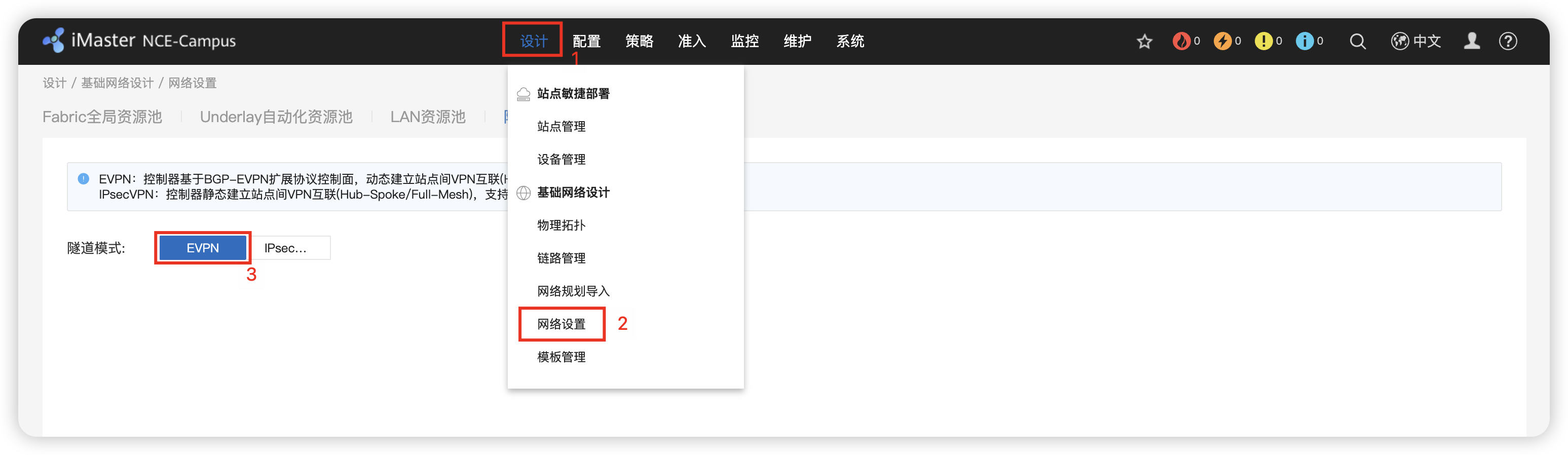
2 - 关闭 物理网络 开局邮件加密
多分支互联 / 全局配置 / 物理网络 / 设备激活安全配置 / 加密使能


3 - 确定 BGP AS 65003 & IP地址池 10.99.0.0/16
多分支互联 / 全局配置 / 虚拟网络 / 路由 & IP地址池
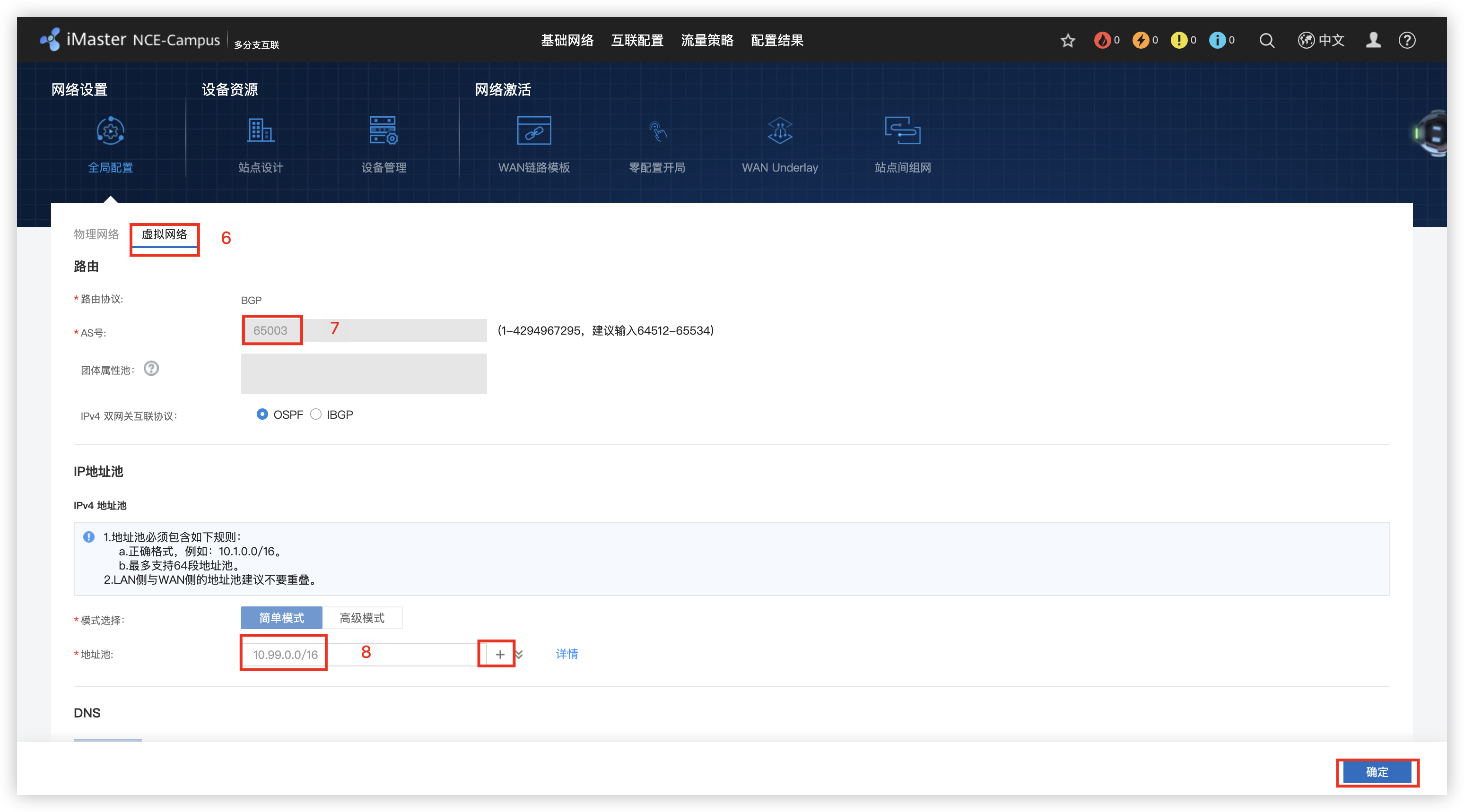
4 - 创建 Site_Y & Site_Store1
多分支互联 / 站点设置 / 创建 / Site_Y 和 Store 站点
Site_Y/Site_Store1: 勾选 AR / LSW / WAC
参数说明: WAC – 随绑/带AC的交换机; AP – 云AP

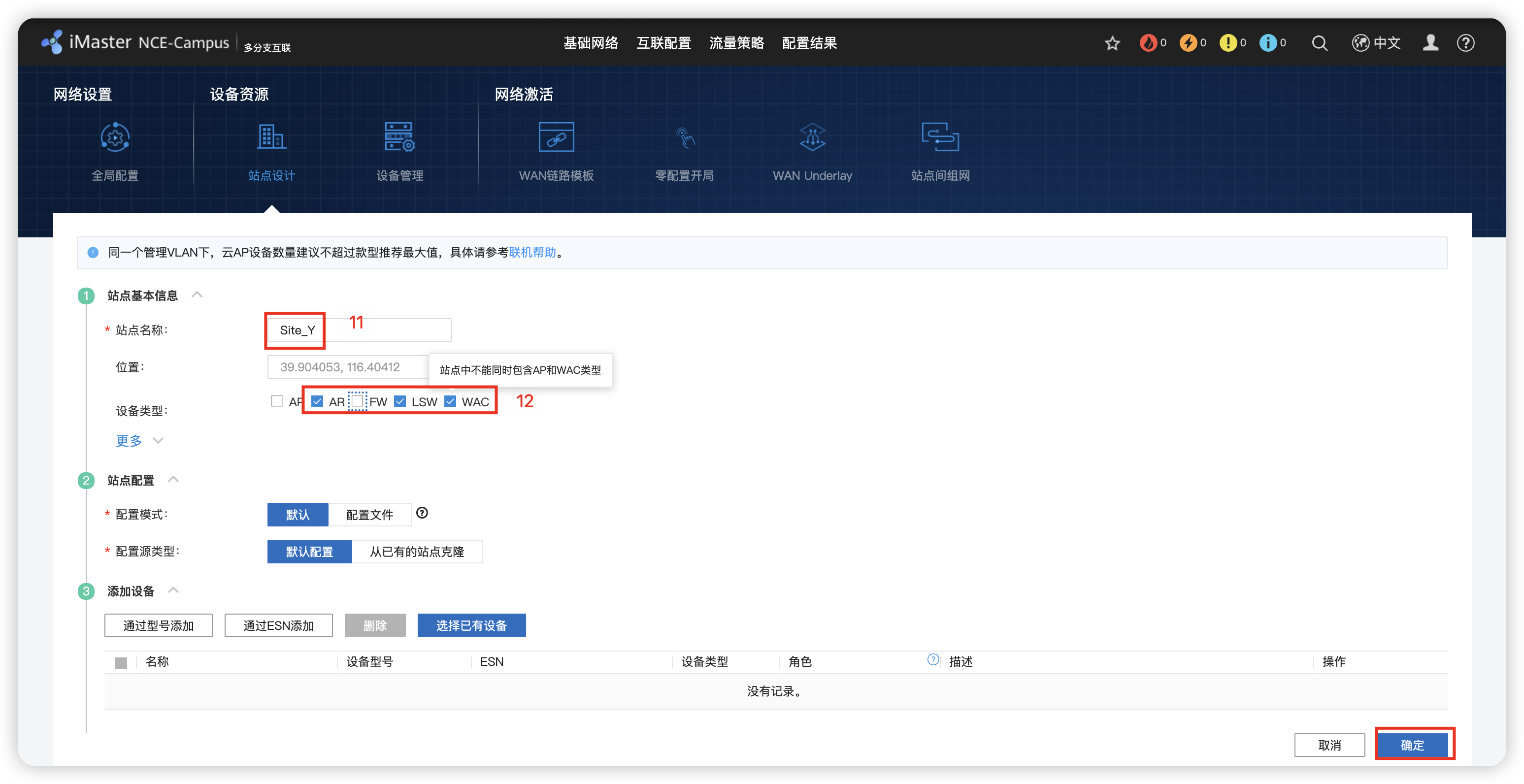
5 - 添加设备
多分支互联 / 设备管理 / 添加设备 / 批量导入 / 选择对应的设备exce模版 / 开始导入 / 确定
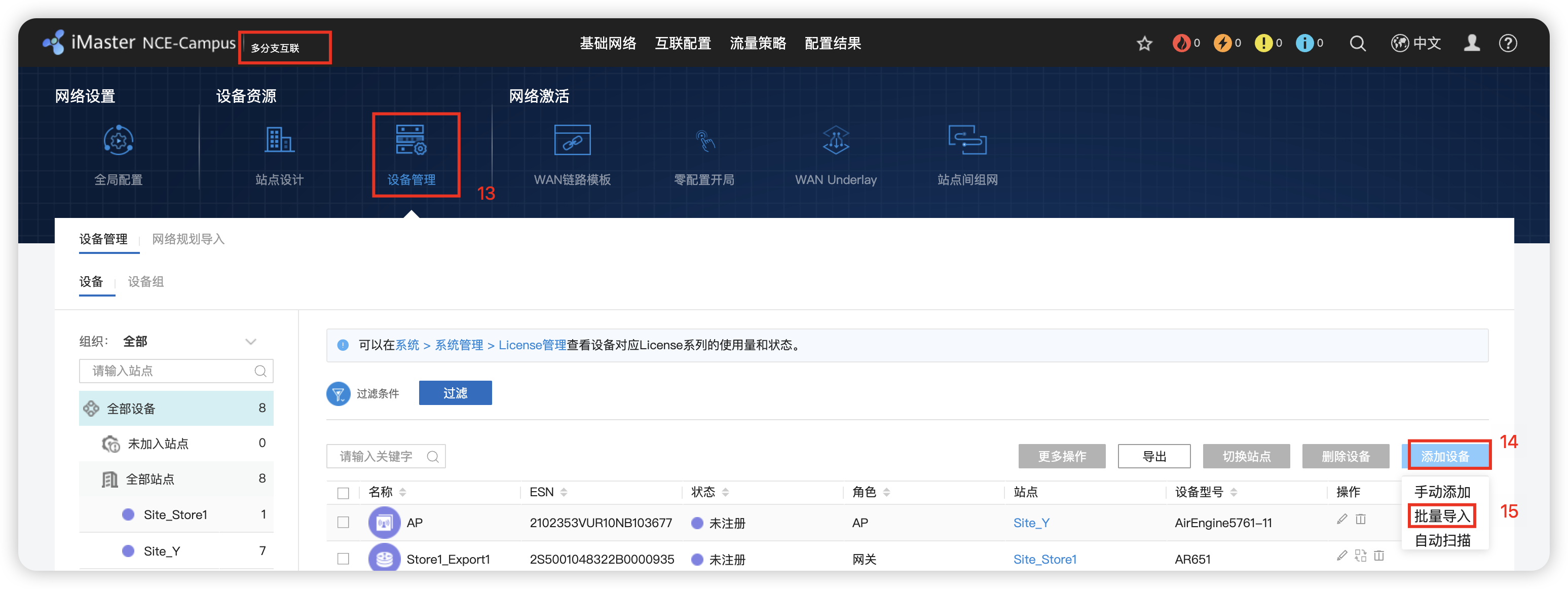
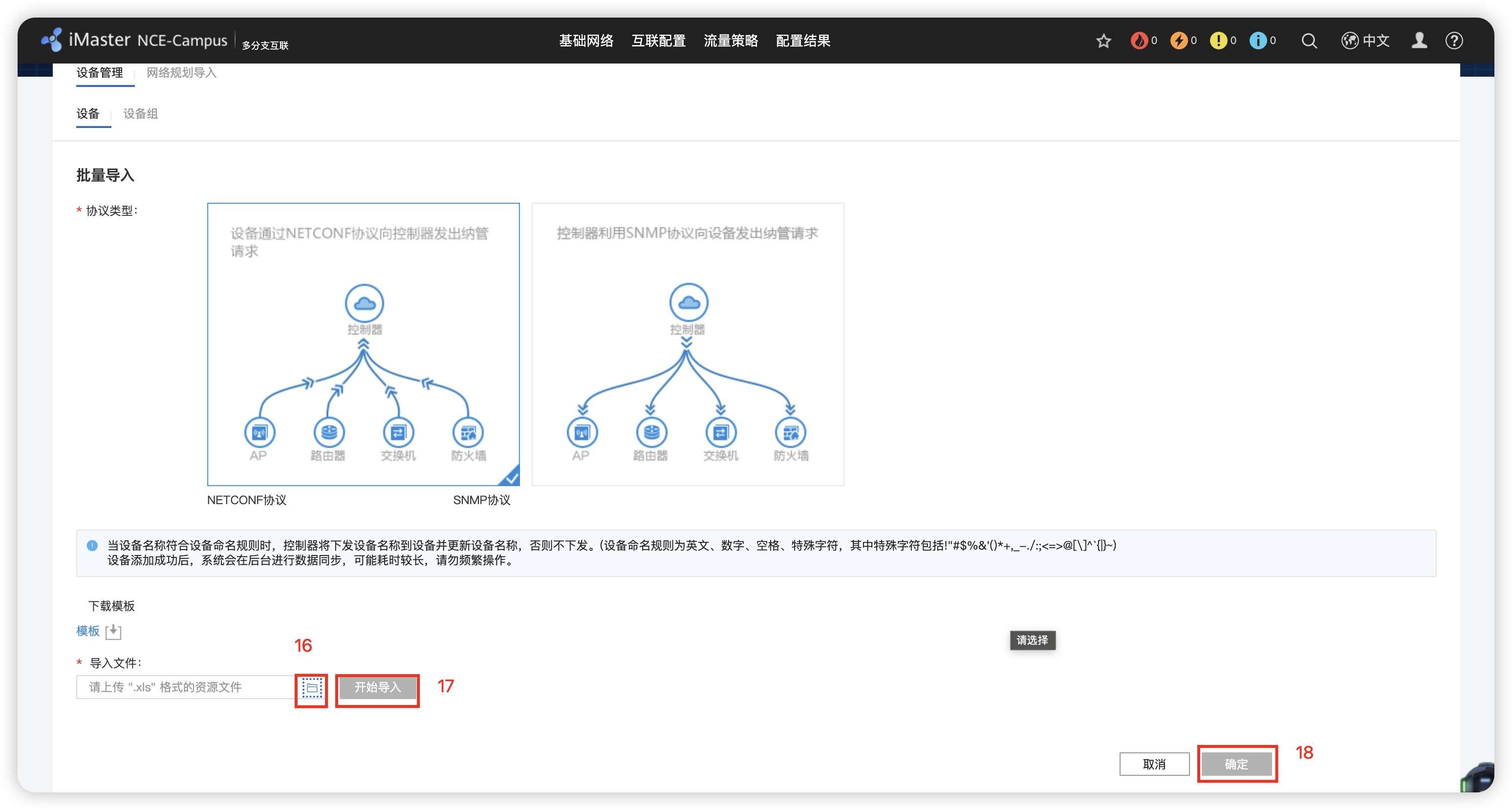
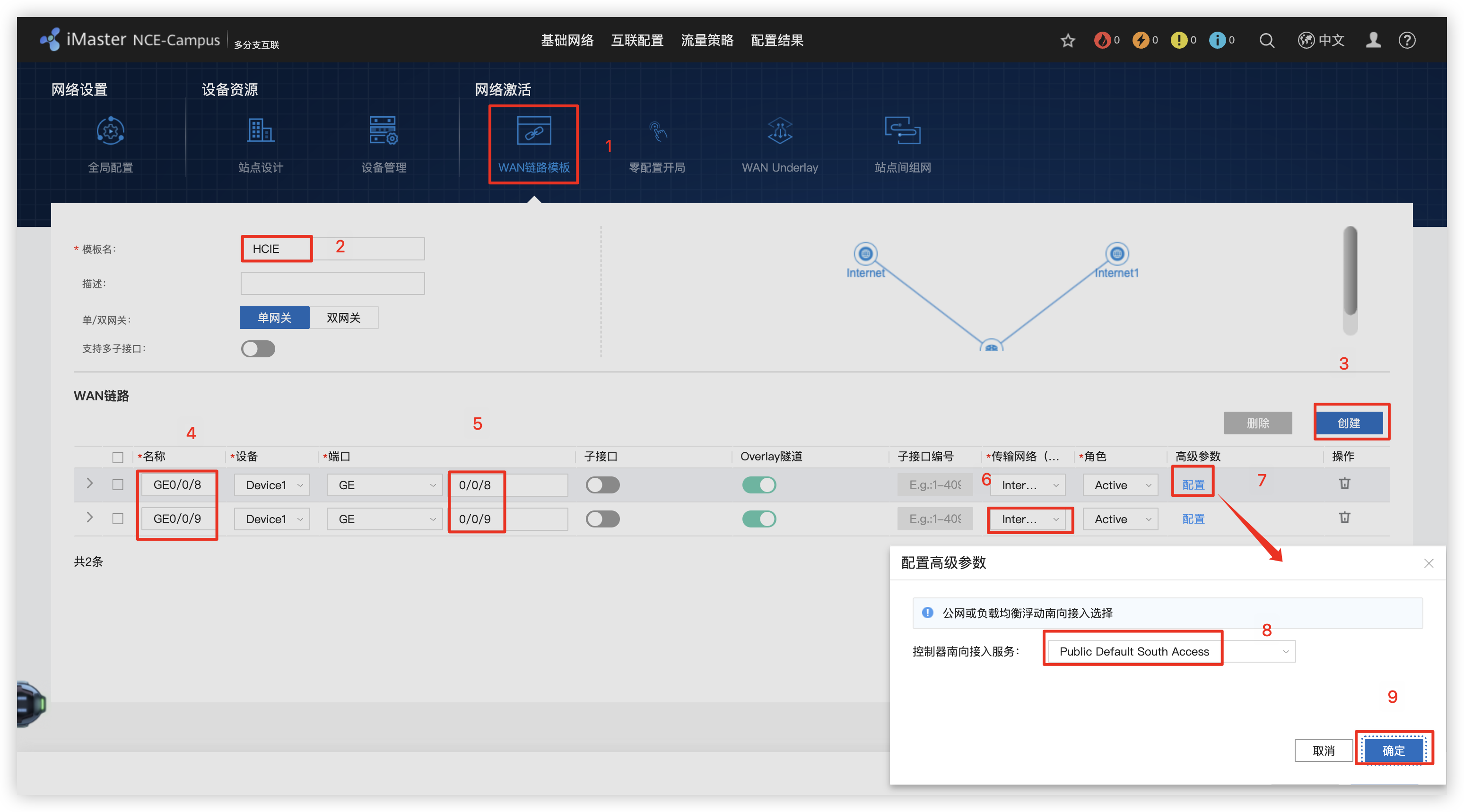
6 - 创建 WAN链路模版
多分支互联 / WAN链路模版
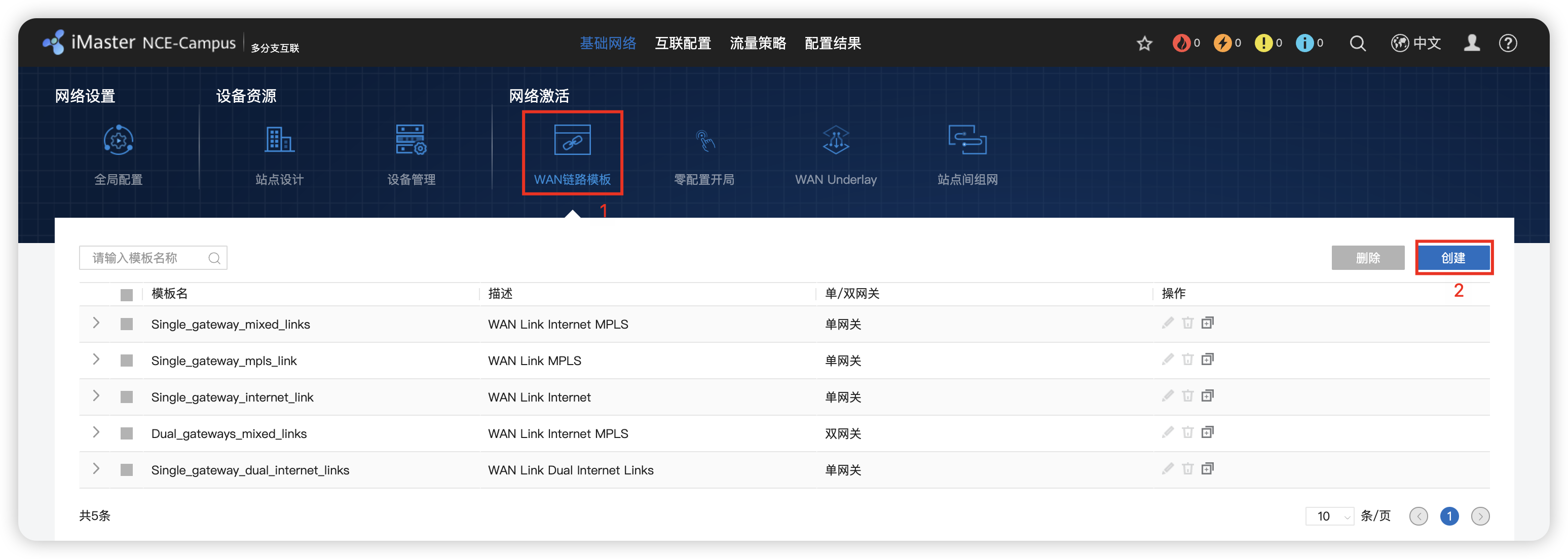
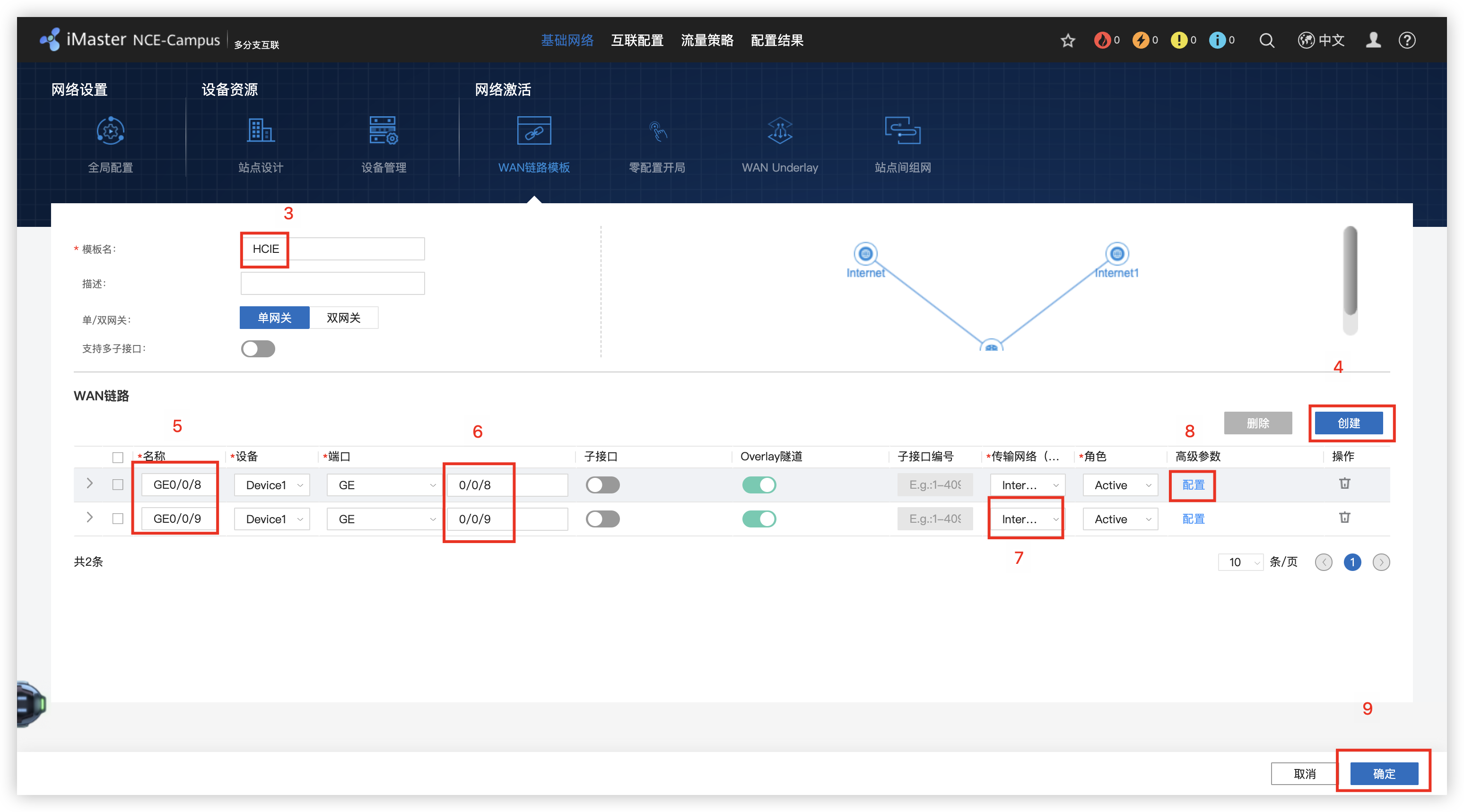
7 - 零配置开局 路由器托管配置(手动配置和自动配置)
多分支互联 / 零配置开局 / 点击开局 / 站点 / DHCP Option / 模版导入 / 配置地址 / 接口编号 IP GW Mb/s
多分支互联 / WAN Underlay / WALN路由(静态路由)
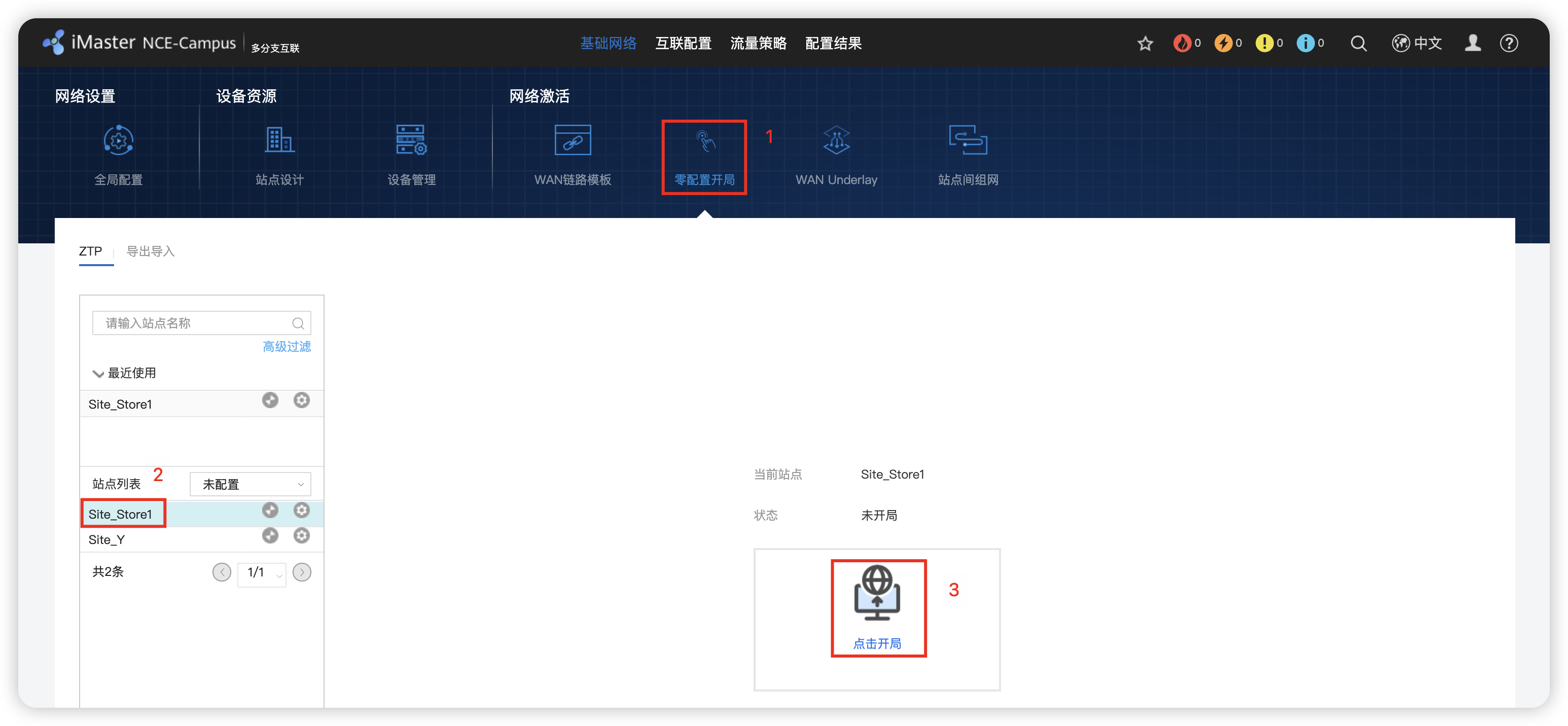
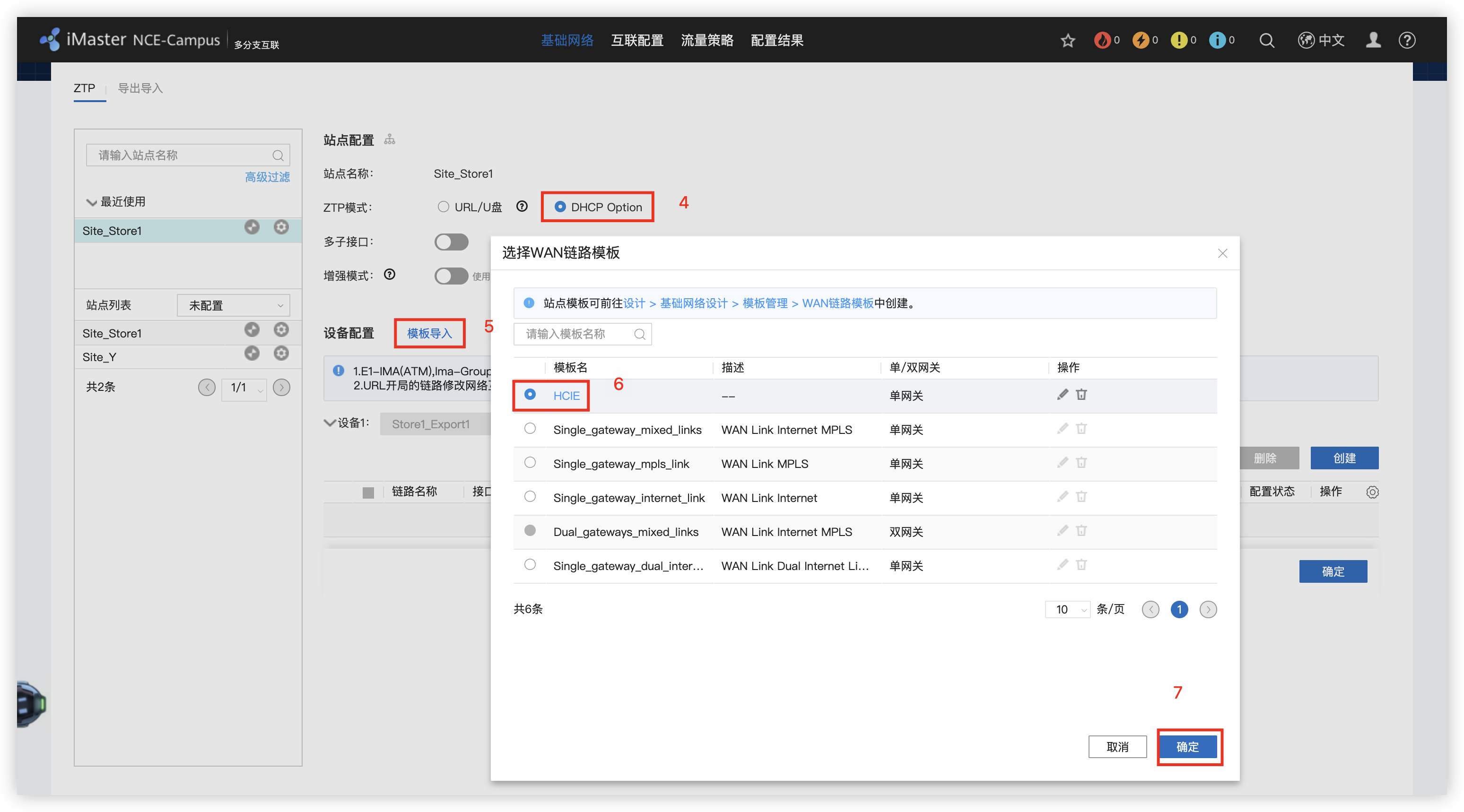
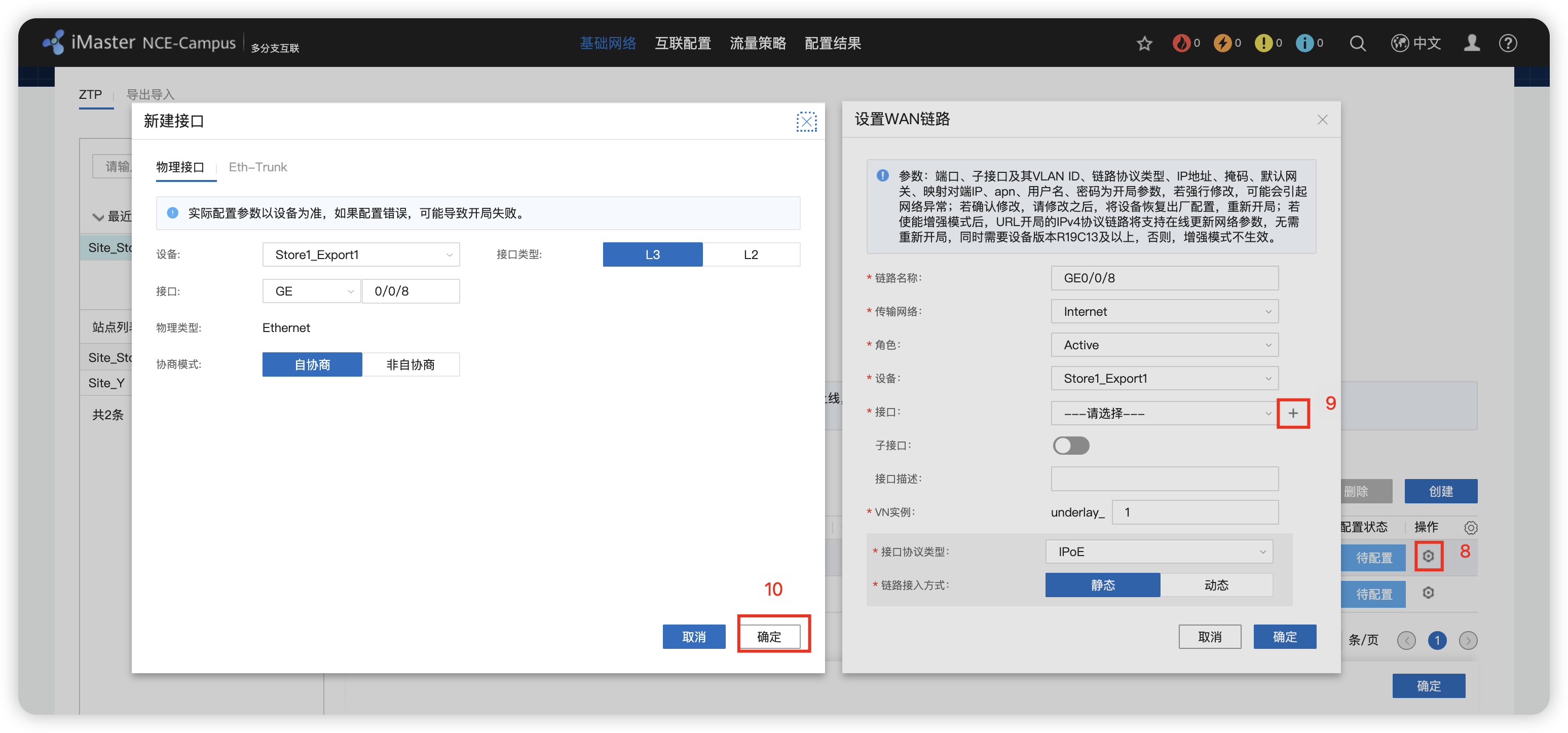
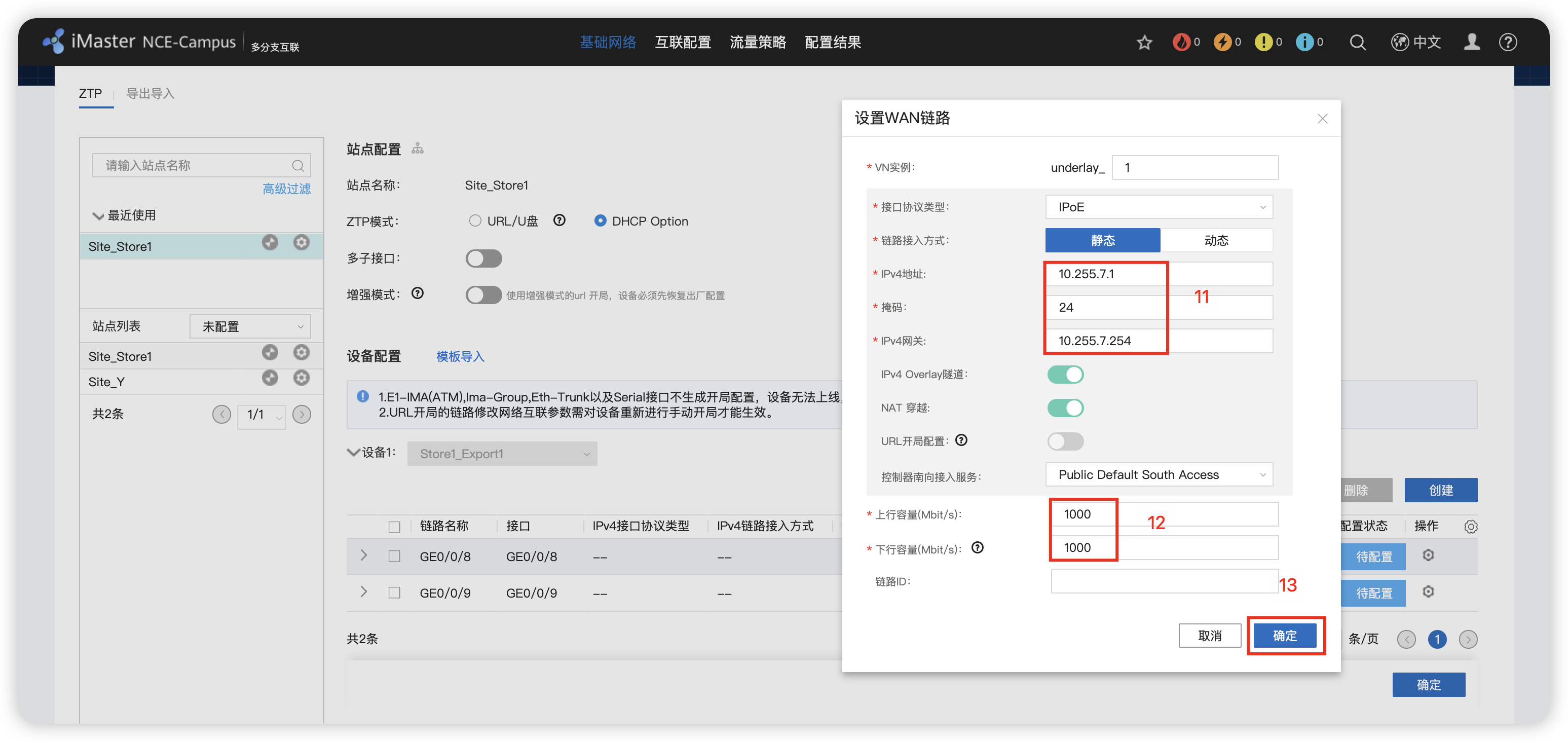
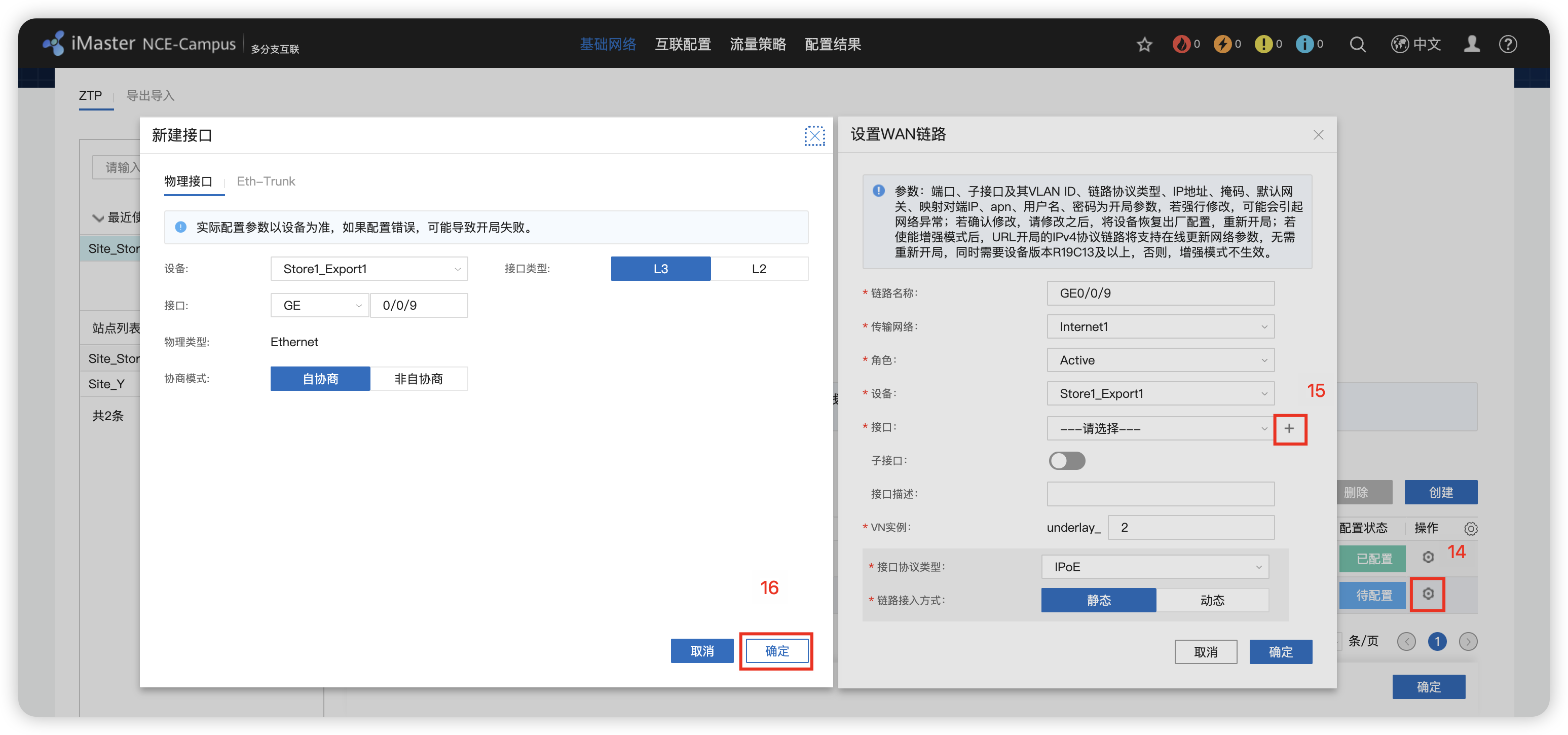
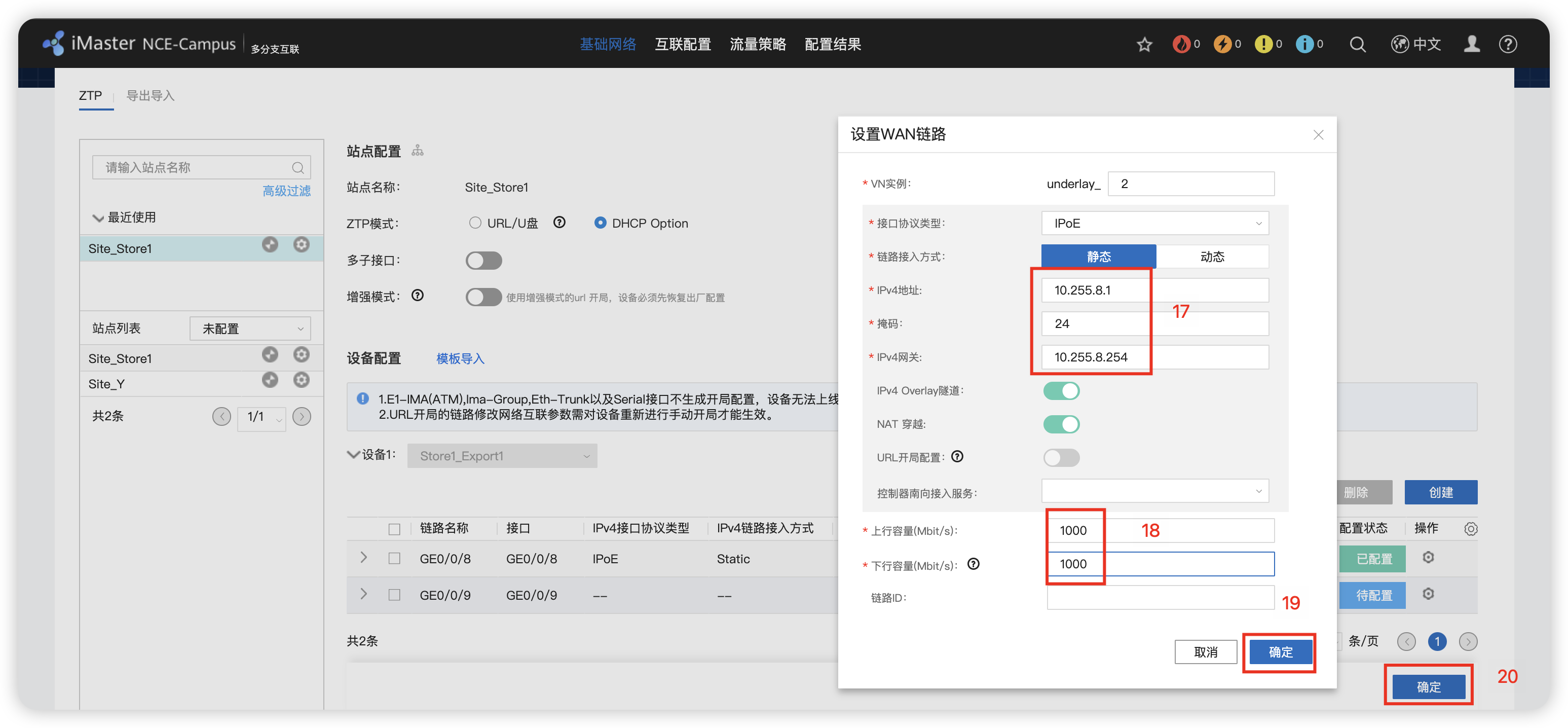
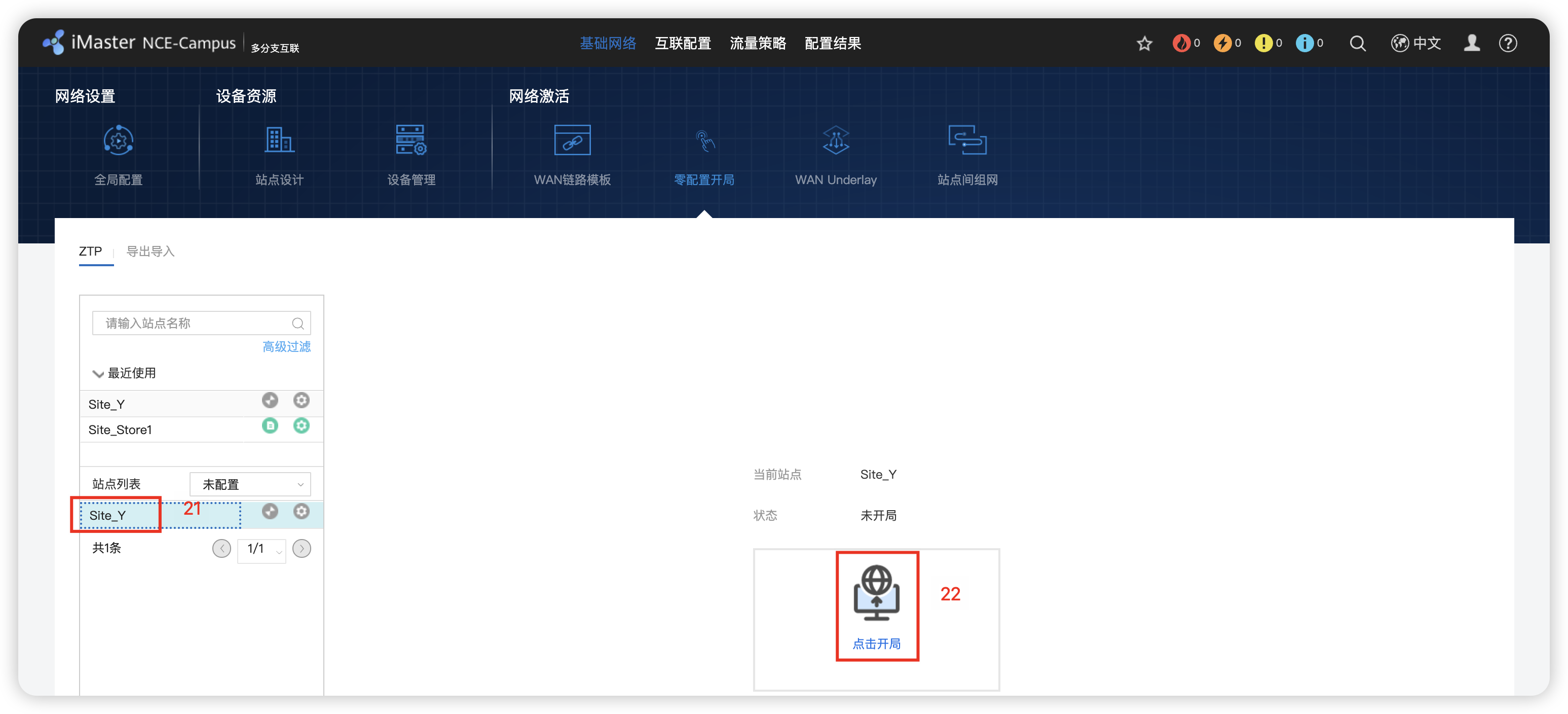
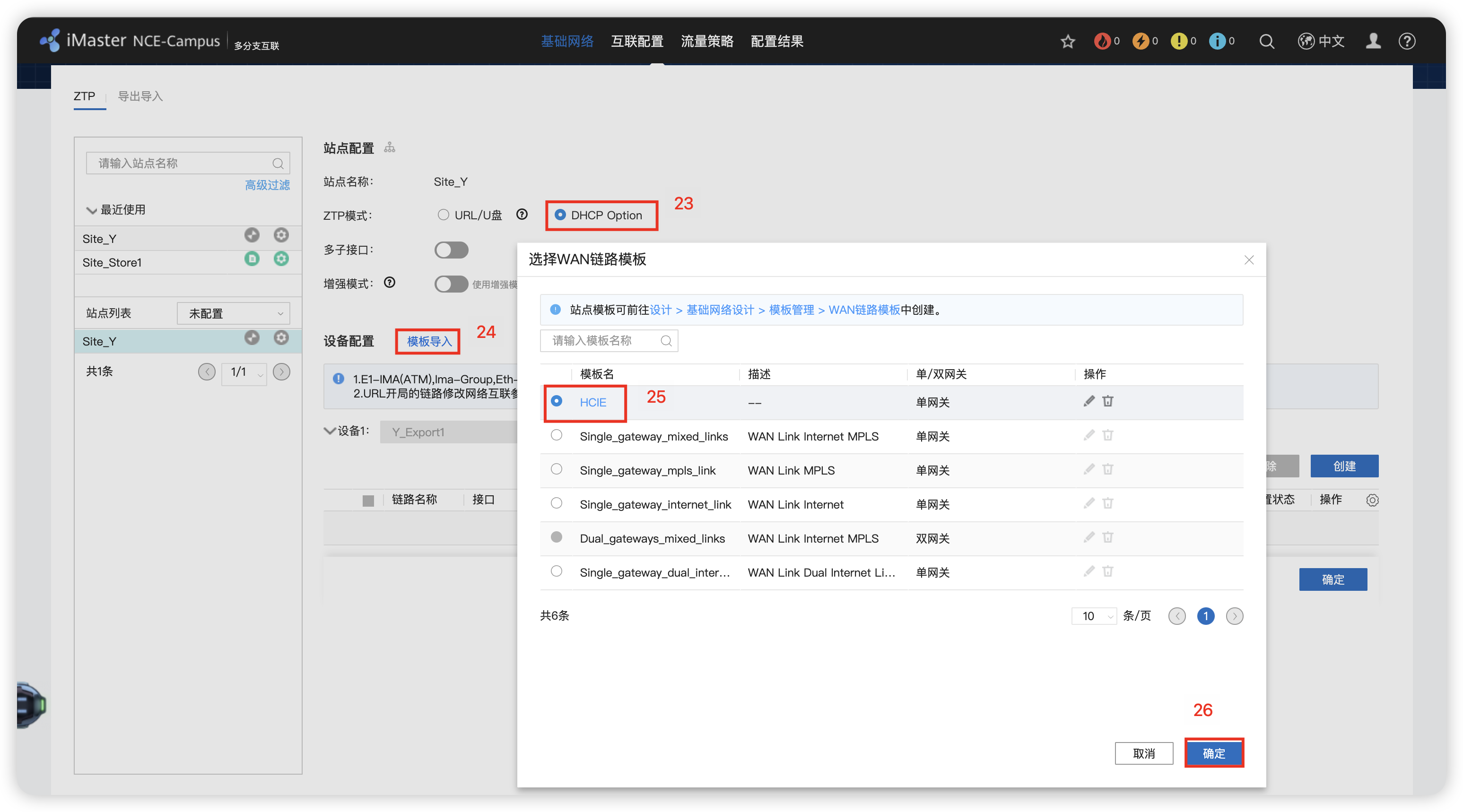
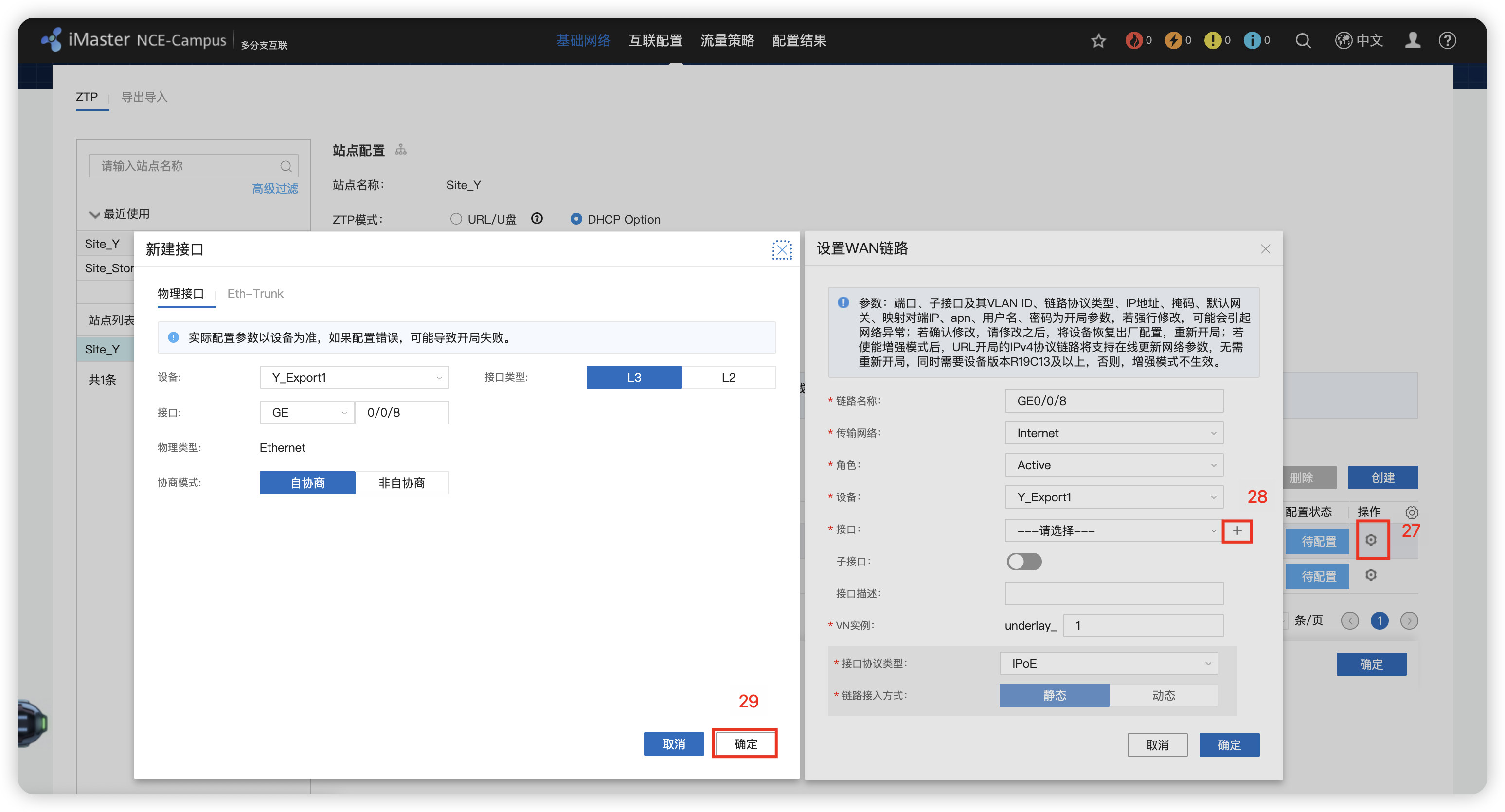
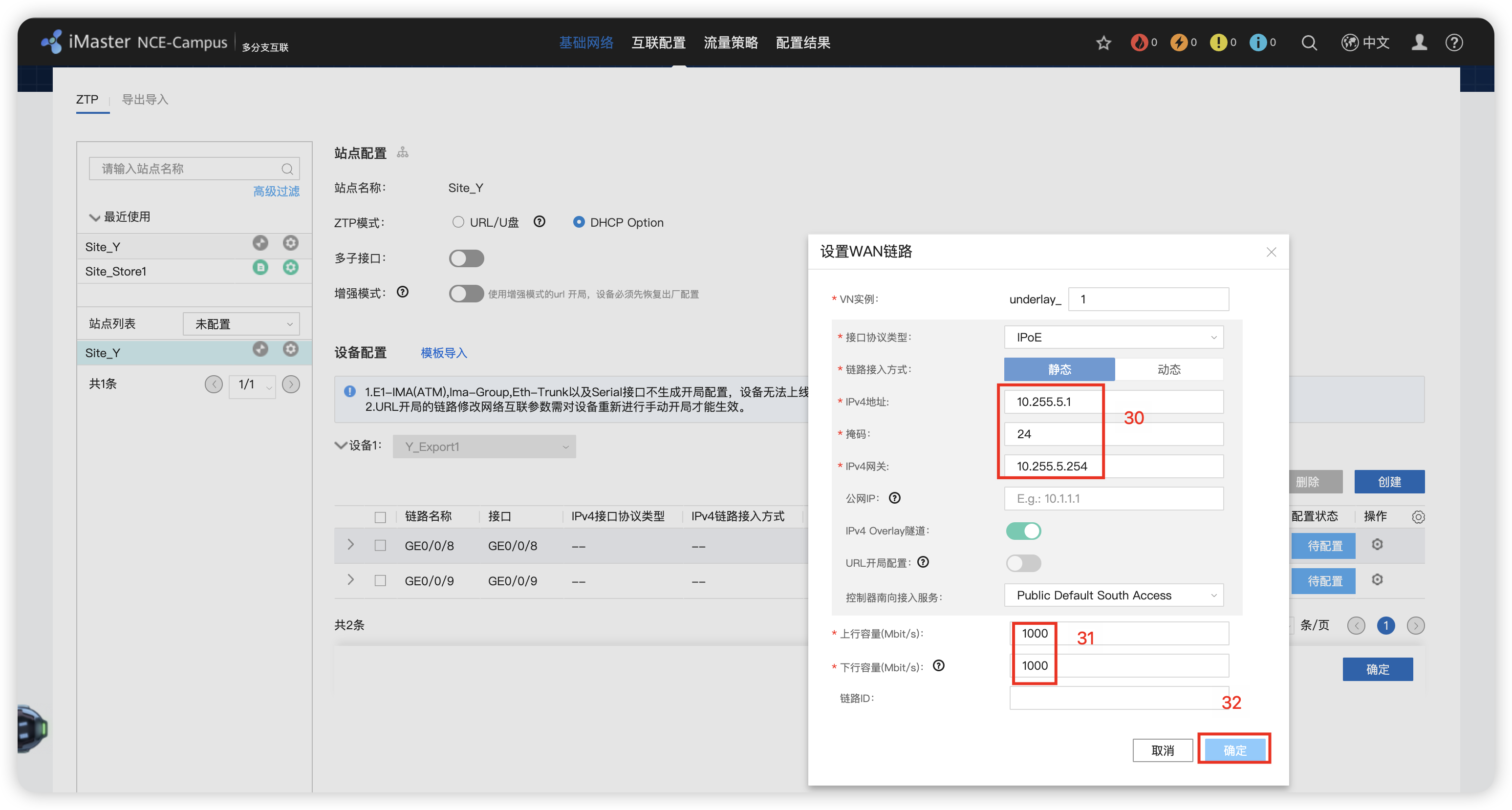
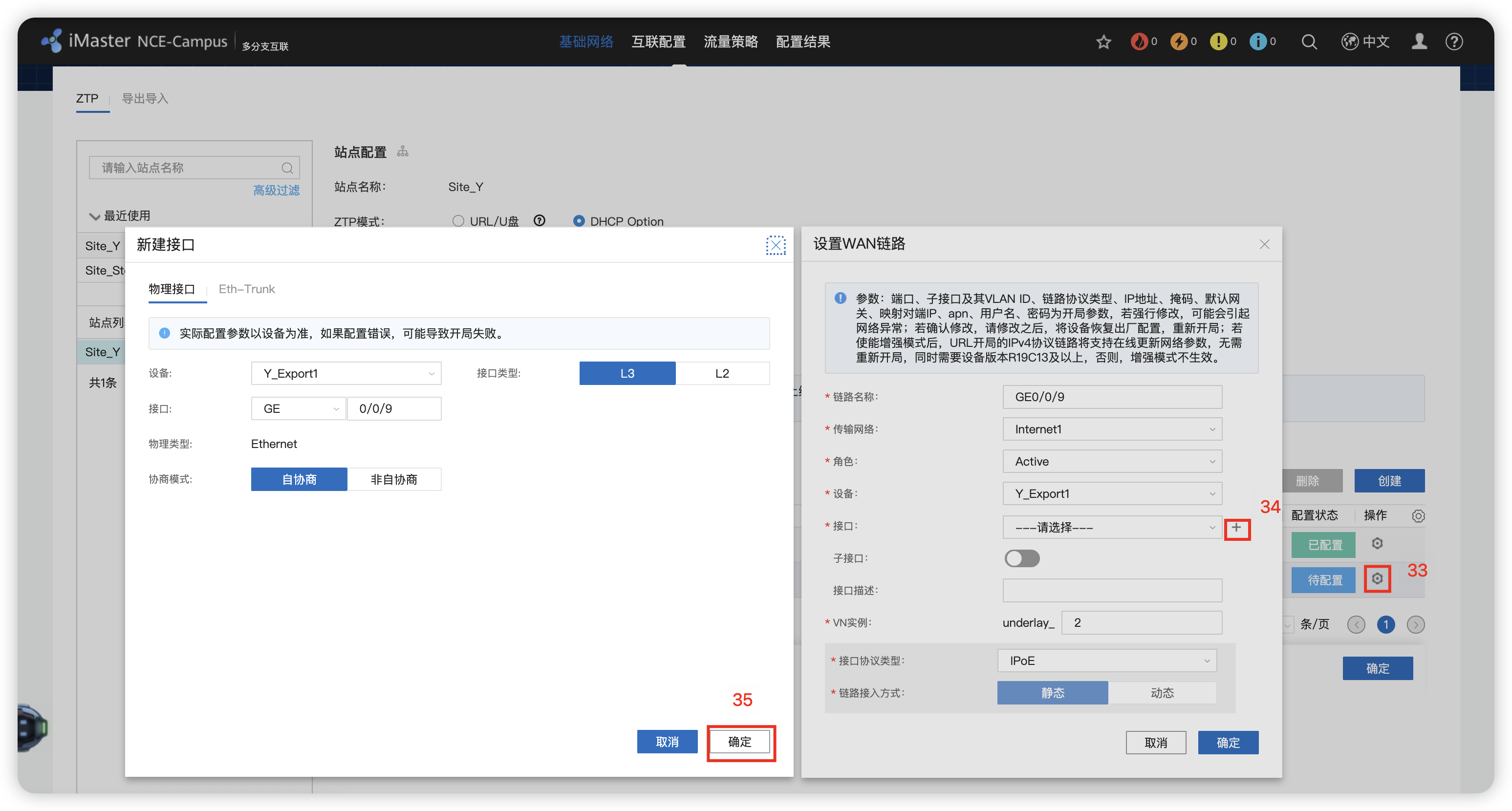
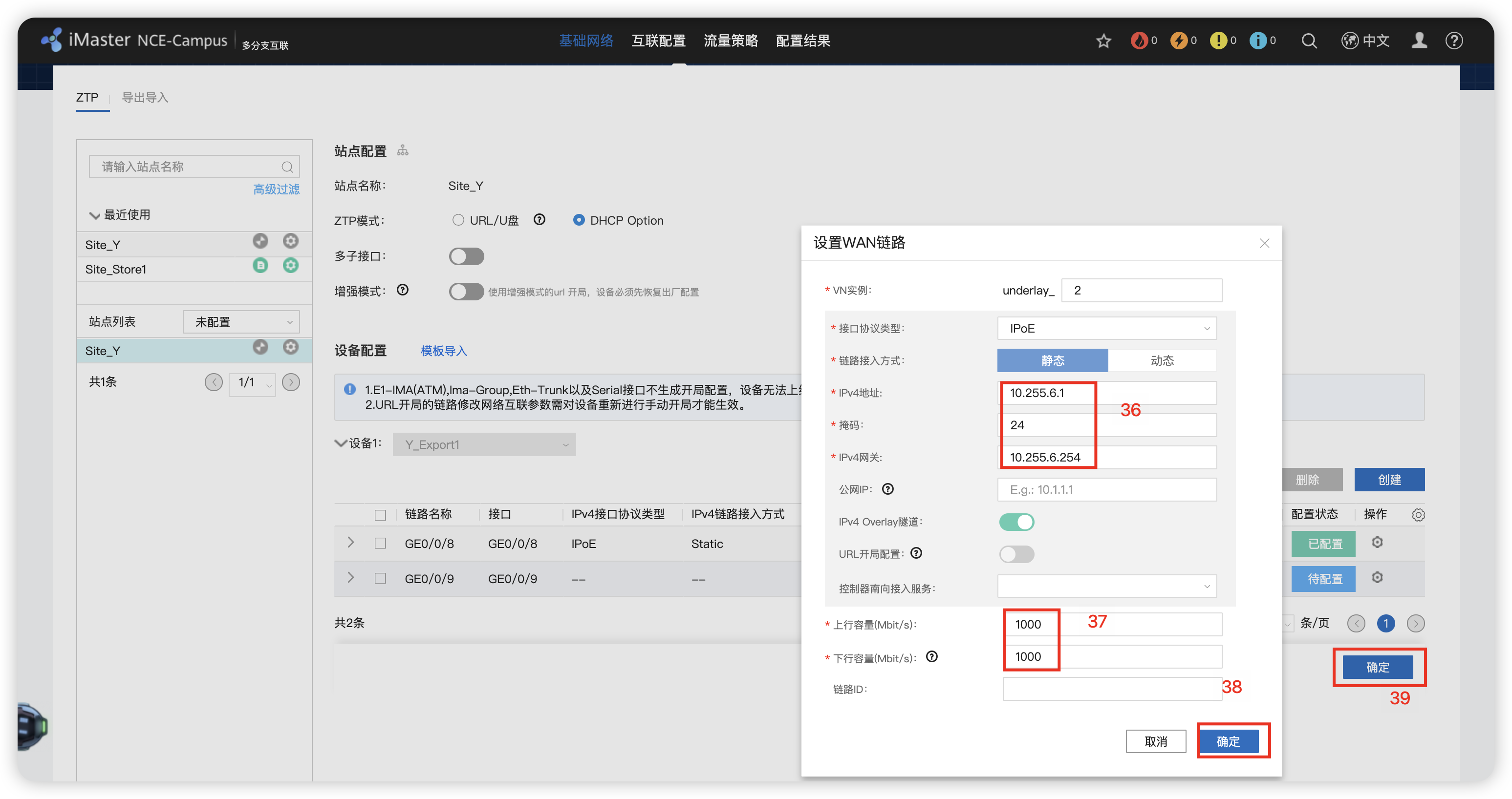
配置静态路由和NAT
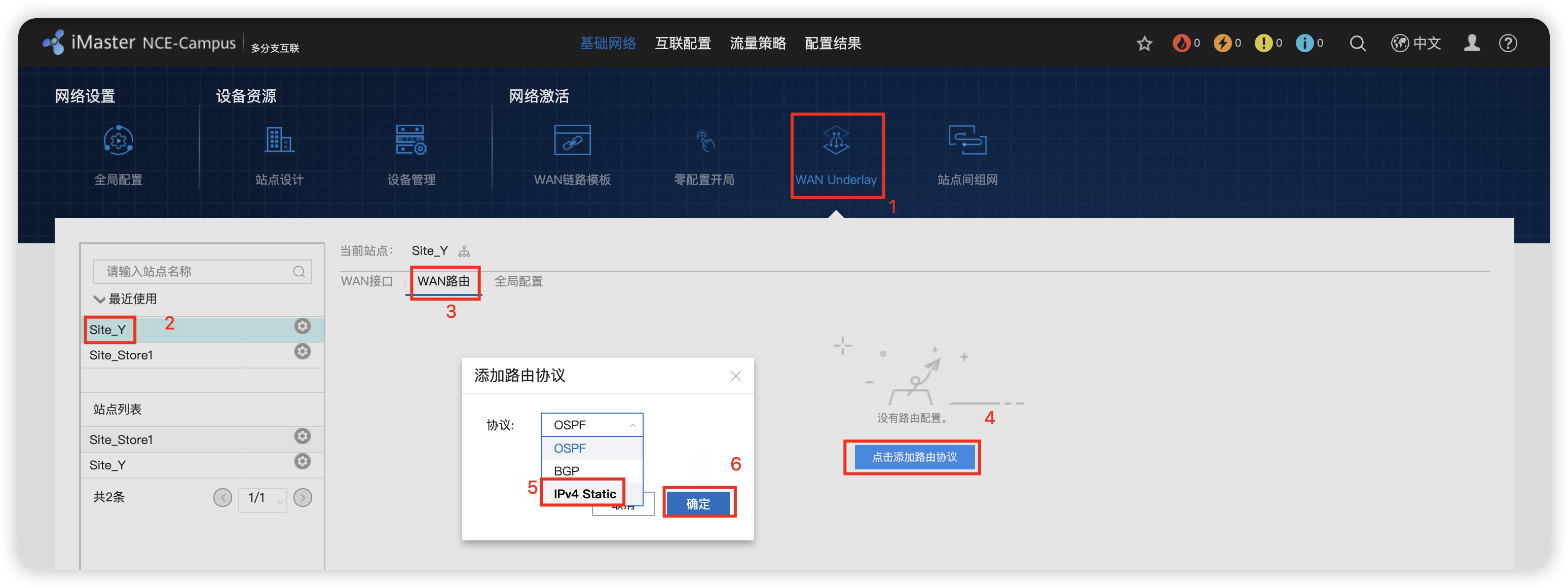
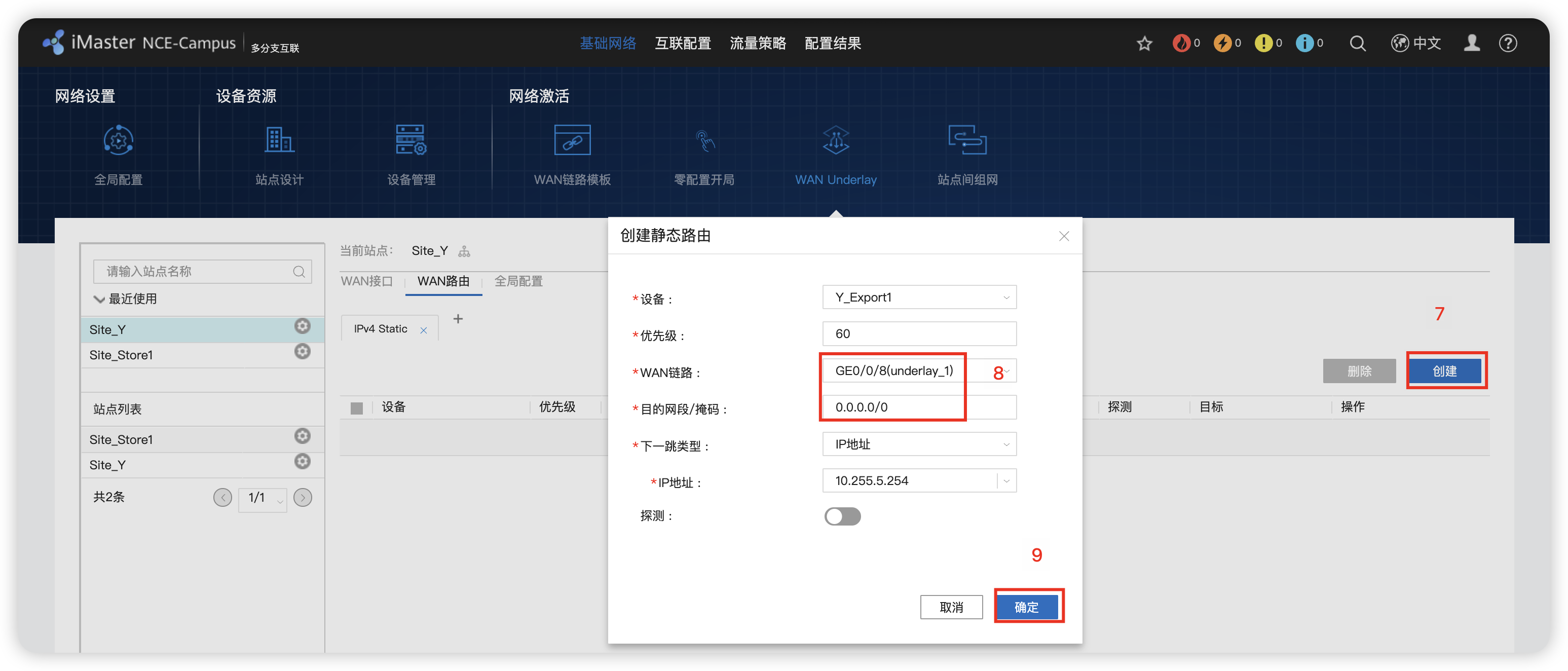
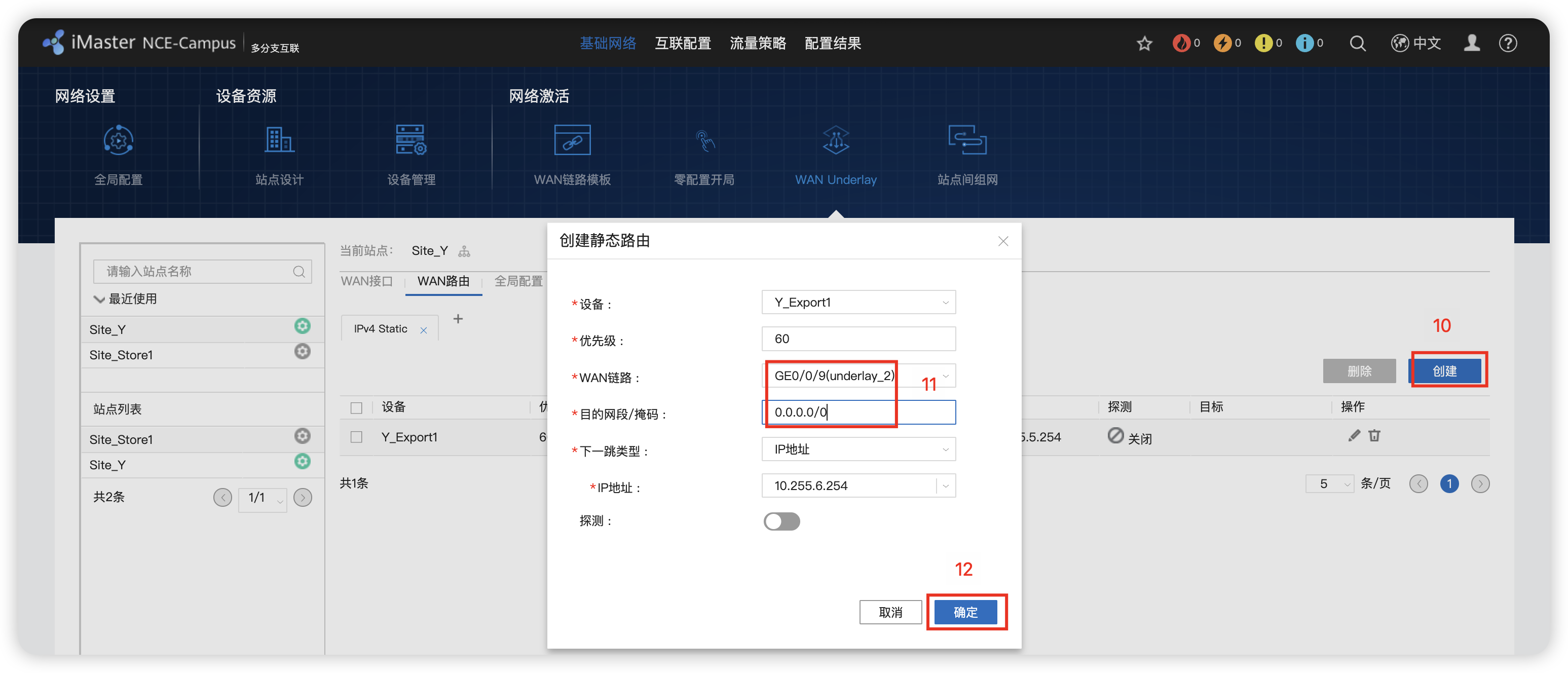
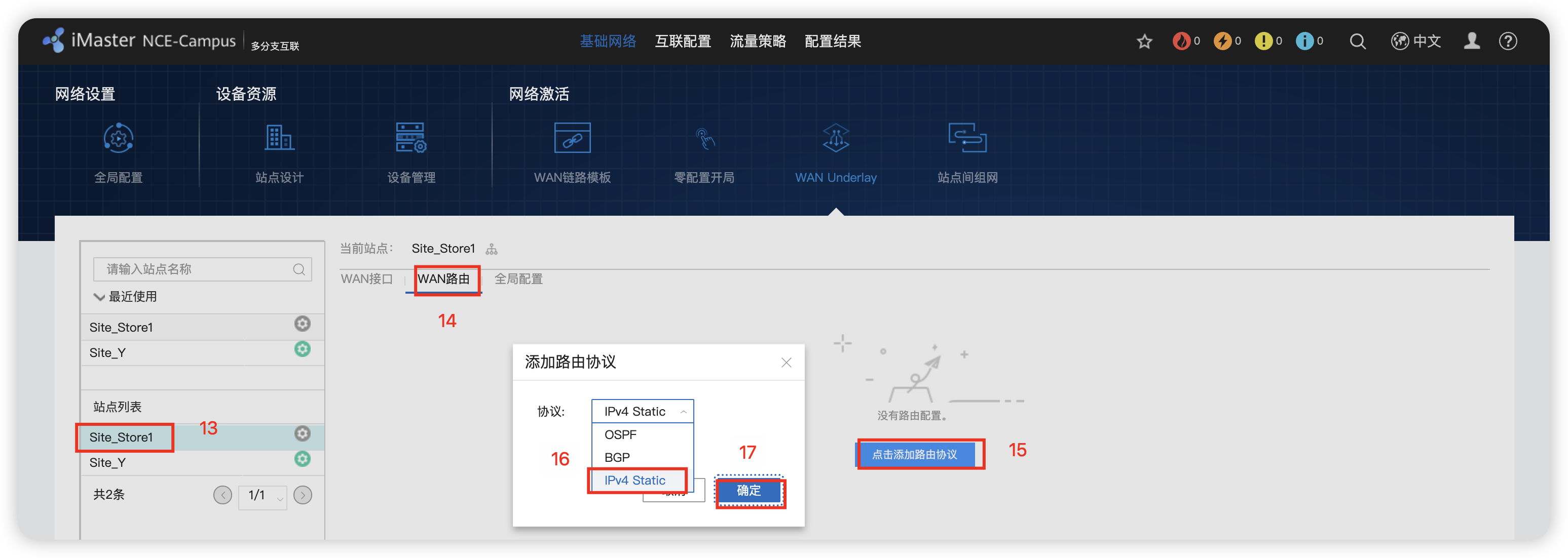
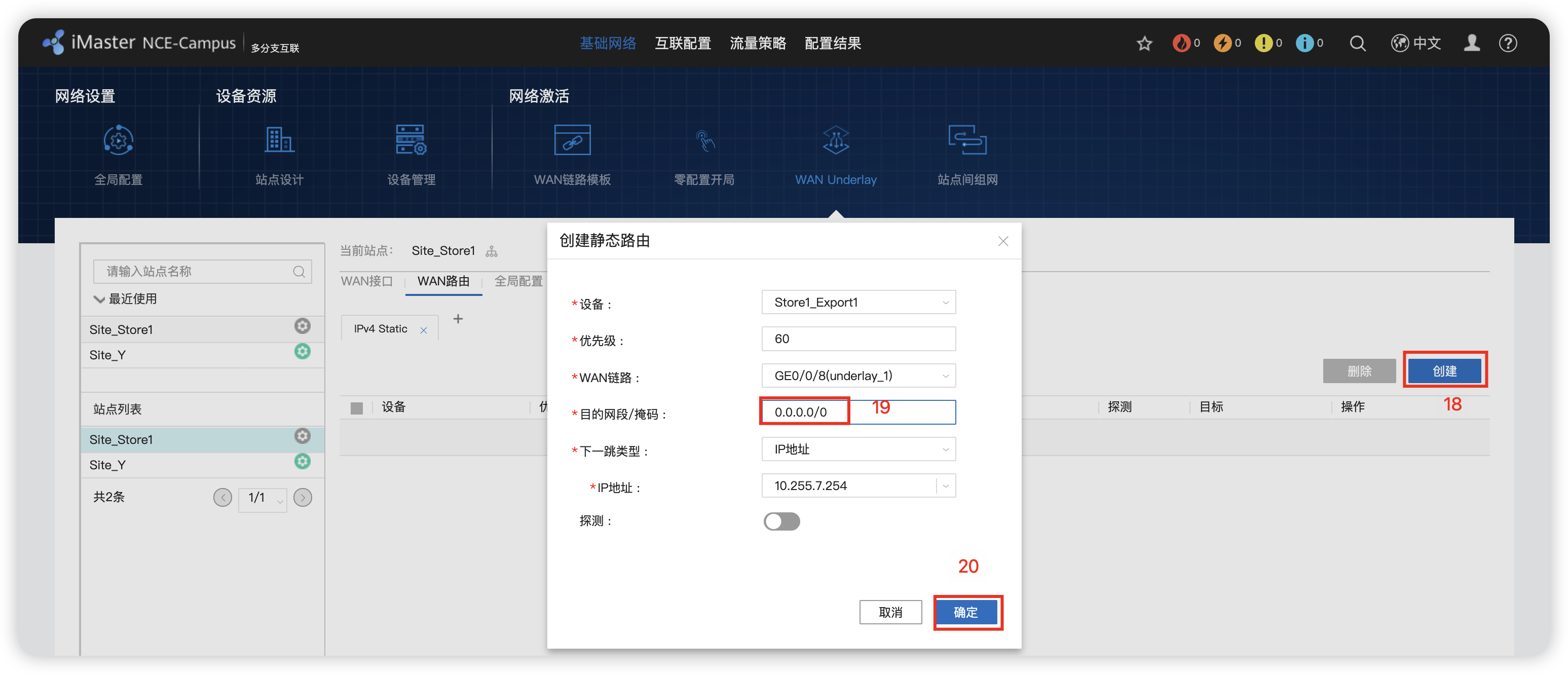
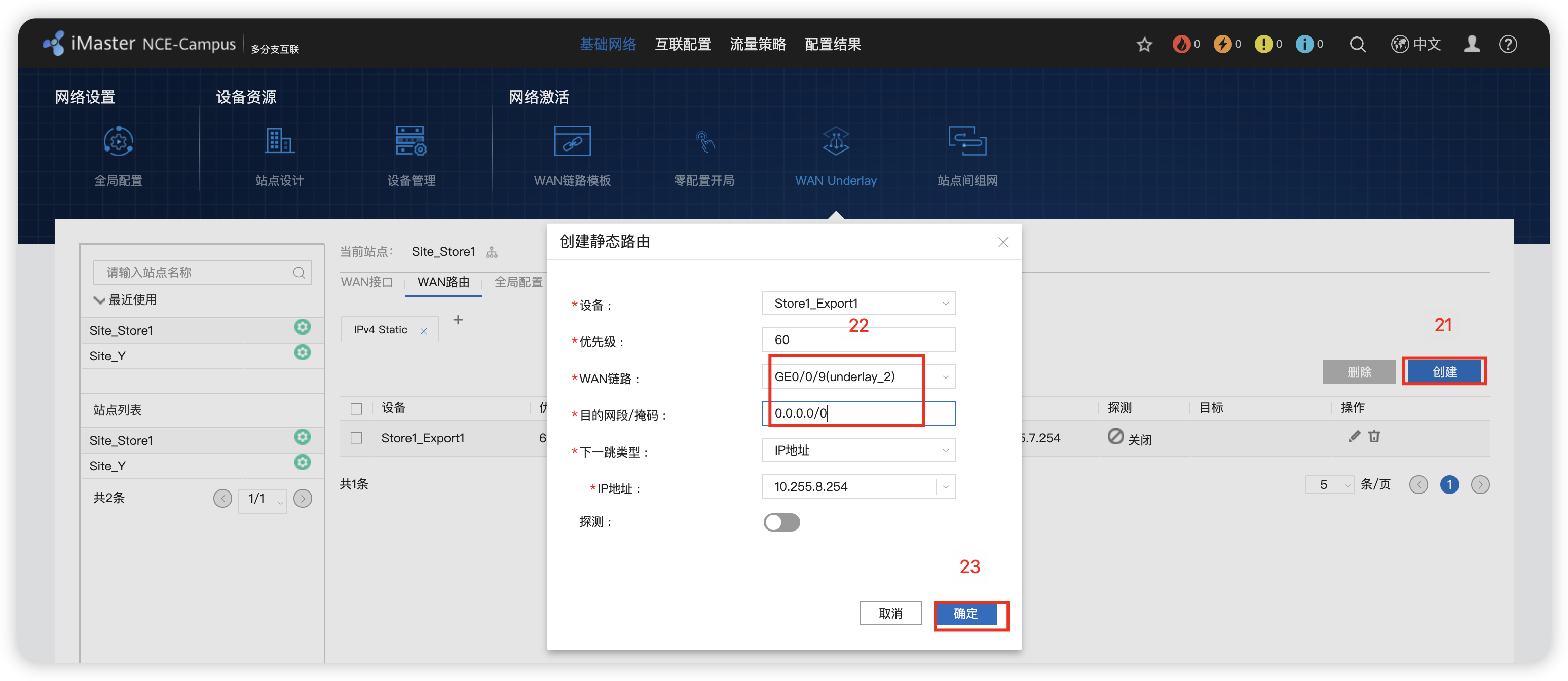
8 - 站点间组网 RR反射器
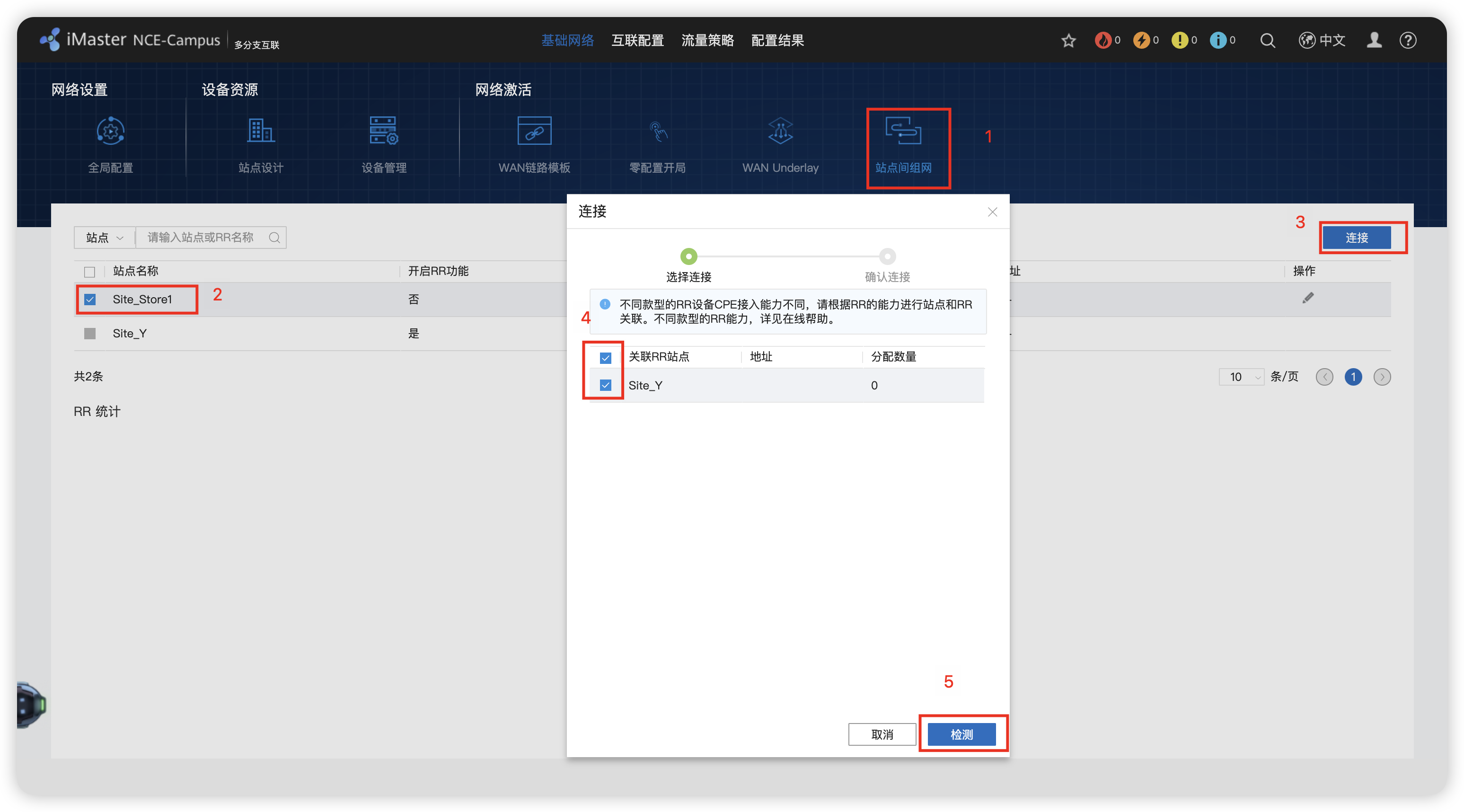
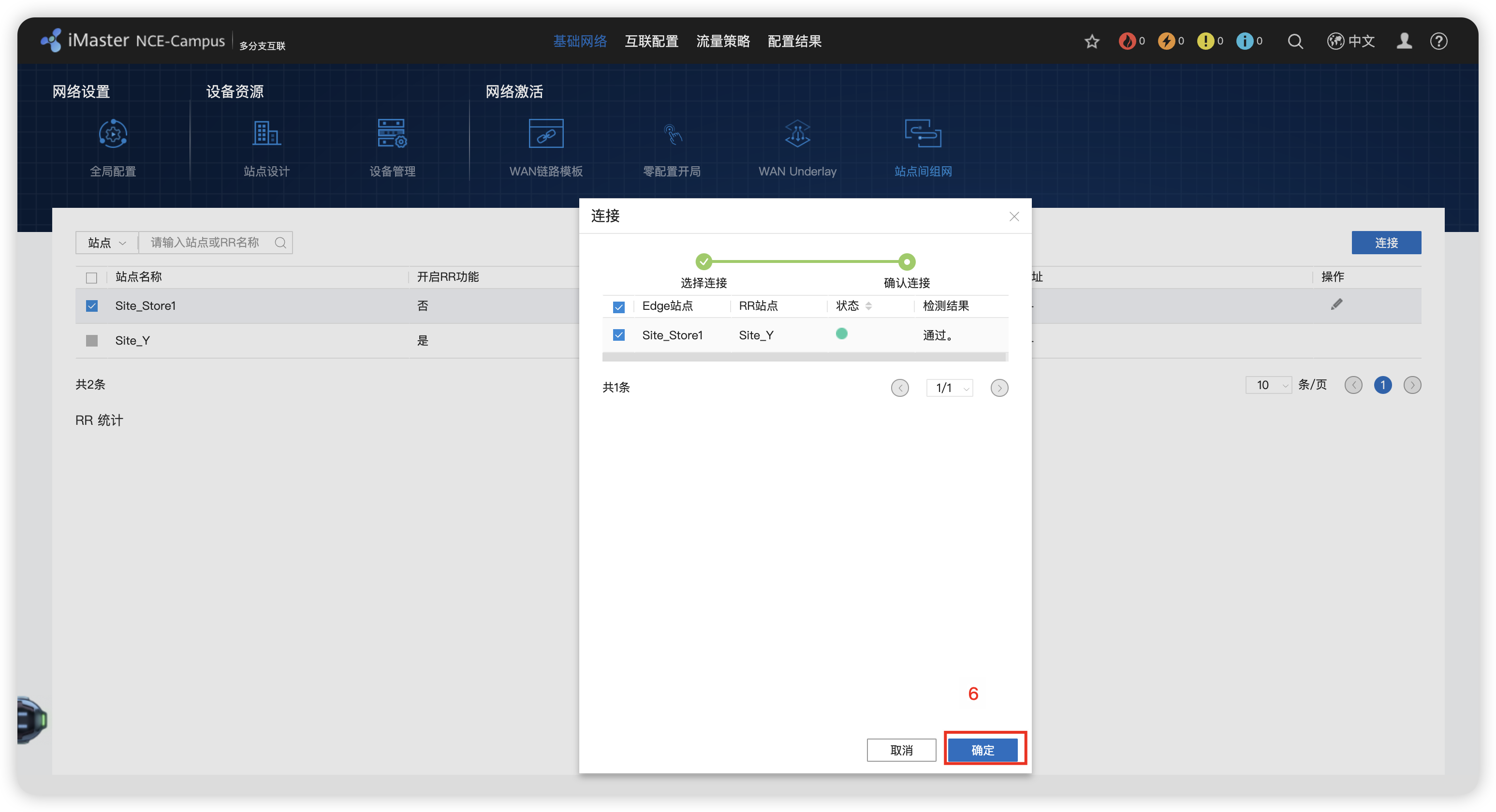
9 - 交换机托管配置 并部署 Management VN

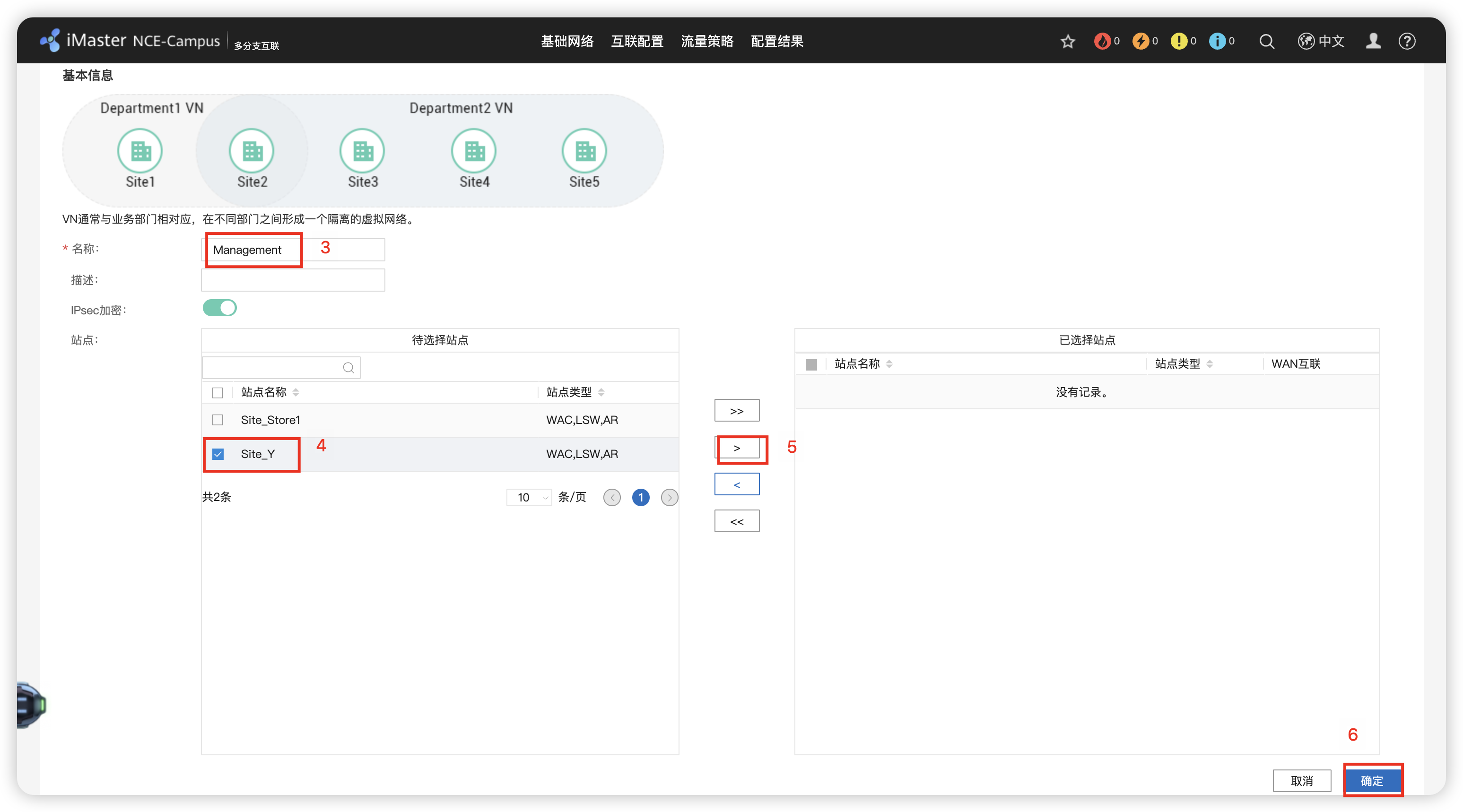

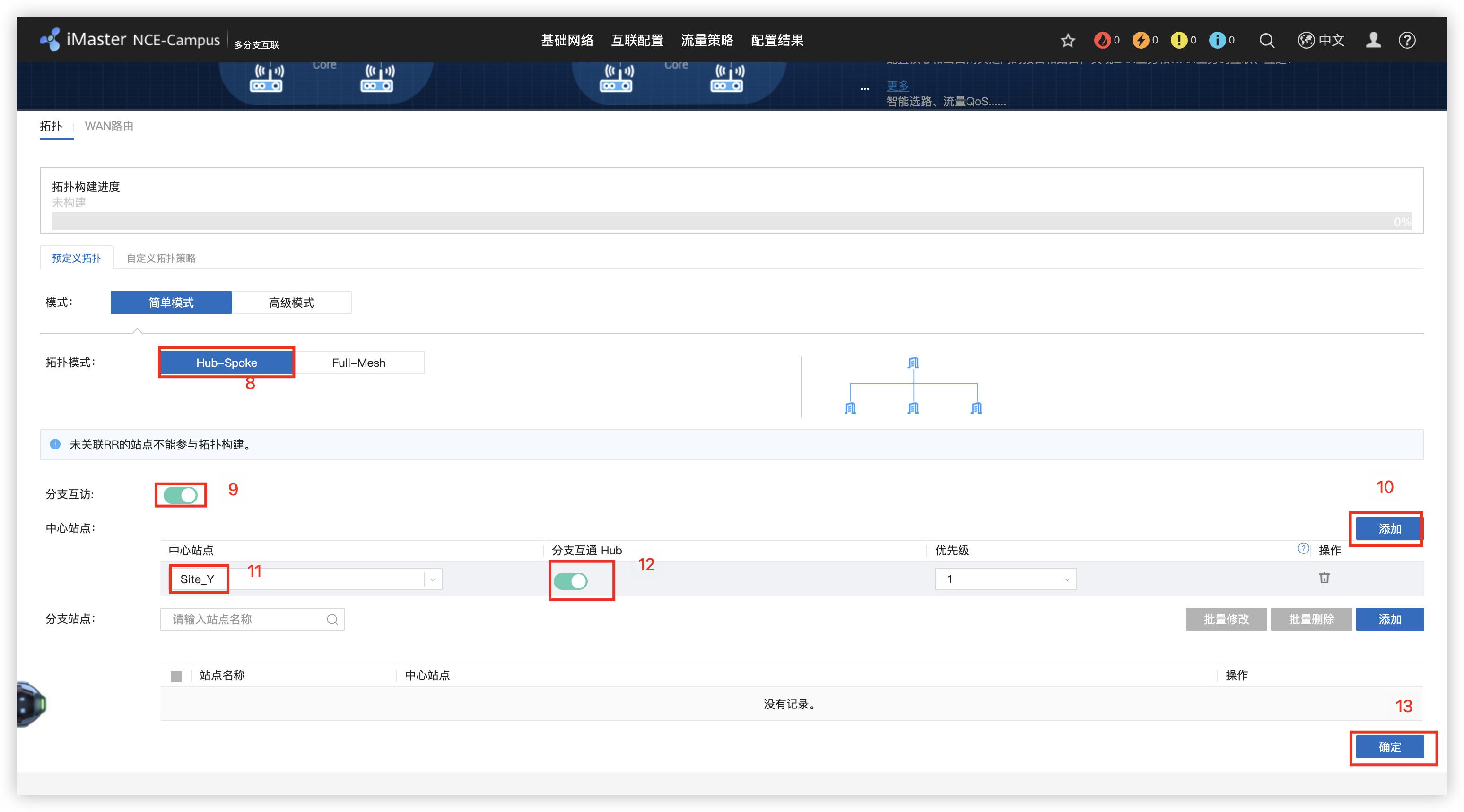
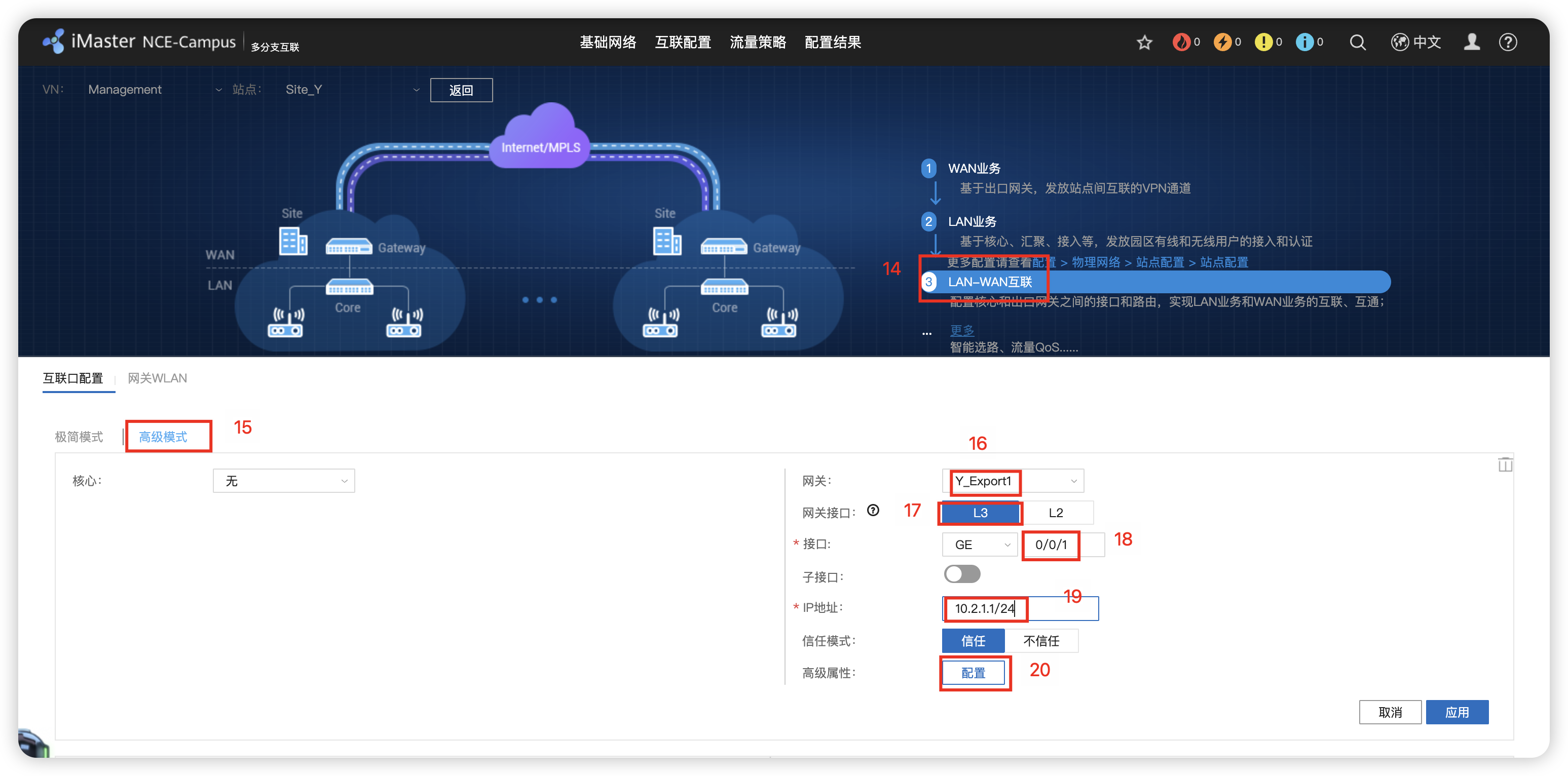
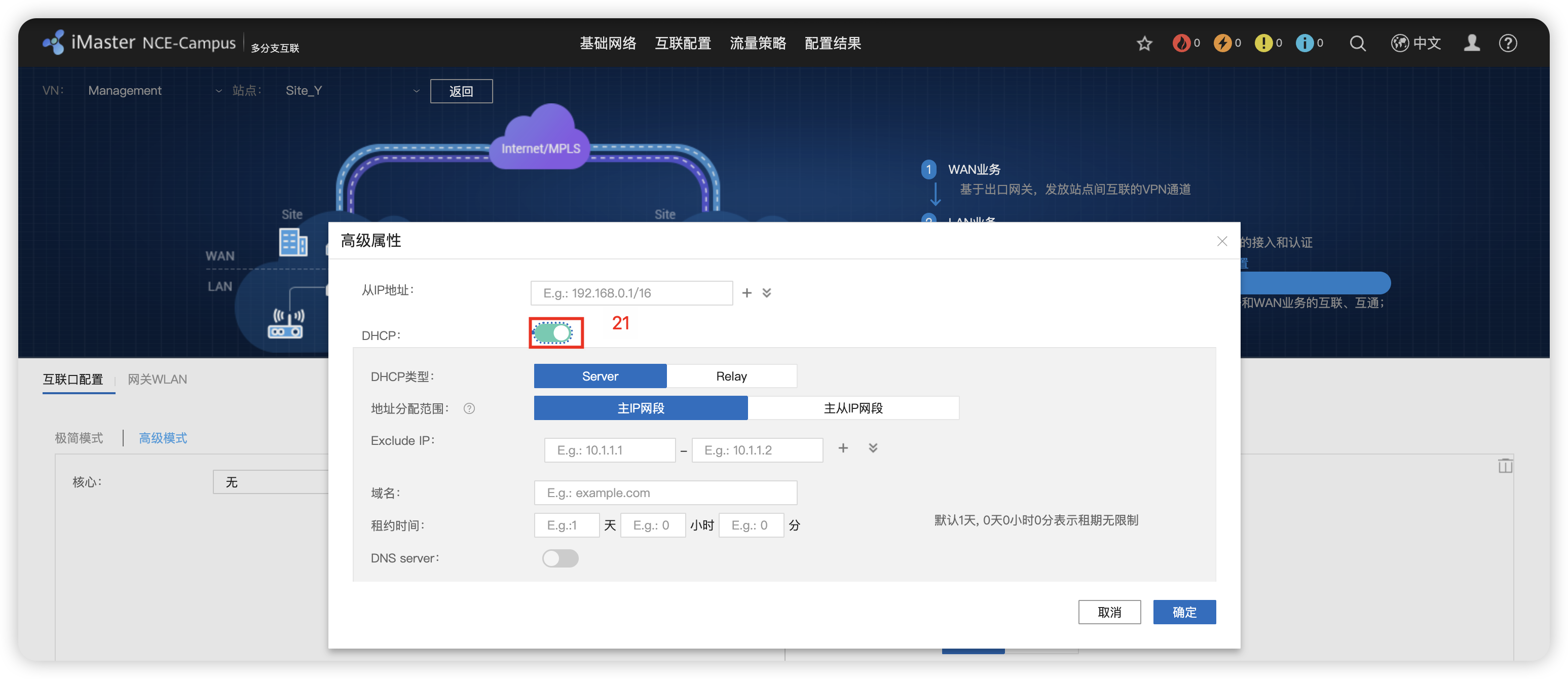
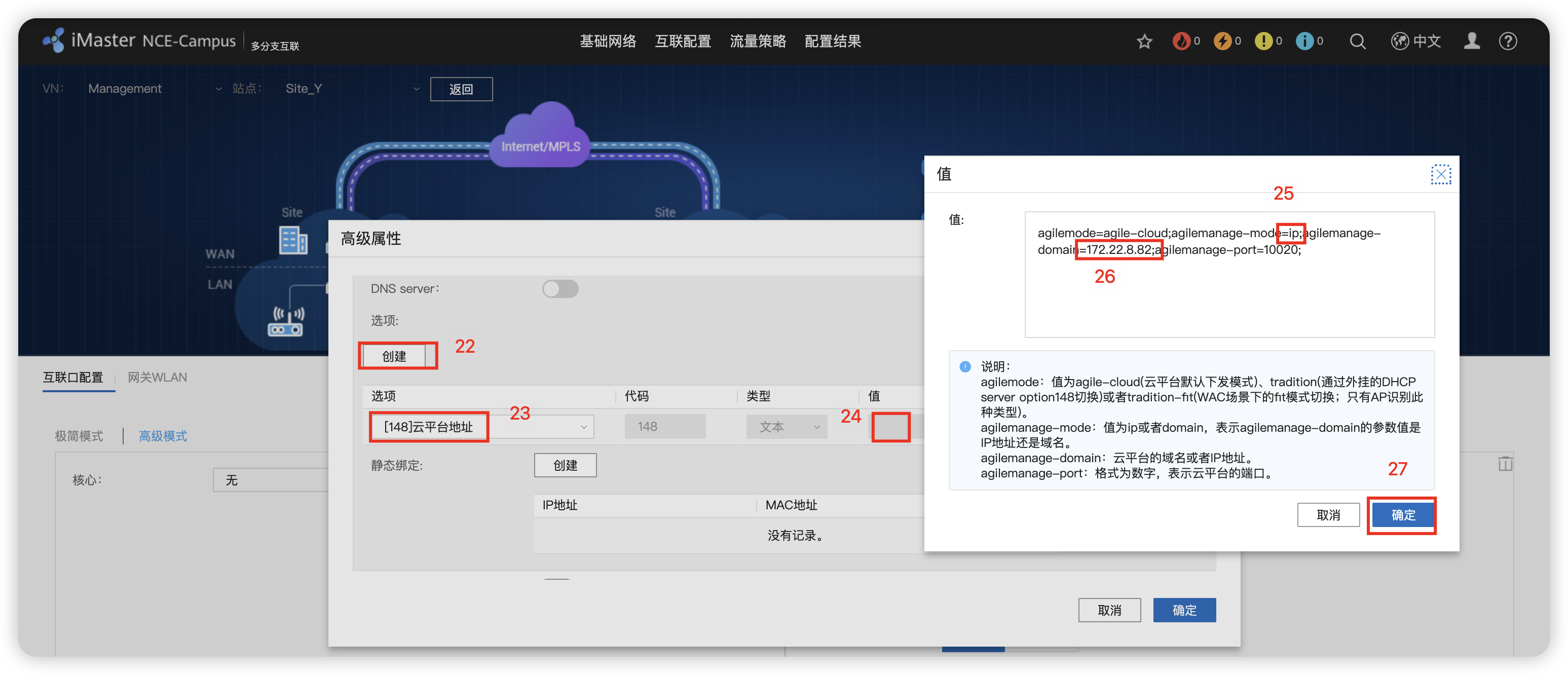
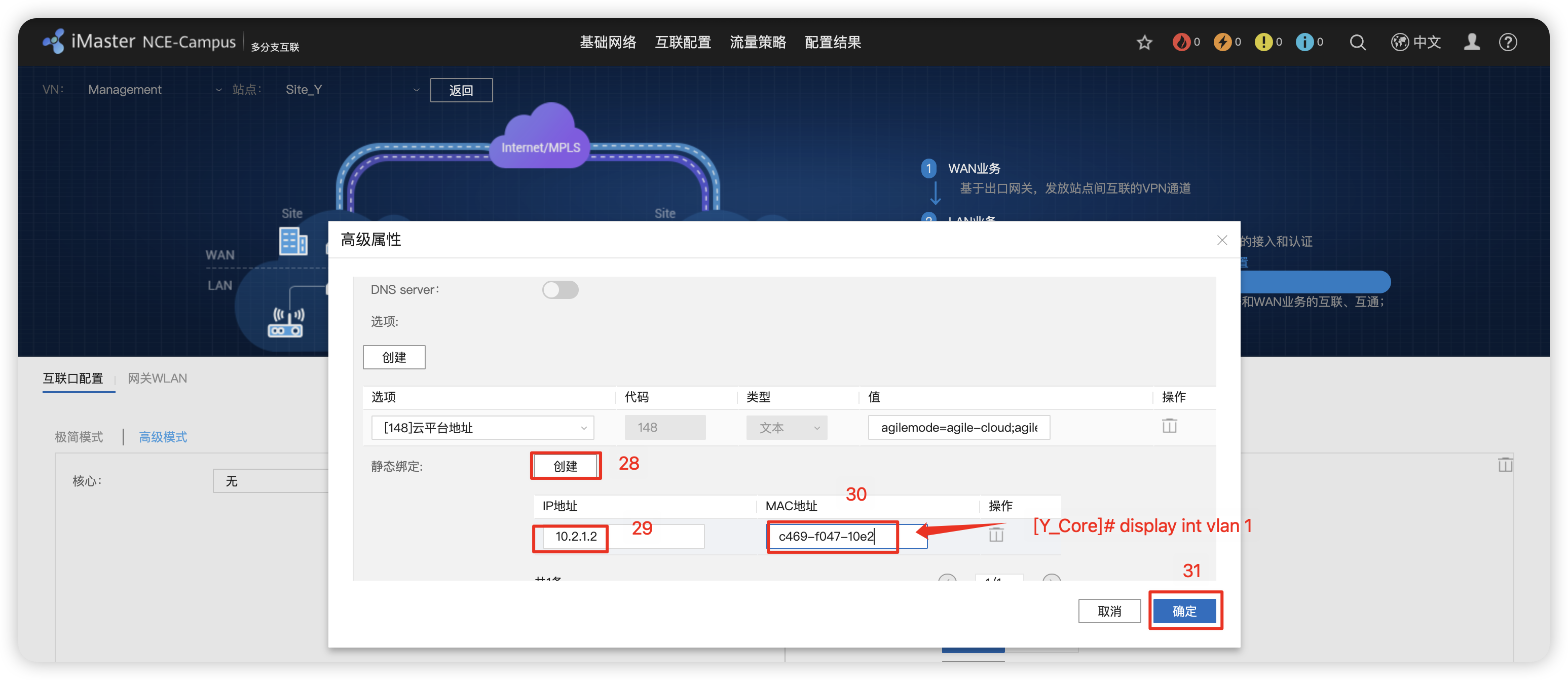
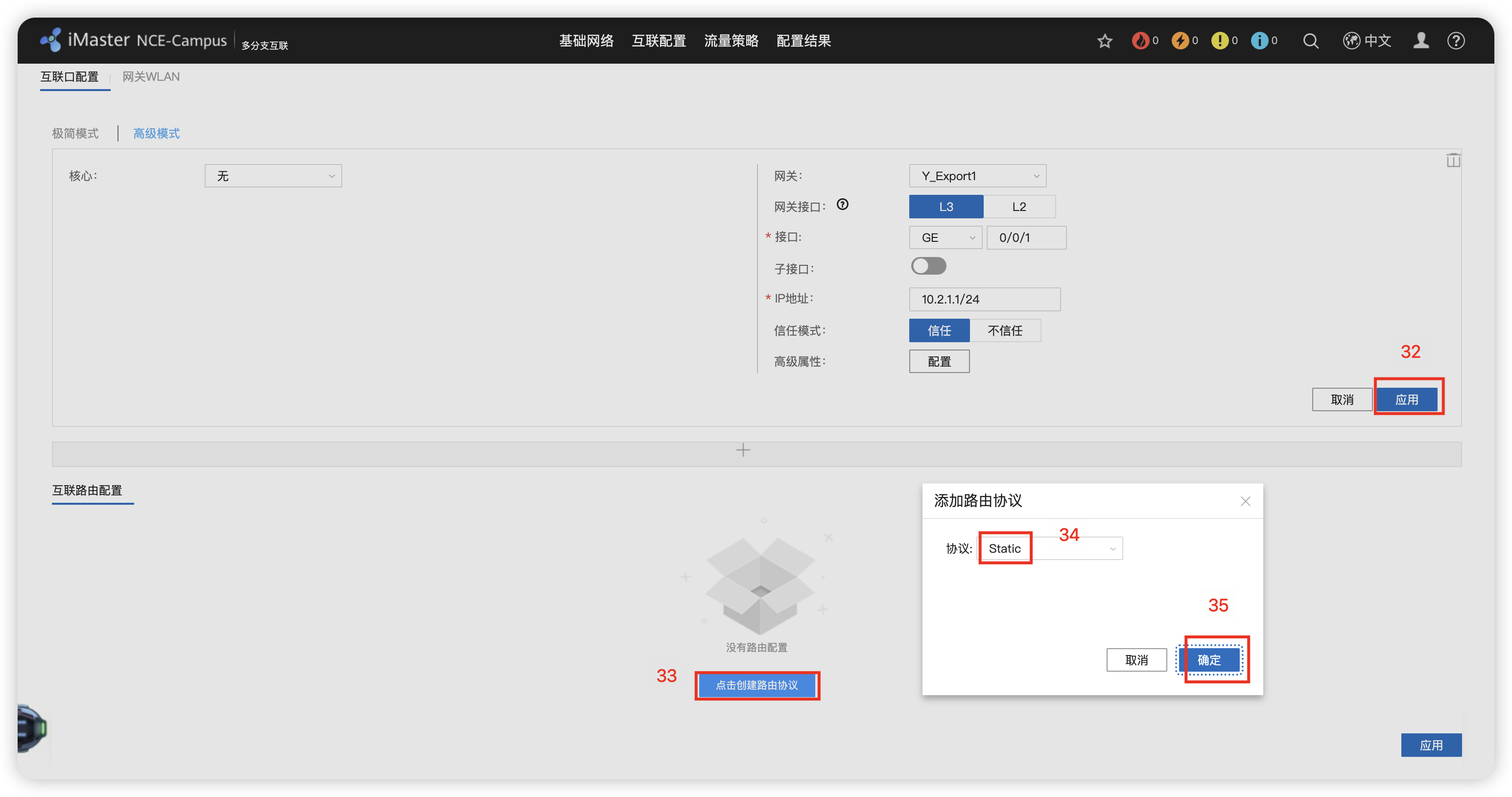
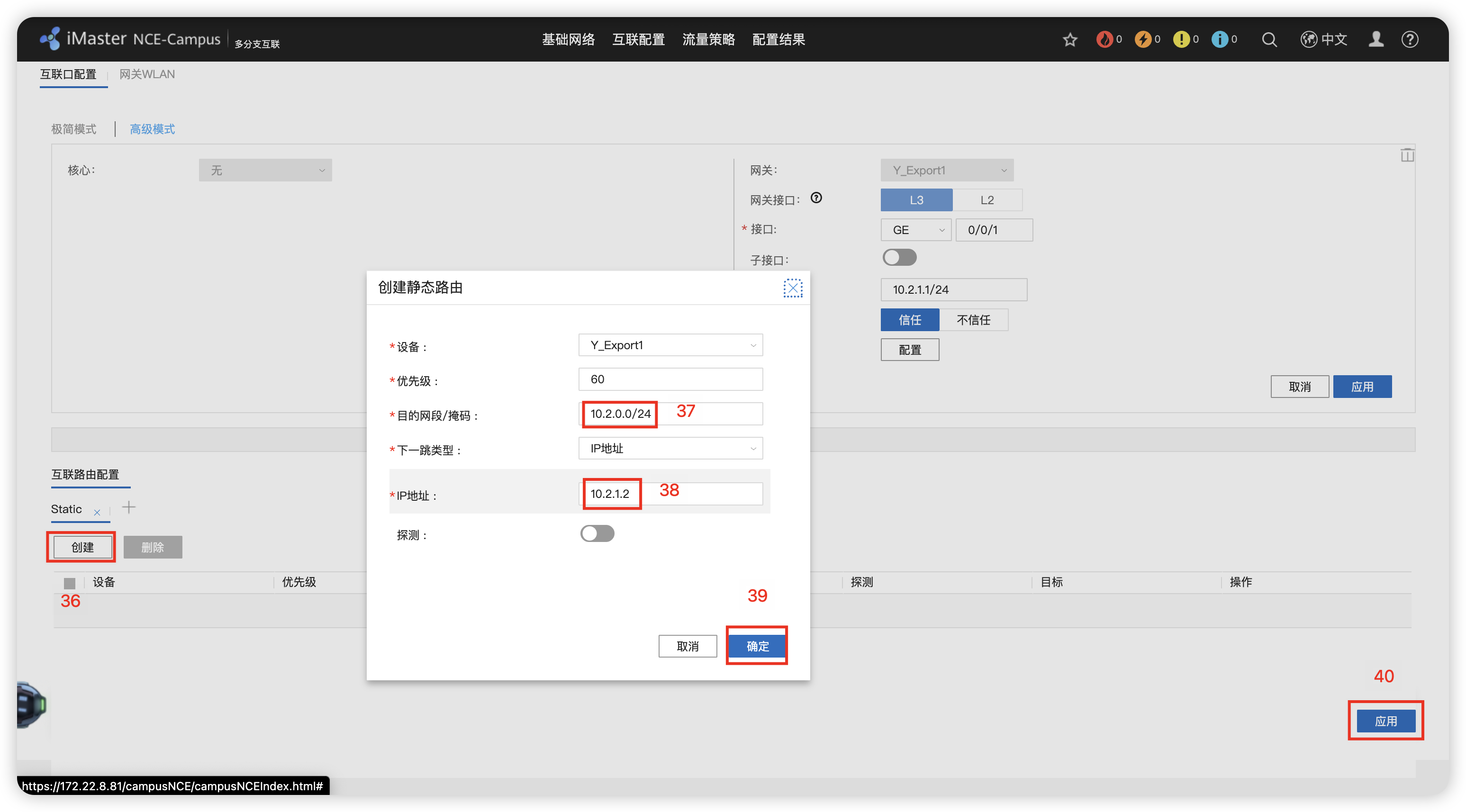
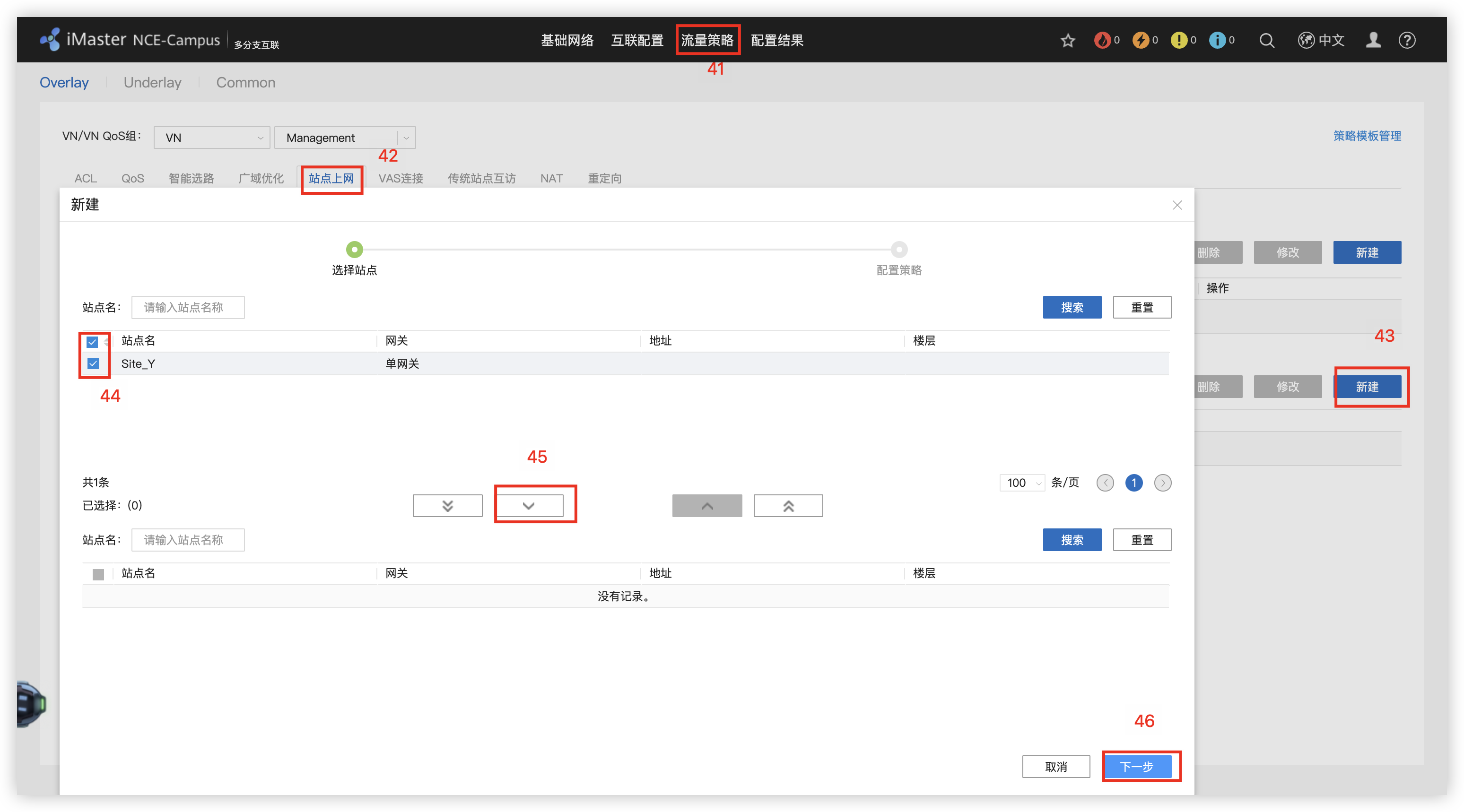
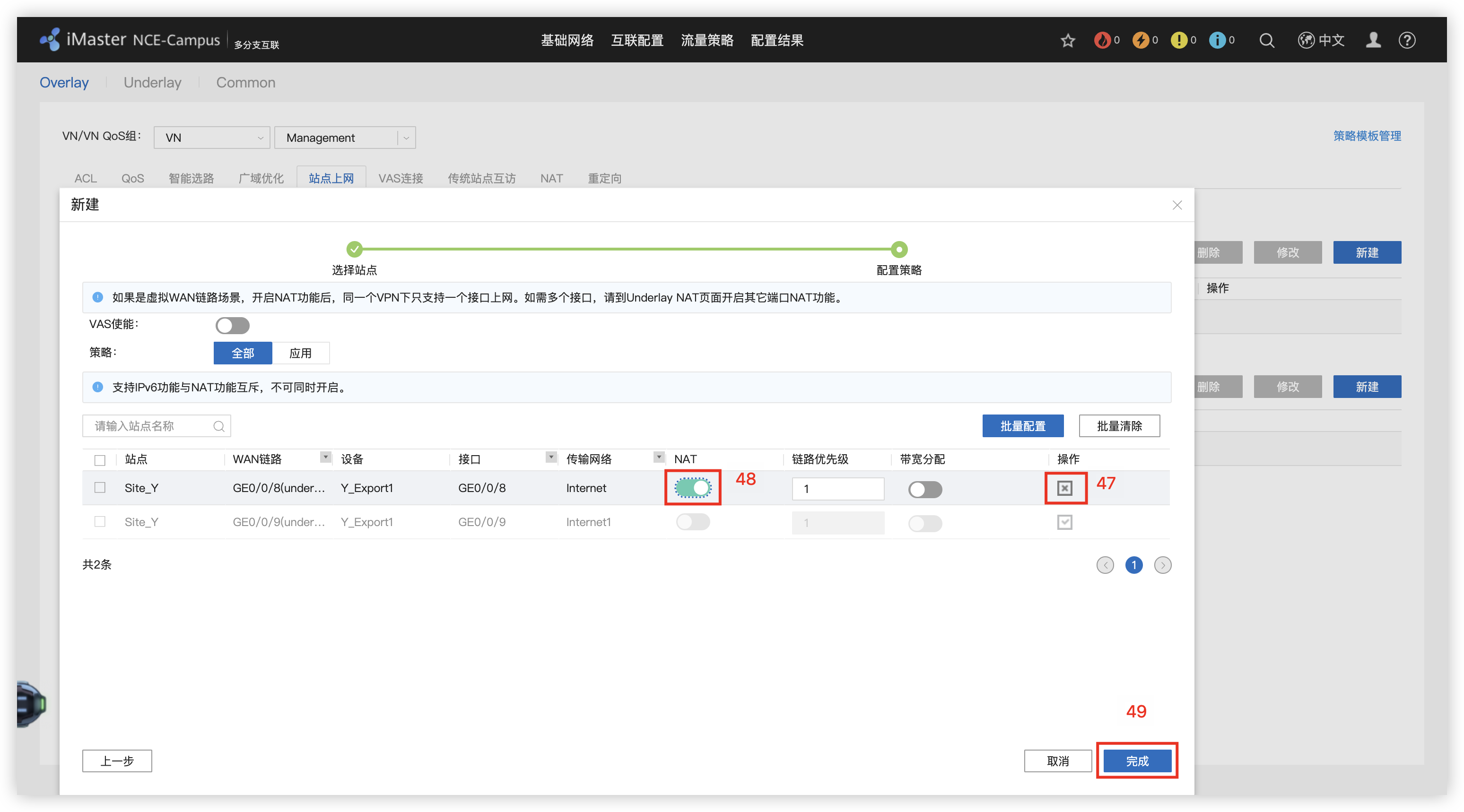
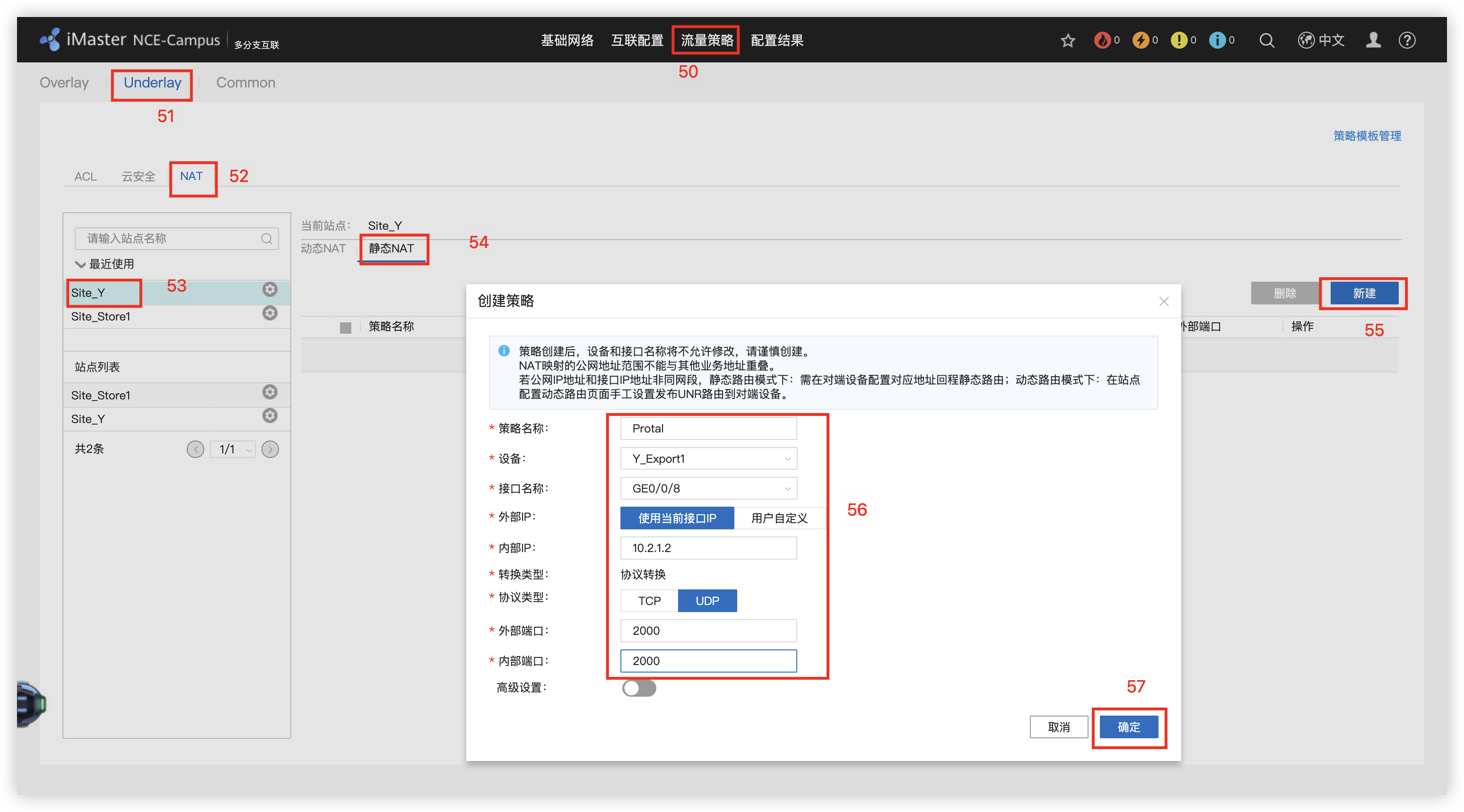
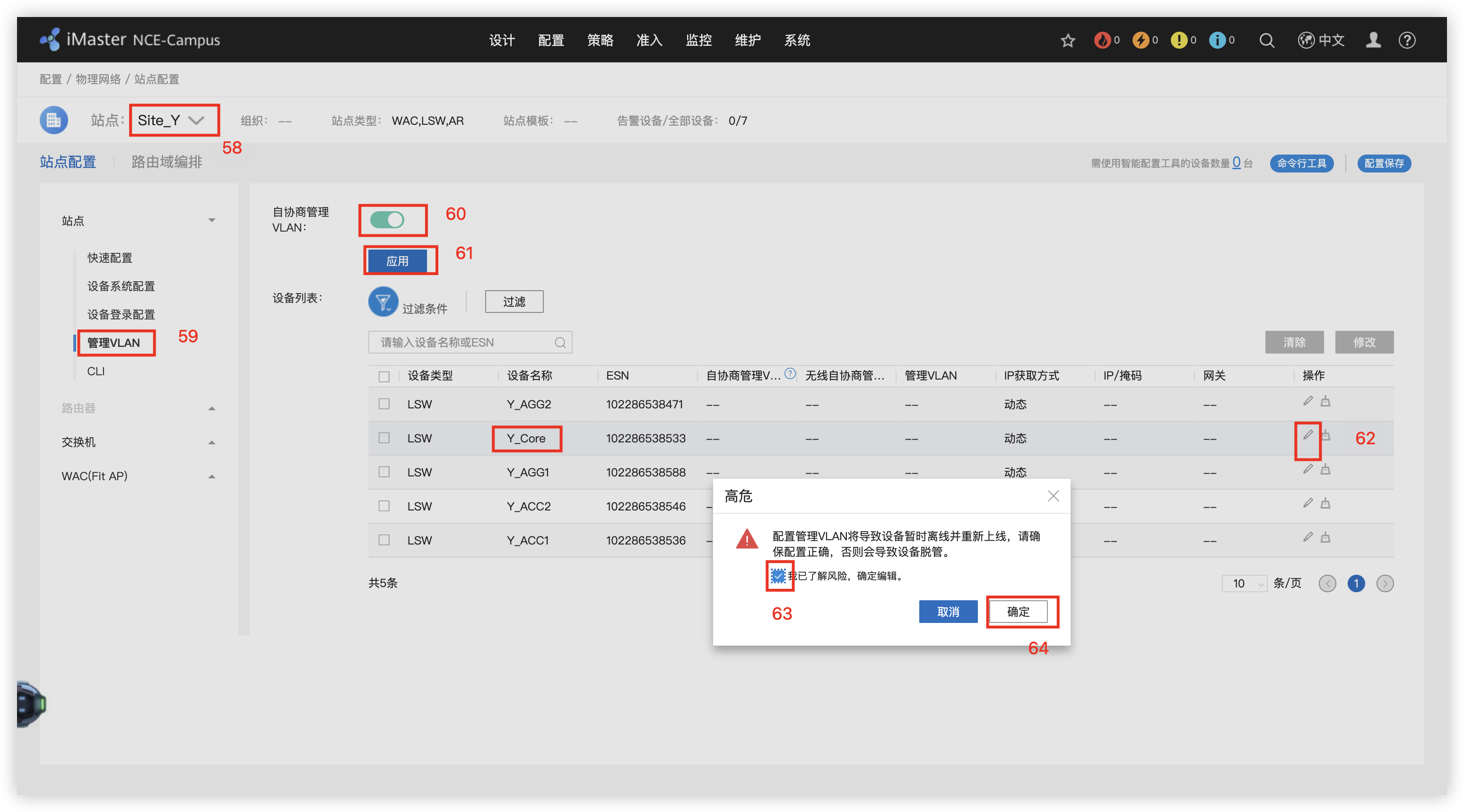
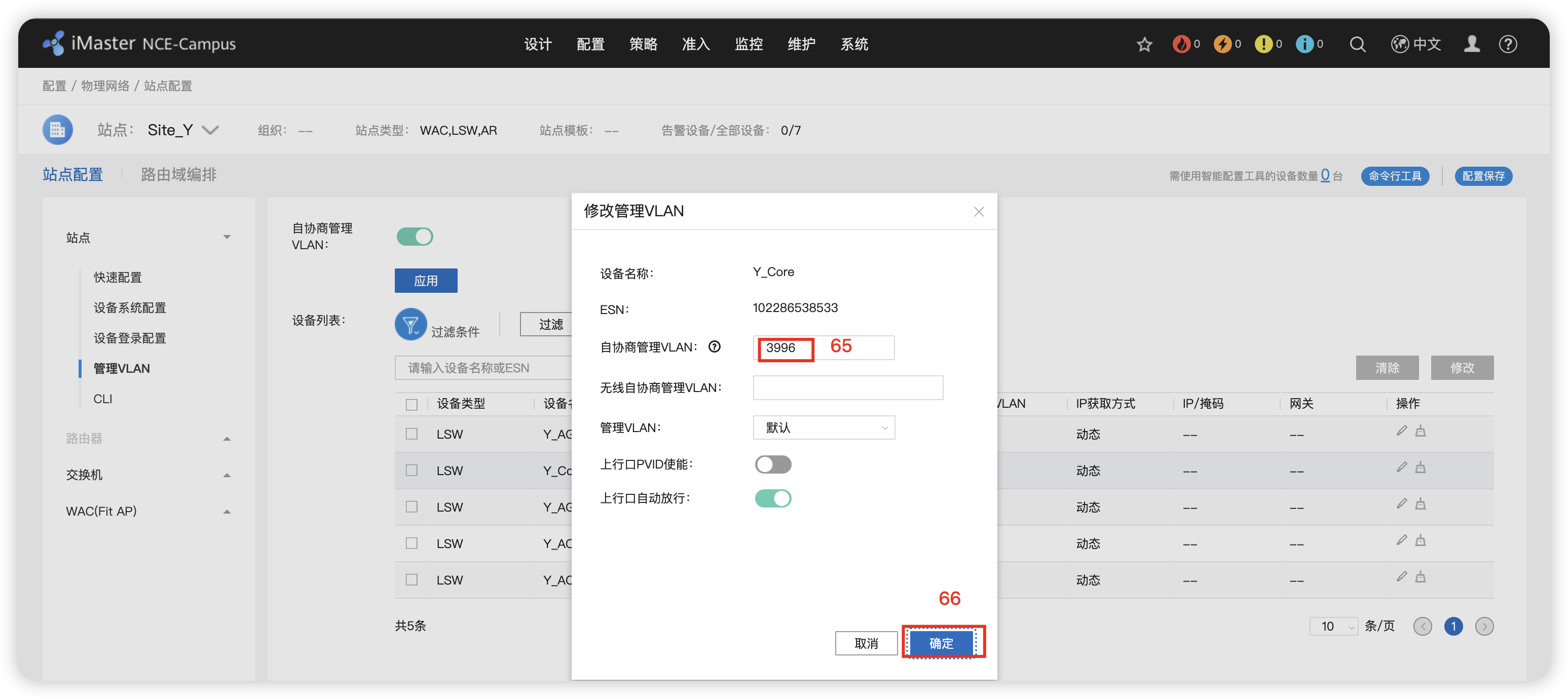
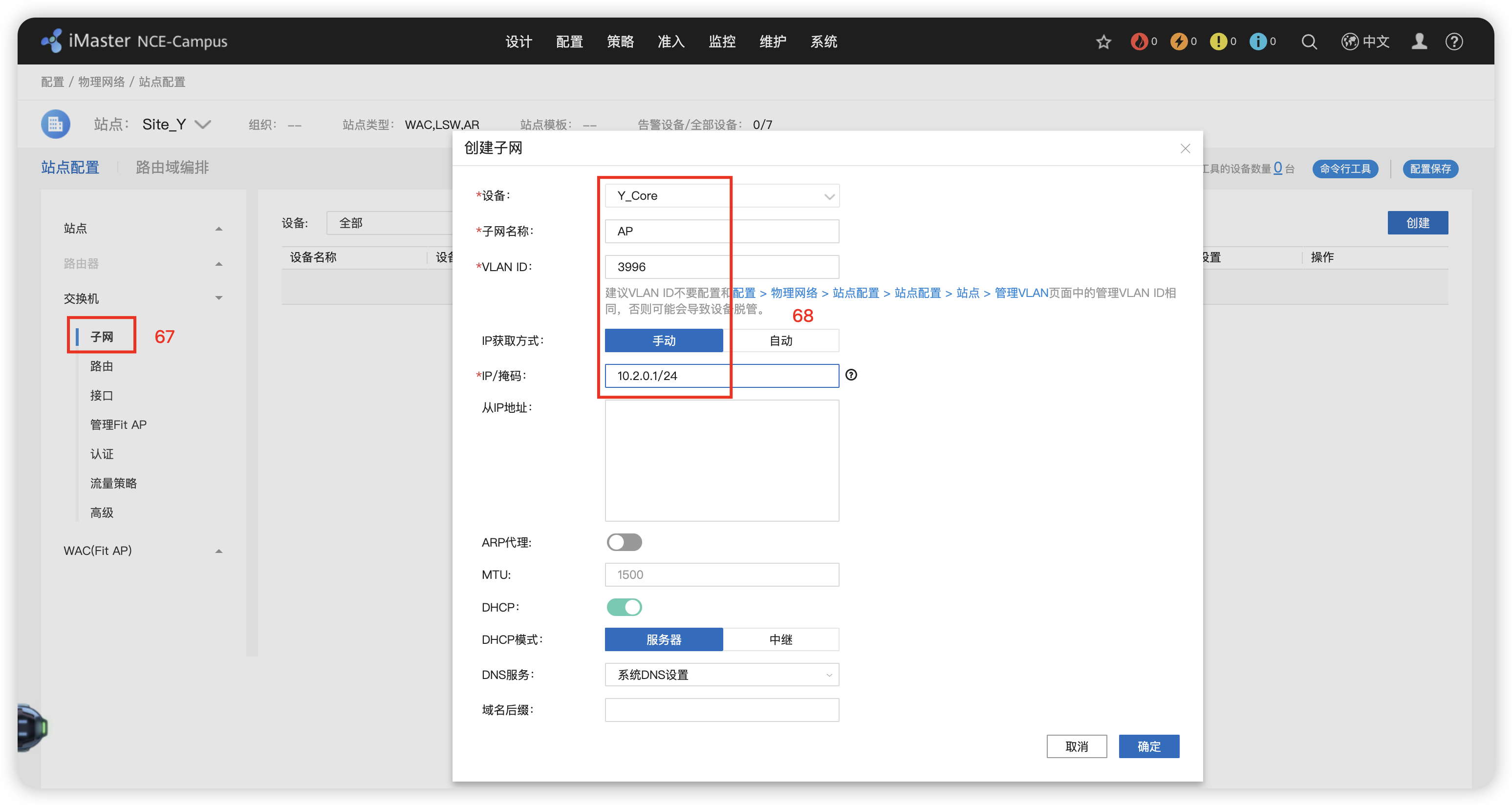
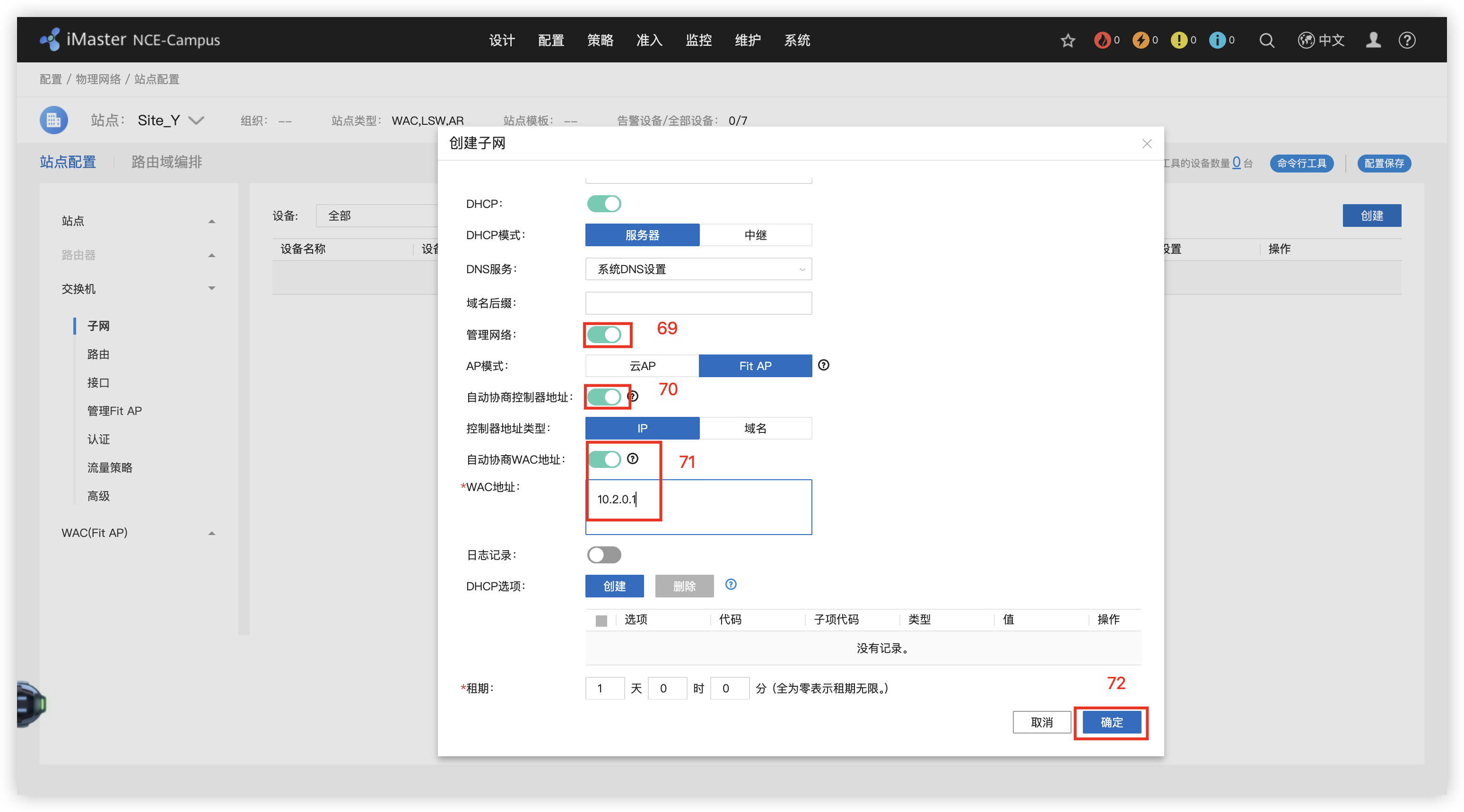
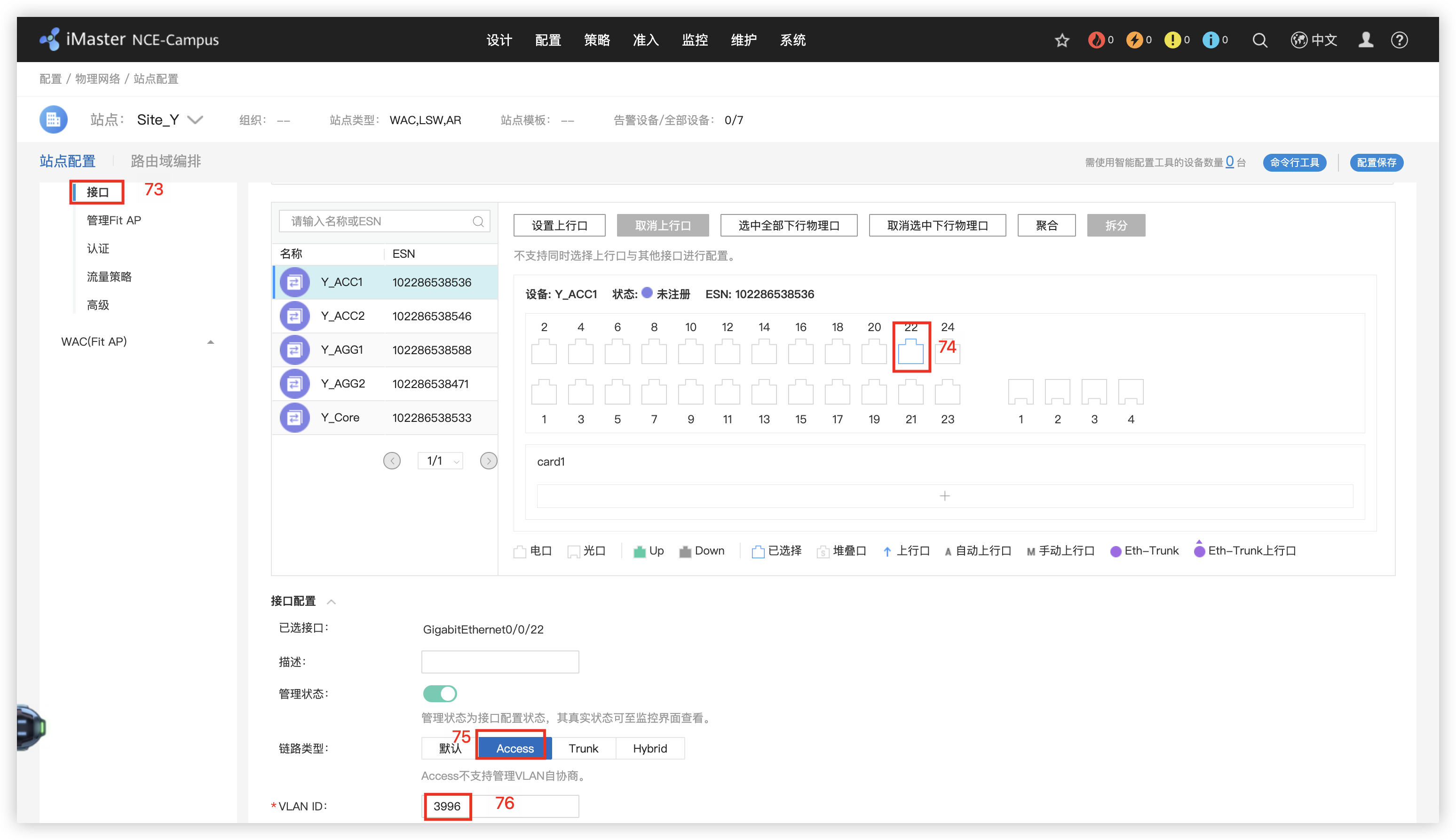
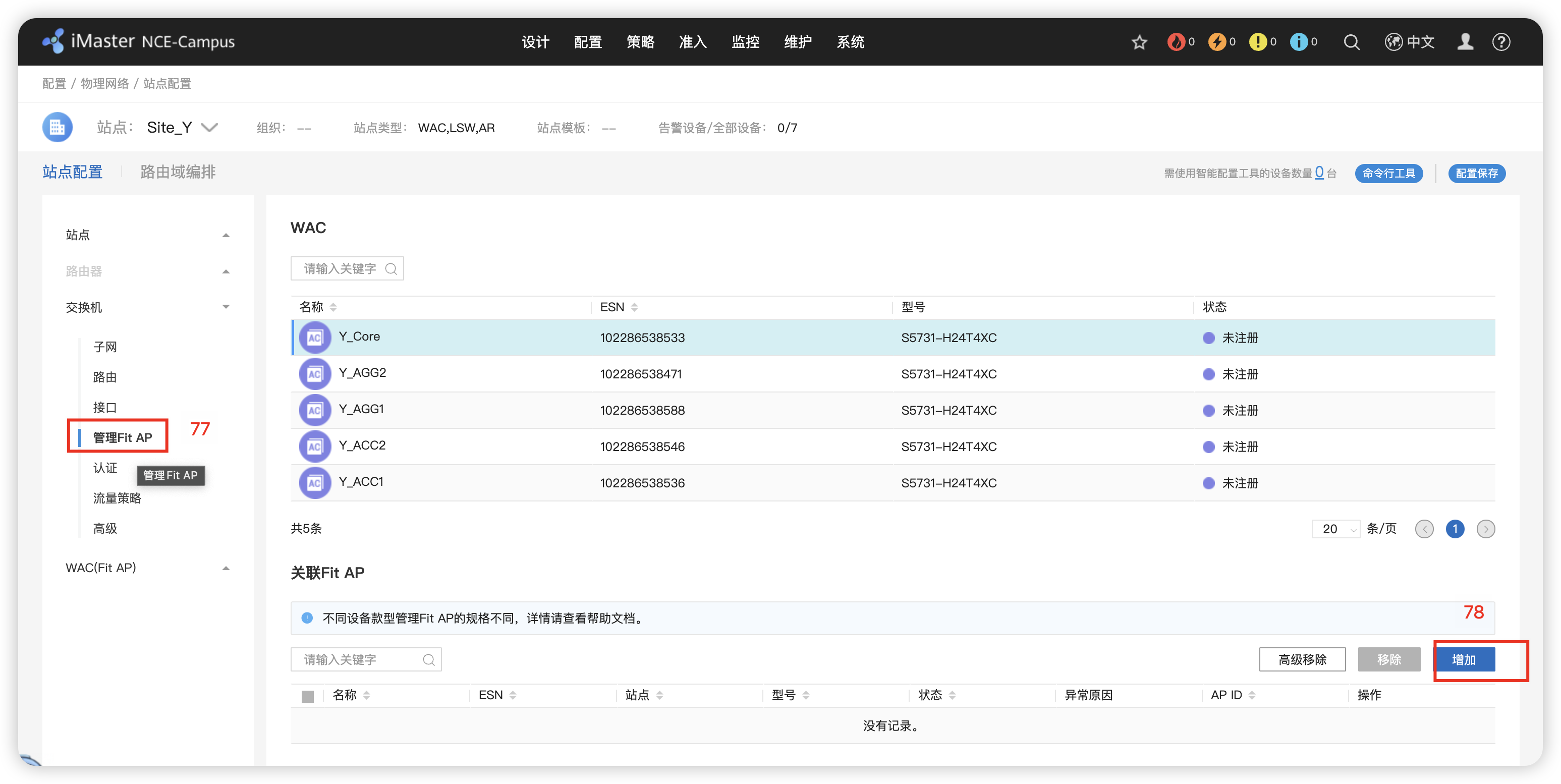
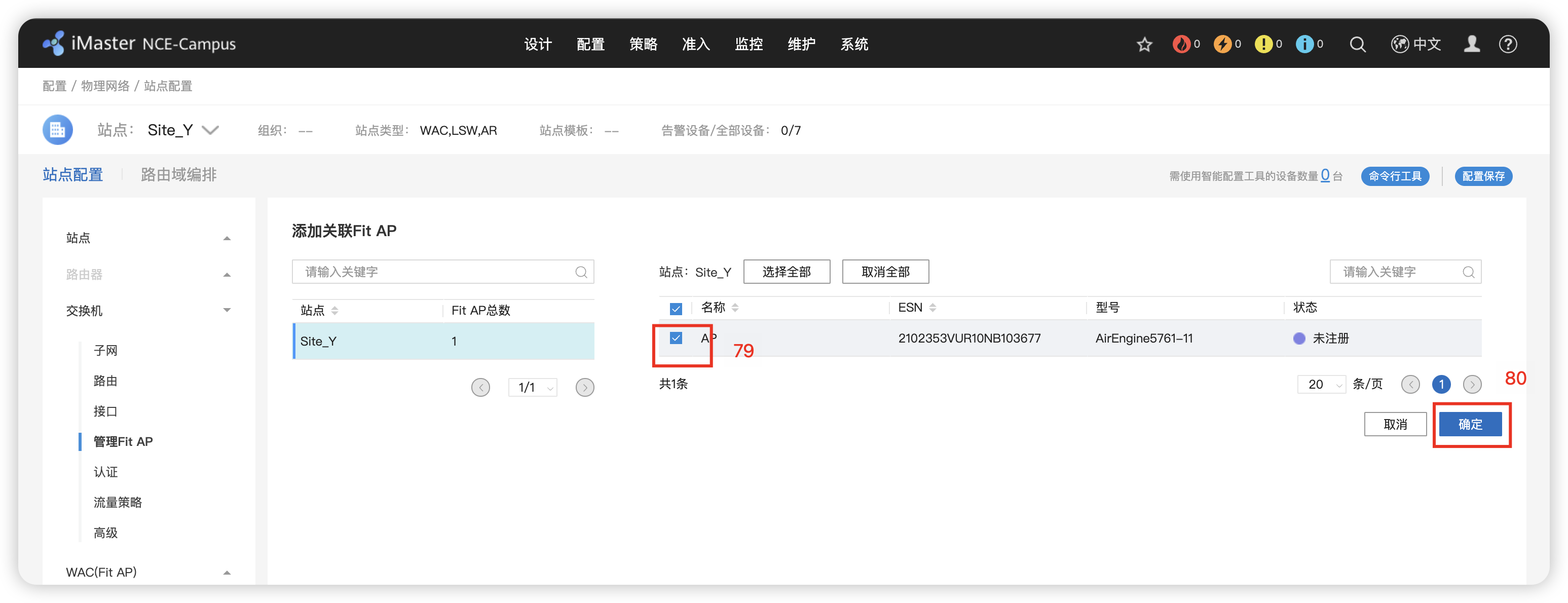
91’ Y_Core -> web -> 配置 -> 无线业务管理 -> vlan 3996 -> 应用
10 - 纳管检查
Fabric(池)资源网络
1 - Fabric网络规划
配置IGP 协议的地址和VLAN 创建Radius服务 Rrotal认证服务器 802.1X认证模版
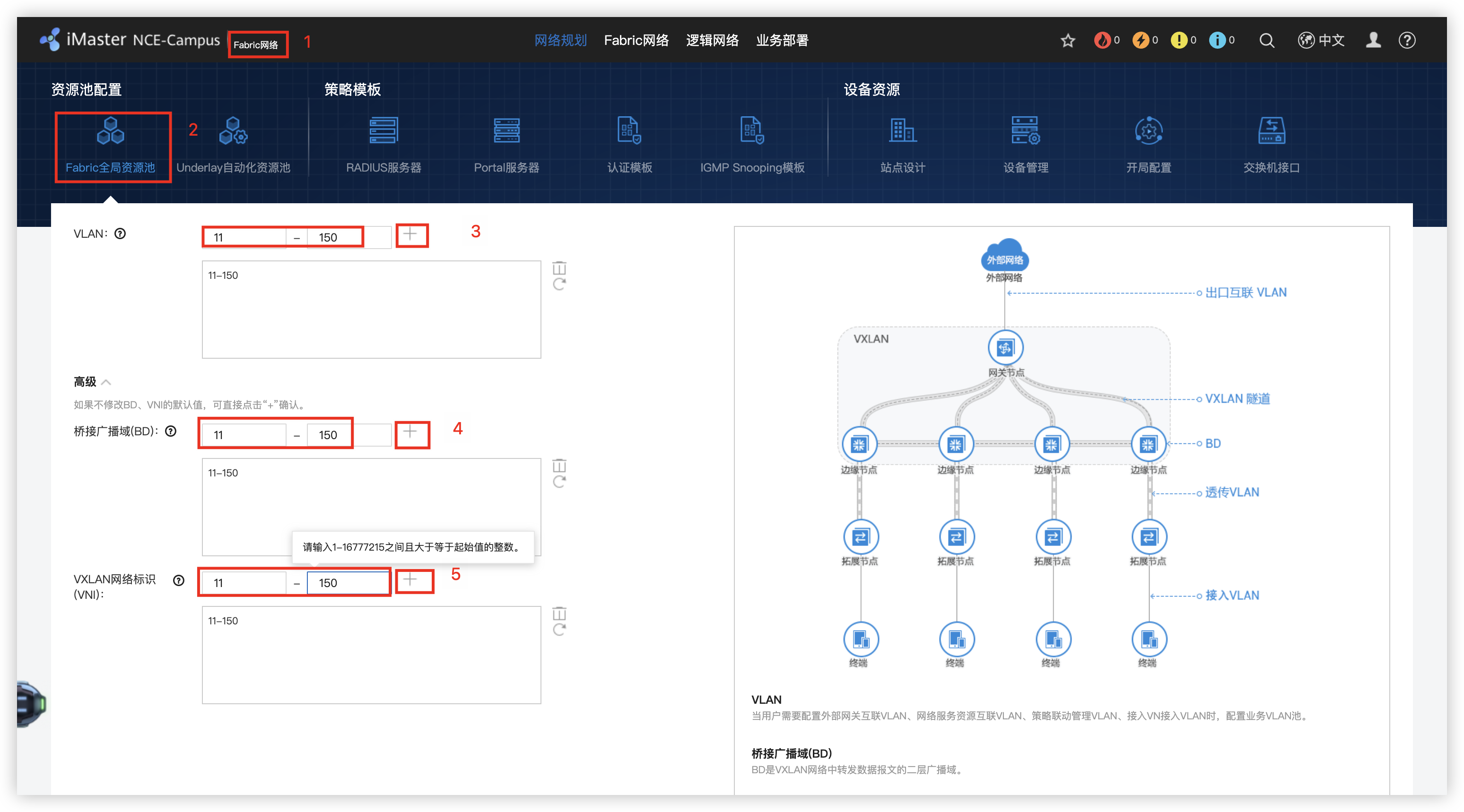
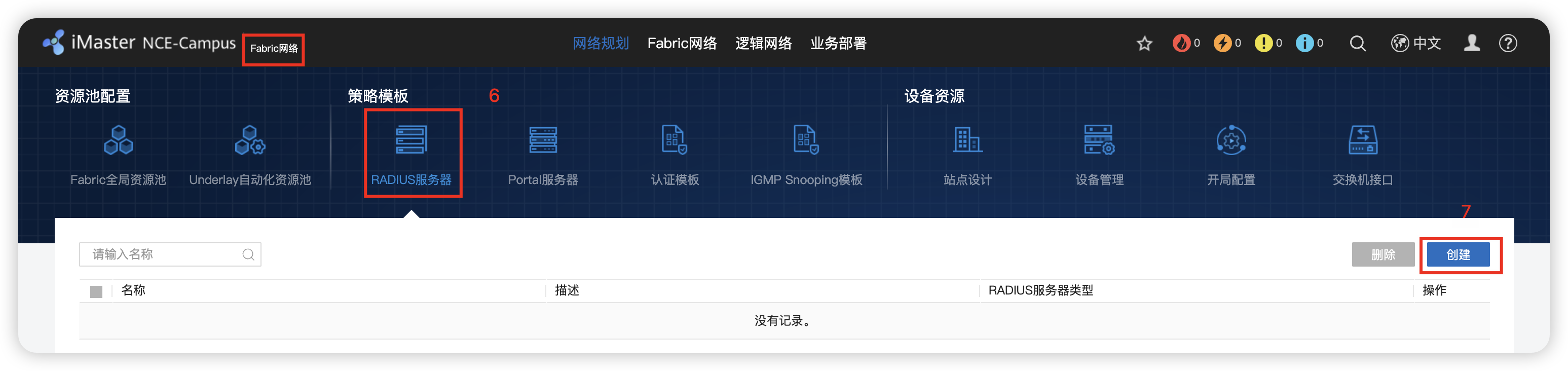
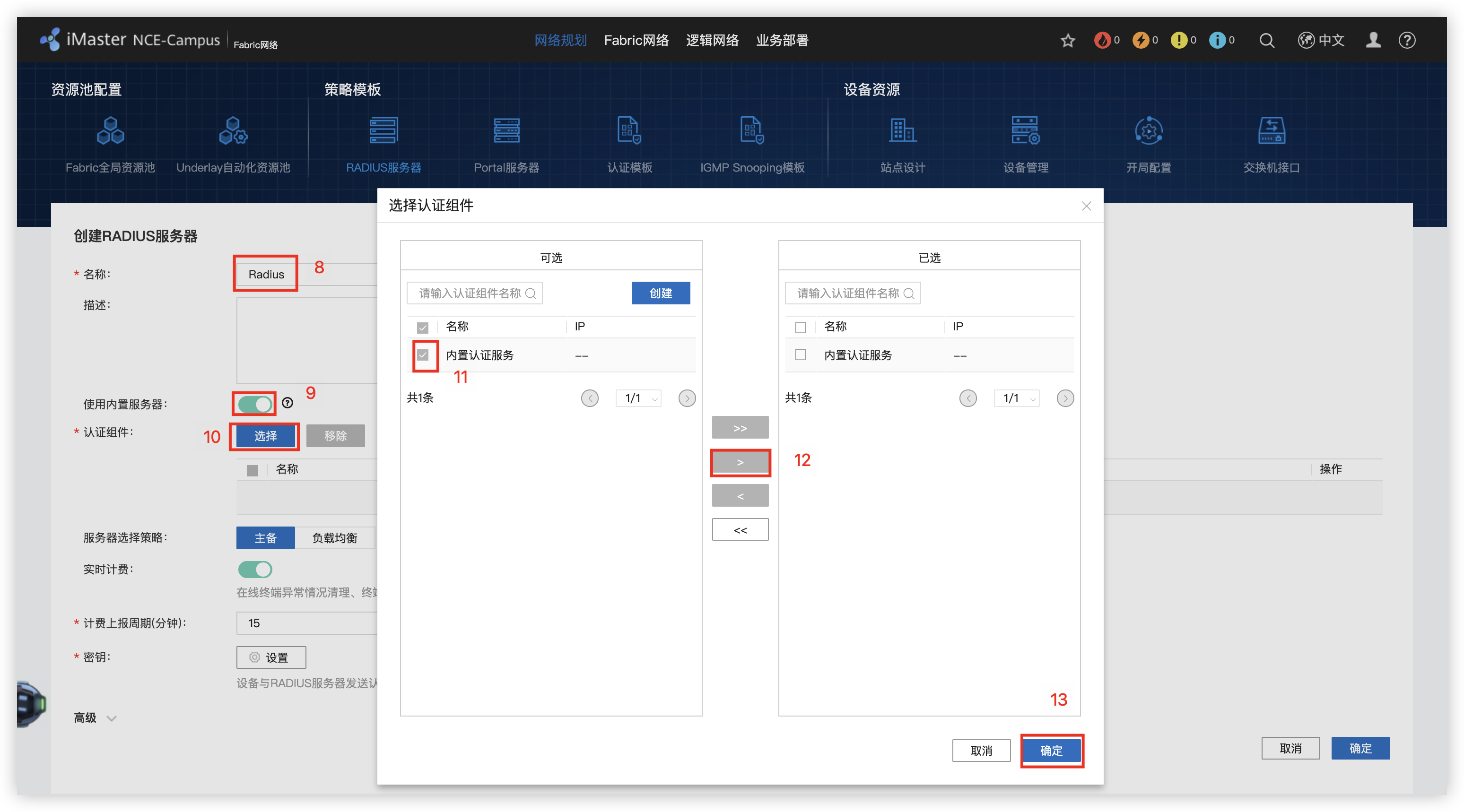
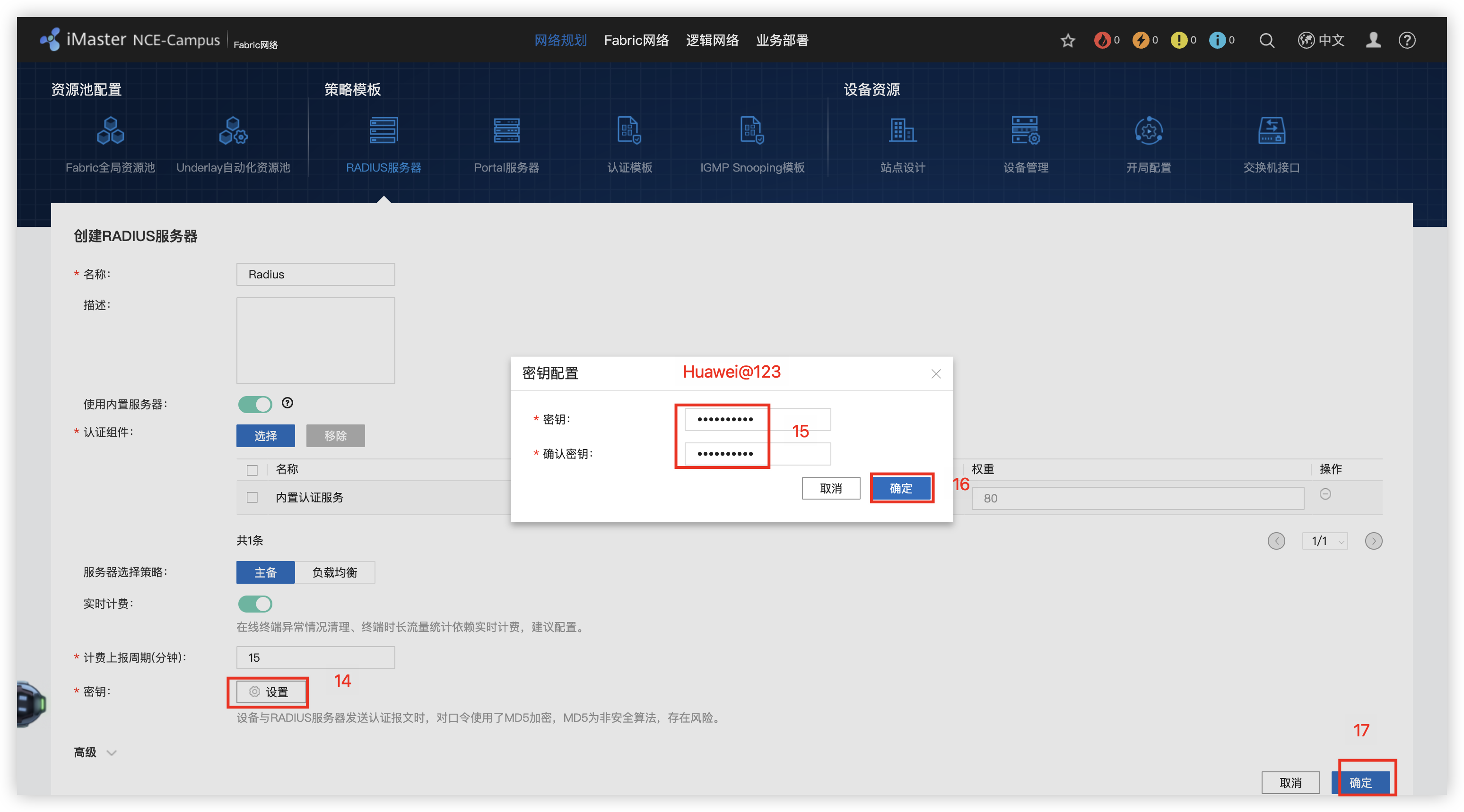
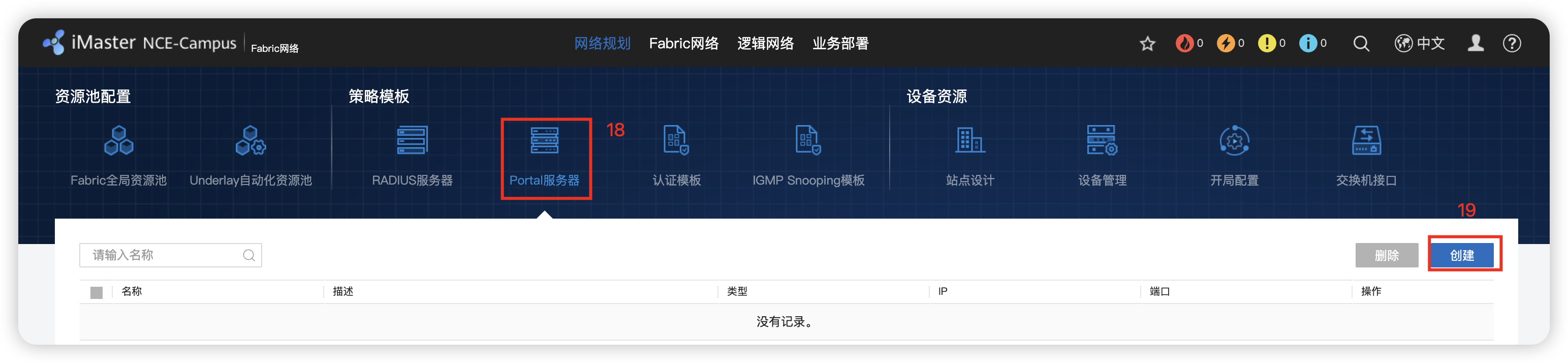
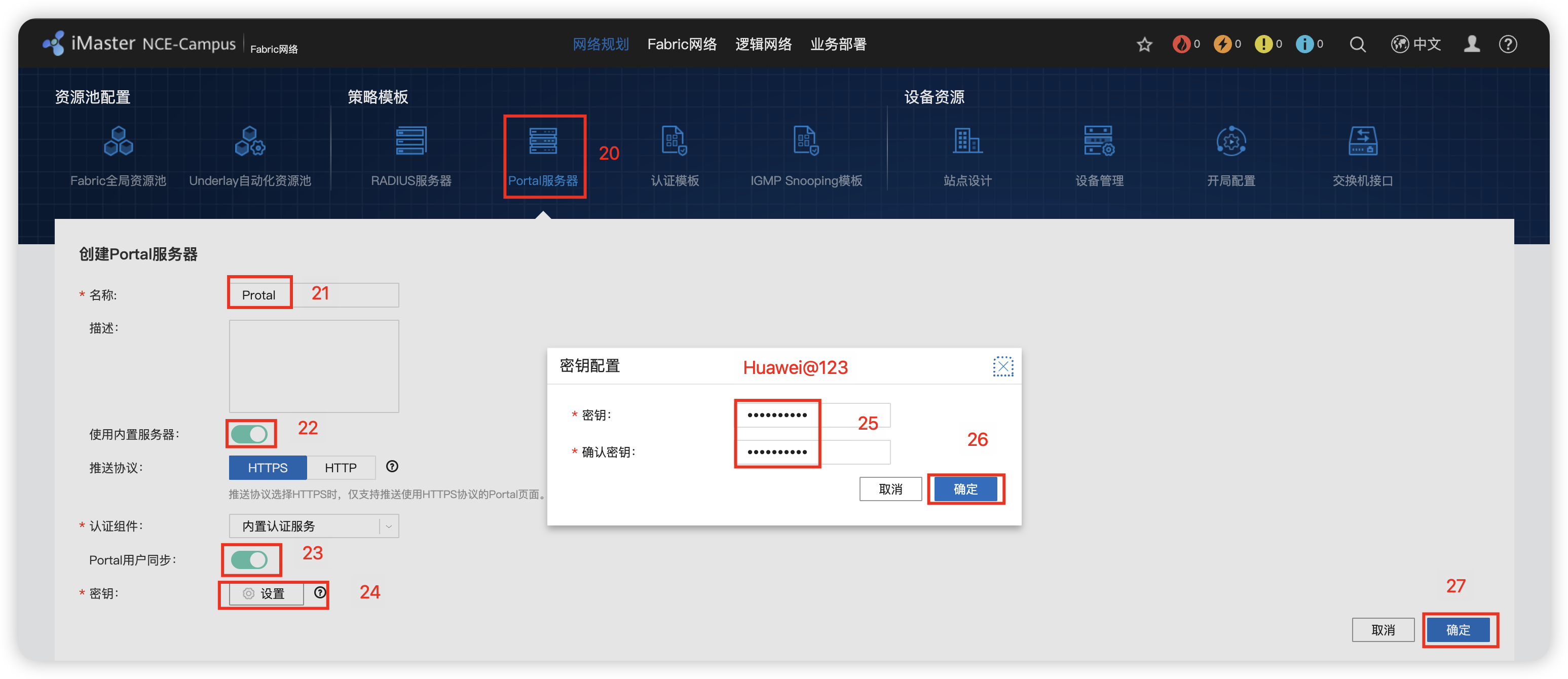
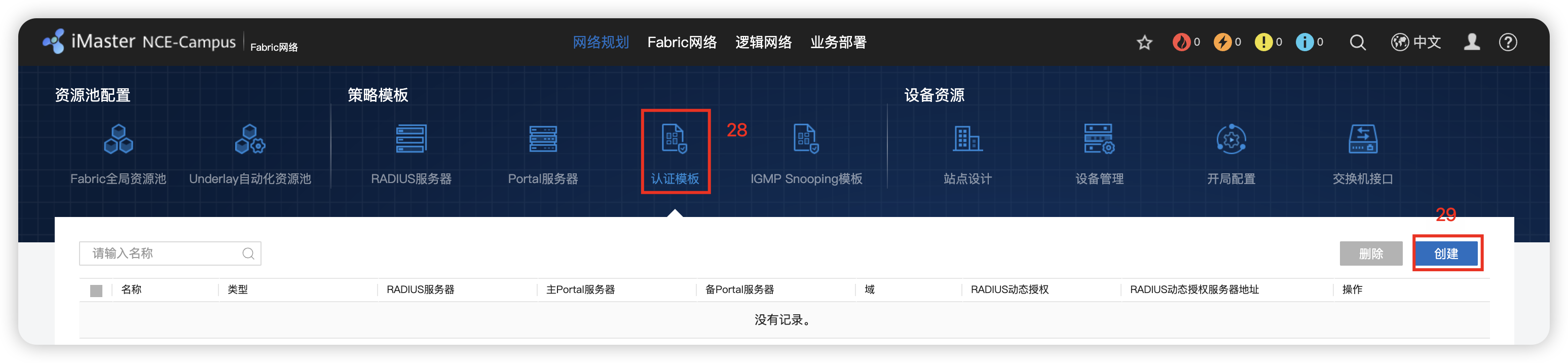
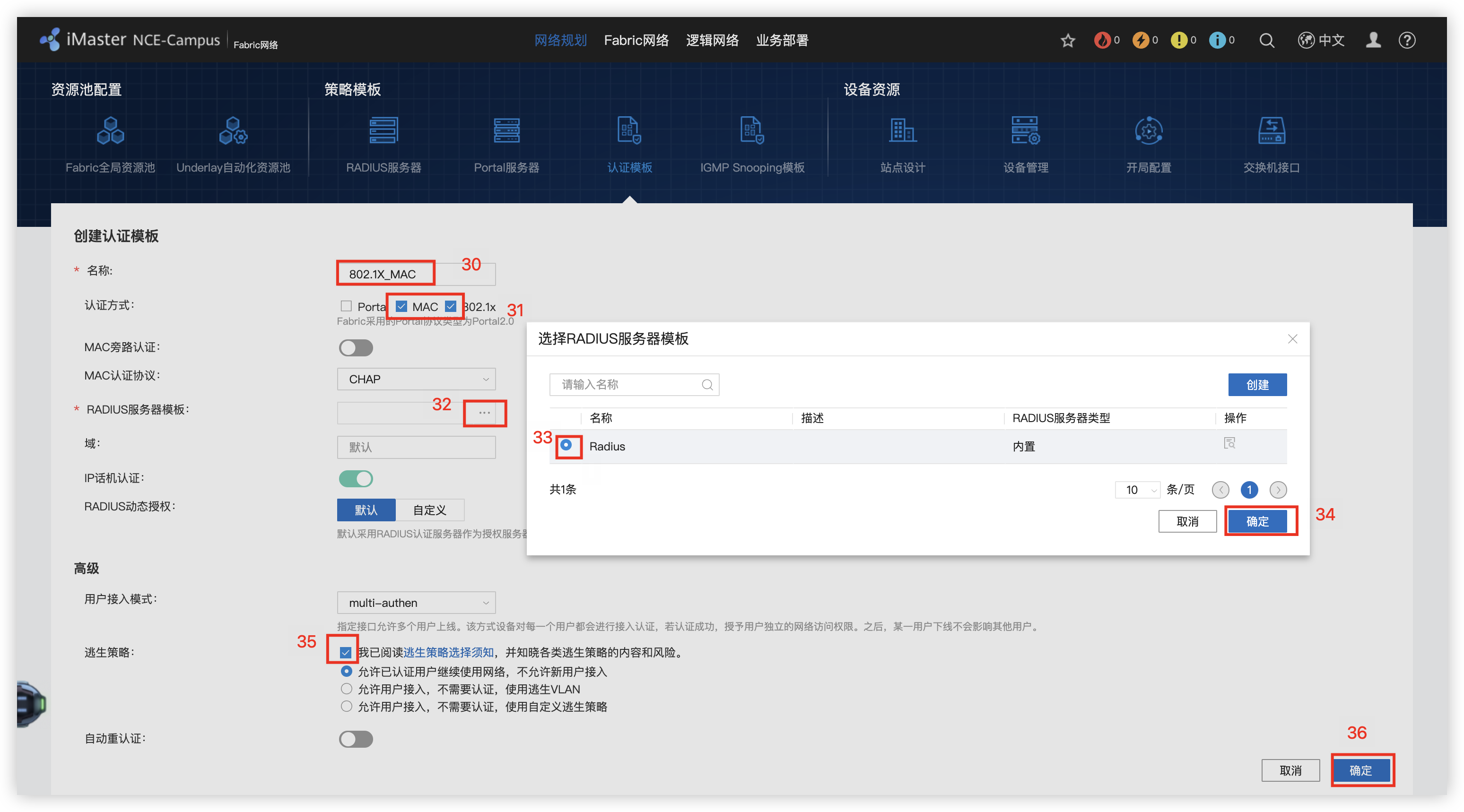
3 - 创建Fabric网络
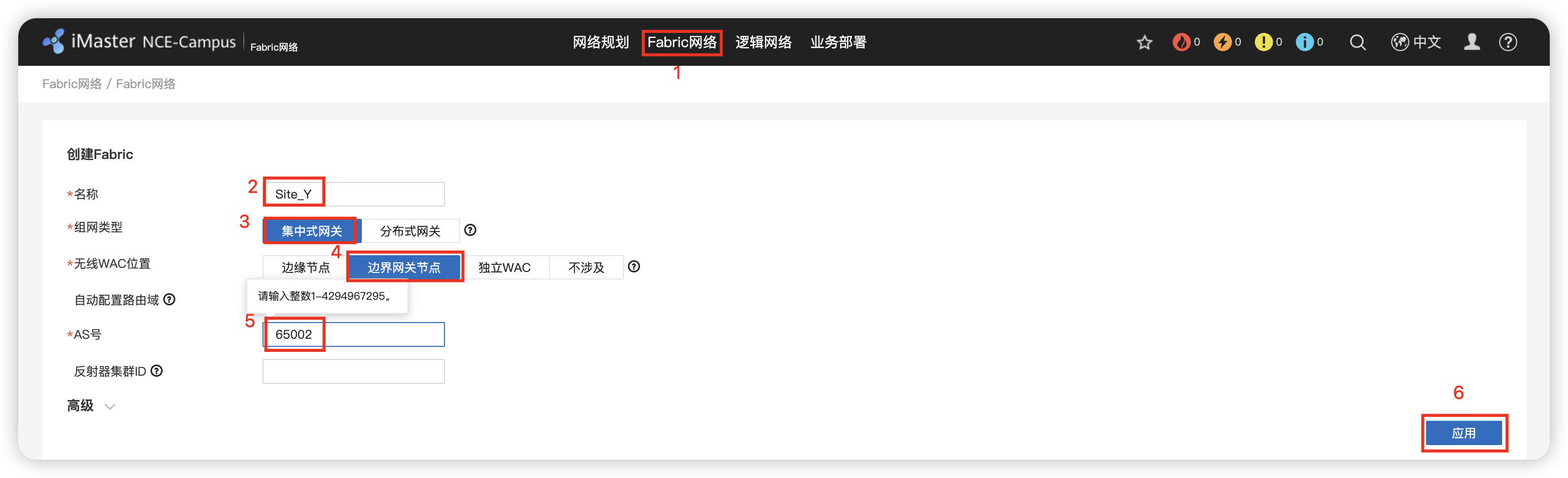
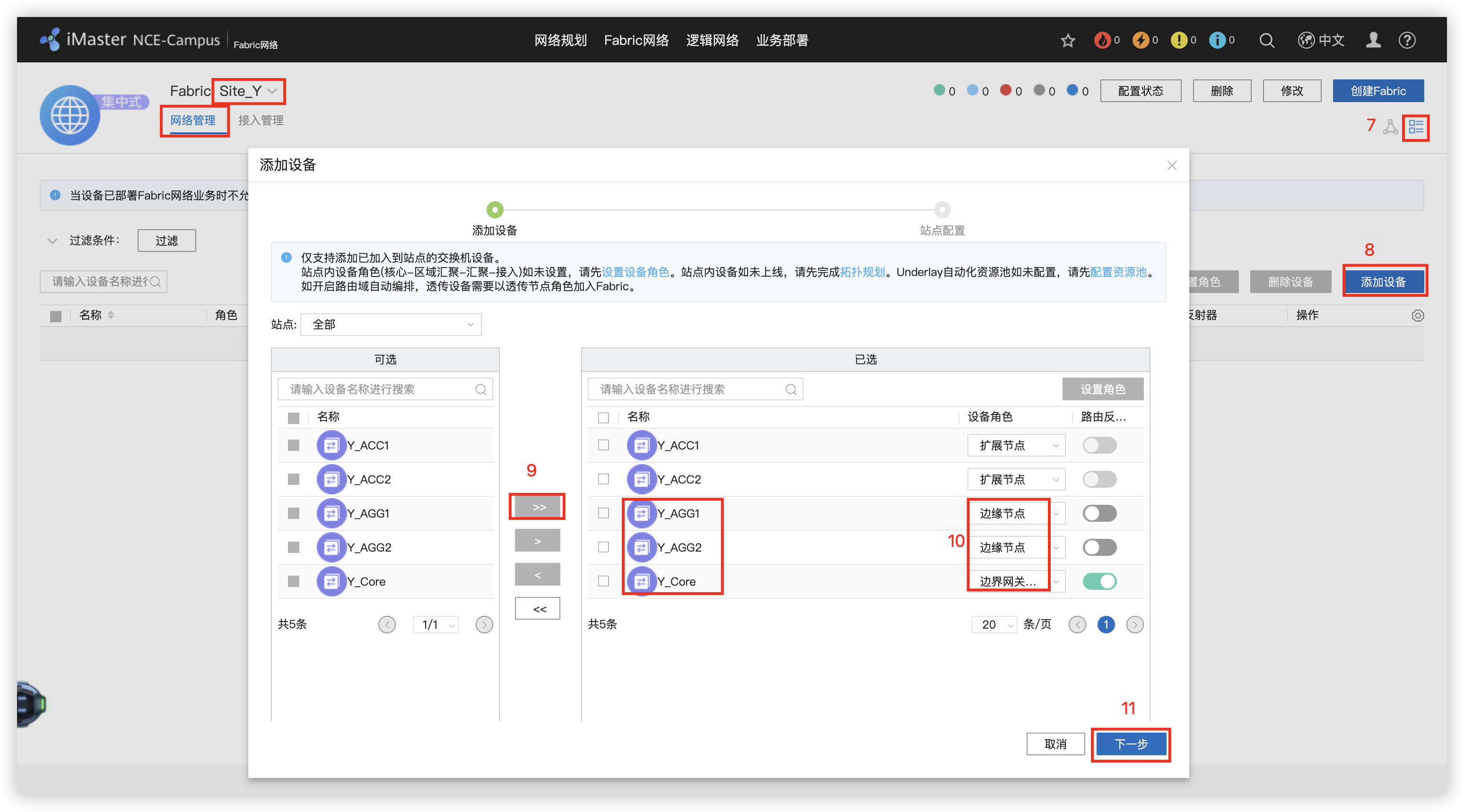
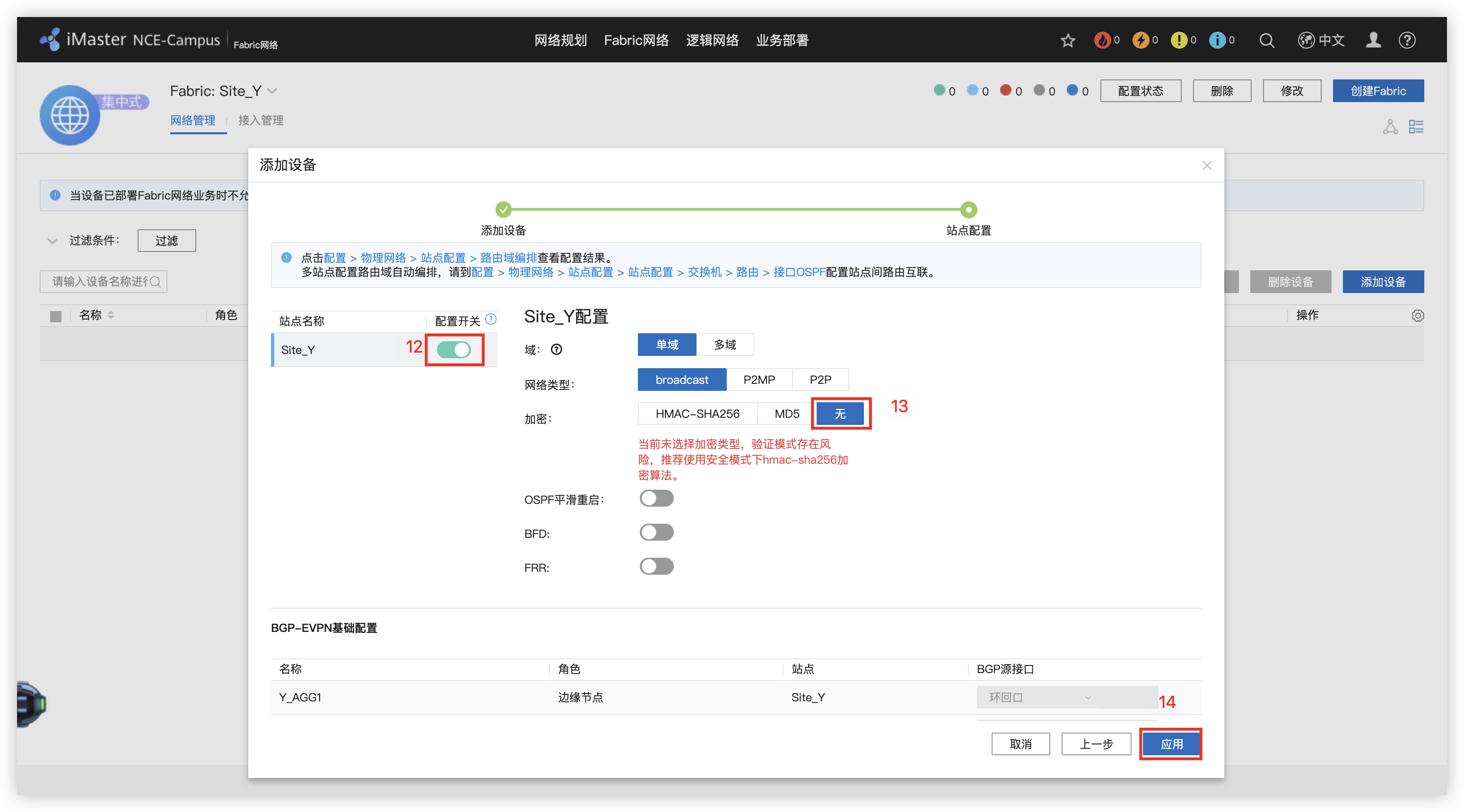
4 - 配置网络中的设备角色(边缘节点和边界网关节点)
5 - 添加DHCP服务器
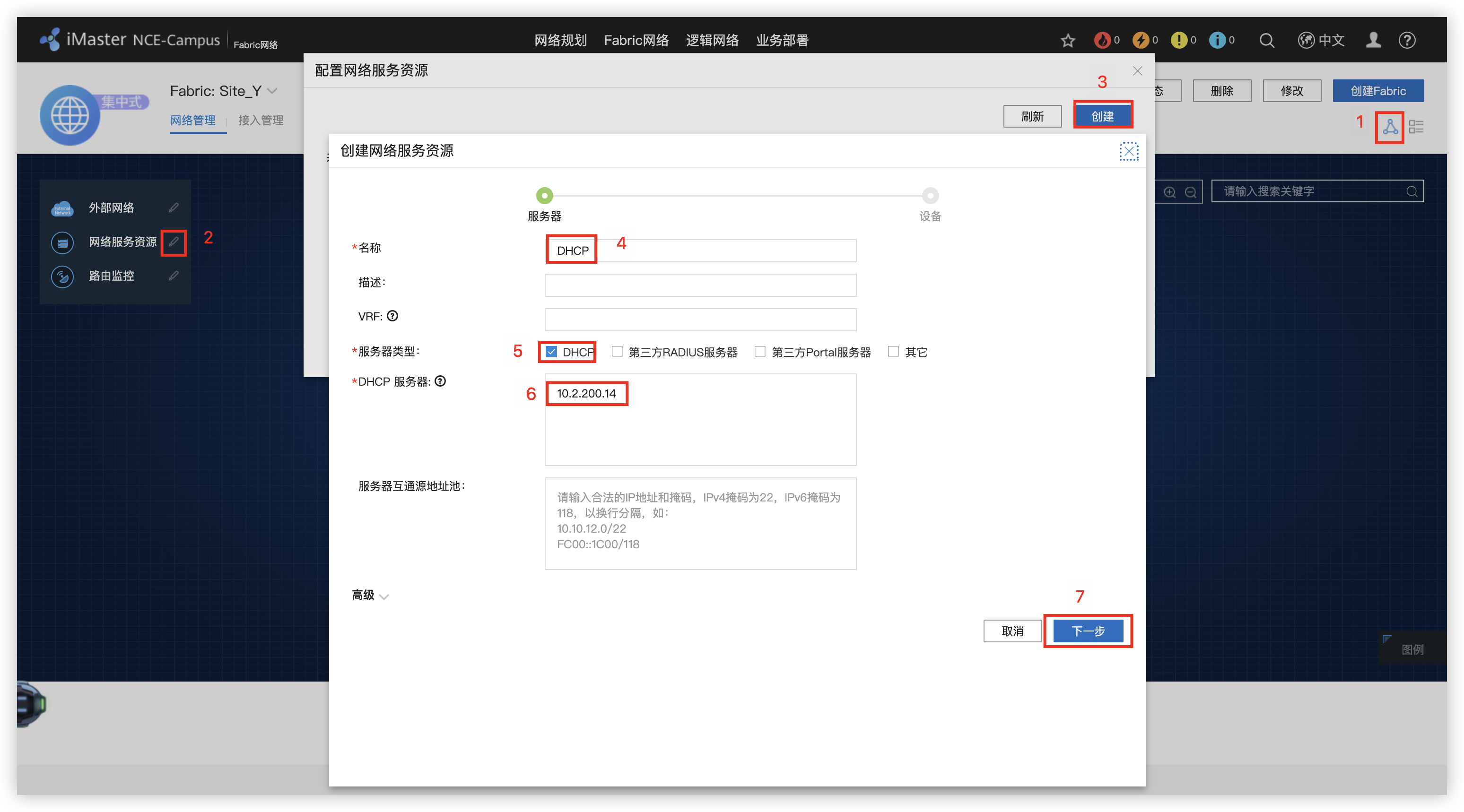
6 - 创建 OA/R&D 业务网络的L3独占外部接口
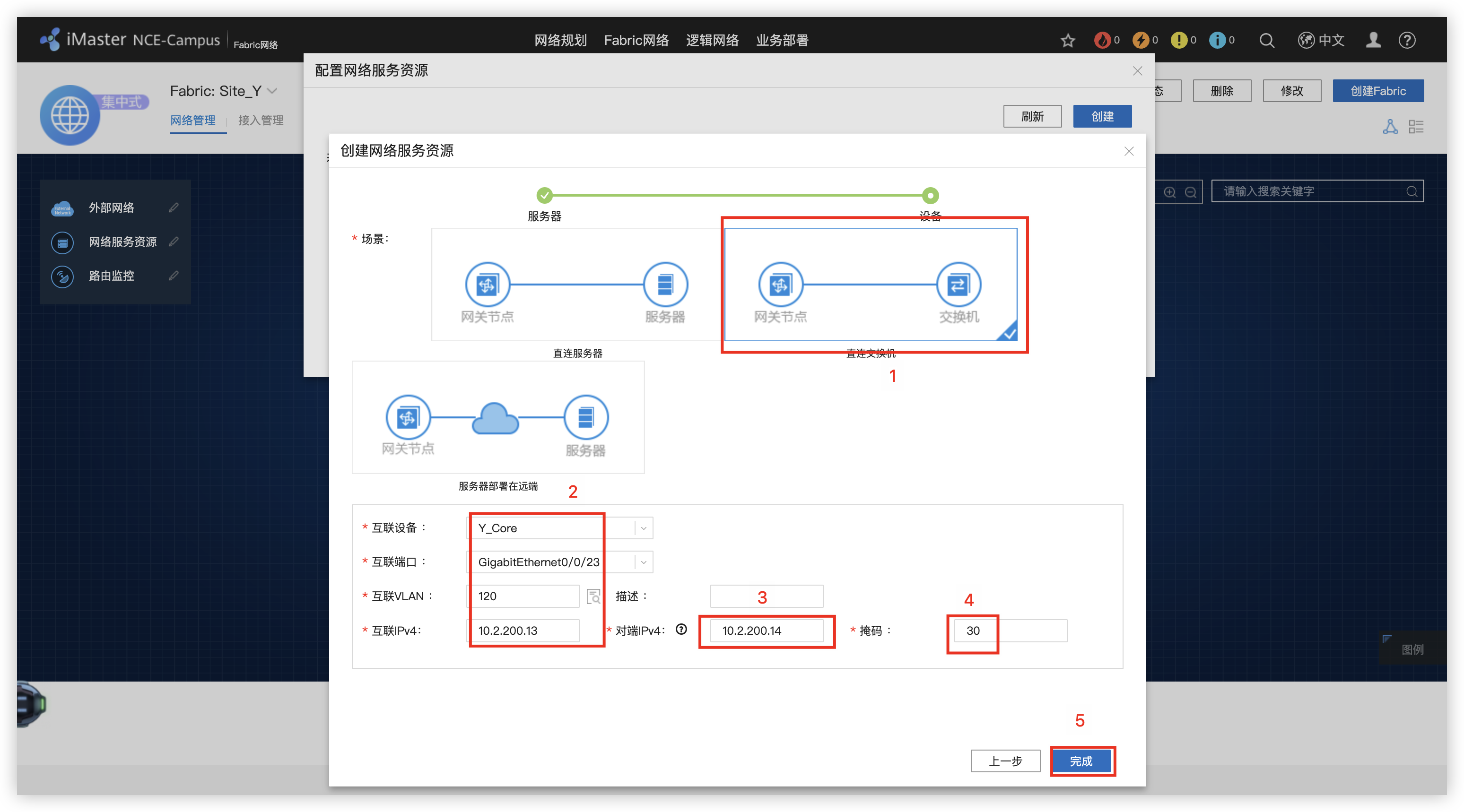
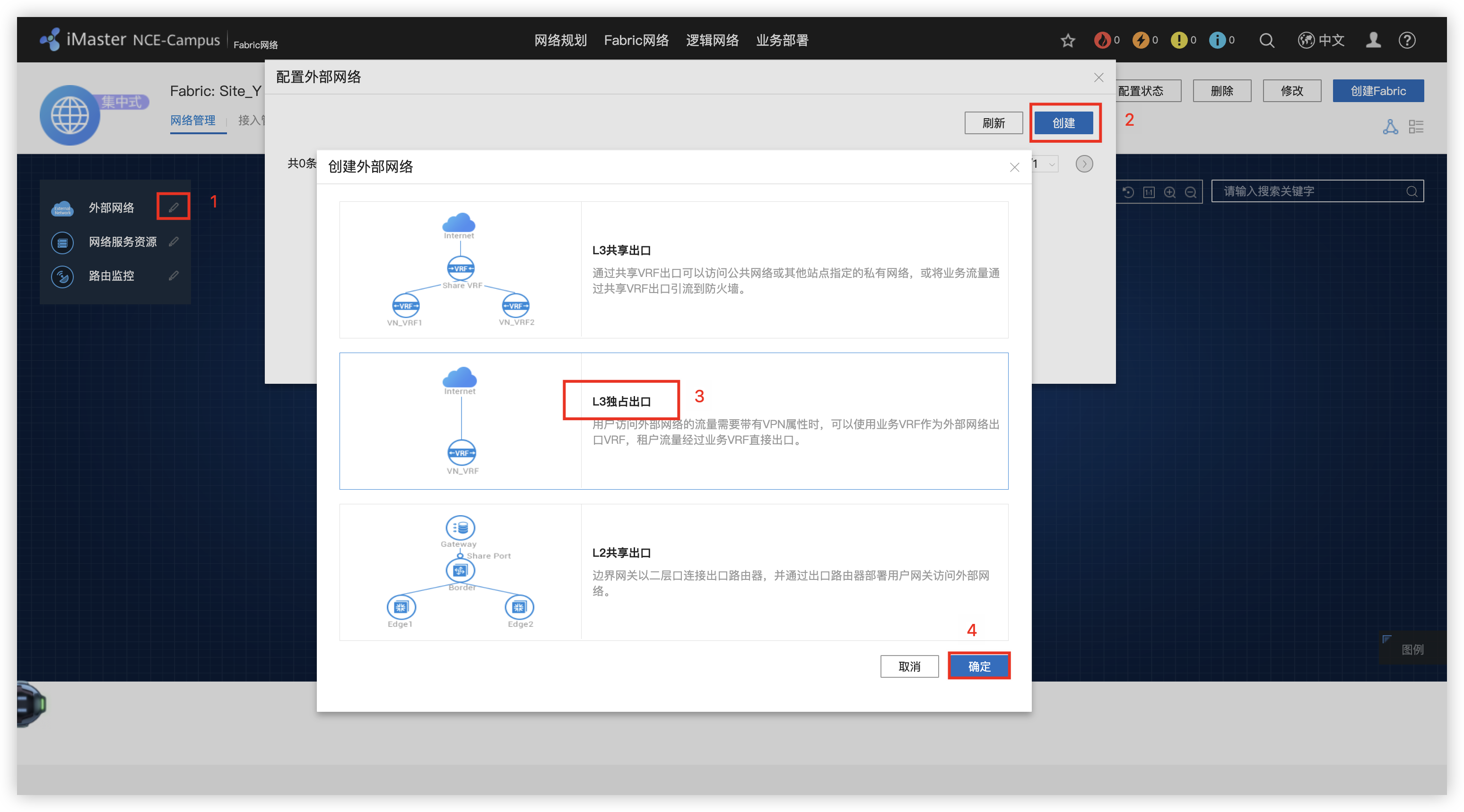
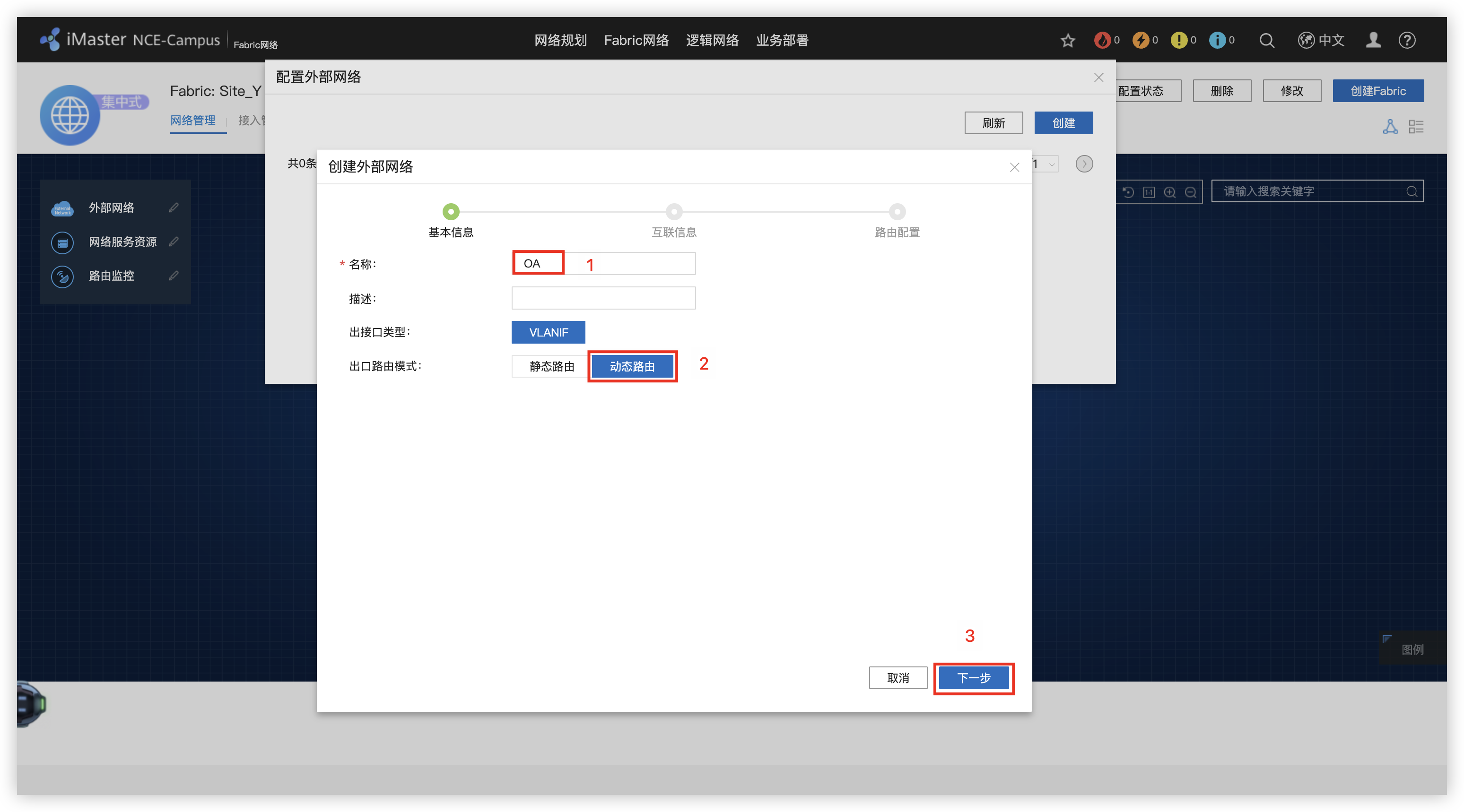
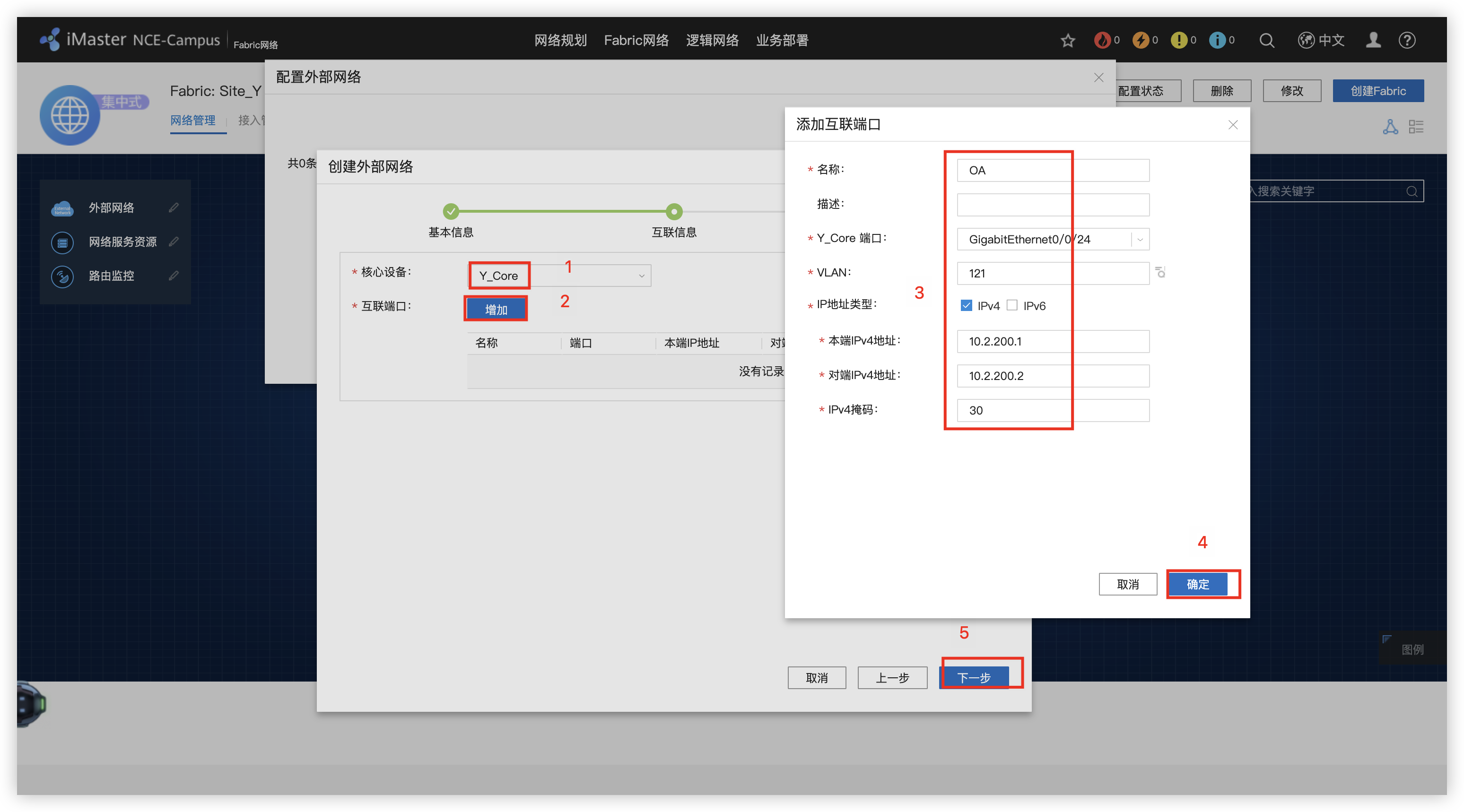
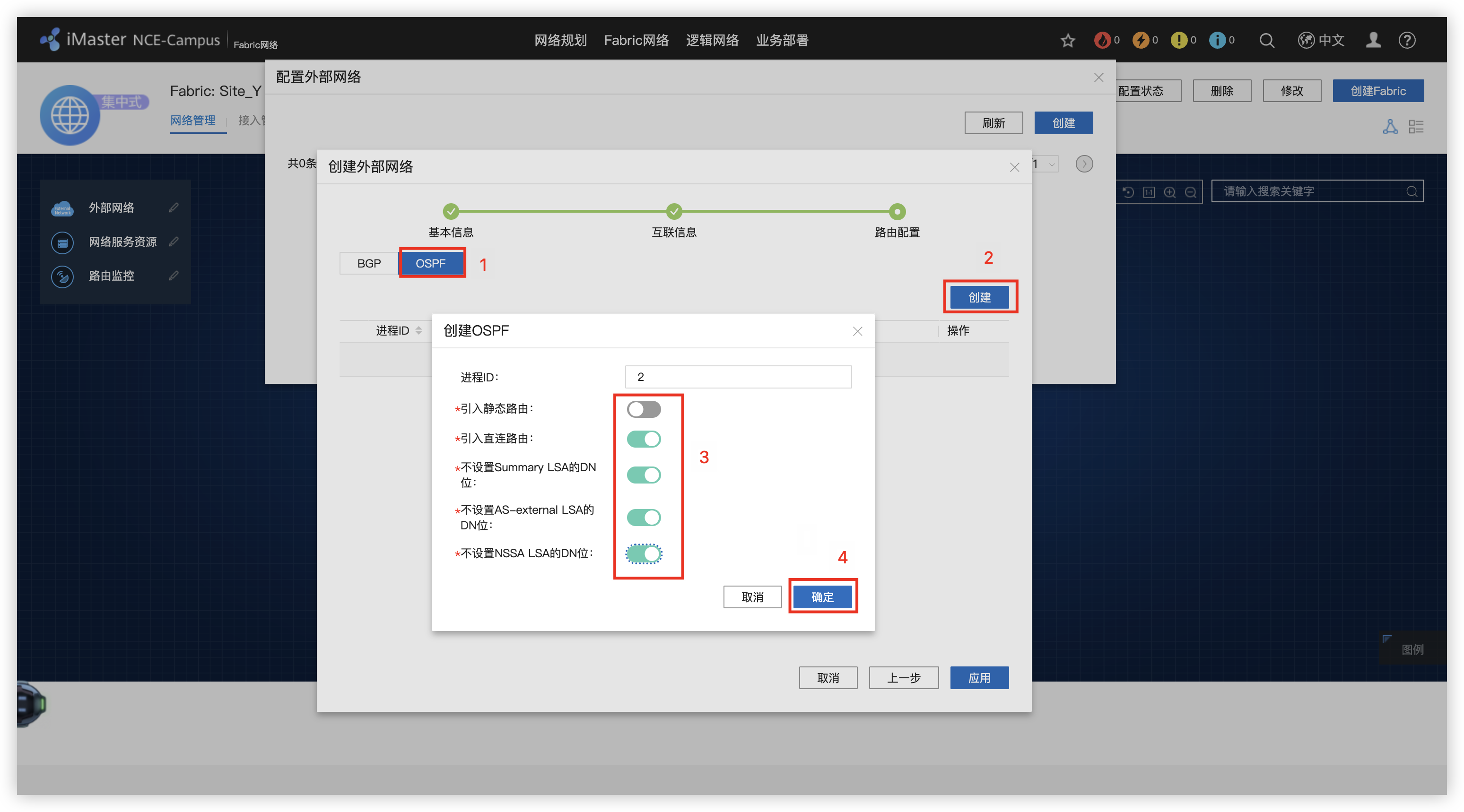
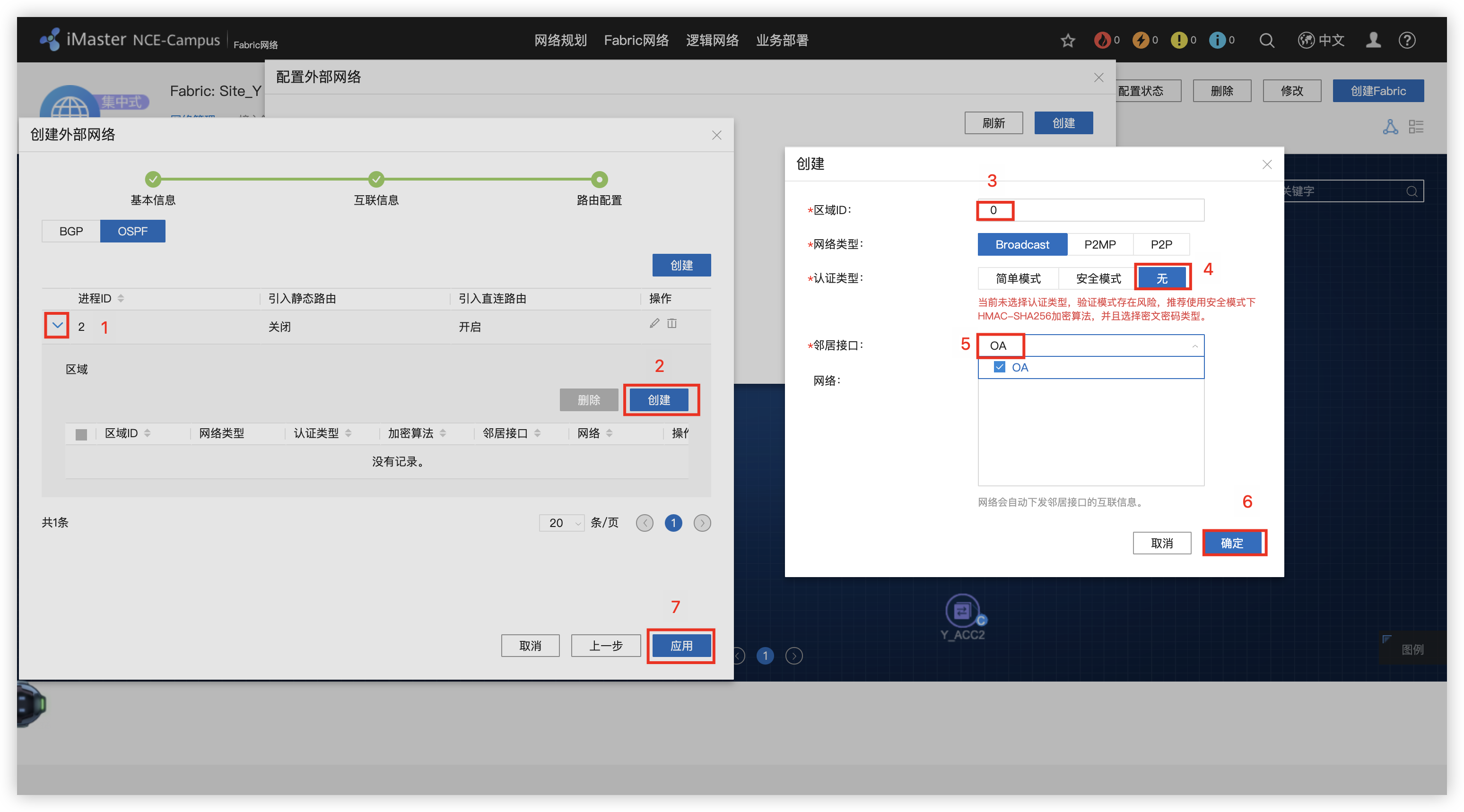
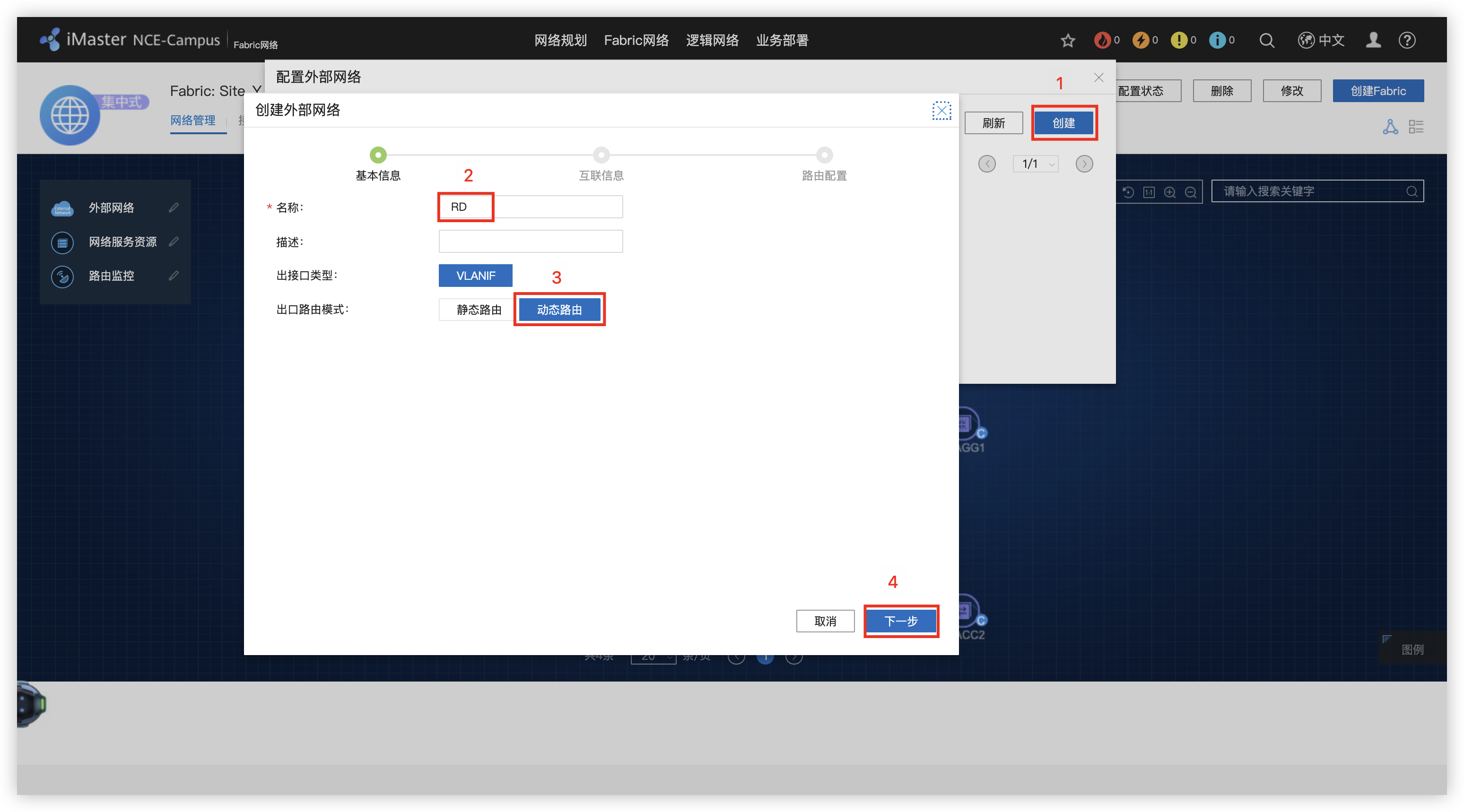
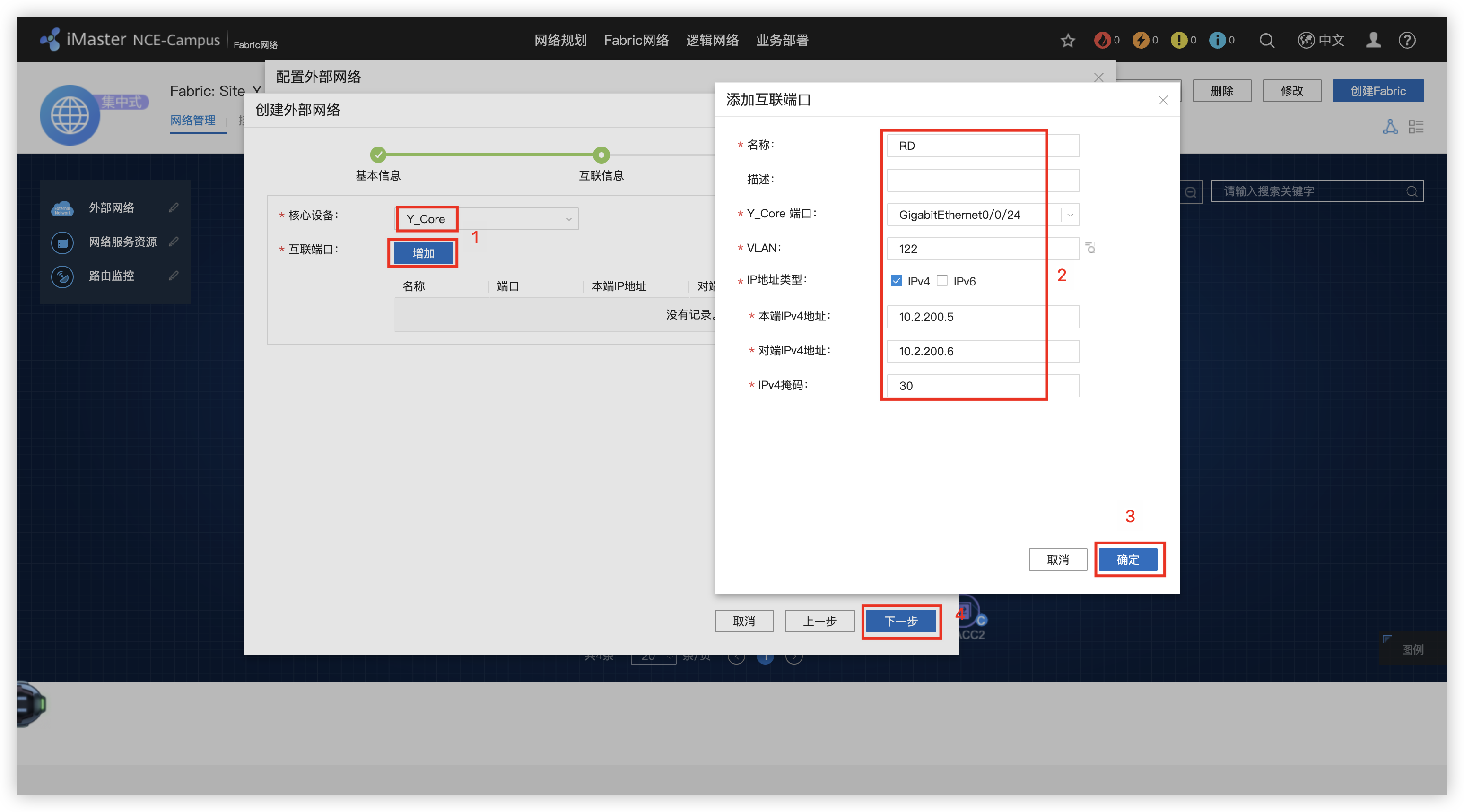
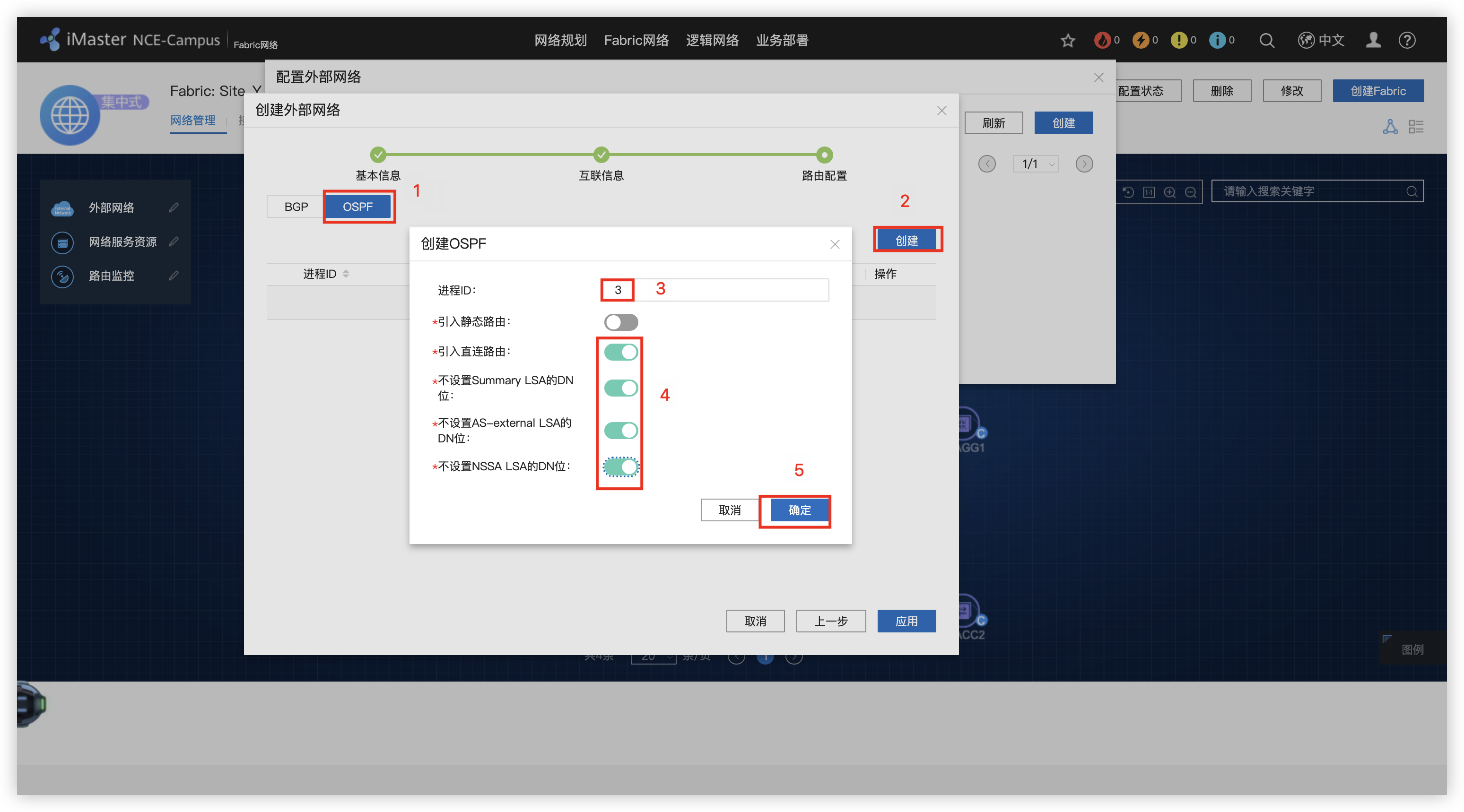
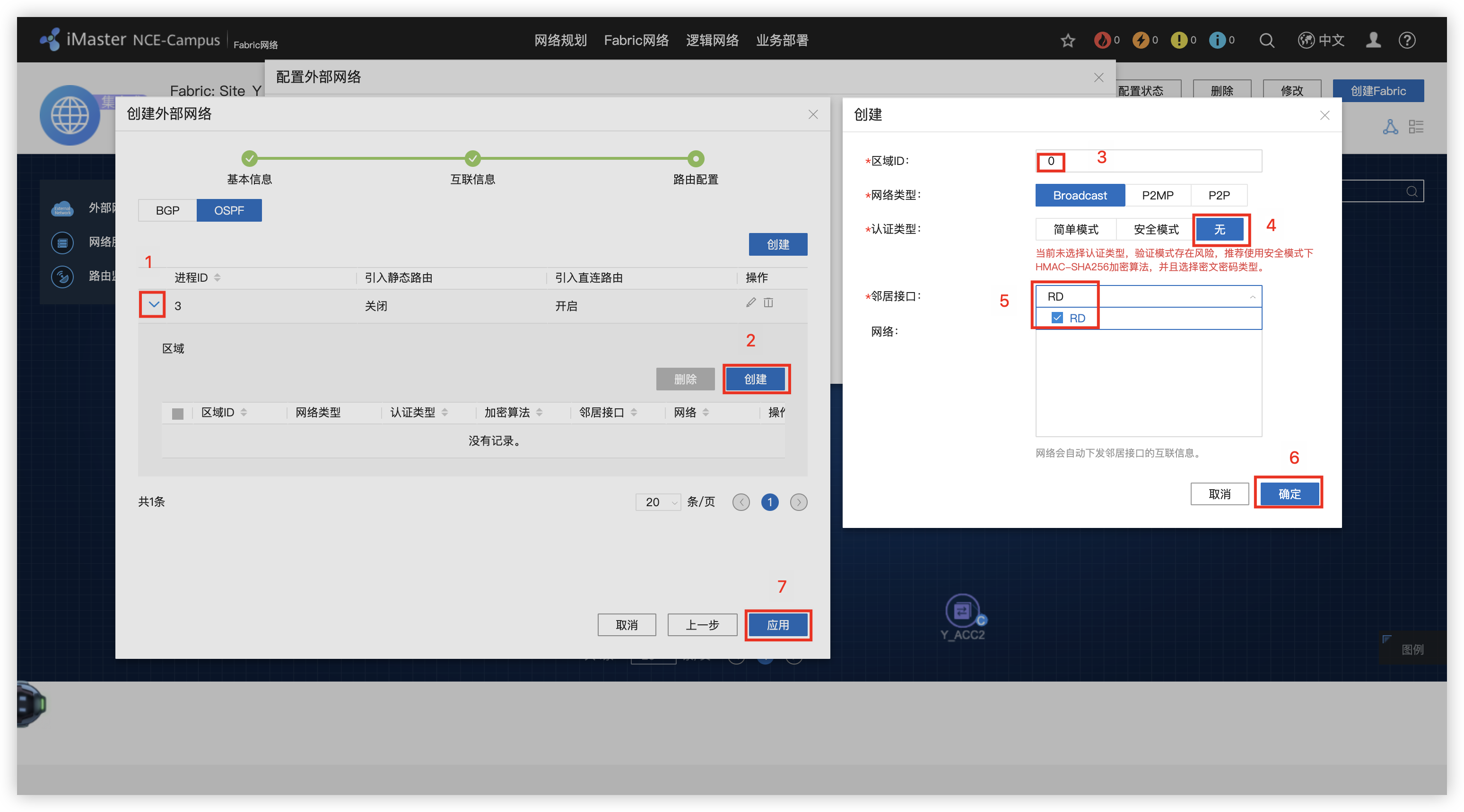
7 - 创建 Guest 业务三层出口
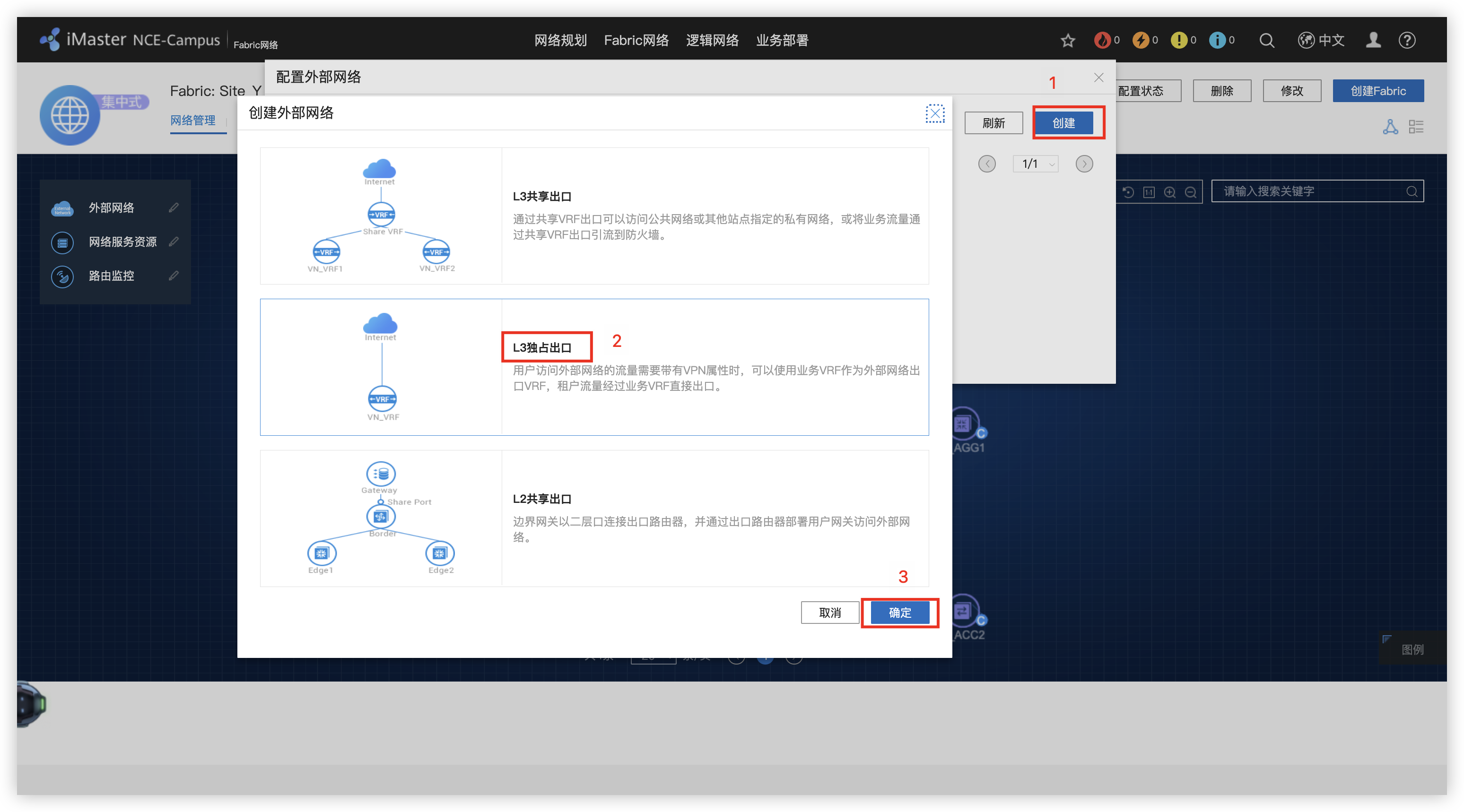
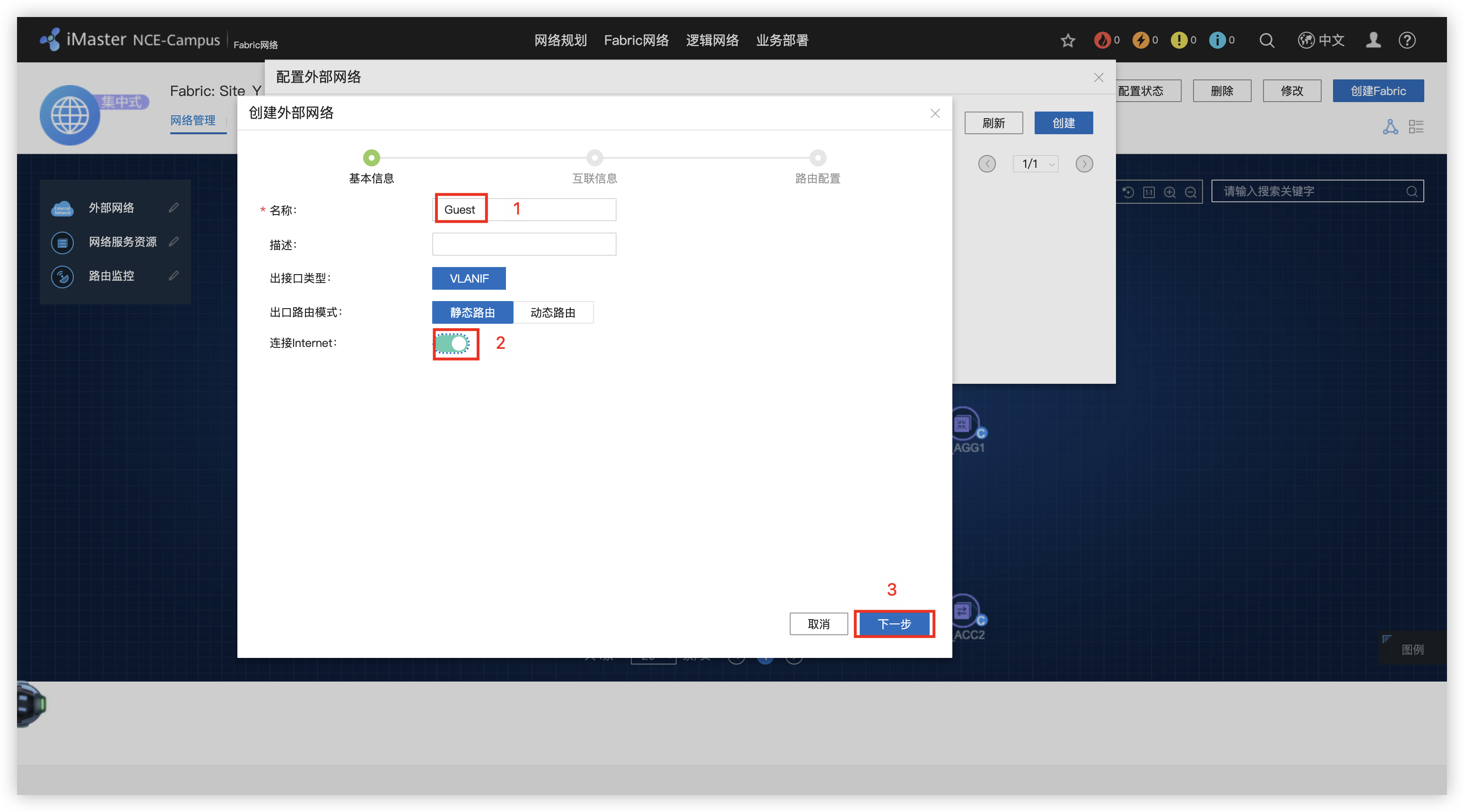
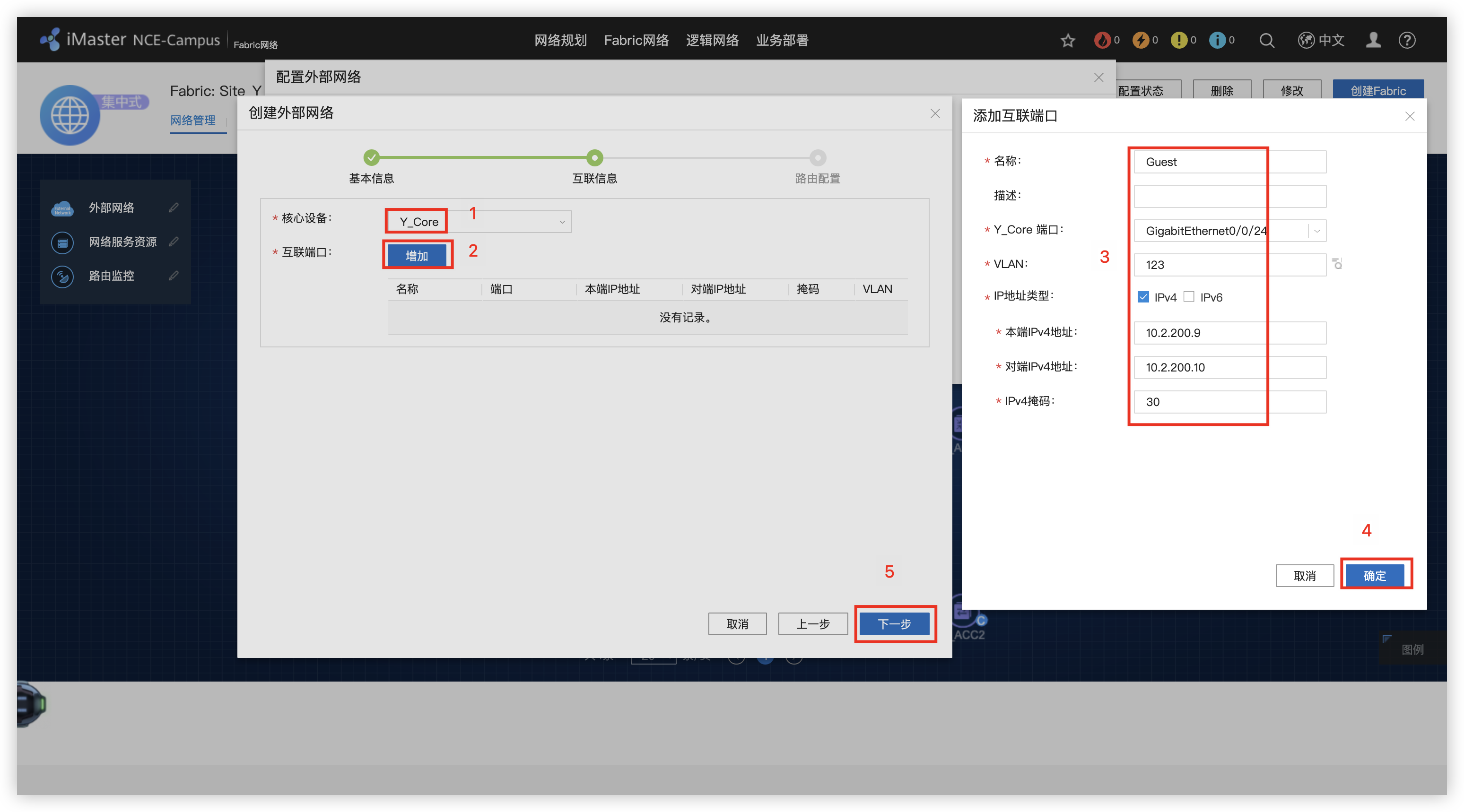
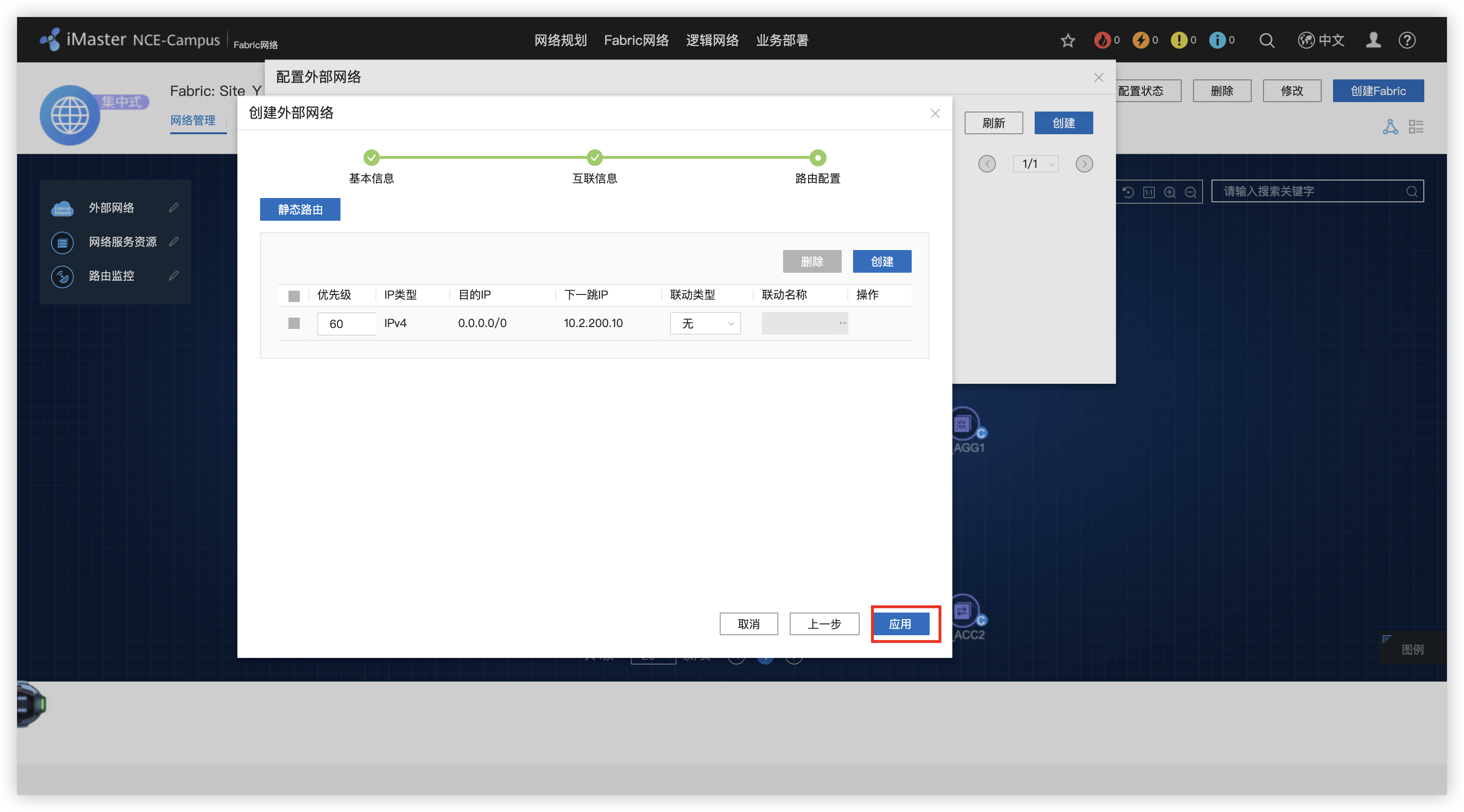
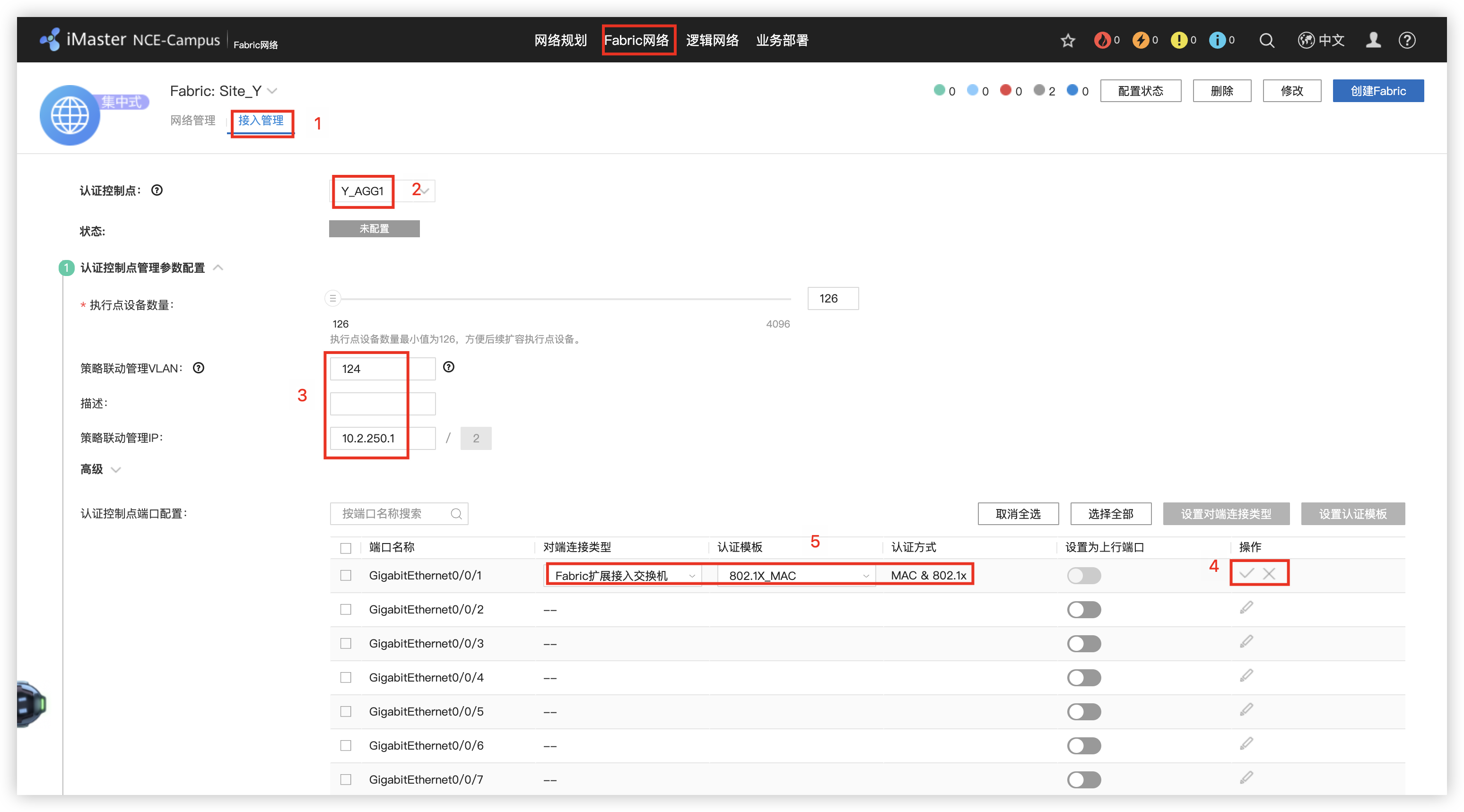
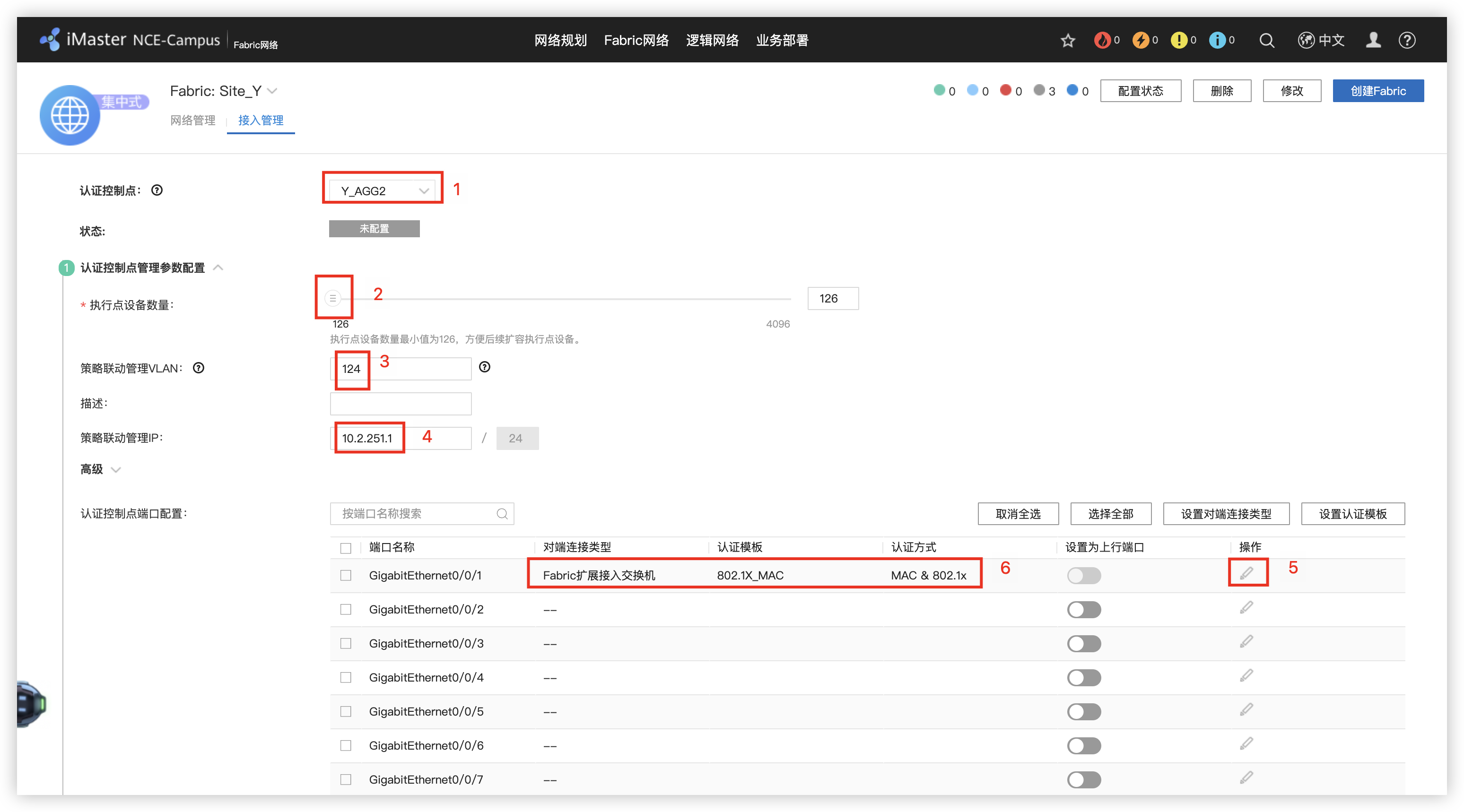
8 - 配置Y_AGG和Y_ACC的接入认证
9 - 执行点配置
10 - 创建LAN侧VN(地址池)
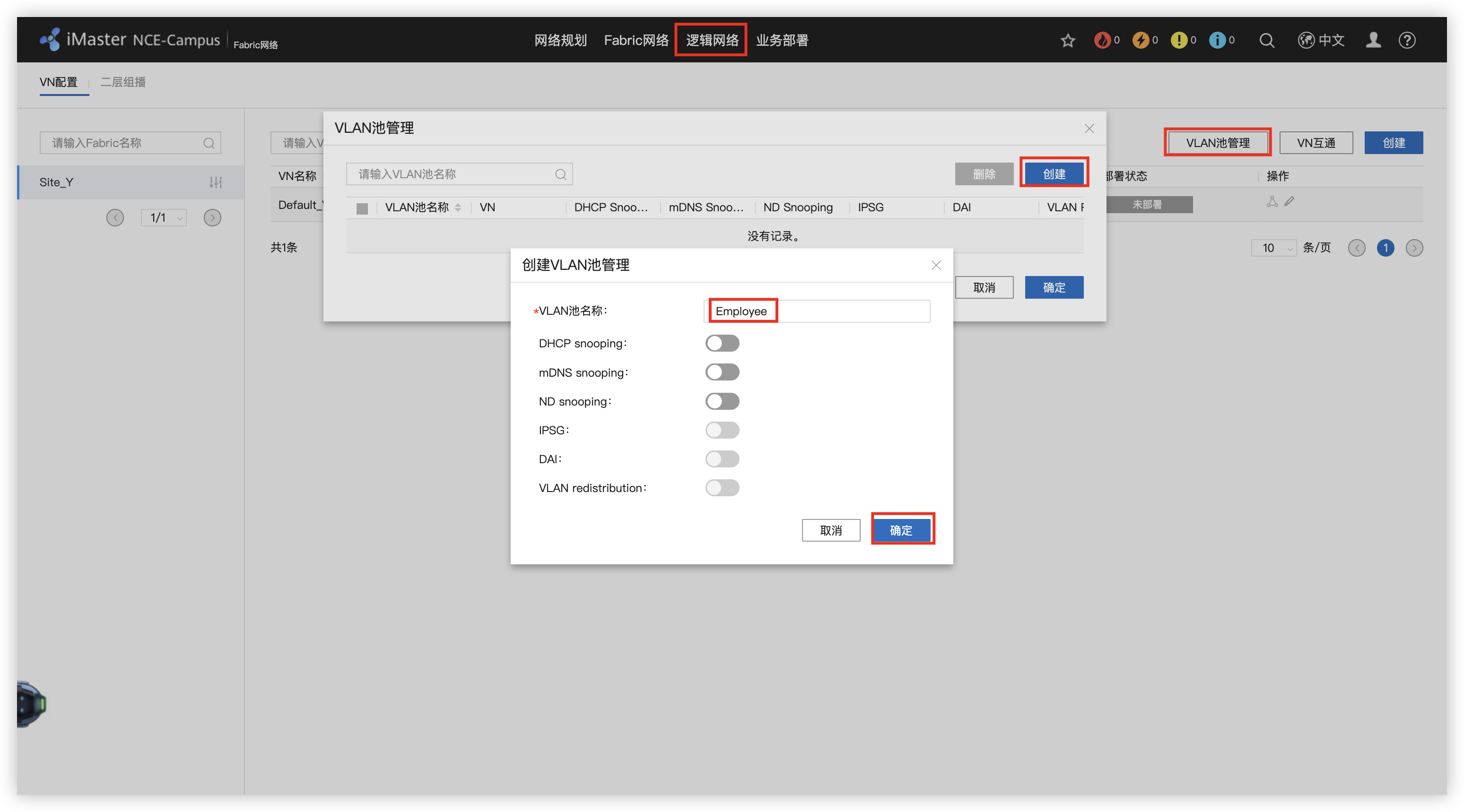
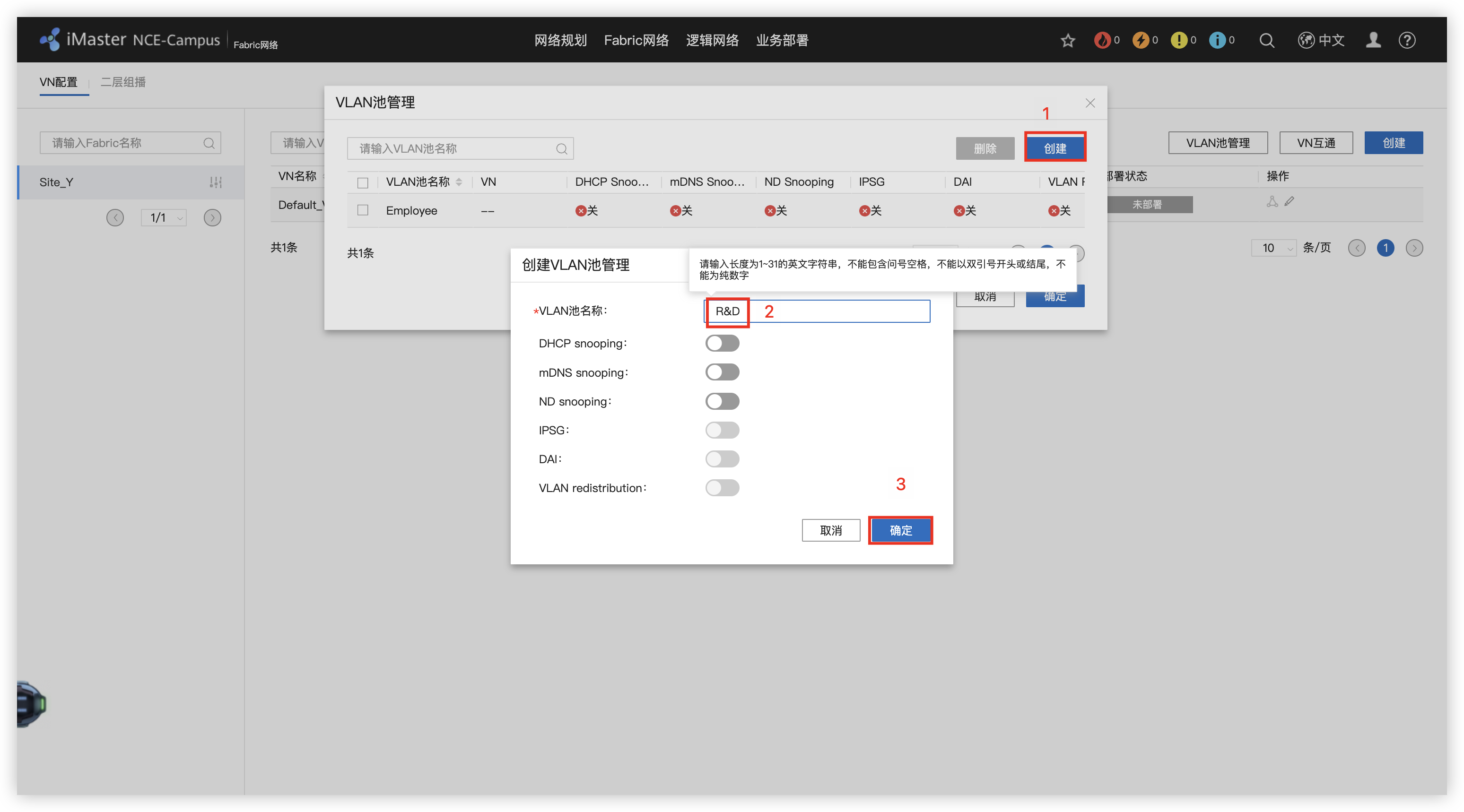
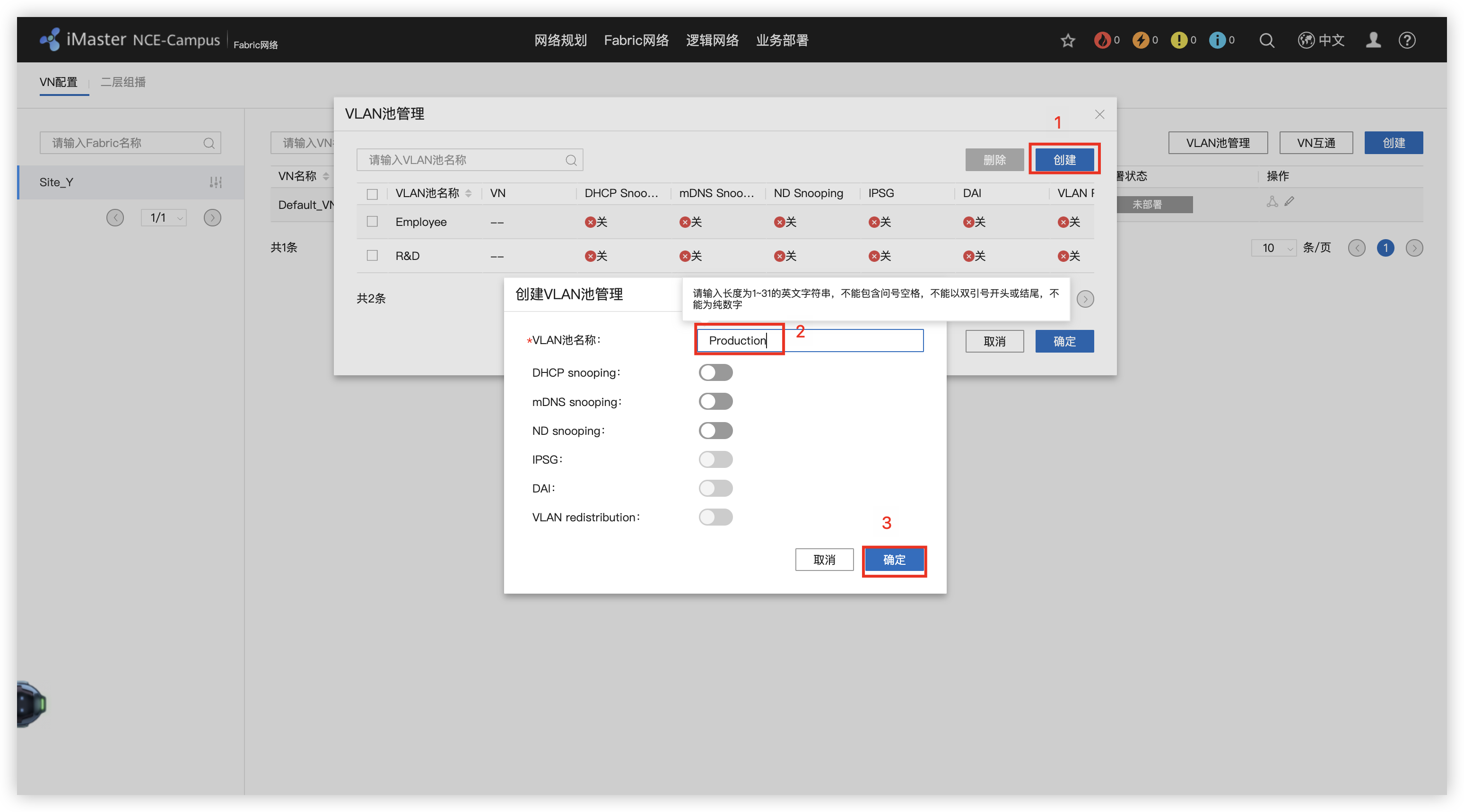
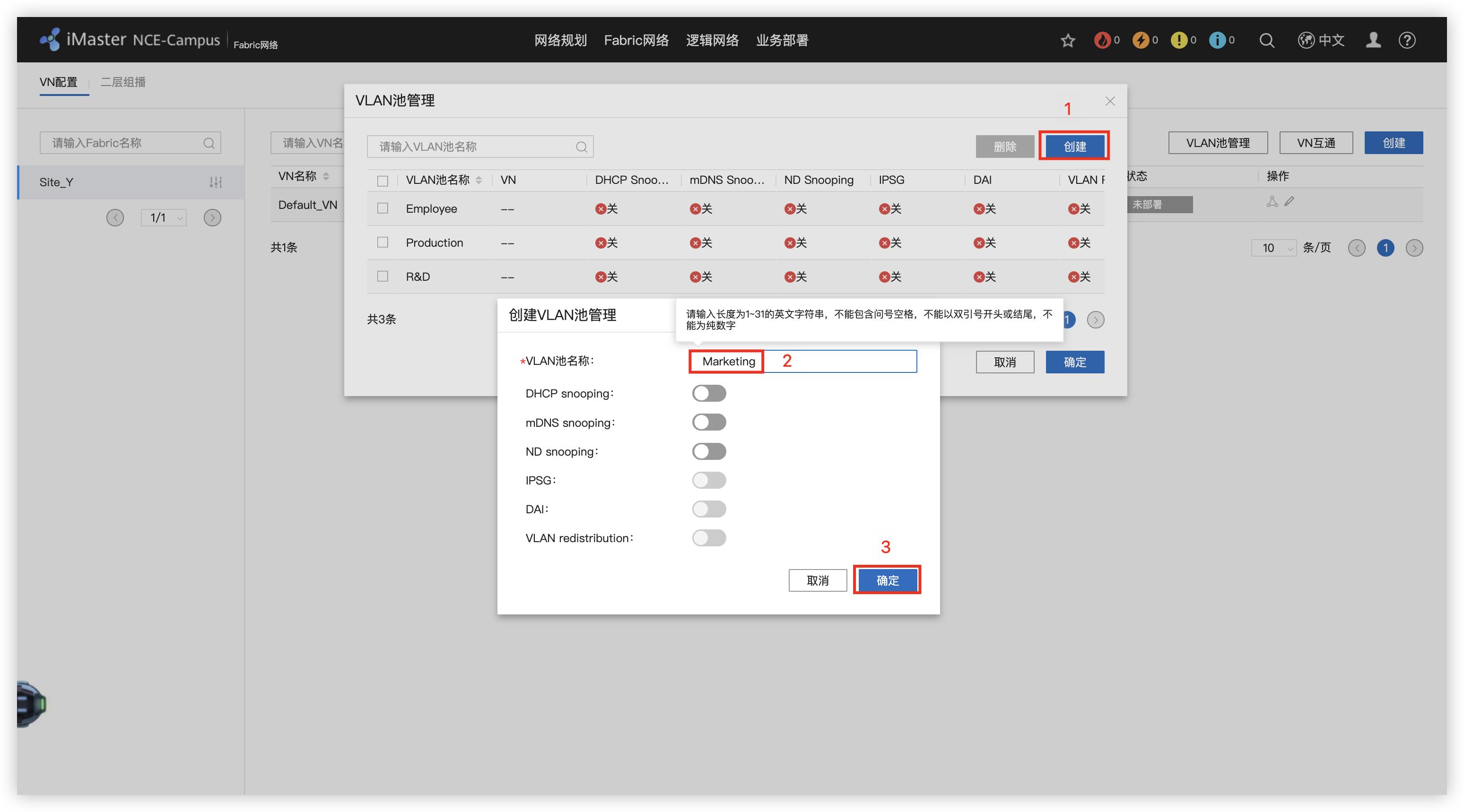
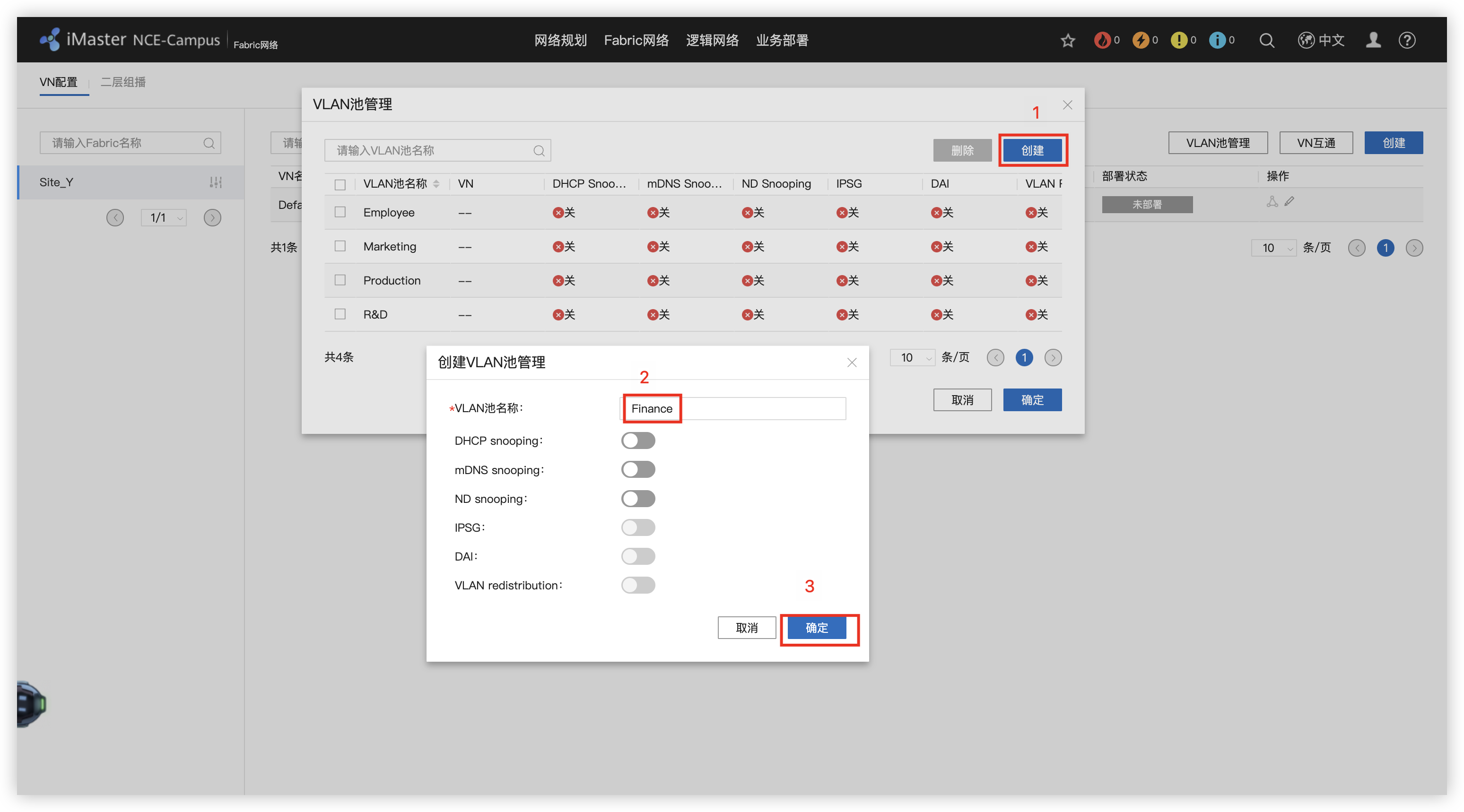
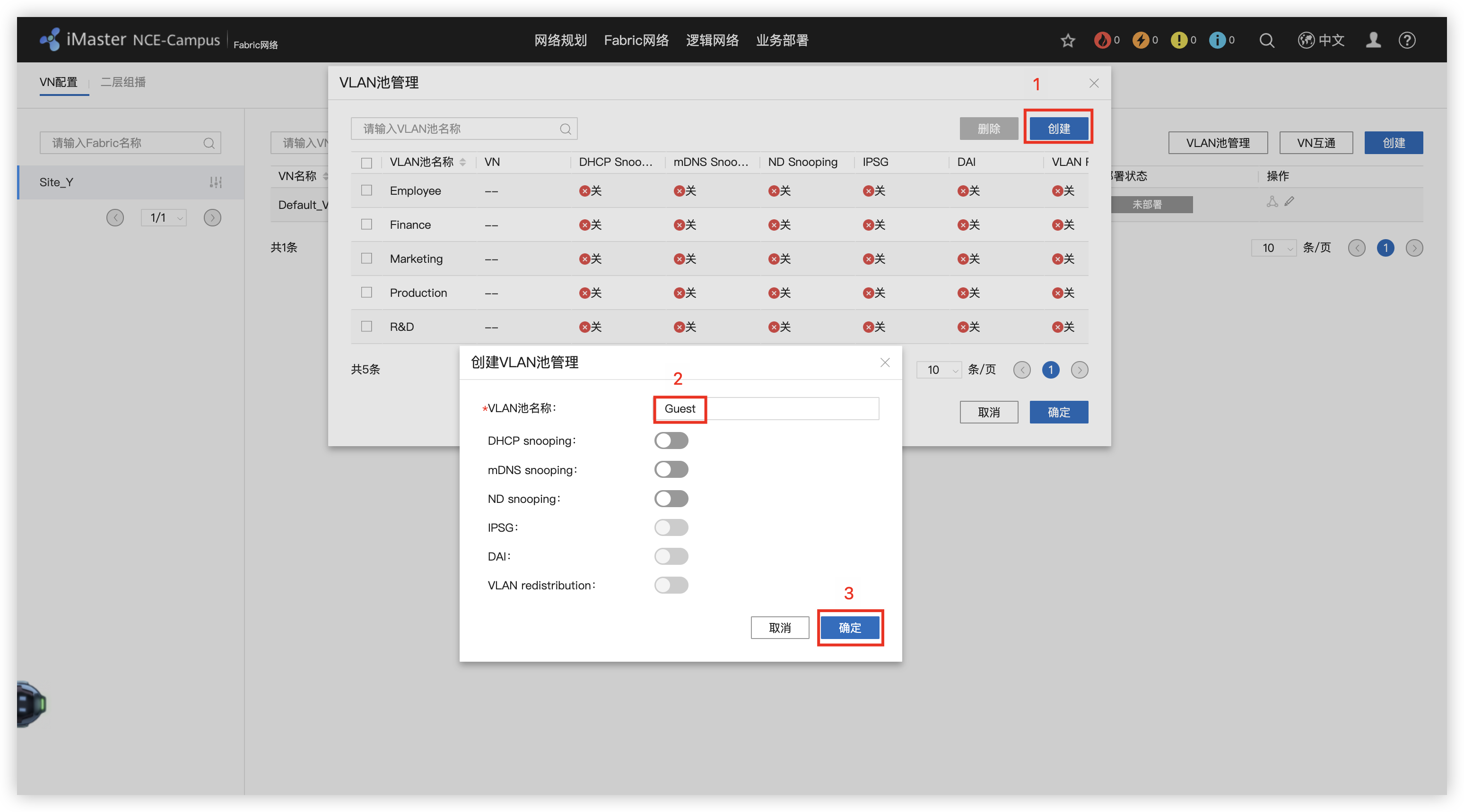
11 - 创建OA虚拟网络,分配地址和网关,添加有线认证部分
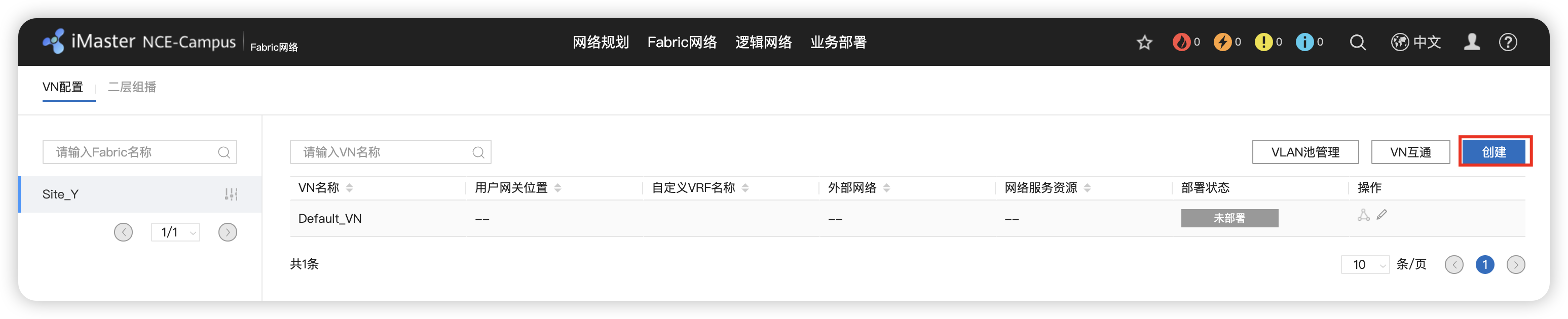
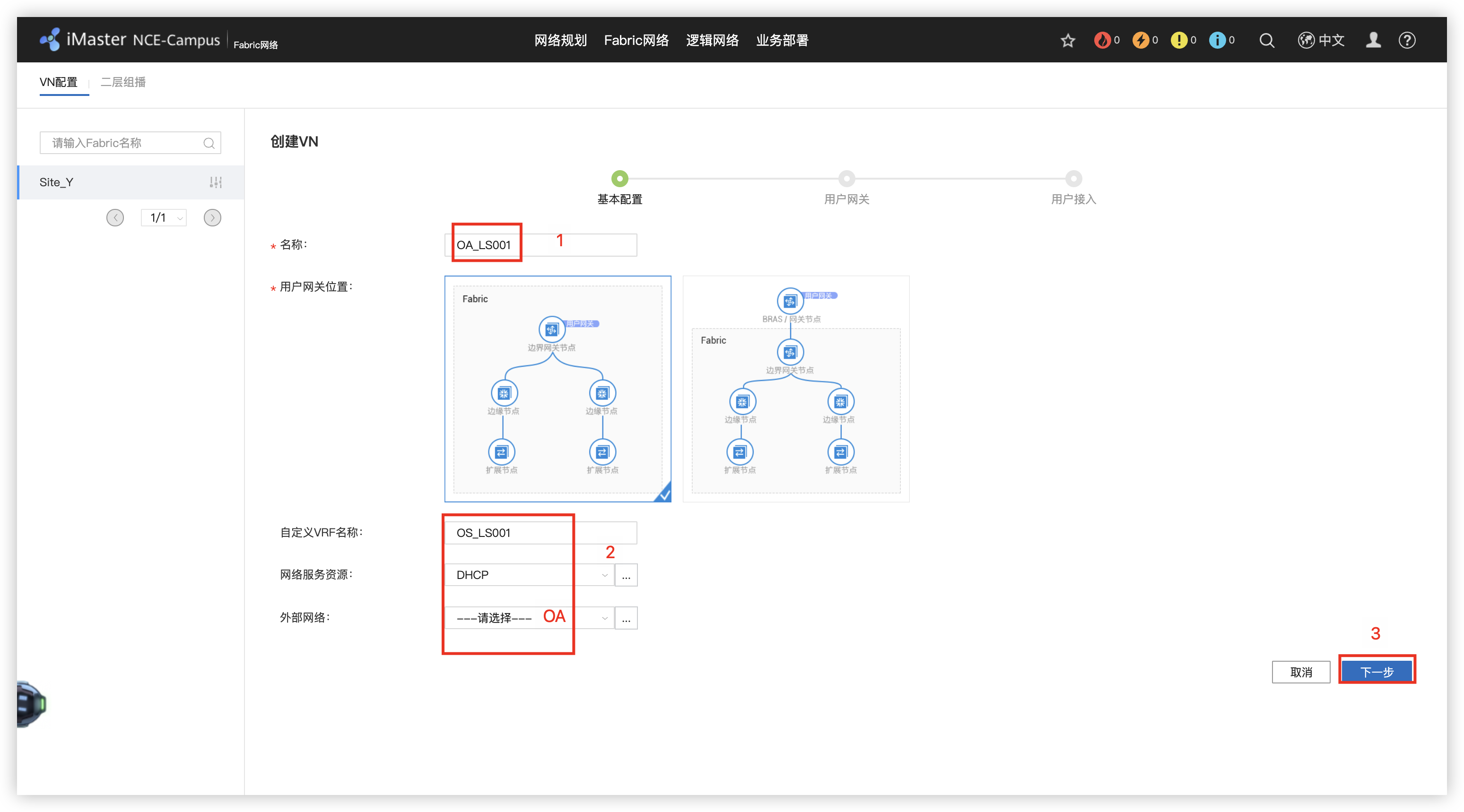
12 - 创建RD虚拟网络,分配网段11-15和21-25
13 - 创建Guest虚拟网络
14 - 部署VN之间的互通
15 - 部署无线用户认证(组/用户)及授权(密码)
16 - 创建优秀用户认证(组/用户)及授权(密码)
17 - 创建安全组,资源组(IP/掩码)
18 - 根据要求部署策略矩阵
19 - 部署准入认证
20 - 配置授权结果
21 - 绑定站点
22 - 创建有线用户的授权规则
23 - 创建无线用户的授权规则
24 - 部署无线网络
25 - 创建无线认证模版
26 - 交换机的WEB界面中国呢,新建两个SSID模版
27 - 创建 Guest/Employee VAP模版,并调用SSID模版,选择安全模版
28 - 配置AP组,添加VAP模版
1、规划资源池
2、配置VXLAN组网方式
3、配置DHCP服
4、配置外部网络接口
5、配置外部网络接口
6、配置VN部署
7、配置VN之间互通
8、配置认证策略
9、配置授权规则/授权结果
10、配置无线
SD-WAN
1、创建WAN侧VN(Y_OA_TO_Sites / Guest_To_Internet / OA HUB-Spoke组网)
2、LAN/WAN融合
3、WAN组网
4、Internet访问
5、监控
6、订单业务流量做低延迟处理
7、优化路由
Z园区:广域网承载及设计
1、全局ISIS配置(IGB打通)
# X/Y/Z_PE1/2
#  network-entity 49.0001.00X0.0000.000X.00
bfd
 quit
isis 1
 is-level level-2
 cost-style wide
 bfd all-interfaces enable
 bfd all-interfaces min-tx-interval 500 min-rx-interval 500
 network-entity 49.0001.0010.0000.0001.00
 domain-authentication-mode md5 plain Huawei@123
 frr
  loop-free-alternate level-2 # 循环-免费-备用
  quit
 quit
int lo0
 isis enable 1
interface GigabitEthernet0/0/0
 isis enable 1
 isis circuit-type p2p # 线路类型
 isis ppp-negotiation 2-way # ppp 协商
 isis authentication-mode md5 plain Huawei@123
interface GigabitEthernet0/0/1
 isis enable 1
 isis circuit-type p2p
 isis ppp-negotiation 2-way
 isis authentication-mode md5 plain Huawei@123
interface GigabitEthernet0/0/2
 isis enable 1
 isis cost 4
 isis circuit-type p2p
 isis ppp-negotiation 2-way
 isis authentication-mode md5 plain Huawei@123
 quit
# X_PEX 多开窗口
dis isis peer # 3个
dis isis bfd session all # 3个
# X_PE1
dis ip routing-table 5.0.0.5 verbose
int GigabitEthernet 0/0/1
 shutdown
 tracert -a 1.0.0.1 5.0.0.5
 undo shutdown
 quit
2、 全局MPLS配置
# X/Y/Z_PE1/2
# mpls lsr-id X.0.0.X
bfd
 mpls-passive
 quit
mpls lsr-id 1.0.0.1
mpls
 mpls bfd enable
 mpls bfd-trigger host
 mpls bfd min-tx-interval 500 min-rx-interval 500
 quit
mpls ldp
 quit
interface GigabitEthernet0/0/0
 mpls
 mpls ldp
 mpls mtu 1382
 isis ldp-sync
interface GigabitEthernet0/0/1
 mpls
 mpls ldp
 mpls mtu 1382
 isis ldp-sync
interface GigabitEthernet0/0/2
 mpls
 mpls ldp
 mpls mtu 1382
 isis ldp-sync
 quit
# 检查
dis mpls ldp peer # 3个
dis mpls bfd session # 7个
display bfd session all # 17个
dis isis ldp-sync interface # 3个
3、 BGP 65000 / group IBGP / vpnv4配置
# X_PE1/2
# router-id 2.0.0.2
# peer 2.0.0.2 as-number 65000
# peer 2.0.0.2 group IBGP
# peer 2.0.0.2 enable
bgp 65000
 router-id 1.0.0.1
 undo default ipv4-unicast # 配置BGP对等体默认不在任何地址族下使能
 group IBGP internal # 创建IBGP对等体组
 peer IBGP connect-interface Loopback 0 # 使用loopback0接口建立BGP邻居关系
 peer IBGP bfd min-rx-interval 500 min-tx-interval 500
 peer IBGP bfd enable
 peer IBGP password cipher Huawei@123
 peer 2.0.0.2 as-number 65000
 peer 2.0.0.2 group IBGP
 peer 3.0.0.3 as-number 65000
 peer 3.0.0.3 group IBGP
 peer 4.0.0.4 as-number 65000
 peer 4.0.0.4 group IBGP
 peer 4.0.0.4 as-number 65000
 peer 5.0.0.5 group IBGP
 peer 5.0.0.5 as-number 65000
 peer 6.0.0.6 group IBGP
 ipv4-family vpnv4
  undo policy vpn-target # (RR)用来取消对接收的VPN路由或者标签块进行VPN-Target过滤的,保证所有的VPN路由或者标签块都能被接收和处理。
  reflector cluster-id 65000 # 配置反射器集群ID,所有RR配置相同,建议使用AS号作为集群ID
  peer 2.0.0.2 enable
  peer 3.0.0.3 enable
  peer 3.0.0.3 reflect-client # 本机作为路由反射器,并将指定的对等体(组)作为路由反射器的客户。
  peer 4.0.0.4 enable
  peer 4.0.0.4 reflect-client
  peer 5.0.0.5 enable
  peer 5.0.0.5 reflect-client
  peer 6.0.0.6 enable
  peer 6.0.0.6 reflect-client
  quit
 quit
# Y/Z_PE1/2
# router-id X.0.0.X # 3,4,5,6
bgp 65000
 router-id 3.0.0.3
 undo default ipv4-unicast
 peer 1.0.0.1 as-number 65000
 peer 1.0.0.1 connect-interface LoopBack0
 peer 1.0.0.1 bfd enable
 peer 1.0.0.1 bfd min-tx-interval 500 min-rx-interval 500
 peer 1.0.0.1 password cipher Huawei@123
 peer 2.0.0.2 as-number 65000
 peer 2.0.0.2 connect-interface LoopBack0
 peer 2.0.0.2 bfd enable
 peer 2.0.0.2 bfd min-tx-interval 500 min-rx-interval 500
 peer 2.0.0.2 password cipher Huawei@123
 #
 ipv4-family vpnv4
  peer 1.0.0.1 enable
  peer 2.0.0.2 enable
  quit
# 检查
dis bgp vpnv4 all peer # X5个 Y2个 Z2个
dis bgp bfd session all # X5个
4、 [65000, 65001] VPN-Instance/IP/BGP
## X_PE1/2
# vpn-instance
#  route-distinguisher 65001:2
ip vpn-instance OA
 ipv4-family
  route-distinguisher 65001:1 # 配置VPN实例IPv4地址族的RD
  vpn-target 1:1 export-extcommunity # 必须将对方的export-extcommunity的VPN Target值配置为自己的import-extcommunity的VPN Target值
  vpn-target 2:2 import-extcommunity
  quit
 quit
# ip binding vpn-instance
#   ip address 10.20.1.10 30
dis ip int brief
interface GigabitEthernet2/0/0
 ip binding vpn-instance OA
 ip address 10.20.1.2 30
 quit
# BGP绑定VPN-instance
#   peer 10.20.1.9 as-number 65001
bgp 65000
 ipv4-family vpn-instance OA
  peer 10.20.1.1 as-number 65001
  quit
 quit

## X_T1_Export1
# ip
#  ip address 10.20.1.9 30
#  ip address 10.20.1.6 30
interface GigabitEthernet2/0/0
 ip address 10.20.1.1 30
interface GigabitEthernet2/0/1
 ip address 10.20.1.5 30
 quit
ping 10.20.1.2
# BGP
#  router-id 10.1.0.2
#  peer 10.20.1.10 as-number 65000
bgp 65001
 router-id 10.1.0.1
 dis ip int brief
 peer 10.20.1.2 as-number 65000
 quit
5、 [65000, 65003] VPN-Instance/IP/BGP
## Y_PE1/2
# VPN-Instance
#  route-distinguisher 65003:2
#  route-distinguisher 65003:4
ip vpn-instance OA
 ipv4-family
  route-distinguisher 65003:1
  vpn-target 1:1 export-extcommunity
  vpn-target 2:2 import-extcommunity
  quit
 quit
ip vpn-instance R&D
 ipv4-family
  route-distinguisher 65003:3
  vpn-target 3:3 export-extcommunity
  vpn-target 4:4 import-extcommunity
  quit
 quit
# IP binding vpn-instance
#  ip address 10.20.2.10 30
#  ip address 10.20.2.14 30
interface GigabitEthernet2/0/0.10
 dot1q termination vid 10 # 开启识别802.1Q数据帧,同时将子接口划分给相应的vlan
 ip binding vpn-instance OA
 ip address 10.20.2.2 30
 arp broadcast enable
interface GigabitEthernet2/0/0.20
 dot1q termination vid 20
 ip binding vpn-instance R&D
 ip address 10.20.2.6 30
 arp broadcast enable
 quit
# BGP绑定VPN-instance
#  peer 10.20.2.9 as-number 65003
#  peer 10.20.2.13 as-number 65003
bgp 65000
 ipv4-family vpn-instance OA
  peer 10.20.2.1 as-number 65003
 ipv4-family vpn-instance R&D
  peer 10.20.2.5 as-number 65003
  quit
 quit

## Y_Export1
# ip binding vpn-instance
#  interface GigabitEthernet2/0/1.10
#   ip address 10.20.2.9 30
#  interface GigabitEthernet2/0/1.20
#   ip address 10.20.2.13 30
interface GigabitEthernet2/0/0.10
 dot1q termination vid 10
 ip binding vpn-instance vpn2
 ip address 10.20.2.1 30
 arp broadcast enable
interface GigabitEthernet2/0/0.20
 dot1q termination vid 20
 ip binding vpn-instance vpn3
 ip address 10.20.2.5 30
 arp broadcast enable
 quit
# BGP绑定VPN-instance
bgp 65003
 ipv4-family vpn-instance vpn2
  peer 10.20.2.2 as-number 65000
  peer 10.20.2.2 ip-prefix deny_default export
  peer 10.20.2.10 as-number 65000
  peer 10.20.2.10 ip-prefix deny_default export
 ipv4-family vpn-instance vpn3
  peer 10.20.2.6 as-number 65000
  peer 10.20.2.14 as-number 65000
  quit
 quit
6、 [65000, 65004] VPN-Instance/IP/BGP
## Z_PE1/2
# vpn-instance
#  route-distinguisher 65004:3
#  route-distinguisher 65004:4
#  route-distinguisher 65004:6
ip vpn-instance OA_In
 ipv4-family
  route-distinguisher 65004:1
  vpn-target 1:1 import-extcommunity
ip vpn-instance OA_Out
 ipv4-family
  route-distinguisher 65004:2
  vpn-target 2:2 export-extcommunity
ip vpn-instance R&D
 ipv4-family
  route-distinguisher 65004:5
  vpn-target 3:3 import-extcommunity
  vpn-target 4:4 export-extcommunity
  quit
 quit
#
dis bgp vpnv4 all peer # Y=4
# ip binding vpn-instance
#  ip add 10.20.3.14 30
#  ip add 10.20.3.18 30
#  ip add 10.20.3.22 30
int g 2/0/0.10
 dot1q termination vid 10
 ip binding vpn-instance OA_In
 ip add 10.20.3.2 30
 arp broadcast enable
int g 2/0/0.11
 dot1q termination vid 11
 ip binding vpn-instance OA_Out
 ip add 10.20.3.6 30
 arp broadcast enable
int g 2/0/0.20
 dot1q termination vid 20
 ip binding vpn-instance R&D
 ip add 10.20.3.10 30
 arp broadcast enable
 quit
# BGP绑定VPN-instance
#  peer 10.20.3.13 as-number 65004
#  peer 10.20.3.17 as-number 65004
#  peer 10.20.3.21 as-number 65004
bgp 65000
 ipv4-family vpn-instance OA_In
  peer 10.20.3.1 as-number 65004
 ipv4-family vpn-instance OA_Out
  peer 10.20.3.5 as-number 65004
  peer 10.20.3.5 allow-as-loop
 ipv4-family vpn-instance R&D
  peer 10.20.3.9 as-number 65004
  quit
 quit

## Z_Export1
# vpn-instance
ip vpn-instance OA
 route-distinguisher 65004:10
  quit
ip vpn-instance R&D
 route-distinguisher 65004:20
  quit
#
int lo0
 ip binding vpn-instance OA
 ip add 10.3.101.254 24
int lo1
 ip binding vpn-instance R&D
 ip add 10.3.99.254 24
int lo2
 ip binding vpn-instance R&D
 ip add 10.3.100.254 24
 quit
# ip binding vpn-instance
#  int g 0/0/1.10
#   ip add 10.20.3.13 30
#  int g 0/0/1.11
#   ip add 10.20.3.17 30
#  int g 0/0/1.20
#   ip add 10.20.3.21 30
int g 0/0/0.10
 dot1q termination vid 10
 ip binding vpn-instance OA
 ip add 10.20.3.1 30
 arp broadcast enable
int g 0/0/0.11
 dot1q termination vid 11
 ip binding vpn-instance OA
 ip add 10.20.3.5 30
 arp broadcast enable
int g 0/0/0.20
 dot1q termination vid 20
 ip binding vpn-instance R&D
 ip add 10.20.3.9 30
 arp broadcast enable
 quit
dis ip int brief
# BGP绑定VPN-Instance
bgp 65004
 router-id 10.3.99.254
 undo default ipv4-unicast
 ipv4-family vpn-instance OA
  peer 10.20.3.2 as-number 65000
  peer 10.20.3.6 as-number 65000
  peer 10.20.3.14 as-number 65000
  peer 10.20.3.18 as-number 65000
 ipv4-family vpn-instance R&D
  peer 10.20.3.10 as-number 65000
  peer 10.20.3.22 as-number 65000
  quit
 quit
# to-do
bgp 65004
 ipv4-family vpn-instance OA
  network 10.3.101.0 24
  quit
 ipv4-family vpn-instance R&D
  network 10.3.99.0 24
  network 10.3.100.0 24
  quit
 quit
7、配置PE BGP export route-policy
## X_PE1 oa主路径
route-policy oa_med permit node 10
 apply cost-type internal # 继承
 quit
#
bgp 65000
 ipv4-family vpn-instance OA
  dis this
  peer 10.20.1.1 route-policy oa_med export
  quit
 quit
## X_PE2 oa备用路径
route-policy oa_med permit node 10
 apply cost 12
 quit
#
bgp 65000
 ipv4-family vpn-instance OA
  dis this
  peer 10.20.1.9 route-policy oa_med export
  quit
 quit
## Y_PE1 oa主路径,rd备路径
route-policy oa_med permit node 10
 apply cost-type internal
 quit
route-policy rd_med permit node 10
 apply cost 12
 quit
#
bgp 65000
 ipv4-family vpn-instance OA
  dis this
  peer 10.20.2.1 route-policy oa_med export
  quit
 ipv4-family vpn-instance R&D
  dis this
  peer 10.20.2.5 route-policy rd_med export
  quit
 quit
## Y_PE2 oa备路径,rd主路径
route-policy oa_med permit node 10
 apply cost 12
 quit
route-policy rd_med permit node 10
 apply cost-type internal
 quit
#
bgp 65000
 ipv4-family vpn-instance OA
  dis this
  peer 10.20.2.9 route-policy oa_med export
  quit
 ipv4-family vpn-instance R&D
  dis this
  peer 10.20.2.13 route-policy rd_med export
  quit
 quit
## Z_PE1 oa主路径,rd备路径
route-policy oa_med permit node 10
 apply cost-type internal
 quit
route-policy rd_med permit node 10
 apply cost 12
 quit
#
bgp 65000
 ipv4-family vpn-instance OA_In
  dis this
  peer 10.20.3.1 route-policy oa_med export
  quit
 ipv4-family vpn-instance R&D
  dis this
  peer 10.20.3.9 route-policy rd_med export
  quit
 quit
## Z_PE2 oa备路径,rd主路径
route-policy oa_med permit node 10
 apply cost 12
 quit
route-policy rd_med permit node 10
 apply cost-type internal
 quit
#
bgp 65000
 ipv4-family vpn-instance OA_In
  dis this
  peer 10.20.3.13 route-policy oa_med export
  quit
 ipv4-family vpn-instance R&D
  dis this
  peer 10.20.3.21 route-policy rd_med export
  quit
 quit

# 检查
## Z_Export1
dis bgp vpnv4 all peer # 6
## X_T_Export1/2
dis bgp routing-table # 21
## Y_Export1
dis ip routing-table vpn-instance vpn2 # 64 63
dis bgp vpnv4 vpn-instance vpn2 routing-table # 42
dis bgp vpnv4 vpn-instance vpn3 routing-table # 30 -------to do
## Z_Export1
dis bgp vpnv4 vpn-instance OA routing-table # 41
dis bgp vpnv4 vpn-instance R&D routing-table # 28
## Z_PE1
dis bgp vpnv4 vpn-instance OA_In routing-table # 41 --- to do 21
dis bgp vpnv4 vpn-instance OA_Out routing-table # 21
8、Y过滤路由,X双点双路路由重发布
## Y_Export1 ----- to do
ip ip-prefix deny_Default deny 0.0.0.0 0
ip ip-prefix deny_Default permit 0.0.0.0 0 less-equal 32
bgp 65003
 ipv4-family vpn-instance vpn2
  dis this
  peer 10.20.2.2 ip-prefix deny_Default export
  peer 10.20.2.10 ip-prefix deny_Default export
  quit
 quit
## Y_Export1
dis cur int lo 1
ip ip-prefix OA permit 10.2.0.0 16 greater-equal 24 less-equal 24
ip ip-prefix OA permit 10.100.2.0 24
dis cur int lo 2
ip ip-prefix R&D permit 10.2.0.0 16 greater-equal 24 less-equal 24
ip ip-prefix R&D permit 10.100.3.0 24
bgp 65003
 ipv4-family vpn-instance vpn2
  dis this
  peer 10.20.2.2 ip-prefix OA export
  peer 10.20.2.10 ip-prefix OA export
 ipv4-family vpn-instance vpn3
  dis this
  peer 10.20.2.6 ip-prefix R&D export
  peer 10.20.2.14 ip-prefix R&D export
  quit
 quit

## X_T_Export1
acl 2001
 rule permit source 10.1.11.0 0.0.0.255
 rule permit source 10.1.12.0 0.0.0.255
 rule permit source 10.1.13.0 0.0.0.255
 rule permit source 10.1.14.0 0.0.0.255
 rule permit source 10.1.15.0 0.0.0.255
 rule permit source 10.1.21.0 0.0.0.255
 rule permit source 10.1.22.0 0.0.0.255
 rule permit source 10.1.23.0 0.0.0.255
 rule permit source 10.1.24.0 0.0.0.255
 rule permit source 10.1.25.0 0.0.0.255
 rule permit source 10.1.31.0 0.0.0.255
 rule permit source 10.1.32.0 0.0.0.255
 rule permit source 10.1.33.0 0.0.0.255
 rule permit source 10.1.34.0 0.0.0.255
 rule permit source 10.1.35.0 0.0.0.255
 rule permit source 10.1.41.0 0.0.0.255
 rule permit source 10.1.42.0 0.0.0.255
 rule permit source 10.1.43.0 0.0.0.255
 rule permit source 10.1.44.0 0.0.0.255
 rule permit source 10.1.45.0 0.0.0.255
 rule permit source 10.1.51.0 0.0.0.255
 rule permit source 10.1.52.0 0.0.0.255
 rule permit source 10.1.53.0 0.0.0.255
 rule permit source 10.1.54.0 0.0.0.255
 rule permit source 10.1.55.0 0.0.0.255
 quit
route-policy b2o permit node 10
 apply tag 10
 quit
route-policy o2b deny node 10
 if-match tag 20
 quit
route-policy o2b permit node 20
 if-match acl 2001
 quit
dis cur config route-policy
#
ospf 1
 import-route bgp route-policy b2o
 default cost inherit-metric
 quit
bgp 65001
 preference 120 255 255
 import-route ospf 1 route-policy o2b
 network 10.20.1.4 30
 quit


## X_T_Export2
acl 2001
 rule permit source 10.1.11.0 0.0.0.255
 rule permit source 10.1.12.0 0.0.0.255
 rule permit source 10.1.13.0 0.0.0.255
 rule permit source 10.1.14.0 0.0.0.255
 rule permit source 10.1.15.0 0.0.0.255
 rule permit source 10.1.21.0 0.0.0.255
 rule permit source 10.1.22.0 0.0.0.255
 rule permit source 10.1.23.0 0.0.0.255
 rule permit source 10.1.24.0 0.0.0.255
 rule permit source 10.1.25.0 0.0.0.255
 rule permit source 10.1.31.0 0.0.0.255
 rule permit source 10.1.32.0 0.0.0.255
 rule permit source 10.1.33.0 0.0.0.255
 rule permit source 10.1.34.0 0.0.0.255
 rule permit source 10.1.35.0 0.0.0.255
 rule permit source 10.1.41.0 0.0.0.255
 rule permit source 10.1.42.0 0.0.0.255
 rule permit source 10.1.43.0 0.0.0.255
 rule permit source 10.1.44.0 0.0.0.255
 rule permit source 10.1.45.0 0.0.0.255
 rule permit source 10.1.51.0 0.0.0.255
 rule permit source 10.1.52.0 0.0.0.255
 rule permit source 10.1.53.0 0.0.0.255
 rule permit source 10.1.54.0 0.0.0.255
 rule permit source 10.1.55.0 0.0.0.255
 quit
route-policy b2o permit node 10
 apply tag 20
 quit
route-policy o2b deny node 10
 if-match tag 10
 quit
route-policy o2b permit node 20
 if-match acl 2001
 quit
#
ospf 1
 import-route bgp route-policy b2o
 default cost inherit-metric
 quit
bgp 65001
 preference 120 255 255
 import-route ospf 1 route-policy o2b
 quit
dis ip routing-table 10.2.31.0
dis ip routing-table 10.2.51.0
dis ip routing-table protocol ospf  # 70 49 21
## X_PE1
dis ip routing-table vpn-instance OA # 51
dis bgp vpnv4 vpn-instance OA routing-table # 120
## X_PE1
dis bgp vpnv4 vpn-instance OA routing-table # 112
## X_T1_CORE
dis ip routing-table protocol ospf # 67
## Y_PE1
dis ip routing-table vpn-instance OA 10.3.101.0 verbose
9、VPN FRR与 MPLS MTU
## X/Y_PE1
route-policy vpnfrr permit node 10
 apply backup-interface g 0/0/2
 apply backup-nexthop 6.0.0.6
 quit
ip vpn-instance OA
 vpn frr route-policy vpnfrr
 quit
# X_PE1
dis ip routing-table vpn-instance OA 10.2.31.0 verbose
# Y_PE1
dis ip routing-table vpn-instance OA 10.3.101.0 verbose
10、QOS & FW & Test
## Y_Export1
acl number 3001
 rule permit ip source 10.2.11.0 0.0.0.255
 rule permit ip source 10.2.12.0 0.0.0.255
 rule permit ip source 10.2.13.0 0.0.0.255
 rule permit ip source 10.2.14.0 0.0.0.255
 rule permit ip source 10.2.15.0 0.0.0.255
 description discover
 quit
acl number 3002
 rule permit ip source 10.2.21.0 0.0.0.255
 rule permit ip source 10.2.22.0 0.0.0.255
 rule permit ip source 10.2.23.0 0.0.0.255
 rule permit ip source 10.2.24.0 0.0.0.255
 rule permit ip source 10.2.25.0 0.0.0.255
 quit
traffic classifier discover
 if-match acl 3001
 quit
traffic behavior discover
 remark dscp af41
 queue af bandwidth 300000
 quit
traffic classifier product
 if-match acl 3002
 quit
traffic behavior product
 remark dscp ef
 queue llq bandwidth 100000
 quit
traffic policy R&D
 classifier discover behavior discover
 classifier product behavior product
 quit
int g 2/0/0.20
 dis this
 traffic-policy R&D outbound
int g 2/0/1.20
 dis this
 traffic-policy R&D outbound

## Y/Z_PE1/2
drop-profile discover
 wred dscp
 dscp af41 low-limit 50 high-limit 90 discard-percentage 50
traffic classifier discover
 if-match dscp af41
 quit
traffic behavior discover
 queue af bandwidth 300000
 drop-profile discover
 quit
traffic classifier product
 if-match dscp ef
 quit
traffic behavior product
 queue llq bandwidth 100000 cbs 2500000
 quit
traffic policy R&D
 classifier discover behavior discover
 classifier product behavior product
 quit
int g 0/0/0
 traffic-policy R&D outbound
int g 0/0/1
 traffic-policy R&D outbound
int g 0/0/2
 traffic-policy R&D outbound
 quit

## Z_PE1/2
int g 2/0/0.20
 traffic-policy R&D outbound
 quit


## X_T_FW
switch vsys Employee
 sys
 ip address-set X type object
  add range 10.1.11.0 10.1.15.255
  add range 10.1.21.0 10.1.25.255
  add range 10.1.31.0 10.1.35.255
  add range 10.1.41.0 10.1.45.255
  add range 10.1.51.0 10.1.55.255
  quit
ip address-set Y type object
  add range 10.2.31.0 10.2.35.255
  add range 10.2.41.0 10.2.45.255
  add range 10.2.51.0 10.2.55.255
  quit
ip address-set Z&Store type object
  add range 10.2.101.0 10.3.101.255
  add range 10.100.2.0 10.100.2.255
  quit
security-policy
 rule name X_Y&Z&Store
  source-zone trust
  destination-zone untrust
  source-address address-set X
  destination-address address-set Y
  destination-address address-set Z&Store
  action permit
 rule name Y&Z&Store_X
  source-zone untrust
  destination-zone trust
  source-address address-set Y
  source-address address-set Z&Store
  destination-address address-set X
  action permit
 rule name Employee_Internet bottom

## X_T_Export1
tracert  -a 10.20.1.5 10.100.2.1
## Y_Export1
ping -vpn-instance vpn3 -a 10.100.3.1 10.3.99.254
##
return
 save
 Y
Python网络自动化
1、前5个需求
1. 5min读取一下 X_T1_AGG1上的关键信息: 电源,风扇,LACP状态,CUP和内存使用率,OSPF邻居状态;
2. PC1-X_T1_AGG1之间采用安全的通道进行连接;
3. 读取风扇信息,如果两个风扇为Nor(坏掉的意思),则输出“All fans are faultly”;
4. 所有监控命令不能固定在代码里面,需要防止文件里面,通过调用文件的方式进行;
5. 每24小时自动保存设备的配置文件并备份到本地,并通过安全的传输协议存在本地设备,以【当天日期_设备名字.后续】的名称命名设备端以及本地的配置文件。举例:2022_2_14_X_T2_AGG1.zip 2022_2_14_X_T2_AGG1.bak
2、创建“command.txt”文件,完成1和4需求
display power
display fan
display lacp brief
display cpu history 1hour
display memory-usage
display ospf peer brief
3、相关需求的Python程序
from paramiko import SSHClient,AutoAddPolicy
from ncclient import manager
from ncclient.xml_ import to_ele
from time import sleep
from datetime import datetime,timedelta


class Datacom:

    def __init__(self,server,username,password):

        self.server=server
        self.username=username
        self.password=password
        self.client=self._get_client()
        self.cli=self.client.invoke_shell()
        self.cli.send('screen-length 0 temporary\n')
        sleep(6)
        self.cli.recv(9999)

    # 创建一个SSH连接客户端
    def _get_client(self):
        client=SSHClient() # SSH客户端工具进行实例化
        client.load_system_host_keys() # 加载SSH的主机公钥
        client.set_missing_host_key_policy(AutoAddPolicy) # 当本地设备没有公钥时自动保存交换机的SSH公钥
        client.connect(self.server,username=self.username,password=self.password) # 使用地址,账号和密码进行SSH连接
        return client

    # 发送命令的方法
    def command(self,cmd):
        self.cli.send('{}\n'.format(cmd))
        sleep(6)
        return self.cli.recv(9999).decode() # 回到cli函数读取回显结果9999字符,并使用decode进行解码

    # 检测风扇是否正常
    def fan_info(self):
        fan_info=self.command('display fan')
        return fan_info.find('Normal')==-1

    # sftp下载配置文件
    def download(self,target,path='/vrpcfg.zip'):
        print('download staring...')
        client=self._get_client()
        sftp=client.open_sftp()
        sftp.get(path,target)
        self.client.close()
        print('download finish.')

    # 关闭连接
    def close(self):
        self.client.close()

# 定义使用ncclient并使用netconf方式进行设备配置,并在配置成功后输出成功提示
def Netconf_by_rpc(ip,username,password,rpc_netconf):
    with manager.connect_ssh(host=ip,
                             username=username,
                             password=password,
                             hostkey_verify=False,
                             device_params={'name':"huaweiyang"})  as  m:
        command=to_ele(rpc_netconf)
        rpc=m.__getattr__("rpc")
        print('get manager inner function rpc {}'.format(rpc))
        rpc(command)
        print('netconf setting success!')

# 定义使用netconf的方法进行设置设备日志主机的函数,并输出正在配置日志主机提示
def Netconf_syslog_host(ip,username,password,syslog):
    rpc_netconf='''<edit-config>
    <target>
      <running/>
    </target>
    <config>
      <syslog:syslog xmlns:syslog="urn:ietf:params:xml:ns:yang:ietf-syslog">
        <syslog:log-actions>
          <syslog:remote>
            <syslog:destination>
              <syslog:name>syslog-host</syslog:name>
              <syslog:udp>
                <syslog:address>{}</syslog:address>
                <syslog:port>43</syslog:port>
              </syslog:udp>
              <syslog:destination-facility xmlns:ietf-syslog-types="urn:ietf:params:xml:ns:yang:ietf-syslog-types">ietf-syslog-types:local0</syslog:destination-facility>
            </syslog:destination>
          </syslog:remote>
        </syslog:log-actions>
      </syslog:syslog>
    </config>
  </edit-config>
  '''.format(syslog)
    print('Using netconf configure syslog...')
    Netconf_by_rpc(ip,username,password,rpc_netconf)


# 定义组装函数
def datacom_loop(ip,username,password,name):
    try:
        while True:
            datacom=Datacom(ip,username,password)
            with open('command.txt')  as f:
             for command in f:
                print(datacom.command(command))
            if datacom.fan_info(): # 判断风扇是否故障
                print('ALL fans are faultly')
            try:
                # 开始判断是不是保存配置超过24小时了, 则进行强行赋值,大于一天
                than_one_day= datetime.now() - last_downloadtime>=timedelta(days=1)
            except NameError:
                than_one_day=True
            if than_one_day: # 开始判断是不是保存配置超过24小时了
                downloadtime=datetime.now() # 记录下载时间
                downloadtime_date=downloadtime.strftime('%Y_%m_%d')
                config_filename='{}_{}.zip'.format(downloadtime_date,name) # 下载载的文件名字
                backup_filename='{}_{}.bak'.format(downloadtime_date,name) # 保存的配置文件名字
                datacom.command('save force {}'.format(config_filename))  # 保存文件
                datacom.download(backup_filename,config_filename) # 下载函数下载文件
                last_downloadtime=downloadtime # 把最后一次的下载的时间设置成现在
                datacom.close()
                sleep(5*60) # 五分钟之后继续重复以上操作
    except Exception as e:
        print('stopped by {}'.format(e))


ip = '10.1.0.6' # 设备IP地址
name = 'X_T1_AGG1' # 设备名
syslog = '10.1.60.2' # 日志主机地址
username = 'python' # SSH的用户名
password = 'Huawei@123' # SSH的密码
nc_username = 'netconf' # 用于netconf的用户名
nc_password = 'Huawei@123' # 用于netconf的密码


if __name__=='__main__':
    try:
        Netconf_syslog_host(ip,nc_username,nc_password,syslog)
        datacom_loop(ip,username,password,name) # 执行巡检调用,进行每5分钟一次的循环
    except KeyboardInterrupt:
        print('end of process!')
网络八股文
1、内网攻击场景
问题1 5’: 来自于外网的流量DDos攻击等,可以通过FW进行防御。来自于内部的流量,会有哪些?举出5 种内网攻击场景,并提供解决方案。(1 个场景1 分,5 个场景以上满分)
答:
DDoS 攻击是指攻击者通过控制大量的僵尸主机,向被攻击目标发送大量精心构造的攻击报文, 造成被攻击者所在网络的链路拥塞、系统资源耗尽,从而使被攻击者产生拒绝向正常用户的请求提供服务的效果。来自外网流量的DDoS 攻击等,可以使用防火墙进行防御,而来自内部的流量也往往存在很多攻击行为,以下是关于内网流量攻击以及相应解决方案:

# 1、LAND 攻击
LAND 攻击是攻击者利用TCP 连接三次握手机制中的缺陷,向目标主机发送一个源地址和目的地址均为目标主机、源端口和目的端口相同的SYN 报文,目标主机接收到该报文后,将创建一个源地址和目的地址均为自己的TCP 空连接,直至连接超时。在这种攻击方式下,目标主机将会创建大量无用的TCP空连接,耗费大量资源,直至设备瘫痪。攻击者利用这个攻击原理攻击重要节点的网络设备, 例如服务器的网关设备,这样会导致设备资源使用率过高,影响网络服务。
# 解决方式:
可以在网关设备上启用畸形报文攻击防范,启用该防范后,设备采用检测TCP SYN 报文的源地址和目的地址的方法来避免LAND 攻击。如果TCP SYN 报文中的源地址和目的地址一致,则认为是畸形报文攻击,丢弃该报文。

# 2、TC-BPDU 攻击
交换设备在接收到TC BPDU 报文后,会执行MAC 地址表项和ARP 表项的删除操作。攻击者利用该原理伪造TC BPDU 报文恶意攻击交换设备,短时间内产生大量的TC BPDU 报文,导致交换设备会收到很多TC BPDU 报文,频繁的删除操作会给设备造成很大的负担,导致设备资源使用率过高,影响网络质量,也给网络的稳定带来很大隐患。解决方式:在交换设备上启用防TC-BPDU 报文攻击,启用该功能后,在单位时间内,交换设备处理TC BPDU 报文的次数可配置。如果在单位时间内,交换设备在收到TC BPDU 报文数量大于配置的阈值,那么设备只会处理阈值指定的次数。对于其他超出阈值的TC BPDU 报文,定时器到期后设备只对其统一处理一次。这样可以避免频繁的删除MAC 地址表项和ARP 表项,从而达到保护设备的目的。

# 3、DHCP Server 仿冒攻击
由于DHCP Server 和DHCP Client 之间没有认证机制,所以如果在网络上随意添加一台DHCP 服务器,它就可以为客户端分配IP 地址以及其他网络参数。如果该DHCP 服务器为用户分配错误的IP 地址和其他网络参数,导致用户上网异常等现象。解决方案:为了防止DHCP Server 仿冒者攻击,可配置设备接口的“信任(Trusted)/非信任(Untrusted)”工作模式,启用后接口默认为非信任模式,将与合法DHCP 服务器直接或间接连接的接口设置为信任接口。此后,从“非信任(Untrusted)”接口上收到的DHCP 回应报文将被直接丢弃,这样可以有效防止DHCP Server 仿冒者的攻击。

# 4、IP 欺骗攻击
随着网络规模越来越大,通过伪造源IP 地址实施的网络攻击(简称IP 地址欺骗攻击)也逐渐增多。攻击者通过伪造合法用户的IP 地址获取网络访问权限,非法访问网络,甚至造成合法用户无法访问网络,或者信息泄露。解决方案:可以在接入设备上启用IPSG,IPSG 利用绑定表(源IP 地址、源MAC 地址、所属VLAN、入接口的绑定关系)去匹配检查二层接口上收到的IP报文,只有匹配绑定表的报文才允许通过,其他报文将被丢弃。绑定表包括静态和动态两种。静态绑定表使用user-bind 命令手工配置。DHCP Snooping 动态绑定表在配置DHCP Snooping 功能后,DHCP 主机动态获取IP 地址时,设备根据DHCP 服务器发送的DHCP 回复报文动态生成。配置IPSG 技术结合DHCP Snooping 功能进行抵御。可以在交换机上接口或者VLAN 上配置IPSG功能,对入方向的IP 报文进行绑定表匹配检查,当设备在转发IP 报文时, 将此IP 报文中的源IP、源MAC、端口、VLAN 信息和绑定表的信息进行比较,如果信息匹配,说明是合法用户,则允许此用户正常转发,否则认为是攻击者,丢弃该用户发送的IP 报文。从而避免了IP 欺骗攻击。

# 5、ARP 欺骗攻击
ARP 欺骗是针对ARP 的一种攻击技术,通过使用错误的ARP 载荷信息欺骗局域网内访问者PC 的网关MAC 地址,使访问者PC 错以为攻击者更改后的MAC 地址是网关的MAC,
2、CloudCampus 全网业务随行原理
问题2 3’:解释CloudCampus 解决方案的业务随行原理,如果有两个认证点(同时也是策略执行点),用户分散在两个认证点,采用什么方案实现全网业务随行。给出两个方案。(3 分)
答:
# 业务随行的原理如下:
传统园区网络主要通过ACL 对用户的策略进行控制。基于ACL 的策略配置依赖组网、IP 和VLAN 的规划,网络的拓扑改变、VLAN 规划改变、IP 地址规划改变以及用户的位置变化都会导致ACL 规则的变更,因此用户策略的配置无法与物理网络解耦,缺乏灵活性,可维护性差。
为了解决这个问题,使得用户不管身处何地、使用哪个IP 地址,都可以保证该用户在园区网络中获得一致性的访问策略,华为推出了基于用户身份进行策略控制的业务随行方案。
首先管理员在控制器中创建用户账号、定义UCL 组,同时将用户账号加入其所属的UCL 组,所有用户必须在认证通过后才可接入网络。然后为用户统一定义基于UCL 组的网络访问策略(即组策略)。
策略组配置完成后控制器将管理员配置的UCL 组下发给所有关联的交换机(执行点和认证点设备),从而实现交换机对用户所属UCL 组的识别。同时执行点设备向控制器发起建立IP-GROUP 通道。
当用户启动认证,在认证过程中,控制器根据用户的登录信息,将其与UCL组关联。认证成功后,控制器收集所有上线用户的IP 地址。
控制器通过IP-GROUP 通道向执行点设备推送UCL 组表项信息(该用户所属安全组作为授权结果),记录源/目的IP 与UCL 组的映射关系。
通过安全组完成了对网络对象的分类,通过安全组策略来定义该安全组能享受的网络服务。在iMaster NCE-Campus 中,管理员在二维矩阵上统一规划安全组所能享受的网络服务,包括访问权限、应用控制等。
业务随行方案:
# (1) 场景1:虚拟化园区场景
可以把汇聚设备部署为认证点和策略执行点,在虚拟化园区网场景下,同时把汇聚设备部署为Edge 节点,Edge 节点之间会部署VXLAN 隧道。当终端设备通过认证后,汇聚设备会拥有UCL 组信息,同时会拥有该汇聚节点下终端的IP-Group信息。
如果互访的终端都在同一个汇聚设备下,那么可以直接根据数据报文的源目的IP信息和IP-Group 表现来查找对应的源目安全组信息,之后再根据源目安全组执行组间策略,允许访问则转发,不允许则丢弃处理。
如果互访的目的终端不在该汇聚节点下,汇聚设备只有源终端的IP-Group 表项信息,没有目的终端的IP-Group 表项信息,所以不能直接执行组间策略。而此时汇聚节点同时是Edge 节点,会进行Vxlan 报文的封装,同时会将源安全组ID信息封装在VXLAN 报文中传递到对端的Edge 设备,对端设备再根据目的IP 查找目的的安全组。最后根据找到的目的安全组和VXLAN 报文中的源组ID 执行组间策略,如果禁止就丢弃,如果允许就通过。
# (2) 场景2:非虚拟化园区网场景
可以把汇聚设备部署为认证点和策略执行点。当终端设备通过认证后,汇聚设备会拥有UCL 组信息,同时会拥有该汇聚节点下终端的IP-Group 信息。
如果互访的终端都在通一个汇聚设备下,那么可以直接根据数据报文的源目IP信息和IP-Group 表项来查找对应的源目安全组信息,之后再根据源目安全组执行组间策略,允许访问则转发,不允许则进行丢弃处理。
如果互访的终端不在同一个汇聚设备下,汇聚设备只有源终端的IP-Group 表项信息,没有目的终端的IP-Group 表项信息,所以不能够直接执行组间策略。而普通的IP 报文无法携带安全组ID 信息,所以此时需要在控制器上配置IP-Group订阅,控制器需要把目的终端的IP-Group 表项信息推送到该汇聚设备上,拥有源目终端的IP-Group 信息,则可以根据数据报文的源目的IP 和IP-Group 表项来查找对应的源目阿全组信息,然后再执行策略,如果禁止就丢弃,允许就通过即可。
3、FRR 环路技术
问题3 5’:FRR 技术可以分为LFA、R-LFA、TI-LFA,FRR 的环路风险有哪些?(为什么会有环路)
答:
1、LFA (Loop-Free Alternates)算法以可提供备份链路的邻居为根节点,利用SPF (Shortest Path First〉算法计算出到目的节点的最短距离。然后,按照以下不等式计算出一组开销最小且无环的备份链路。
LFA 不等式1:Distance_opt(N, D)< Distance_opt(N, S) + Distance_opt(S, D)。其中,Distance_opt(X,Y)是指节点X 到Y 之间的最短路径,N 是备份链路的节点,D 是流量转发的目的节点,S 是转发流量的源节点。
LFA 不等式2:Distance_opt(N, D)< Distance_opt(N, E) + Distance_opt(E,D)。其中,S 是转发流量的源节点,E 是发生故障的节点,N 是备份链路的节点,D是流量转发的目的节点。
满足以上两个公式,就避免了计算的备用路径产生环路的风险。但是并不意味部署1P FRR 的网络环境中就一定没有环路,可能会因为收敛不一致导致微环。
当主路径故障,流量切换到备份路径后,而后期原主路径恢复后,转发流量的源节点还未收敛完成,收到流量依旧向备份路径转发。此时备份链路的节点已经收敛完成,且该节点去往目的节点会经过源节点,则产生微环。
2、LFA FRR 对于某些大型组网,特别是环形组网,无法计算出备份路径,不能满足可靠性要求。在这种情况下,实现了Remote LFA FRR。Remote LFA 算法根据保护路径计算PQ 节点,并在源节点与PQ 节点之间建立tunnel 隧道形成备份下一跳保护。当保护链路发生故障时,流量自动切换到隧道备份路径,继续转发,从而提高网络可靠性。R-LFA 虽然提高了计算备用路径的覆盖率,但是同样会存在路由器拓扑变化的IGP 收敛先后不一致导致的微环。
3、LFA FRR 和Remote LFA 对于葉些场景中,扩展P 空间和Q 空间既没有交集,也没有直连的邻居,无法计算出备份路径,不能满足可靠性要求。在这种情况下,实现了T-LFA。TI-LFA 算法根据保护路径计算扩展P 空间,Q 空间,Post convergence 最短路径树,以及根据不同场景计算Repair List,并从源节点到。节点,再到Q 节点建立SegmentRouting 隧道形成备份下一跳保护。当保护链路发生故障时,流量自动切换到隧道备份路径,继续转发,从而提高网络可靠性。虽然T-LFA 拓扑无关,但是同样存在路由器收敛不一致导致的微环问题,T-LFA 可以通过算法来避免微环,主要的微环保护以下三个方面:
# (1) SR-MPLS 本地正切防微环
本地正切微环指的是紧邻故障节点的节点收敛后引发的环路。全网节点都部署TI-LFA,当主路径故障的时候,节点针对目的地址的收敛过程如下:源节点感知到故障,进入TI-LFA 的快速重路由切换流程,向报文插入Repair List,将报文转向TI-LFA 计算的PQ 节点。因此报文会先转发到下一跳备份节点。当源节点完成到目的地址的路由收敛,则直接查找目的节点的路由,将报文转发到下一跳备份节点,此时不再携带Repair List,而是直按转发。如果此时备份节点还未完成收敛,当源节点向备份节点转发报文时,备份节点的转发表中到目的节点的路由下一跳还是源节点,这样就在源节点和备份节点之间形成了环路。
解决方式:
在源节点部署正切防微环,部署正切防微环后的收敛流程如下:源节点感知到故障,进入T-LFA 流程,报文沿着备份路径转发,下一跳为备份节点,并封装Repair List,源节点启动一个定时器T1。在T_期间,源节点不响应拓扑变化,转发表不变,报文依旧按照TI-LFA 策略转发。网络中其他节点正常收敛。源节点的定时器T1 超时,这时网络中其他节点都己经完成收敛,源节点也正常收敛,退出TI-LFA 流程,按照正常收敛后的路径转发报文。
# (2)本地回切防微环
微环不但可能在路径正切时产生,也可能在故障恢复后路径回切时出现。下面介绍回切时产生环路:
主链路发生故障之后,报文按照重新收敛之后的备份路径发送到目的节点。
主链路故障恢复后,假设备份节点率先完成收敛。源节点收到报文,由于源节点未完成收敛,依然按照故障恢复前路径转发,转发给备份节点。备份节点已经完成收敛,所以备份节点按照故障恢复后的路径转发到源节点,这样就在源节点和备份节点之间形成了环路。
解决方式:
在备份节点部署回切防微环,部署回切防微环后的收敛流程如下:
主链路故障后恢复,备份节点率先完成收敛。备份节点启动定时器T1,在T1 超时前,备份节点针对访问目的节点的报文计算出防微环Segment List。源节点收到报文,由于源节点未完成收敛,依然按照故障恢复前路径转发,转发给备份节点。备份节点在报文中插入防微环Segment List,并转发到源节点。源节点根据Node SID 和Adjacency SID 指令执行转发动作,沿着Adjacency SiID 指定的出接口转发出去,最终转发至目的节点。
# (3) 远端防微环
前面介绍了本地正切防微环,实际上正切时不仅会导致本地微环,也可能引起远端节点之间形成环路,即沿着报文转发路径,如果离故障点更近的节点先于离故障点远的节点收敛,就可能会导致环路。下面描述远端微环产生过程:计算节点的非直连链路或节点故障,假设计算节点率先完成收敛,备份节点未完成收敛。备份节点沿着故障前路径将报文转发到计算节点,由于计算节点已经完成收敛,根据路由下一跳转发到备份节点。这样报文就在备份节点和计算节点之间形成了环路。
解决方式:
在计算节点使能远端防微环,使能远端防微环后的收敛流程如下:
计算节点的非直连链路或节点故障,假设计算节点率先完成收敛。计算节点启动定时器T1,在T1 超时前,算节点针对访问目的节点的报文计算出防微环Segment List。备份节点收到报文,由于备份节点未完成收敛,依然按照故障发生之前的路径将报文转发给计算节点。计算节点在报文中插入防微环Segment List,并转发到备份节点。备份节点根据Node SID 的指令执行转发动作,将报文转发给最远P 节点。最远P 节点根据AdjacencysD 的指令执行转发动作,沿着Adjacency SID 出接口转发出去,最后转发到目的节点。
4、FRR TI-LFA环路风险
问题3 在部署FRR 时,开启TI-LFA 功能规避环路的风险,那么FRR 是否存在环路的风险?
答:
LFA FRR 和Remote LFA 对于某些场景中,扩展P 空间和Q 空间既没有交集,也没有直连的邻居,无法计算出备份路径,不能满足可靠性要求。在这种情况下,实现了TI-LFA。TI-LFA 算法根据保护路径计算扩展P 空间,Q 空间,Post-convergence 最短路径树,以及根据不同场景计算Repair List,并从源节点到P 节点,再到Q 节点建立SegmentRouting 隧道形成备份下一跳保护。当保护链路发生故障时,流量自动切换到隧道备份路径,继续转发,从而提高网络可靠性。虽然TI-LFA 拓扑无关,但是同样存在路由器收敛不一致导致的微环问题,TI-LFA 可以通过算法来避免微环,主要的微环保护以下三个方面:
# (1) SR-MPLS 本地正切防微环
本地正切微环指的是紧邻故障节点的节点收敛后引发的环路。全网节点都部署TIHLFA,当主路径故障的时候,源节点针对目的地址的收敛过程如下:
源节点感知到故障,进入T-LFA 的快速重路由切换流程,向报文插入Repair List,将报文转向TH-LFA 计算的PQ 节点。因此报文会先转发到下一跳备份节点。当源节点完成到目的地址的路由收敛,则直接查找目的节点的路由,报文转发到下一跳备份节点,此时不再携带Repair List,而是直接转发。如果此时备份节点还未完成收敛,当源节点向备份节点转发报文时,备份节点的转发表中到目的节点的路由下一跳还是源节点,这样就在源节点和备份节点之间形成了环路。
解决方式:
在源节点部署正切防微环,部署正切防微环后的收敛流程如下:源节点感知到故障,进入T-LFA 流程,报文沿着备份路径转发,下一跳为备份节点,并封装RepairList。源节点启动一个定时器T1。在T1 期间,源节点不响应拓扑变化,转发表不变,报文依旧按照TI-LFA 策略转发。网络中其他节点正常收敛。源节点的定时器T1 超时,这时网络中其他节点都己经完成收敛,源节点也正常收敛,退出TI-LFA 流程,按照正常收敛后的路径转发报文。
# (2)本地回切防微环
微环不但可能在路径正切时产生,也可能在放障恢复后路径回切时出现。下面介绍回切时产生环路:
主链路发生故障之后,报文按照重新收敛之后的备份路径发送到目的节点。主链路故障恢复后,假设备份节点率先完成收敛。源节点收到报文,由于源节点未完成收敛,依然按照故障恢复前路径转发,转发给备份节点。备份节点已经完成收敛,所以备份节点按照故障恢复后的路径转发到源节点,这样就在源节点和备份节点之间形成了环路。
解决方式:
在备份节点部署回切防微环,部署回切防微环后的收敛流程如下:
主链路故障后恢复,备份节点率先完成收敛。备份节点启动定时器T1,在T1超时前,备份节点针对访问目的节点的报文计算出防微环Segment List。源节点收到报文,由于源节点未完成收敛,依然按照故障恢复前路径转发,转发给备份节点。备份节点在报文中插入防微环Segment List,并转发到源节点。源节点根据Node SID 和Adjacency SID 指令执行转发动作,沿着Adjacency SID 指定的出接口转发出去,最终转发至目的节点。
# (3)远端防微环
前面介绍了本地正切防微环,实际上正切时不仅会导致本地微环,也可能引起远端节点之间形成环路,即沿着报文转发路径,如果离放障点更近的节点先于离放障点远的节点收敛,就可能会导致环路。下面描述远端微环产生过程:
计算节点的非直连链路或节点故障,假设计算节点率先完成收敛,备份节点未完成收敛。备份节点沿着故障前路径将报文转发到计算节点,由于计算节点己经完成收敛,根据路由下一跳转发到备份节点。这样报文就在备份节点和计算节点之间闻形成了环路。
解决方式:
在计算节点使能远端防微环,使能远端防微环后的收敛流程如下:
计算节点的非直连链路或节点故障,假设计算节点率先完成收敛。计算节点启动定时器T1,在T1 超时前,计算节点针对访问目的节点的报文计算出防微环Segment List。备份节点收到报文,由于备份节点末完成收敛,依然按照故障发生之前的路径将报文转发给计算节点。计算节点在报文中插入防微环Segment List,并转发到备份节点。备份节点根据Node SID 的指令执行转发动作,将报文转发给最远P 节点。最远P 节点根据Adjacency SID 的指令执行转发动作,沿着Adjacency SID 出接口转发出去,最后转发到目的节点。
5、LDP、RSVP-TE 跟SR 比较
问题4:LDP、RSVP-TE 跟SR 比,不好在哪里。(MPLS LDP 和RSVP-TE 与SR 相比较有不足之处,那么部署MPLS LDP 和RSVP-TE 有什么问题?)
答:
MPLS LDP 和SR 相比MPLS LDP 建立LSP 需要同时使用IGP 和LDP 协议,IGP 用来通告路由和拓扑信息,形成路由表。LDP 用来分发标签,形成标签转发表。LDP 的LSP 需要依赖IGP 生成的路由表才能形成LSP。MPLS LDP 的两个主要缺点:
    (1)存在IGP 和LDP 同步的问题,某些场景,IGP 如果先收敛,LDP 后收敛会导致数据传递的路由黑洞问题。
    (2)LDP 不支持计算路径。SR 的路由信息的通告和计算全部使用IGP 协议单独完成,OSPF 通过LSA10 中的type7 来携带PrefixSID,ISIS 通过TLV235携带PrefixSID,那么就不存在MPLS LDP 中的IGP 和LDP 问题。
    (3)LDP 是为每条路由分配标签,而SR 只为节点和IGP 的邻居分配标签,在标签空间的使用上,SR 比LDP 少很多,SR 更适合大规模组网。
RSVP-TE 和SR 相比
    (1)控制平面:SR 信令控制也是IGP 的扩展,无需专门的MPLS 的控制协议,减少了协议的数量,而RSVP- TE 需要RSVP 作为控制协议,控制平面比较复杂。
    (2)可扩展性:SR 是源路由技术,通过控制器可以计算路径,隧道的信息有标签栈进行携带,也就是状态在数据包中。而RSVPTE 每台设备都需要维护隧道的状态信息,可扩展性差。
    (3)负载分担能力:RSVP 的隧道不支持负载分担,如果需要做负载必须创建多个隧道,而SR 的隧道很容易支持负载分担。
6、外网攻击场景
论述题1.5 来自外网的流量攻击 DDos攻击等,可以通过FW进行防御。来自于内网的流量,会有哪些?举出5种内网攻击场景,并提供解决方案。(1个场景1分,5个场景以上满分)
答:DDos攻击是指攻击者通过控制大量的僵尸主机,向被攻击目标发送大量精心构造的攻击报文,造成被攻击者所在网络的链路拥塞、系统资源耗尽,从而使被攻击者产生拒绝向正常用户的请求提供服务的效果。来自外网流量的DDos攻击等,可以使用防火墙进行防御,而来自内部的流量也往往存在很多攻击行为,以下是关于内网流量攻击以及相应的解决方案:
- LAND 攻击
LAND攻击是攻击者利用 TCP 连接三次握手机制中的缺陷,向目标主机发送一个源地址和目的地址均为目标主机、源端口和目的端口相同的 SYN 报文,目标主机接受到该报文后,将创建一个源地址和目的地址均为自己的 TCP 空连接,直至连接超时。在这种攻击方式下,目标主机将会创建大量无用的 TCP 空连接,耗费大量资源,直至设备瘫痪。攻击者利用这个攻击原理攻击重要节点的网络设备,例如服务器的网关设备,这样会导致设备资源使用率过高,影响网络服务。
解决方式:
可以在网关设备上启用畸形报文攻击防范,启用该防范后,设备采用监测 TCP SYN 报文的源地址和目的地址的方式来避免LAND攻击。如果 TCP SYN 报文中的源地址和目的地址一致,则认为是畸形攻击,丢弃该报文。
- TC-BPDU攻击
交换设备在接受到TC BPDU 报文后,会执行 MAC 地址表项和 ARP 表项的删除操作。攻击者利用该原理伪造TC BPDU 报文而已攻击交换设备,短时间内产生大量的 TC BPDU 报文,
导致交换设备会收到很多 TC BPDU 报文,频繁的删除操作会给设备造成很大的负担,导致设备资源使用率过高,影响网络质量,也给网络的稳定带来很大隐患。
解决方式:
在交换设备上启用防 TC-BPDU 报文攻击,启用该功能后,在单位时间内,交换设备处理 TC BPDU 报文的次数可配置。如果在单位时间内,交换设备在收到 TC BPDU 报文数量大于配置的阈值,那么设备只会处理阈值指定的次数。对于其他超出阈值的 TC BPDU 报文,定时器到期后设备只对其统一处理一次。这样可以避免频繁的删 MAC 地址表象和 ARP 表项,从而达到保护设备的目的。
- DHCP Server 仿冒攻击
由于 DHCP Server 和 DHCP Client 之间没有认知机制,所以如果在网络上随意添加一台 DHCP 服务器,他就可以为客户端分配 IP 地址以及其他网络参数。如果该 DHCP 服务器为用户分配错误的 IP 地址和其他的网络参数,导致用户上网异常等现象。
解决方案:
为了防止 DHCP Server 放冒者攻击,可配置设备接口的“信任(Trusted)/非信任(Untrusted)”工作模式,启用后接口默认为非信任模式,将与合法 DHCP 服务器直接或间接的连接的接口设置为信任接口。此后,从“非信任(Untrusted)”接口上收到的 DHCP 回应报文将被直接丢弃,这样可以有效防止 DHCP Server 放冒者的攻击。
- IP 欺骗攻击
随着网络规模越来越大,通过伪造源 IP 地址实施的网络攻击(简称 IP 地址欺骗攻击)也逐渐增多。攻击者通过伪造合法用户的 IP 地址获取网络访问权限,非法访问网络,甚至造成合法用户无法访问网络,或者信息渗漏。
解决方案:
可以在接入设备上启用 IPSG,IPSG 利用绑定表(源 IP 地址、源 MAC 地址、所属 VLAN、入接口的绑定关系)去匹配检查二层接口上收到的IP报文,只有匹配绑定表的报文才允许通过,其他报文将被丢弃。绑定表包括静态和动态两种。静态绑定表使用 user-bind 命令手动配置。 DHCP Snooping 动态绑定表在配置 DHCP Snooping 功能后, DHCP 主机动态获取IP地址时,设备根据 DHCP 服务器发送的 DHCP 回复报文动态生成。配置 IPSG 技术结合 DHCP Snooping 功能进行抵御。可以在交换机上接口或者 VLAN 上配置 IPSG 功能,对入方向的IP报文进行绑定表匹配检查,当设备在转发IP报文时,将此IP报文中的源IP、源MAC、端口、VLAN信息和绑定表的信息进行比较, 如果信息匹配,说明是合法用户,则允许此用户正常转发,否则认为是攻击者,丢弃该用户发送的IP报文。从而避免了IP欺骗报文。
- ARP欺骗攻击
ARP欺骗是针对ARP的一种攻击技术,通过使用错误的ARP 载荷信息欺骗局域网内访问者PC的网关MAC地址,使访问者PC错以为攻击者更改后的MAC地址是网关的MAC,导致网关不通。此种攻击可让攻击者获取局域网上的数据包甚至可以篡改数据包,且可让网络上特定计算机或所有计算机无法正常连通。
解决方案:
为了防御 ARP 欺骗攻击,可以在 Switch 上部署动态 ARP 监测 DAI(Dynamic ARP Inspection)功能。动态ARP监测是利用DHCP snooping绑定表来防御中间人攻击的。当设备收到ARP报文时,将此ARP报文对应的源IP、源MAC、VLAN以及接口信息和绑定表的信息进行比较,如果信息匹配,说明发送该ARP报文的用户是合法用户,允许此用户的ARP报文通过,否则就认为是攻击,丢弃该ARP报文。
7、CloudCampus 解决方案的业务随行多认证点
论述题2.5 解释 CloudCampus 解决方案的业务随行原理,如果有两个认证点(同时也是策略执行点),用户分散在两个认证点,采用什么方案实现全网业务随行。给出两个方案。
答:业务随行的原理如下:
传统园区网络主要通过 ACL 对用户的策略进行控制。基于 ACL 的策略配置依赖组网、IP和VLAN 的规划,网络的拓扑改变、VLAN规划改变、IP地址改变以及用户的位置变化都会导致ACL规则的变更,因此用户策略的配置无法与物理网络解耦,缺乏灵活性,可维护性差。
为了解决这个问题,使得用户不管身处何处、使用哪个IP地址,都可以保证该用户在园区网络中忽的一致性的访问策略
其他
常用命令与技巧
- 检查命令
# 保持ssh会话
sys
user-interface console 0
idle-timeout 0 0
# 关闭日志
undo info-center enable
# lldp
system-view
lldp enable
display lldp neighbor brief
# 查看 IP 地址池
display current-configuration configuration ip-pool
#
display ip interface brief
#
display port vlan
#
dis lldp neighbor brief
#
dis cur | include prefix
> # 清除配置,重启生效
reset saved-configuration
# 查看VPN实例
dis cur config vpn-instance- 快捷键
CTRL+X 删除光标左侧所有的字符
CTRL+Y 删除光标所在位置及其右侧所有的字符
CTRL+E 将光标移动到当前行的末尾
CTRL+A 将光标移动到当前行的第一个字符
CTRL+W 删除光标左侧的一个字
# 组合键
ESC+B 将光标向左移动一个字符串
ESC+D 删除光标右侧的一个字符串
# 不常用
ESC+F 将光标向右移动一个字符串
CTRL+B 将光标向左移动一个字符
CTRL+F 将光标向右移动一个字符
CTRL+D 删除当前光标所在位置的字符
CTRL+H 删除光标左侧的一个字符
CTRL+N 显示历史命令缓冲区中的后一条命令
CTRL+P 显示历史命令缓冲区中的前一条命令
排查命令
display  ospf 65001 error
dis cu configuration  ospf  65001
转载请注明来源,欢迎对文章中的引用来源进行考证,欢迎指出任何有错误或不够清晰的表达。可以邮件至 hjxstart@126.com
